-
-
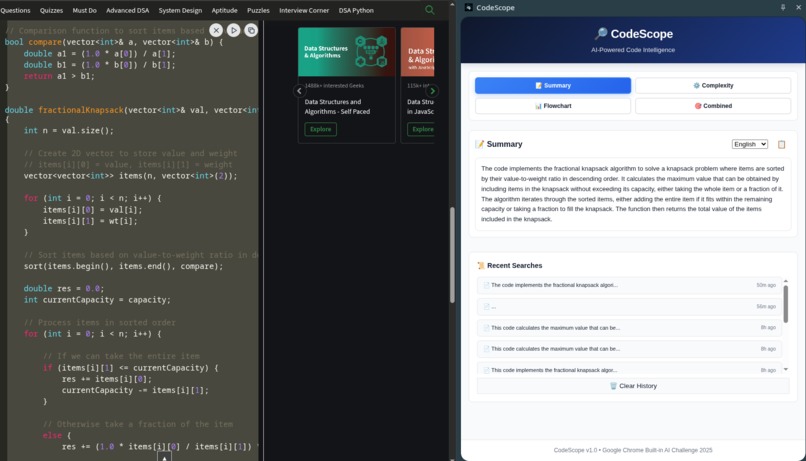
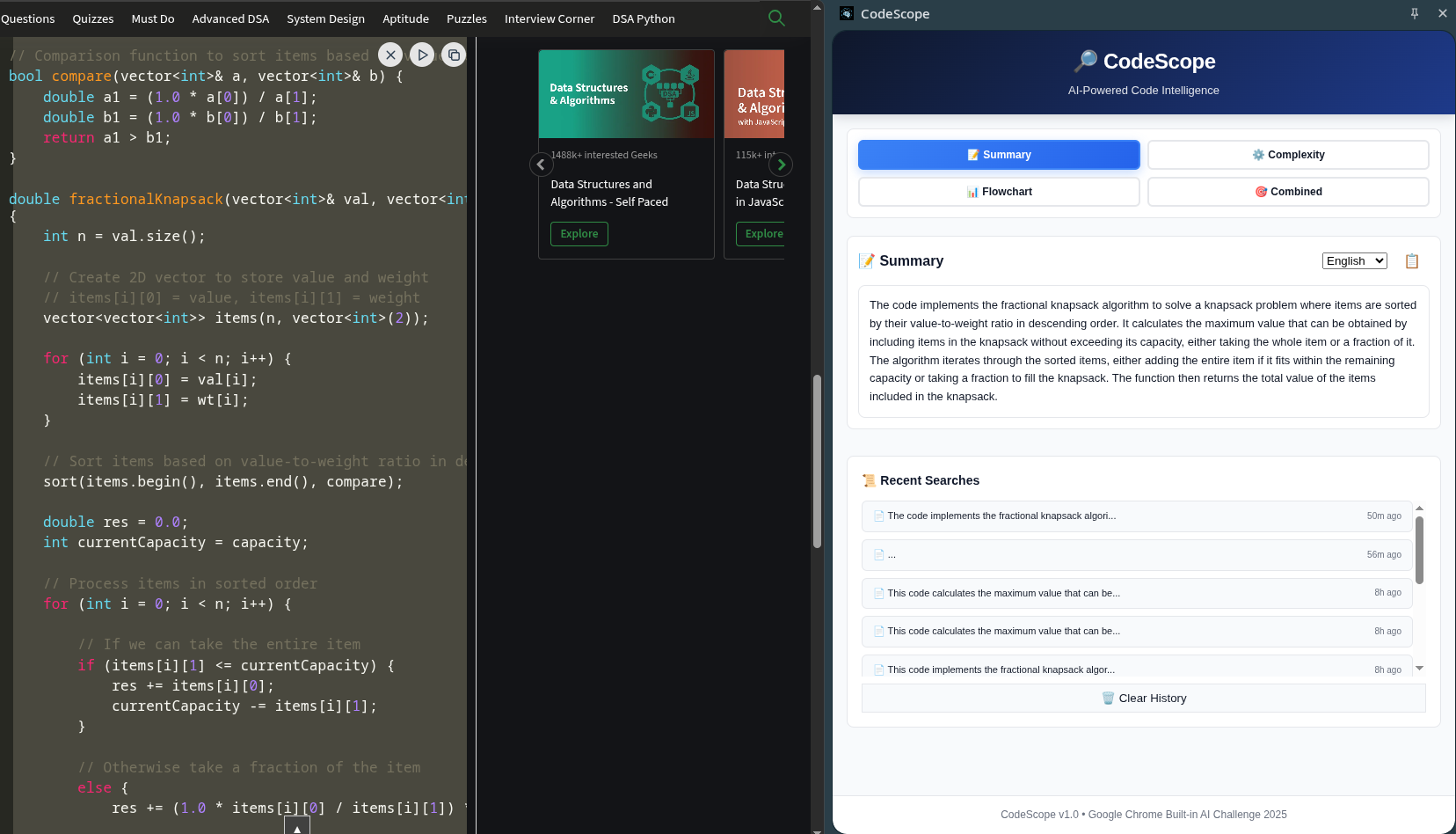
Code Summary Feature
-
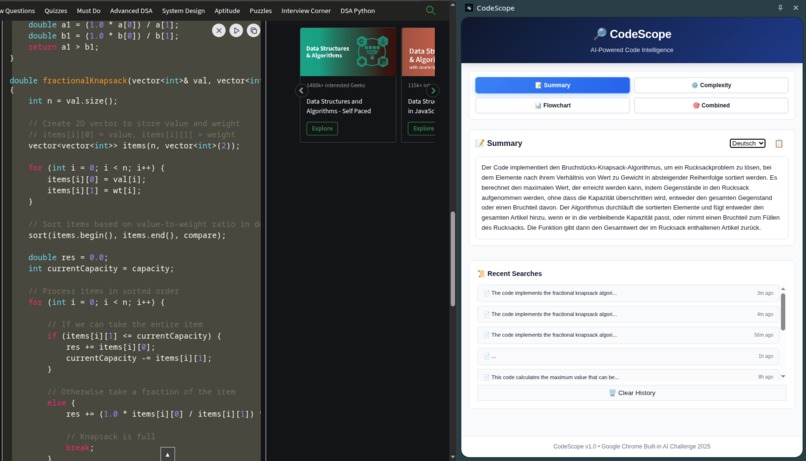
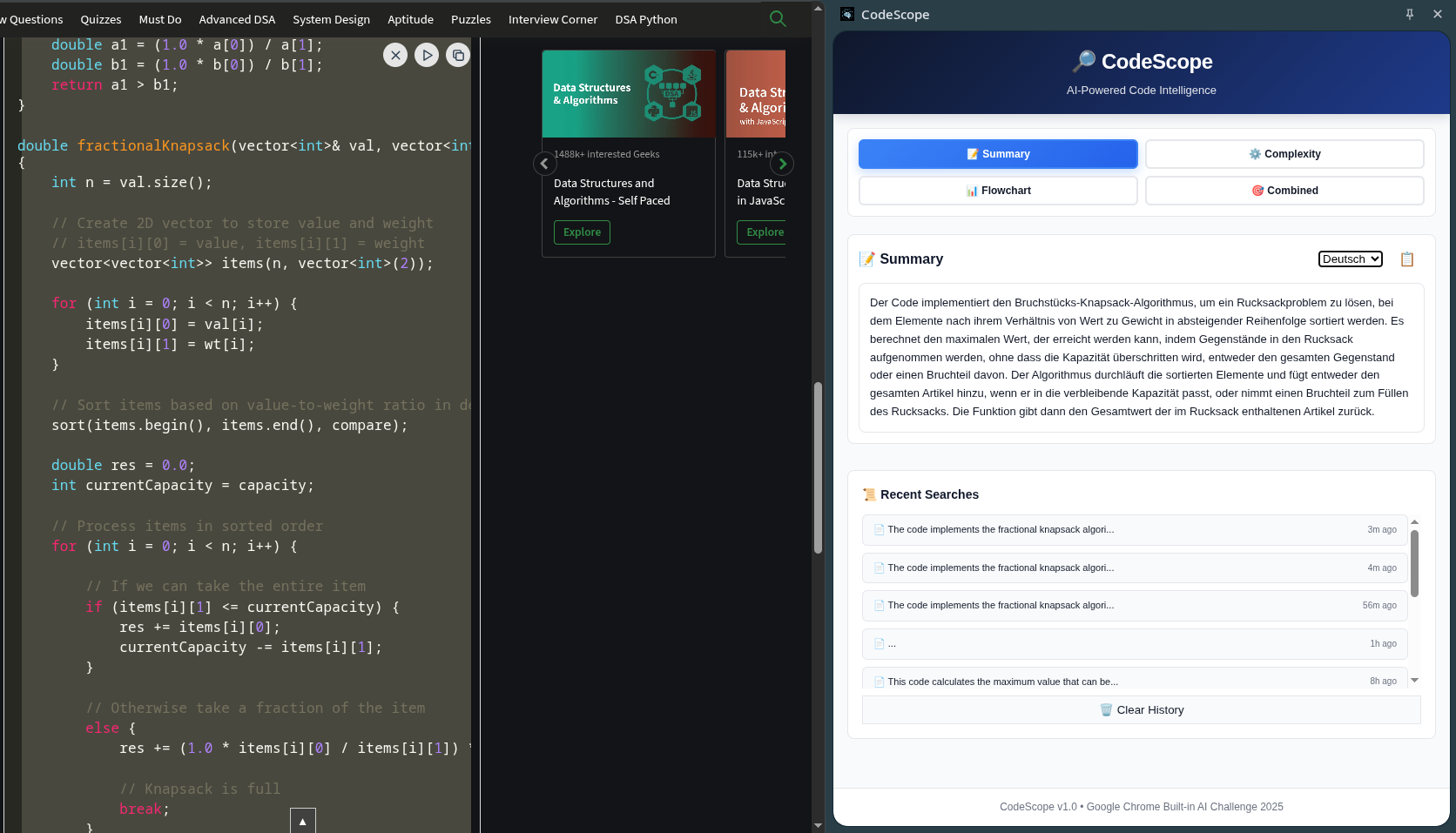
Multilingual Summary feature
-
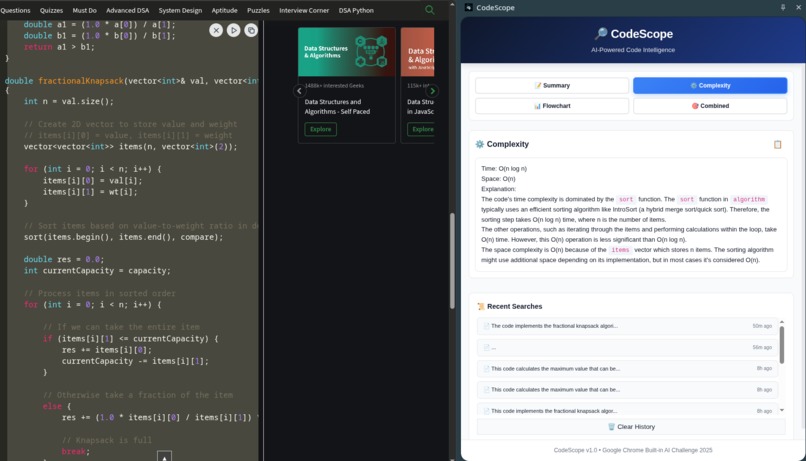
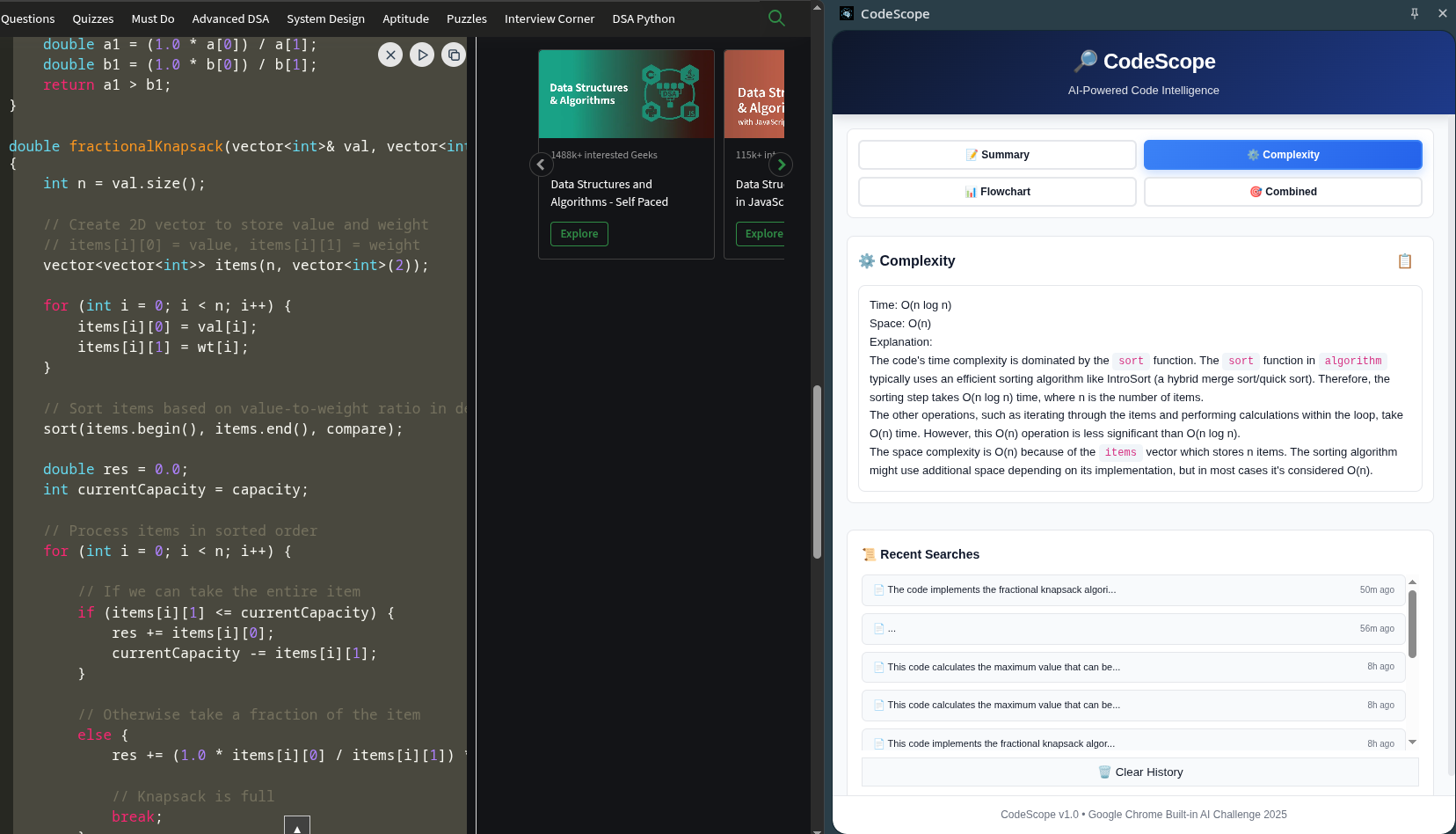
Code Complexity Analysis Feature
-
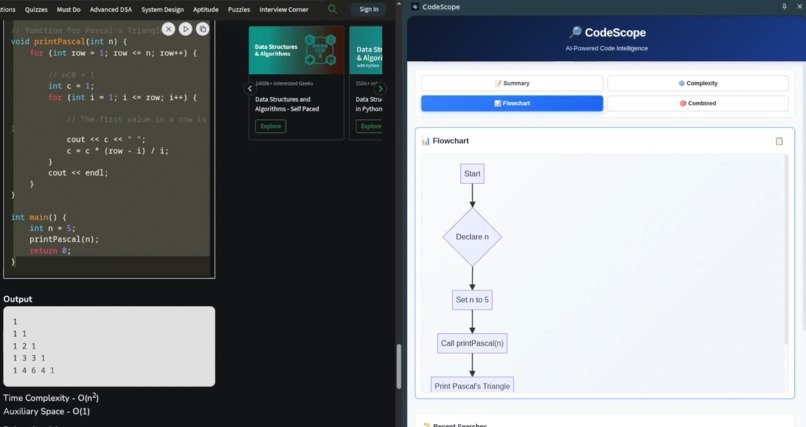
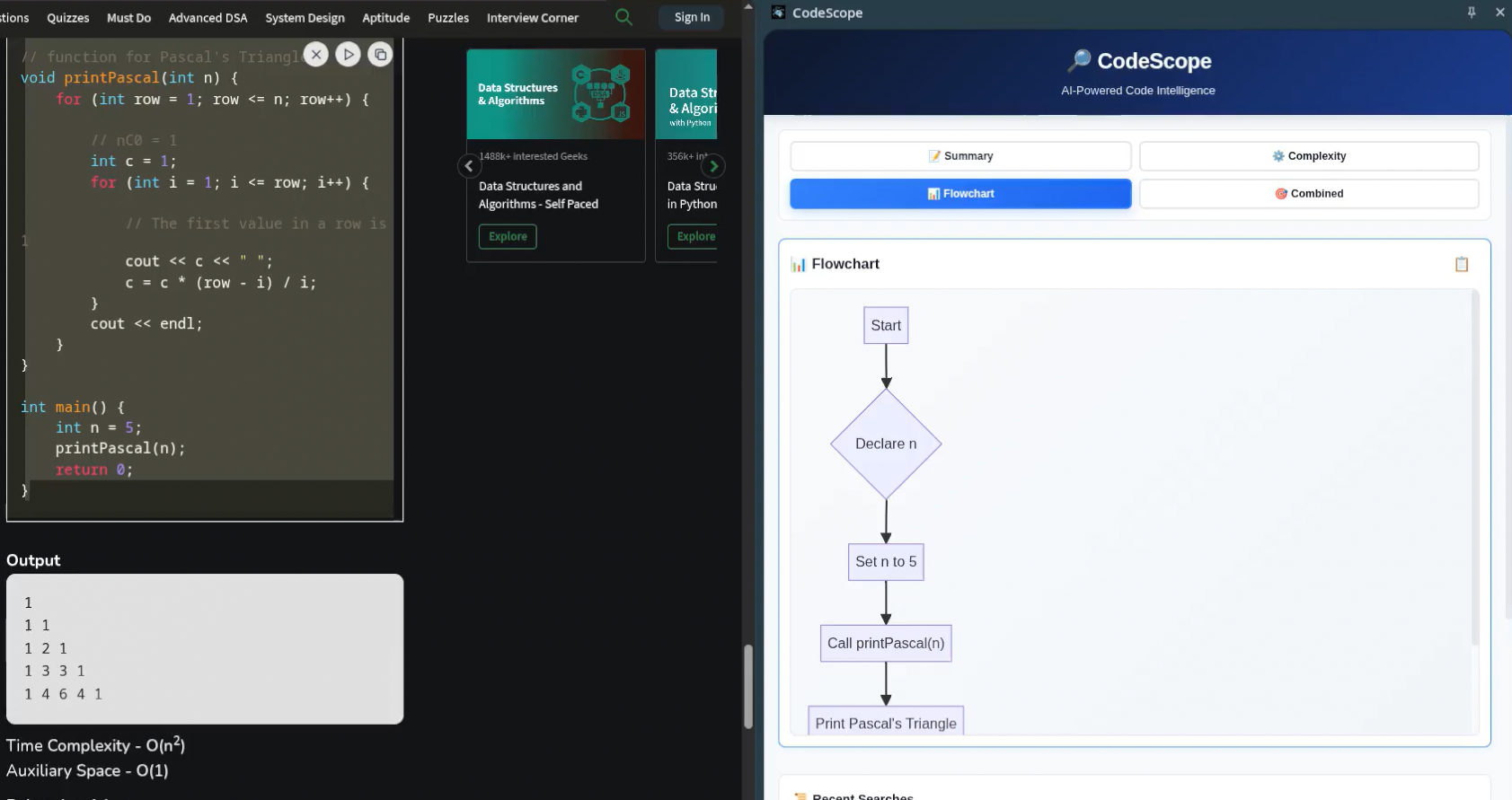
Flowchart creation feature
CodeScope


A production-ready Chrome extension for the Google Chrome Built-in AI Challenge 2025 that analyzes code using Chrome's on-device AI models.
📖 Description
CodeScope is an intelligent Chrome extension that leverages Chrome's built-in AI models to provide comprehensive code analysis directly in your browser. It offers code summarization, flowchart generation, and complexity analysis without requiring external API calls or data transmission.
✨ Features
- 🧠 AI-Powered Code Summarization - Generate intelligent summaries using Chrome's built-in AI
- 📊 Interactive Flowchart Generation - Automatic Mermaid diagram visualization of code logic
- 📈 Complexity Analysis - Big O time and space complexity assessment
- 📋 Export Capabilities - Copy Mermaid code for external rendering
- 🎛️ Side Panel Interface - Sleek side panel UI for enhanced user experience
- 📱 Responsive Design - Optimized layout for various screen sizes
- 🖱️ One-Click Analysis - Right-click context menu integration
- 🔄 Scrollable Diagrams - Large flowcharts scroll smoothly within the interface
🔧 Prerequisites
System Requirements
- Operating System: Windows 10+, macOS 13+, Linux, or ChromeOS (Chromebook Plus)
- Storage: At least 22 GB free space
- RAM: 16 GB or more recommended
- CPU: 4 cores or more (or GPU with >4 GB VRAM)
- Network: Unlimited/unmetered connection (Wi-Fi or Ethernet preferred)
Chrome Setup
- Chrome Browser (Chrome 140+ - latest version)
- Enable AI Settings:
- Navigate to
chrome://settings/ai - Turn ON "Use AI" (allows Chrome to download the model)
- Navigate to
- Download AI Model Component (CRITICAL STEP):
- Go to
chrome://components - Find "On-Device Model Execution Service"
- Click "Check for update" button
- Wait for download to complete (several hundred MB)
- Restart Chrome completely
- Go to
🚀 Installation
Method 1: Clone from Repository
git clone https://github.com/Arunav47/CodeScope.git
cd CodeScope
Method 2: Download ZIP
- Download the repository as a ZIP file
- Extract to your desired location
Load Extension into Chrome
- Open
chrome://extensions/in Chrome - Enable Developer mode (toggle in top-right corner)
- Click Load unpacked
- Select the
CodeScopefolder - Extension appears in your Chrome toolbar
Verify Installation
- Right-click any code text on a webpage
- Look for "Analyze Code" option in the context menu
- Click it to open the analysis side panel
📋 Usage
Basic Analysis
- Select Code: Highlight any code snippet on a webpage
- Right-Click: Open the context menu
- Click "Analyze Code": Opens the analyzer in the side panel
- Wait for Results: AI models process your code (~5-10 seconds)
- View Results: See summary, flowchart, and complexity analysis
Features Overview
- Code Summary: Get AI-generated explanations of what your code does
- Flowchart: Visual representation of code logic flow
- Complexity Analysis: Big O notation for time and space complexity
- Export Options: Copy Mermaid code for use in other tools
🏗️ Architecture
CodeScope leverages Chrome's built-in AI APIs for local processing:
- Manifest V3: Modern Chrome extension architecture
- Service Worker: Background script for context menu handling
- Side Panel API: Enhanced user interface experience
- Chrome AI APIs: Summarizer and Prompt APIs for on-device processing
- Mermaid.js: Flowchart generation and rendering
🛠️ Troubleshooting
⚠️ "AI Model Not Ready" Error (Most Common)
This indicates the on-device AI model hasn't been downloaded yet. This is normal on first use!
Solution:
- Navigate to
chrome://settings/aiand turn ON "Use AI" - Go to
chrome://components - Find "On-Device Model Execution Service" or "Optimization Guide On Device Model"
- Click "Check for update" button (version shows 0.0.0.0 initially)
- Wait for "Component updated" message (download takes 5-10 minutes)
- Go to
chrome://flags - Enable "optimization-guide-on-device-model" and "prompt-api-for-gemini-nano".
- Completely quit Chrome (not just close windows)
- Restart Chrome
- Try the extension again
"Chrome AI API not found"
- Ensure you're using Chrome 140 or later
- Download from Chrome Dev or Chrome Canary
- Verify you're not using a different browser (Edge, Firefox, etc.)
Extension Context Menu Missing
- Reload extension: Go to
chrome://extensions→ Find CodeScope → Click reload - Ensure you're selecting text before right-clicking
- Try on a different website
Blank or Incomplete Results
- Wait 10-15 seconds for AI processing on first use
- Use code snippets with at least 20 characters
- Check console for errors: Right-click side panel → Inspect → Console tab
📁 Project Structure
CodeScope/
├── manifest.json           # Extension configuration (Manifest V3)
├── service-worker.js       # Background script (context menu handler)
├── content-script.js       # Content script for webpage interaction
├── popup.html              # Side panel UI template
├── popup.js                # Main AI analysis logic
├── styles.css              # Styling and animations
├── mermaid.min.js          # Mermaid library for flowcharts
├── icons/                  # Extension icons
│   ├── icon16.png
│   ├── icon32.png
│   ├── icon48.png
│   └── icon128.png
├── LICENSE                 # MIT License
└── README.md               # This documentation
🛠️ Built With
| Component | Technology |
|---|---|
| Language | JavaScript (ES2020+) |
| Framework | Chrome Extension API (Manifest V3) |
| AI Models | Chrome Gemini Nano (on-device) |
| APIs | Chrome Summarizer API, Prompt API |
| UI Framework | Vanilla HTML/CSS/JavaScript |
| Diagrams | Mermaid.js |
| Build Process | Zero-config (no build step required) |
🤝 Contributing
Contributions are welcome! Please feel free to submit a Pull Request.
Development Setup
- Fork the repository
- Create your feature branch (
git checkout -b feature/AmazingFeature) - Make your changes
- Test the extension locally
- Commit your changes (
git commit -m 'Add some AmazingFeature') - Push to the branch (
git push origin feature/AmazingFeature) - Open a Pull Request
Guidelines
- Follow existing code style and conventions
- Test your changes thoroughly
- Update documentation as needed
- Ensure compatibility with Chrome 140+
📄 License
This project is licensed under the MIT License - see the LICENSE file for details.
🆘 Support
If you encounter any issues or have questions:
- Check the Troubleshooting section
- Search existing issues
- Create a new issue with detailed information
🏆 Acknowledgments
- Built for the Google Chrome Built-in AI Challenge 2025
- Powered by Chrome's on-device AI models
- Mermaid.js for flowchart generation
- Chrome Extension API documentation and community
Made with ❤️ for the Chrome Built-in AI Challenge 2025
Built With
- css
- html
- javascript
- prompt-api
- translator-api

Log in or sign up for Devpost to join the conversation.