-
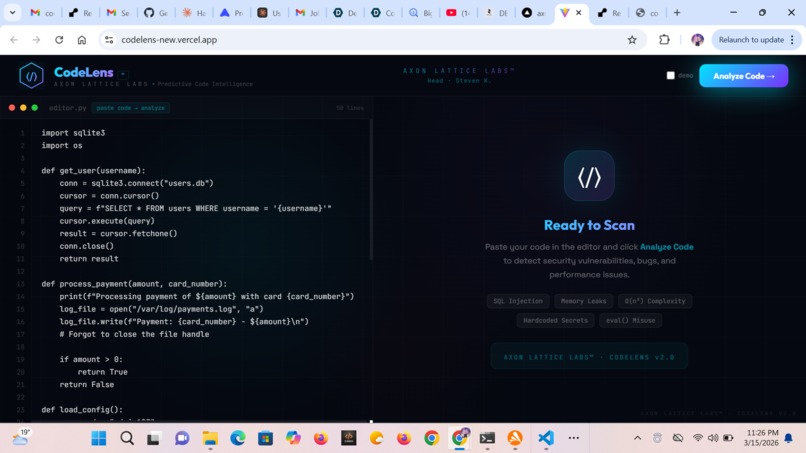
Code Lens landing page
Inspiration
What it does
How we built it
Challenges we ran into
Accomplishments that we're proud of
What we learned
What's next for CODELENS
CodeLens™ — The Story Inspiration Every developer has shipped a bug they should have caught. Not because they were careless — but because code review is cognitively expensive. You're scanning hundreds of lines for subtle patterns: a missing conn.close(), an f-string wired directly into a SQL query, a nested loop that looks innocent at $n = 10$ but detonates at $n = 10{,}000$.
The idea behind CodeLens was simple: what if a second pair of eyes never got tired, never missed a pattern, and could explain exactly what would go wrong in production — before you pushed?
Static linters catch syntax. CodeLens catches intent. There's a difference between a tool that tells you "this line has an issue" and one that tells you "this line will hand an attacker your entire database."
I wanted to build the second kind.
How I Built It The Stack The architecture is deliberately lean — two services, one AI model, zero overhead:
React 19 (Vercel) → FastAPI (Render) → Groq LLM (llama-3.3-70b) The frontend is a pure React app with no component library — every card, gauge, and animation is hand-crafted in inline styles. The backend is a FastAPI service with three core endpoints: /analyze, /fix, and /github/analyze.
The Prompt Engineering Problem The hardest engineering decision wasn't the stack — it was the prompt. Getting a language model to return structured, accurate JSON consistently is non-trivial. The analysis response needs to be machine-parseable every time, across any language, any code quality, any edge case.
The system prompt enforces a strict JSON contract:
{ "health_score": 28, "issues": [ { "severity": "critical", "line_start": 7, "suggestion": "Use parameterized queries..." } ] } Any deviation — a markdown fence, a trailing explanation, a missing field — breaks the frontend. The solution was to strip markdown artifacts with regex post-processing and wrap every parse in a structured error handler.
The Health Score The health score is a 0–100 integer computed by the LLM, guided by this rubric baked into the system prompt:
$$H = \begin{cases} 90\text{–}100 & \text{Excellent — production ready} \ 70\text{–}89 & \text{Good — minor issues} \ 50\text{–}69 & \text{Needs work} \ 30\text{–}49 & \text{Poor — significant risks} \ 0\text{–}29 & \text{Critical — do not ship} \end{cases}$$
The gauge animates from 0 to the score using a cubic-bezier SVG stroke-dashoffset transition:
$$\text{offset} = C - \frac{H}{100} \cdot C \quad \text{where } C = 2\pi r \cdot 0.75$$
The $0.75$ factor clips the arc to 270° (a three-quarter circle), giving the classic speedometer aesthetic.
The Rework Pipeline The "Rework Code" feature chains two LLM calls conceptually into one UI action:
/analyze returns a structured list of issues with suggestions The user clicks ✦ Rework Code with AI Fixes /fix receives the original code + full issue list, and returns a rewritten file with inline # FIX: comments The fix prompt encodes every issue as a line-referenced instruction:
- [Line 7] [CRITICAL] SQL Injection: Use parameterized queries
- [Line 27] [CRITICAL] Hardcoded Credentials: Use os.environ.get(...) The LLM treats this as a diff spec — it knows exactly what to change and where.
What I Learned
- LLMs hallucinate line numbers badly In early versions, the model would confidently report issues on lines that didn't exist. A 50-line file would get issues reported at lines 73, 91, 108. The model was pattern-matching against its training data rather than the actual input.
The fix: inject line numbers directly into the prompt.
1 | import sqlite3 2 | import os 3 | 4 | def get_user(username): 5 | conn = sqlite3.connect("users.db") With explicit line markers and an instruction "you MUST only reference lines 1 to N", hallucinated line numbers dropped to near zero. The model now has a concrete anchor rather than a floating reference.
- CORS is unforgiving with wildcard origins allow_origins=["*"] and allow_credentials=True is invalid per the CORS specification. Browsers reject it at the preflight stage. The fix is either:
Use allow_credentials=False with wildcard origins, or Enumerate exact origins with credentials enabled This cost more debugging time than it should have.
- Free hosting has cold start physics Render's free tier sleeps services after 15 minutes of inactivity. The first request after sleep takes ~30–50 seconds as the container spins up. This is invisible in the backend logs but catastrophic for UX — users see a timeout and assume the app is broken.
The workaround is a loading state with a message explaining the cold start, so users wait instead of leave.
- Environment variables at build time vs runtime Vite bakes VITE_* variables into the JavaScript bundle at build time, not at runtime. This means:
Changing VITE_API_BASE in Vercel's dashboard requires a full redeploy Old deployment URLs (preview builds) serve old bundles permanently The production domain always reflects the latest build This distinction matters more than it seems when you're debugging why a live app is still hitting a dead backend.
Challenges Railway → Render Migration The original backend ran on Railway. After deployment, Railway was routing external traffic to port 8000 while the $PORT environment variable was set to 8080 — a silent mismatch that produced persistent 502s. Internal healthchecks passed (Railway probed the container directly), but external traffic failed at the edge.
After exhausting Railway's debugging options, I migrated to Render. The first Render build failed because Python 3.14 (Render's default) had no pre-built wheel for pydantic-core==2.23.4, and Render's filesystem is read-only so Rust compilation failed mid-build. The fix was relaxing the pydantic version constraint to >=2.10.0, letting pip resolve a wheel with 3.14 support.
Scroll-Snap Vulnerability Slides The right panel uses CSS scroll-snap-type: y mandatory with each vulnerability card occupying exactly 100% of the container height. The challenge: the container height is dynamic (depends on the header and panels). Getting the snap to feel native — no jank, correct dot navigation sync, SLIDE button jumping to the right card — required careful coordination between the onScroll handler, scrollTo(), and React state.
$$\text{slide index} = \left\lfloor \frac{\text{scrollTop}}{\text{containerHeight}} + 0.5 \right\rfloor$$
Rounding to the nearest integer (rather than flooring) prevents the dot nav from flickering during the snap animation.
What's Next VS Code extension — inline annotations directly in the editor gutter GitHub Actions integration — block PRs that drop the health score below a threshold Multi-file analysis — scan an entire repository, not just a single file Trend dashboard — track health score over time per repository Built by Steven K. · Head of AXON LATTICE LABS™ CodeLens™ — See your code's future before it ships.
Built With
- all
- analysis
- auto-deploy-from-github)
- eslint
- free-tier)-fonts-&-design-google-fonts-?-space-grotesk
- github
- httpx
- is
- javascript-(jsx)-frameworks-&-libraries-fastapi
- jetbrains-mono
- languages-python
- node.js
- on-demand
- outfit-dev-tools-git
- per
- pip-no-database-?-stateless-api
- pydantic
- react-19
- render-(backend
- uvicorn-ai-/-apis-groq-api-?-llama-3.3-70b-versatile-model-cloud-&-hosting-vercel-(frontend
- vite


Log in or sign up for Devpost to join the conversation.