Inspiration
The inspiration behind CodeCraft AI stemmed from a desire to create a comprehensive, intelligent coding environment that goes beyond a basic online compiler. We recognized the growing need for tools that not only facilitate code writing and execution but also actively assist developers in learning, debugging, and optimizing their code. A significant driving force was also to cater to specific educational needs, such as the rigorous norminette standards of the 42 School, and to provide a clear pathway for users to transition their prototypes into full-fledged applications using platforms like bolt.new.
What it does
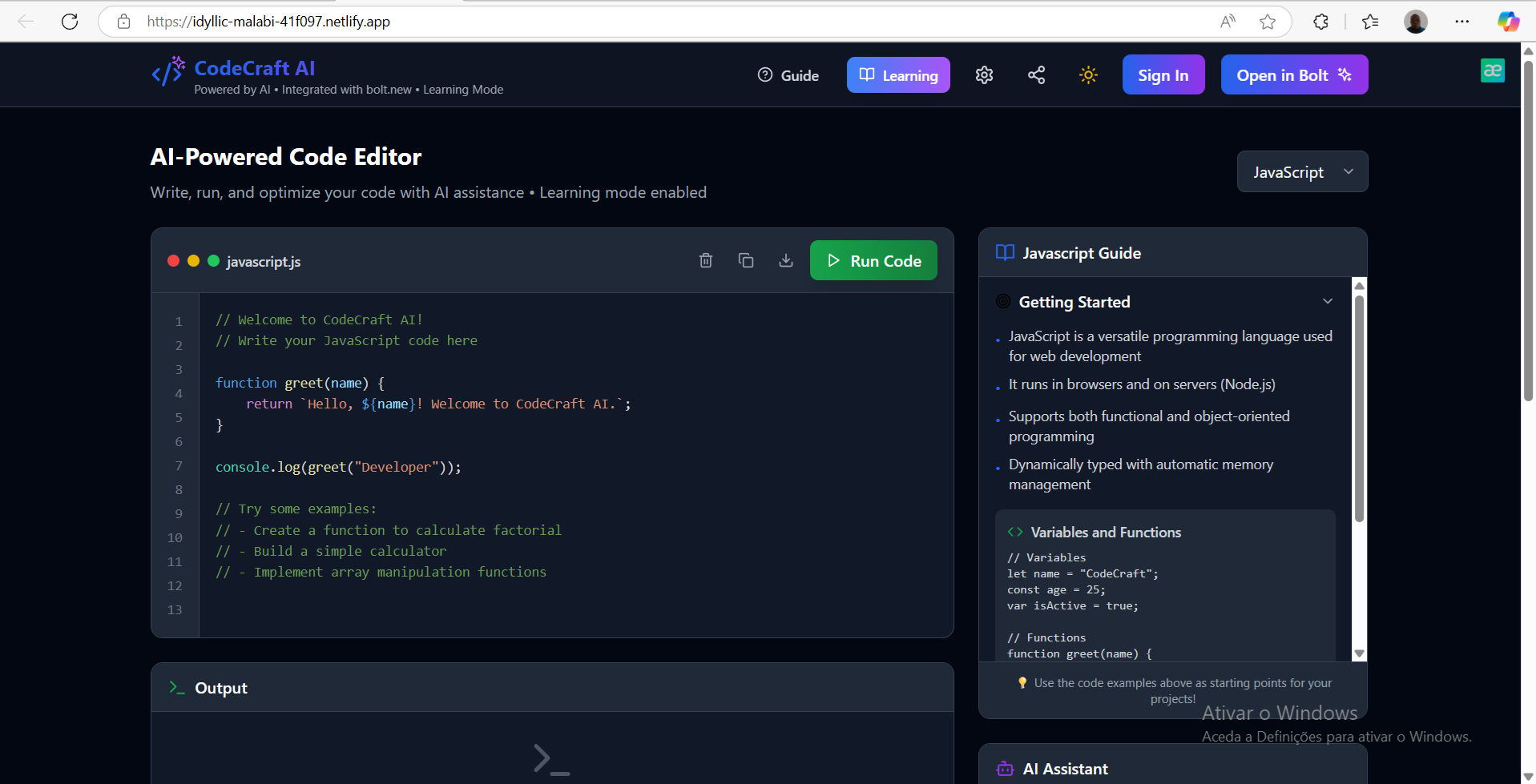
CodeCraft AI is an AI-powered online compiler and development environment. It features a versatile code editor with syntax highlighting for multiple languages including JavaScript, Python, C, HTML, CSS, React, and TypeScript. Users can write and execute code directly in the browser, viewing the output in a dedicated panel.
The core of its intelligence lies in the AI Assistant, which can explain code, help debug issues, suggest optimizations, and provide language-specific learning resources. For C programmers, especially those from the 42 School, it includes a specialized Norminette Checker that identifies and even auto-fixes coding standard violations. The platform also offers user authentication, subscription management via Stripe, and detailed usage tracking, all wrapped in a clean, intuitive user interface with toggleable dark mode and a dedicated "Learning Mode."
How we built it
CodeCraft AI was built as a modern web application using React with TypeScript for the frontend, bundled efficiently with Vite. Tailwind CSS was instrumental in rapidly developing the responsive and visually appealing user interface, complemented by Lucide React for crisp icons. The interactive code editor leverages react-syntax-highlighter for robust syntax highlighting, with a custom textarea overlay enabling seamless editing.
For backend services, we chose Supabase, utilizing its capabilities for user authentication, managing user profiles, tracking usage data, and storing subscription plan details. The subscription model is powered by Stripe, with critical payment flows like checkout session creation and webhook handling managed through Supabase Edge Functions (built with Deno). This architecture allowed us to maintain a serverless approach while ensuring secure and scalable operations.
Challenges we ran into
Developing CodeCraft AI presented several interesting challenges:
Simulated Code Execution: A primary hurdle was simulating code execution for various languages (C, Python, React) directly within the browser without a full-fledged backend compiler. This required careful design of client-side logic to provide a convincing and responsive execution experience.
AI Assistant Responsiveness: Integrating the AI assistant to provide meaningful and timely responses without direct, real-time API calls to a large language model was a significant design consideration, requiring clever simulation techniques.
Robust Stripe Integration: Setting up a reliable subscription system with Stripe, including handling checkout sessions, processing webhooks, and accurately updating user subscription statuses in Supabase, proved complex. Ensuring robust error handling for network issues and timeouts during payment flows was particularly challenging, as evidenced by recent improvements to the Stripe integration.
Supabase RLS and Policies: Implementing secure data access with Row Level Security (RLS) and fine-grained policies for user profiles, usage tracking, and subscription plans required meticulous configuration to prevent unauthorized data access.
User Experience and Modals: Balancing a rich feature set with a clean and intuitive user interface, especially when dealing with complex authentication and subscription modals, demanded careful attention to UI/UX design and state management.
Accomplishments that we're proud of
We are particularly proud of several key accomplishments:
Integrated AI Assistant: Successfully embedding an intelligent AI assistant directly into the coding environment, providing valuable real-time help to users.
Specialized 42 Norminette Checker: Delivering a highly specialized tool that directly addresses the unique needs of 42 School students, complete with auto-fixing capabilities.
Seamless User Experience: Creating a clean, modern, and intuitive user interface that smoothly integrates a wide array of complex features, from code editing and AI assistance to authentication and subscriptions.
Robust Authentication & Payments: Successfully implementing a secure user authentication system and a fully functional subscription model using Supabase and Stripe.
Bolt.new Integration: Establishing a direct and intelligent pathway for users to transition their code from CodeCraft AI into full-scale applications on bolt.new.
What we learned
Throughout the development of CodeCraft AI, we gained valuable insights into:
- The intricacies of building a comprehensive full-stack web application using modern technologies like React, TypeScript, Tailwind CSS, Supabase, and Stripe.
- The critical importance of robust error handling, especially in sensitive areas like authentication and payment processing, and how to provide clear, actionable feedback to users when issues arise.
- The power and flexibility of serverless functions (Supabase Edge Functions) for handling backend logic, such as Stripe webhooks and API integrations.
- Best practices for securing database access using Row Level Security (RLS) and database policies.
- Techniques for simulating complex functionalities (like code execution and AI responses) on the client-side to provide a rich user experience without heavy backend dependencies.
- The benefits of a modular, component-based architecture in React for managing application complexity and promoting code reusability.
What's next for CodeCraft AI
For the future of CodeCraft AI, we envision several exciting developments:
- Enhanced AI Capabilities: Integrating with actual Large Language Model (LLM) APIs to provide more dynamic, accurate, and powerful AI responses for code explanation, debugging, and optimization.
- Real-time Collaboration: Implementing features that allow multiple users to work on the same codebase simultaneously, fostering collaborative learning and development.
- Expanded Language Support: Continuously adding support for more programming languages and specialized development environments.
- Advanced Debugging Tools: Developing more sophisticated debugging functionalities beyond basic output, such as breakpoints and variable inspection.
- Version Control Integration: Exploring integrations with popular version control systems like GitHub for seamless code management and project tracking.
- Customizable Environments: Offering users more options to personalize their coding environment, including custom themes, keybindings, and editor settings.
- Community Features: Building out features that enable users to share their projects, create and follow tutorials, and interact with a broader community of developers.
Built With
- lucide-react
- netlify
- react-syntax-highlighter
- react-with-typescript
- stripe
- supabase
- tailwind-css
- vite


Log in or sign up for Devpost to join the conversation.