As a college student, I live by a simple rule: when exam season hits, the internet goes out. Our university shuts down campus Wi-Fi to prevent cheating, which is a total nightmare for coding exams. You're suddenly cut off from documentation, Stack Overflow, and the AI tools like Copilot that have become essential for learning.
Last semester, I was stuck on a frustrating bug during a timed practical exam, knowing the answer was just a quick search away. In that moment of frustration, I had an idea: What if my AI assistant didn't need the internet? What if its brain was right here, inside my own laptop?
That's the spark that ignited CodeCapsule—a tool born out of necessity, designed to be a developer's lifeline when they're forced to be in a digital lockdown.
What it does
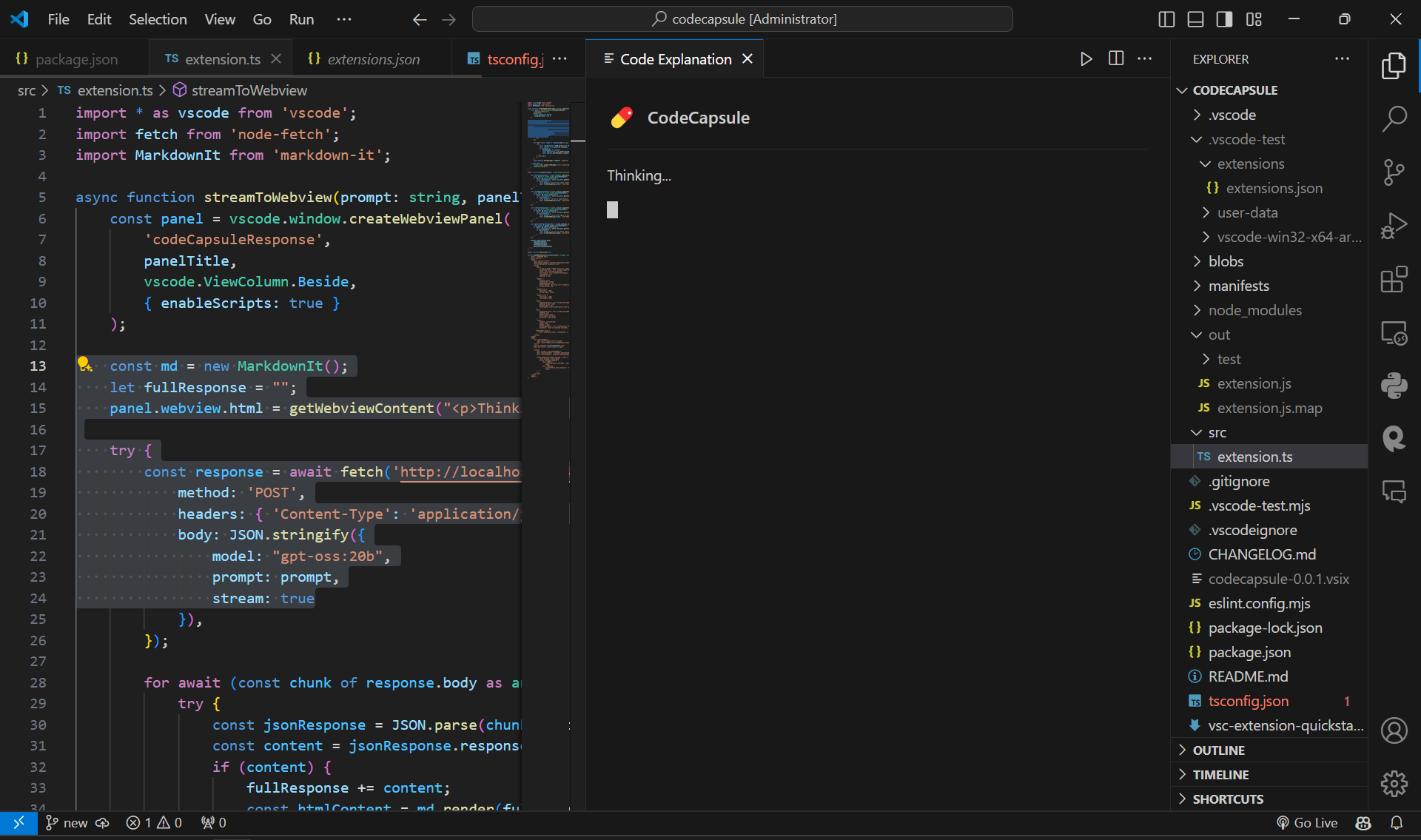
CodeCapsule is a Visual Studio Code extension that transforms gpt-oss into your personal, private, and completely offline AI pair programmer. It integrates four powerful features directly into the right-click context menu:
Explain Code: Provides a clear, natural-language breakdown of any selected code.
Find Bugs: Analyzes a block of code for logical errors, potential crashes, and bad practices.
Refactor Code: Rewrites selected code to be more efficient, readable, and modern.
Generate Program: Writes a complete, runnable program based on a simple comment or description.
All responses are streamed in real-time into a polished, theme-aware webview panel, providing an interactive and responsive user experience.
How we built it
The project is built on a stack that champions the open-source and local-first ethos of the hackathon:
Frontend: The extension itself is built for Visual Studio Code using TypeScript, utilizing the VS Code API for creating commands, context menus, and custom Webview panels.
Backend: We use Ollama to serve the AI model locally. It creates a simple, stable API endpoint on localhost that the extension communicates with.
The Brain: The core of our project is OpenAI's gpt-oss-20b model, which provides a fantastic balance of powerful reasoning and manageable performance on a standard developer laptop.
Challenges we ran into
The journey was filled with real-world development challenges. Our biggest hurdle was the initial environment setup, from forcing Ollama to use a different drive to avoid filling up system storage, to navigating a complex series of module compatibility issues between CommonJS and ESM in the VS Code extension environment.
Another significant challenge was prompt engineering. We spent a lot of time refining our prompts to get the AI to respond reliably. For instance, our initial "Generate Program" prompt was so strict that the model returned an empty response. We had to iterate to find a more encouraging prompt that guided the AI to the correct output format without over-constraining it.
Accomplishments that we're proud of
We are incredibly proud of building a tool that is not just a proof-of-concept, but a genuinely useful, stable, and polished application. Achieving our primary goal of a tool that works flawlessly with the Wi-Fi turned off feels like a huge win. The fact that we built a solution that will help us and our classmates in the next exam season is the most rewarding accomplishment of all. The final UI, with its streaming responses, icons, and theme-aware design, is something we're particularly proud of.
What we learned
This project was a deep dive into the practicalities of on-device AI. We learned that you no longer need massive cloud infrastructure to build powerful AI applications. We also learned that robust error handling and clear setup instructions are just as important as the core code. Most importantly, this project taught us that prompt engineering is a true art form—the difference between a failed response and a perfect one can be just a few carefully chosen words.
What's next for CodeCapsule
We see a bright future for truly private AI development tools. Our next steps for CodeCapsule are:
Full Project Context: Allow CodeCapsule to index an entire workspace, so its suggestions are aware of how different files and functions interact.
Custom Commands: Enable users to create and save their own custom prompts, effectively letting them build their own specialized AI tools within the extension.
Support for More Editors: Expand beyond VS Code to other popular IDEs like those in the JetBrains suite.
Built With
- gpt-goss-20
- markdown-it
- node-fetch
- ollama
- typescript
- visual-studio-code

Log in or sign up for Devpost to join the conversation.