-
-
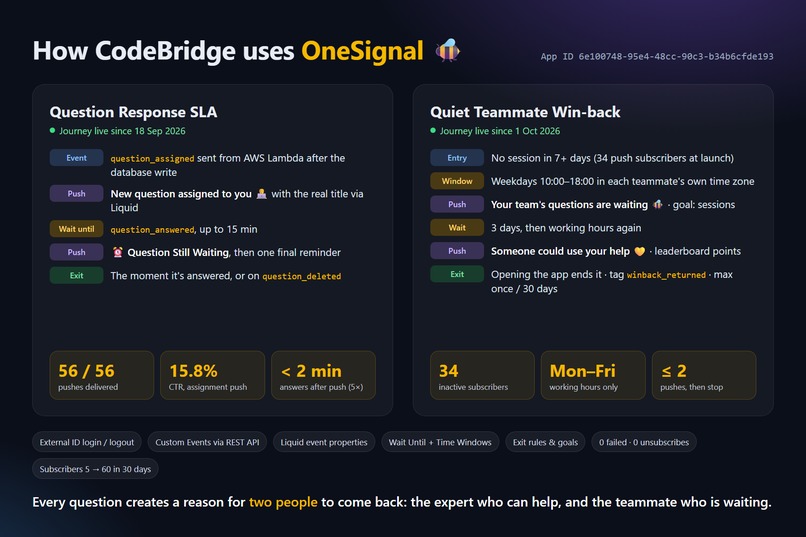
How CodeBridge uses OneSignal: two live Journeys, step by step.
-
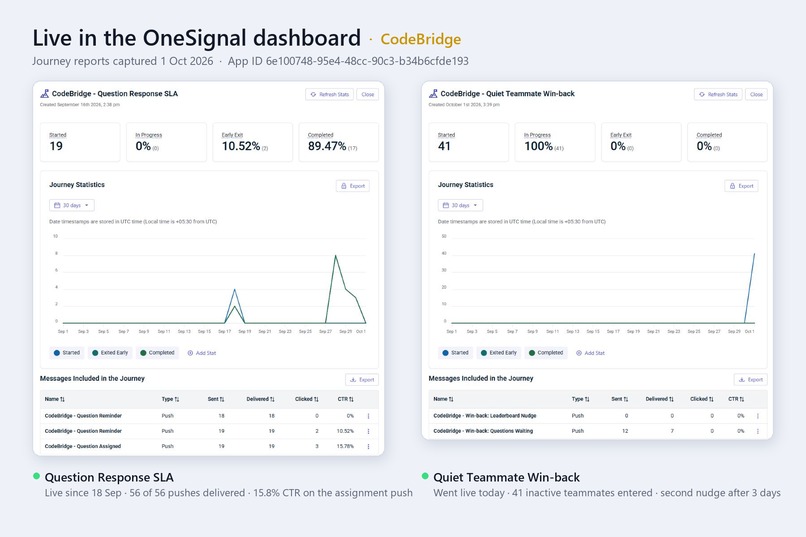
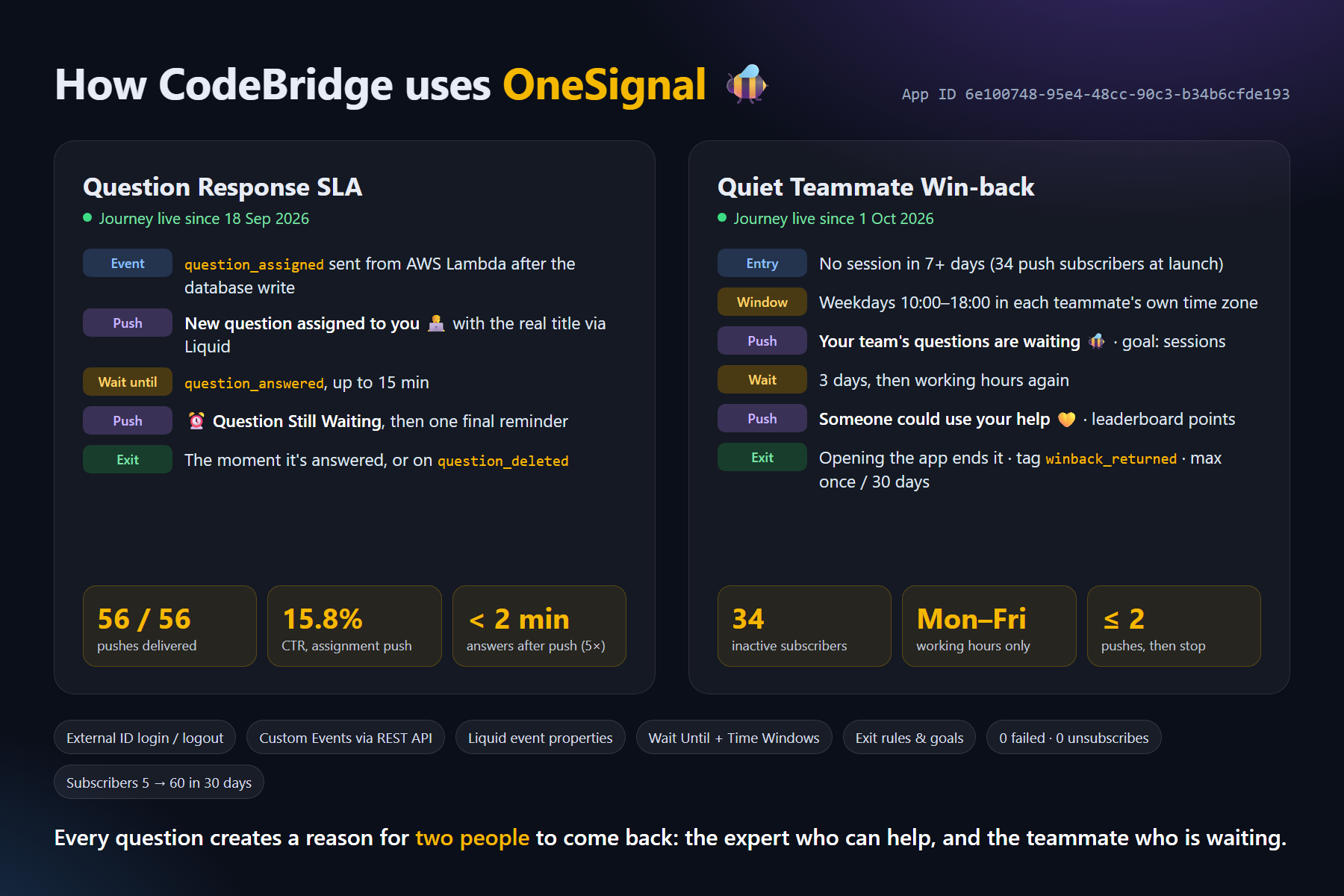
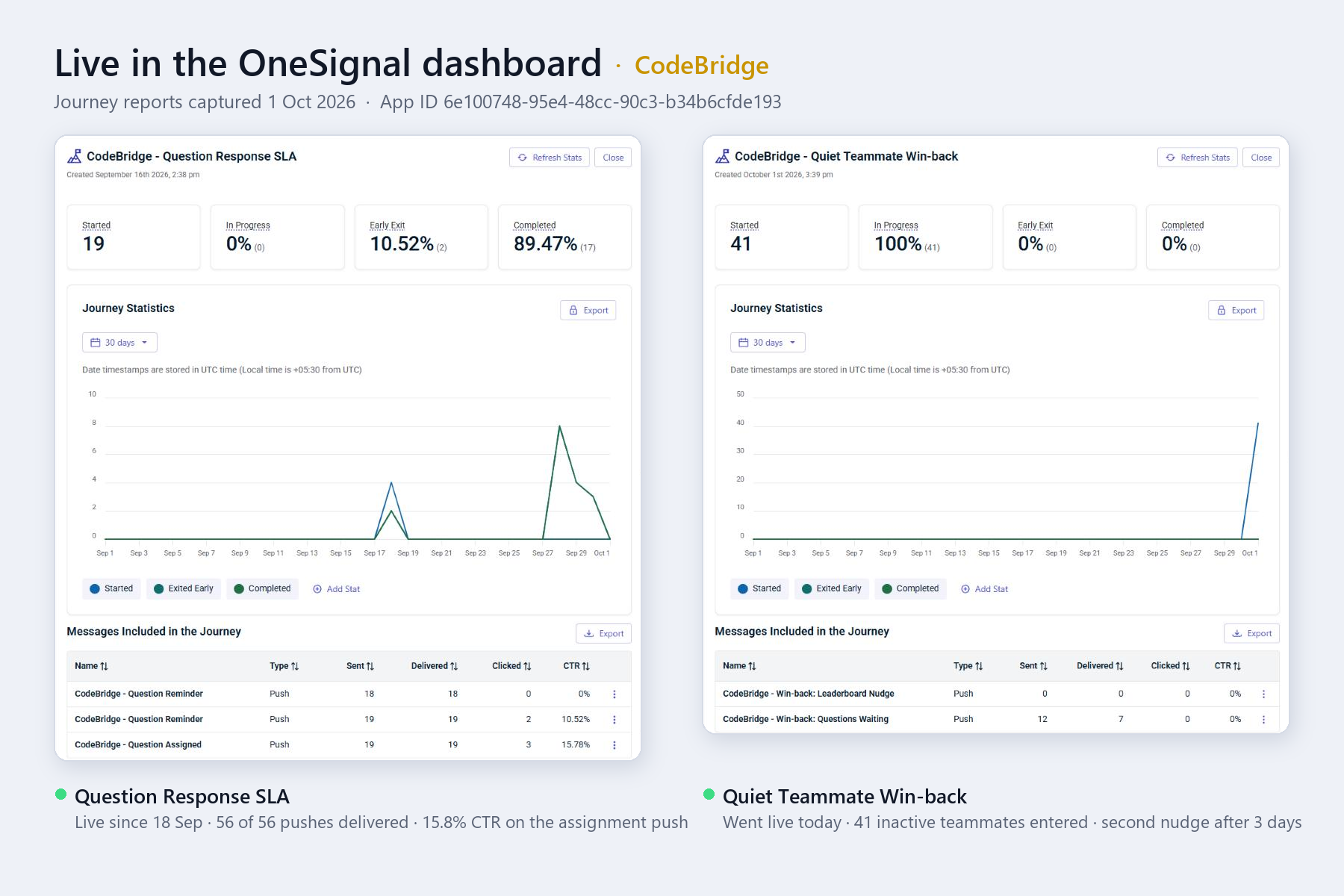
Live in the OneSignal dashboard: both Journey reports, captured 1 Oct 2026.
-
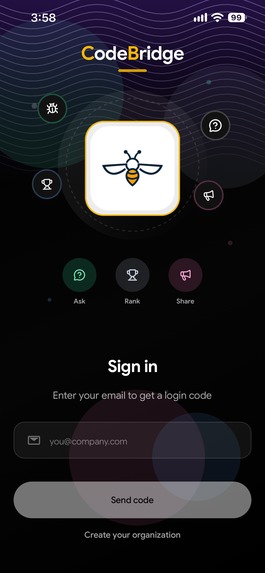
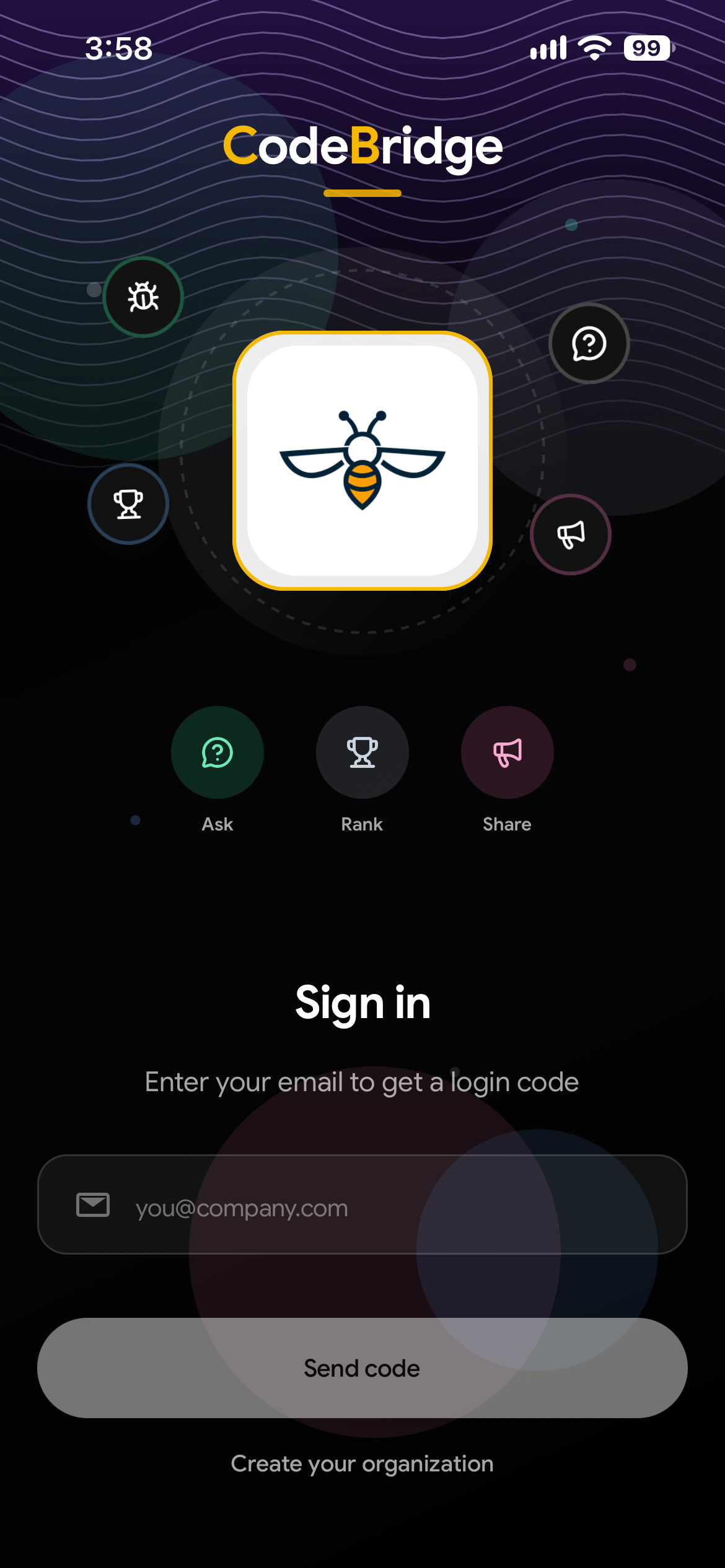
Sign in: a passwordless login with a one-time code sent to your work email, plus an option to create your organisation.
-
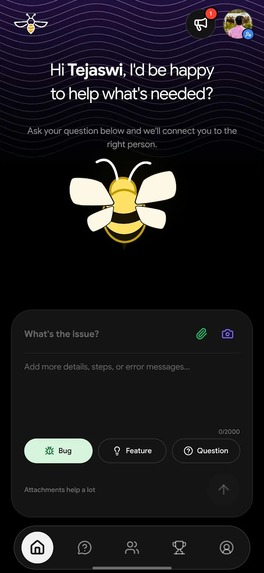
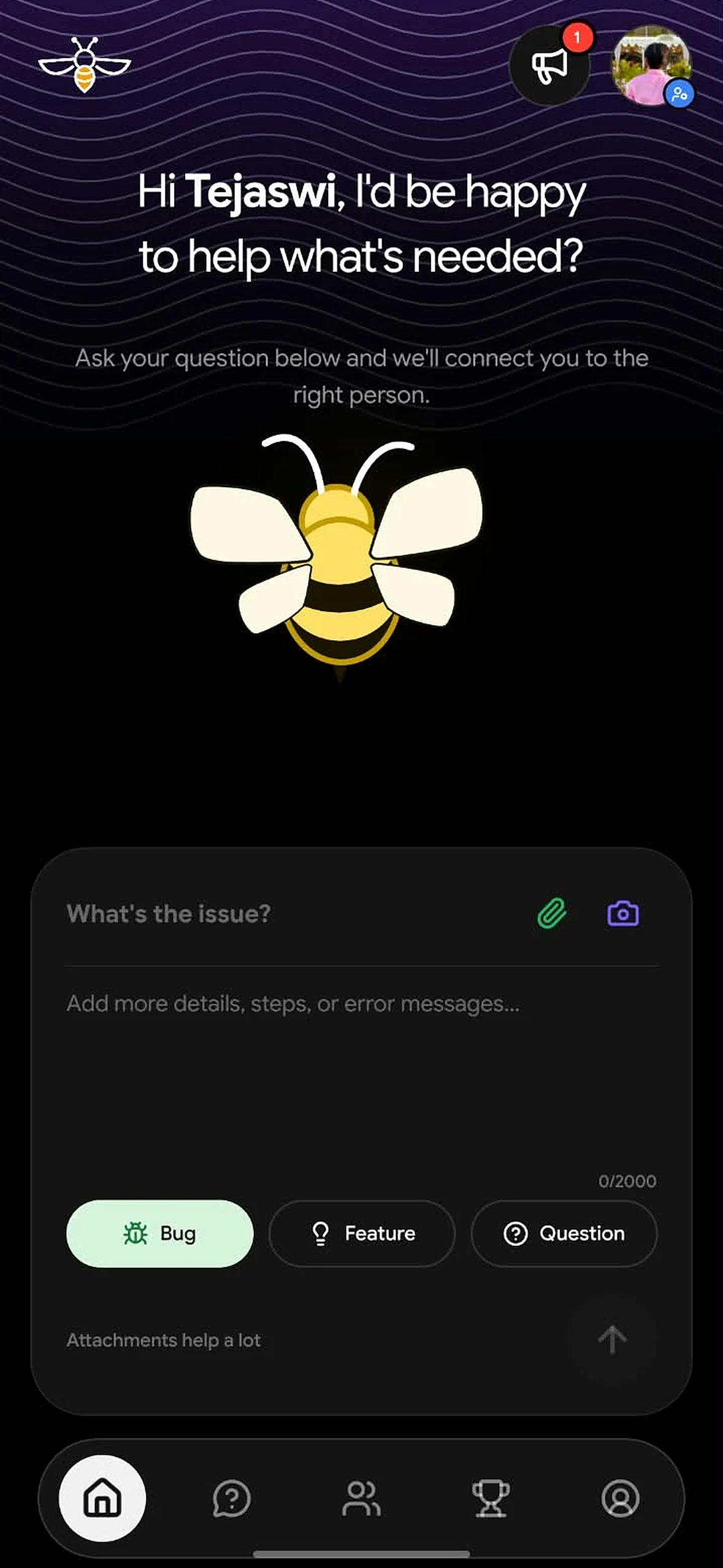
Home: ask anything with a title, detailed description and screenshots, then tag it as a Bug, Feature or Question.
-
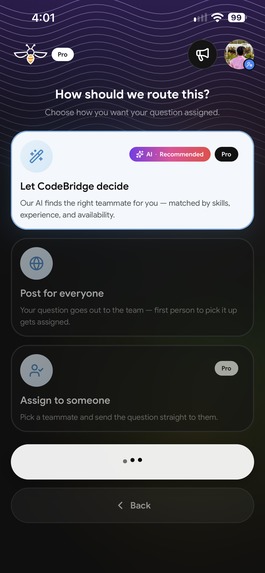
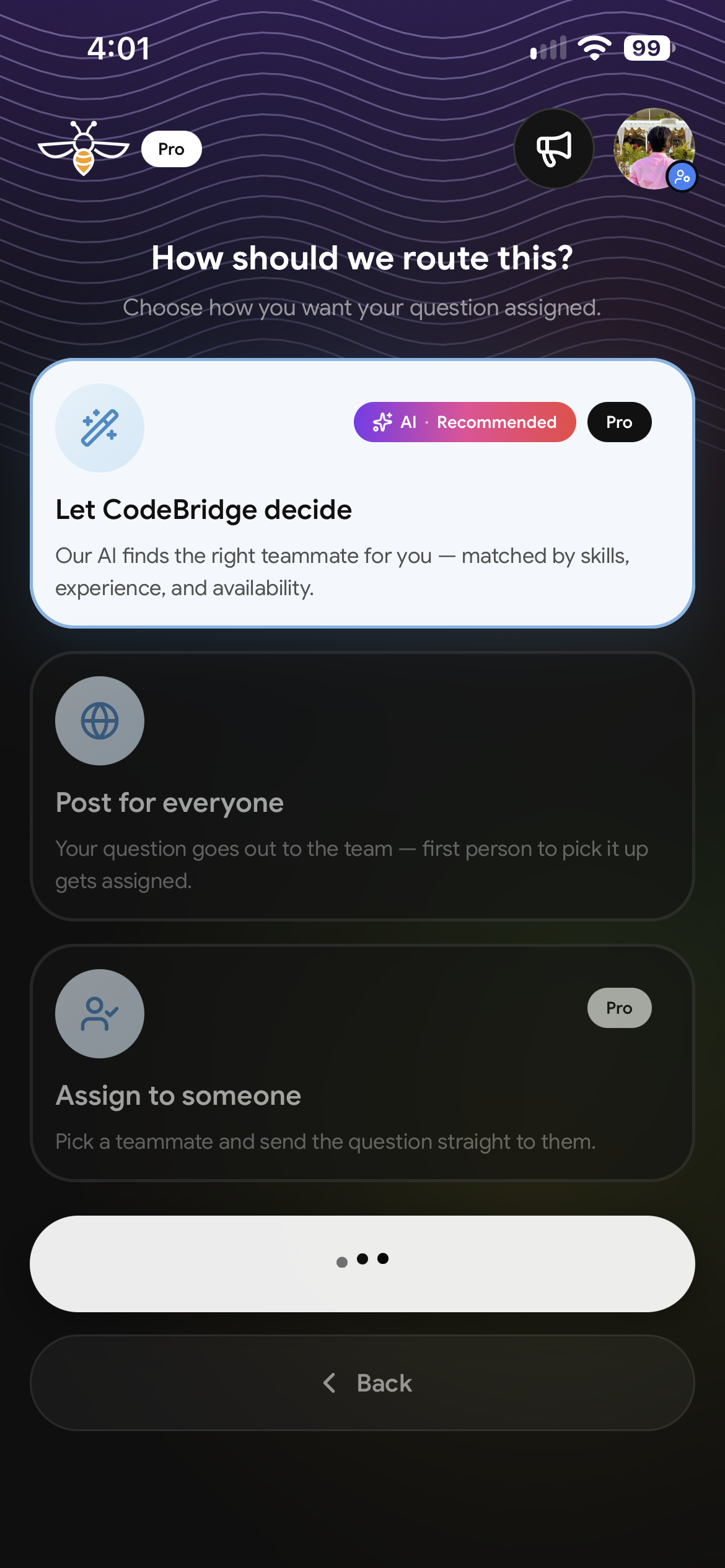
Smart routing: let CodeBridge AI pick the best teammate, post to everyone, or assign the question to someone directly.
-
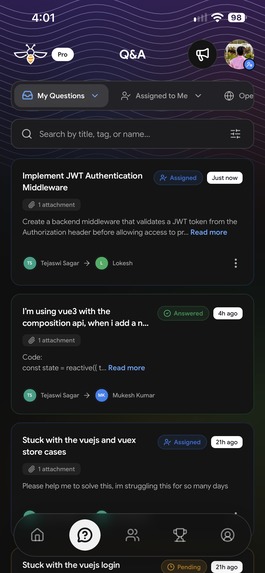
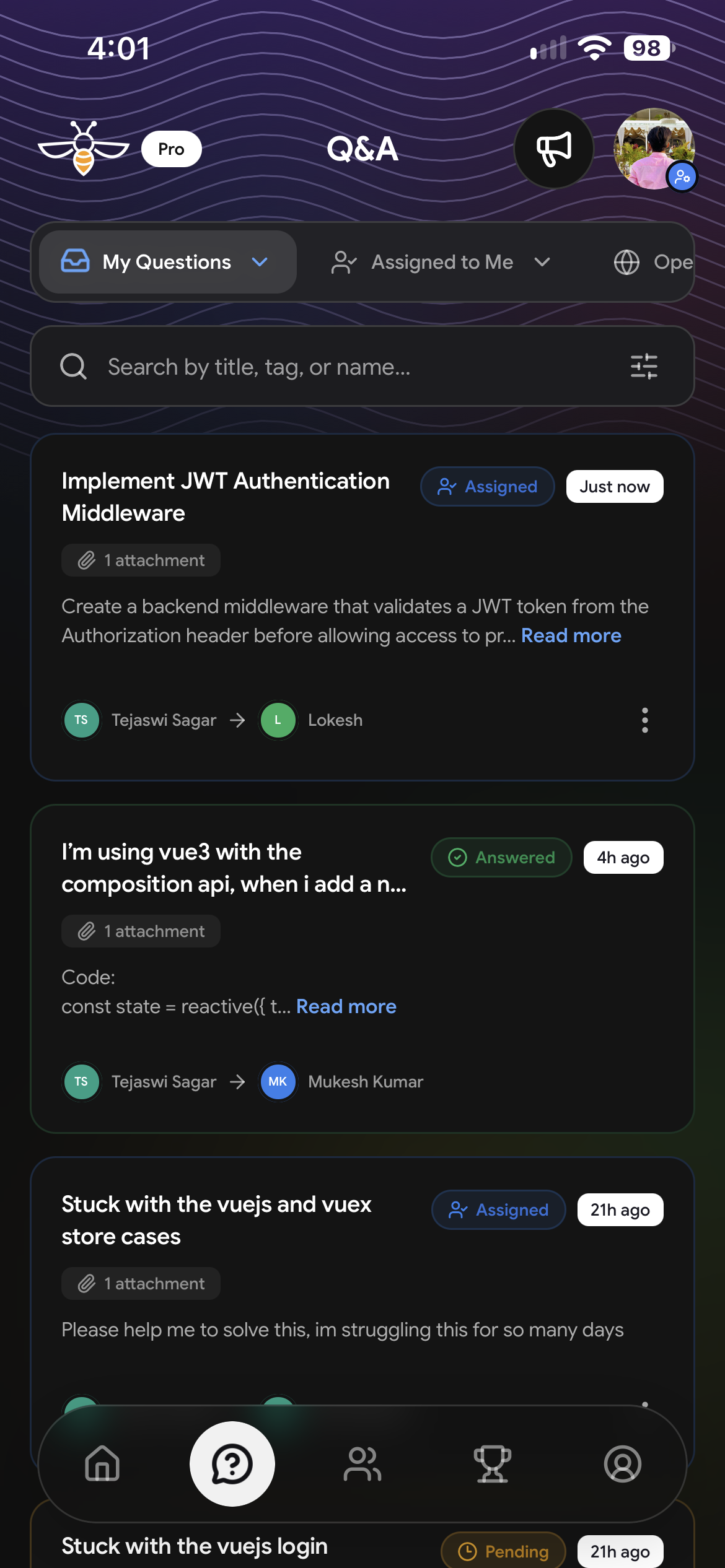
Q&A: track My Questions, Assigned to Me and Open Pool with status chips, search, filters and who asked whom.
-
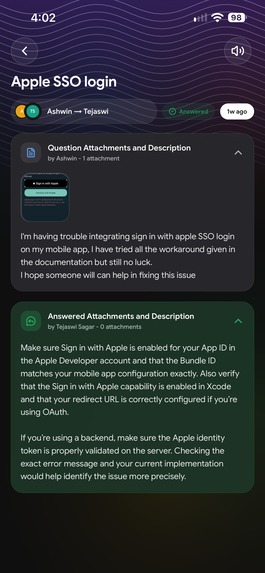
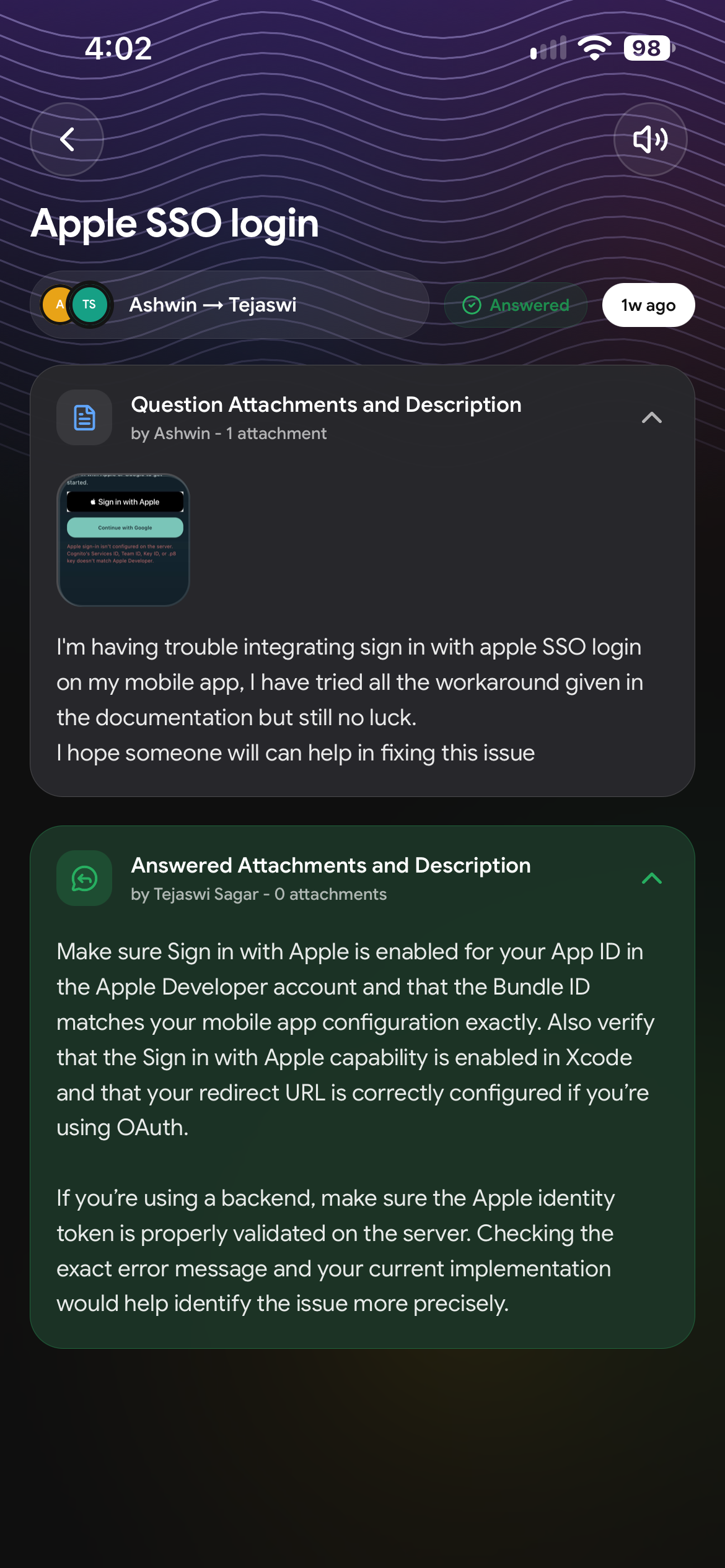
Answered question: Ashwin's Apple SSO issue solved by a teammate, with the question, attachment and answer in one view.
-
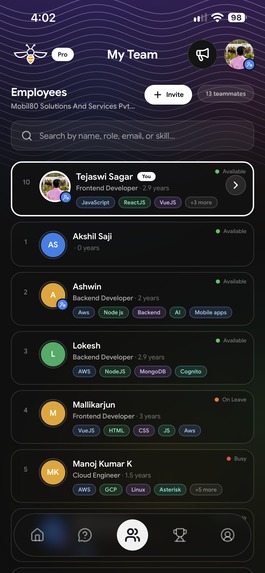
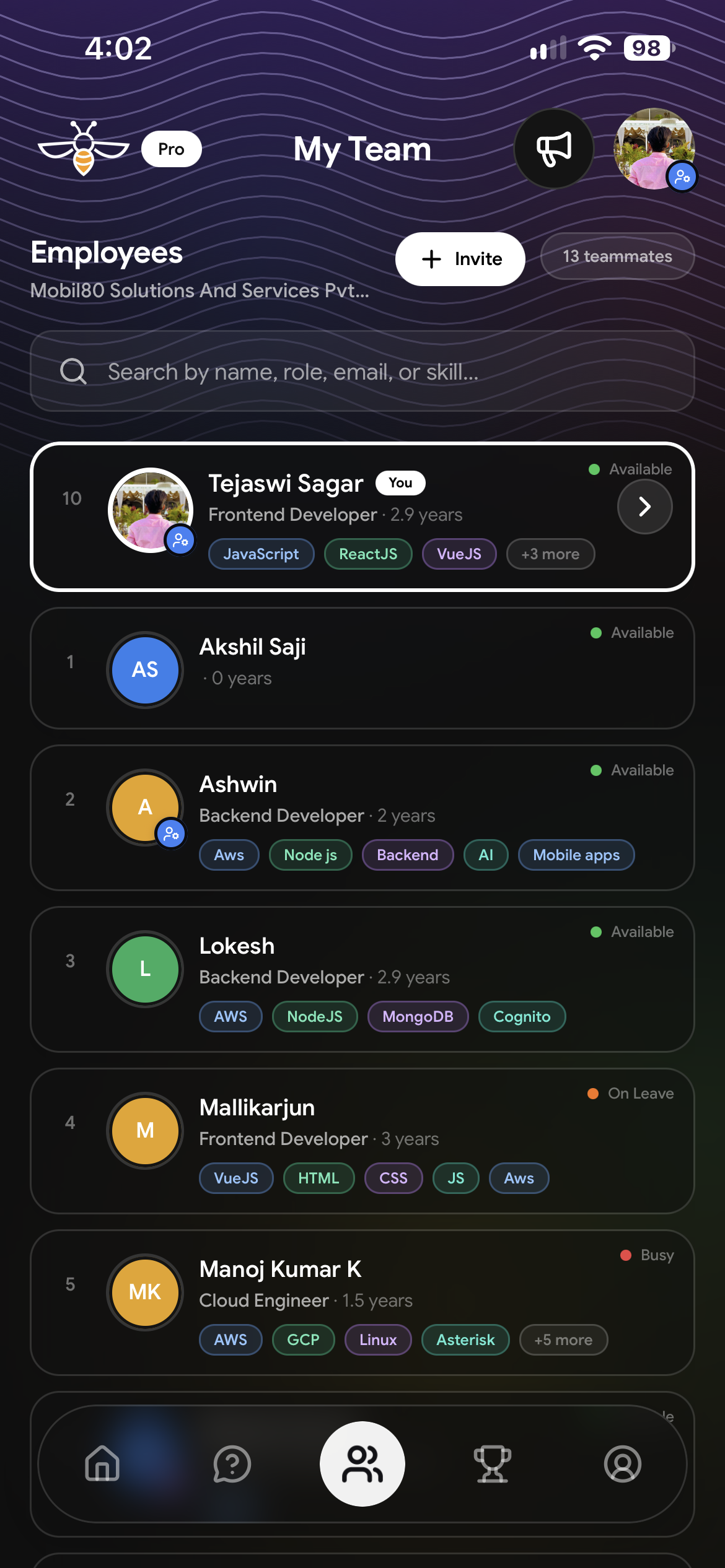
My Team: search teammates by name, role, email or skill, see live availability and invite new members in one tap.
-
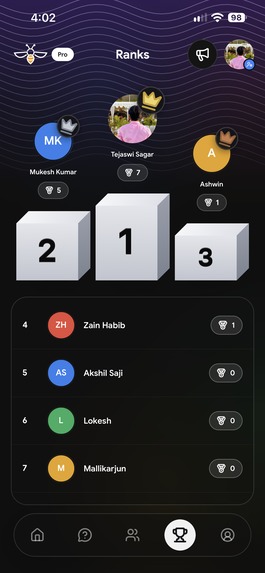
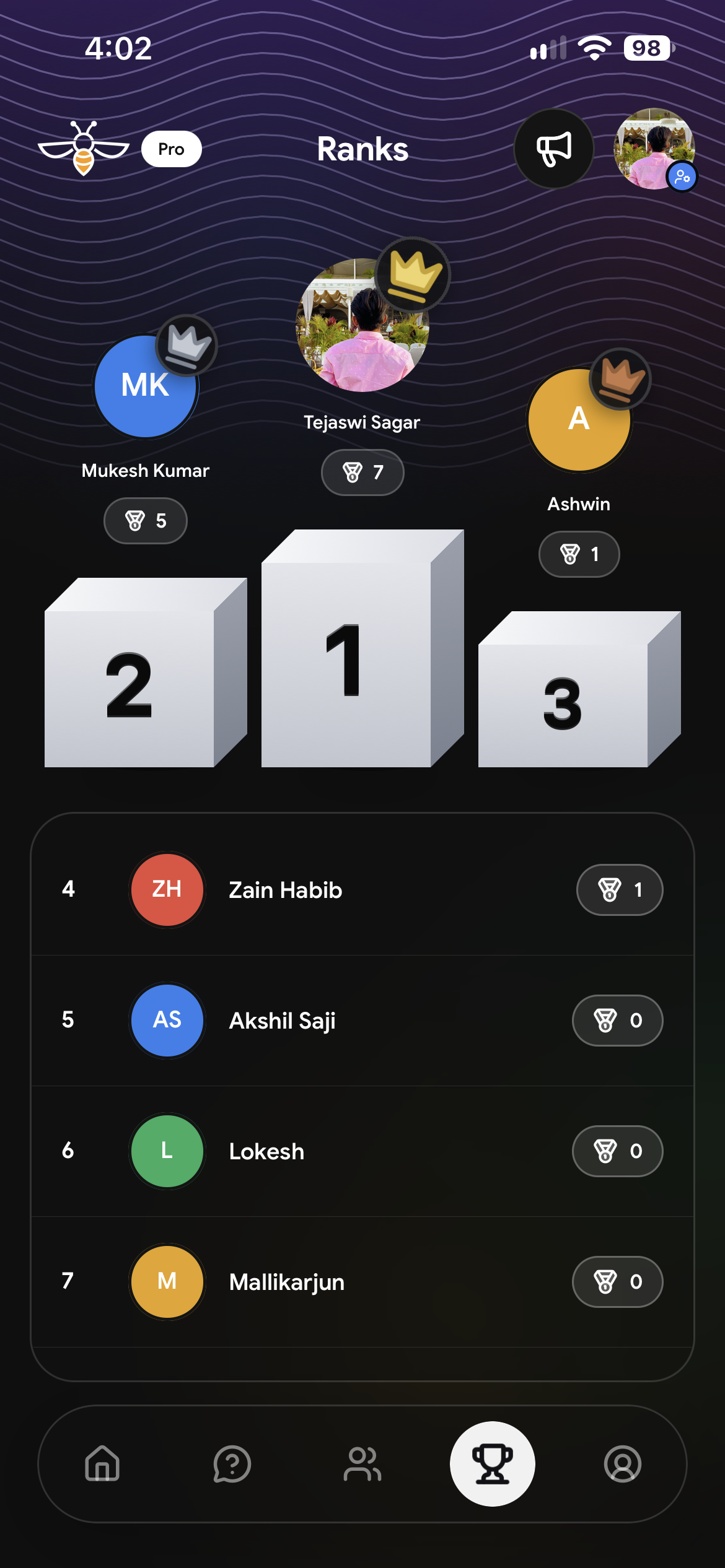
Ranks: a 3D podium and leaderboard rewards the most helpful teammates with badges for every question they answer.
-
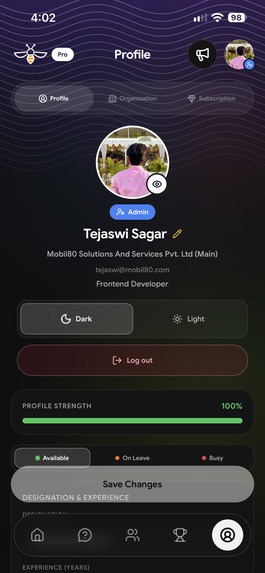
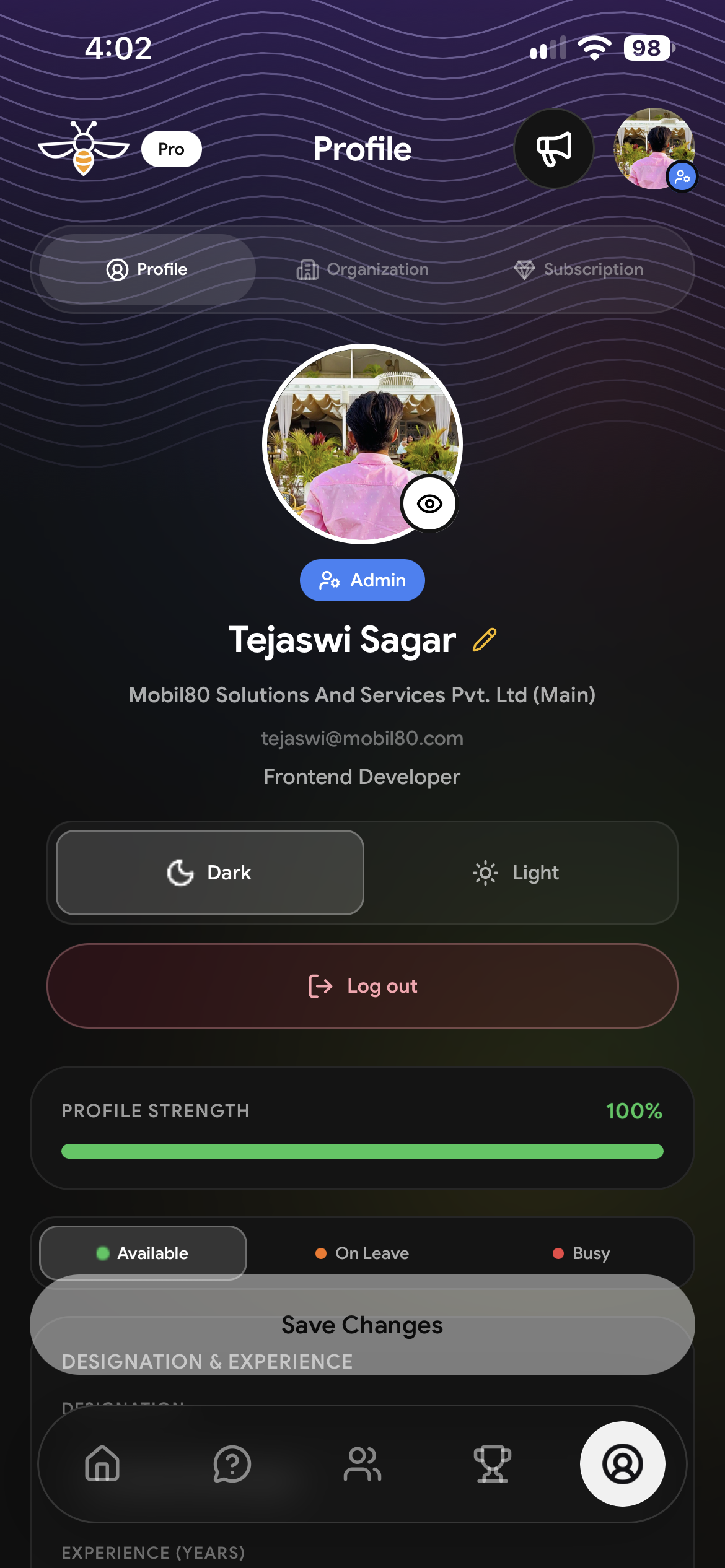
Profile: admin badge, 100% profile strength, dark/light themes and availability status, all editable in one place.
-
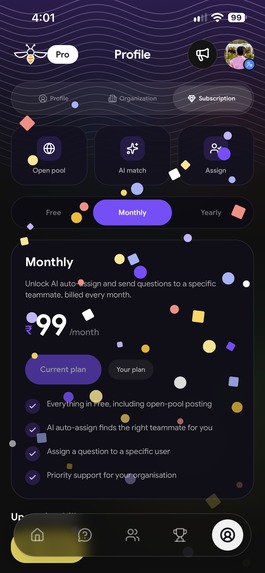
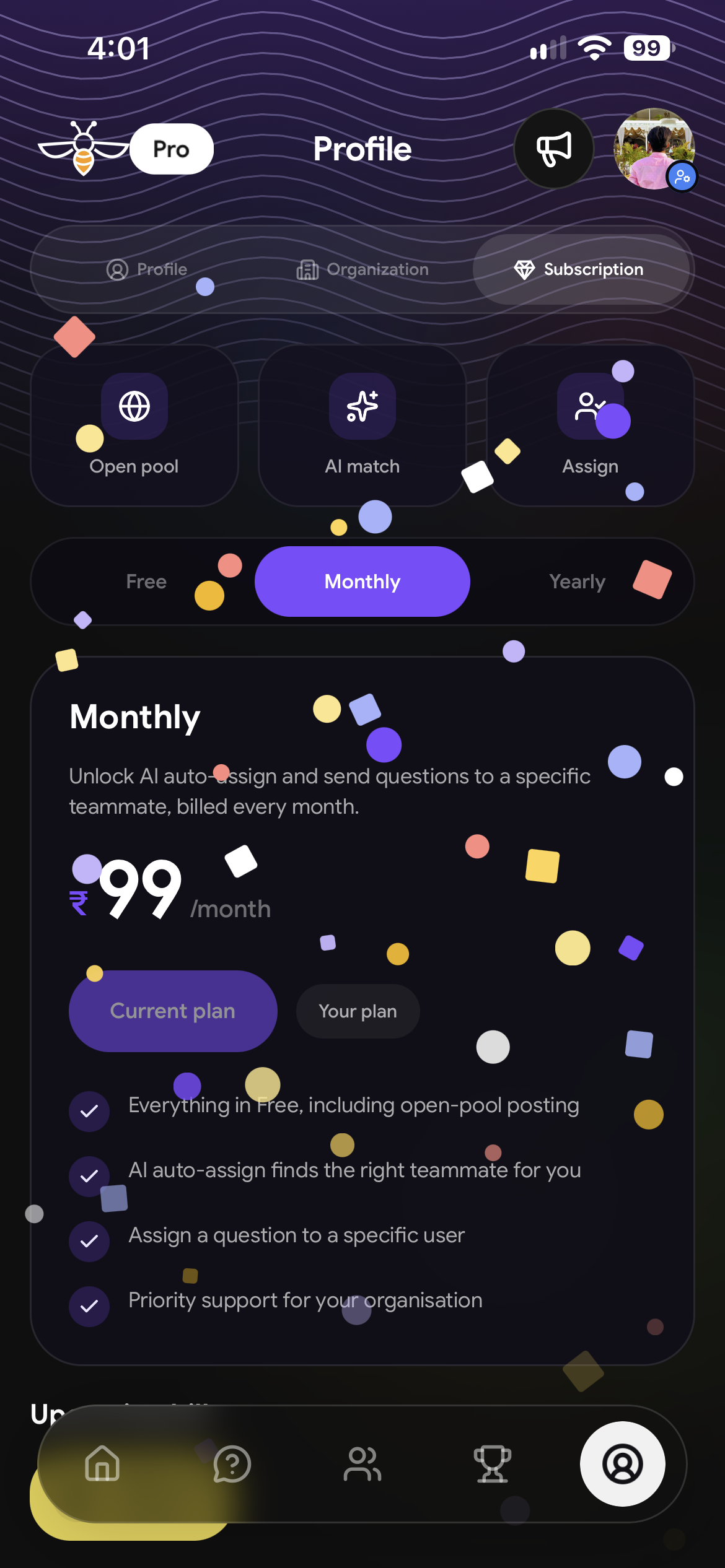
Go Pro: unlock AI auto-assign and direct assignment for ₹99/month, celebrated with a confetti animation on upgrade.
💡 Inspiration
When I joined my company, I got stuck on a front-end problem in my very first weeks. Like most developers, I went straight to ChatGPT and a few documentation sites. I got an answer, but I wasn't satisfied. The solution worked in isolation, yet it looked nothing like the code my teammates had already written. It didn't follow our patterns, our folder structure, or the libraries we had agreed on.
I was frustrated. The right answer already existed inside my own company: someone on my team had solved this exact problem before. I just didn't know who to ask, and I felt awkward pinging the whole team.
Over time, I noticed a bigger pattern. Projects in our company live for years and pass through many hands. Every time someone moves on, a Knowledge Transfer (KT) happens, but it never covers 100%. Maybe 80% gets passed on, then 80% of that, and after a few handovers, critical project knowledge quietly disappears. When a senior leaves, we don't just lose a person, we lose a library.
That's when the idea clicked:
What if there was one app that connects everyone in an organisation, and every project inside it, so you can ask a question and get the answer from the colleague who actually knows your codebase?
When I heard about this Shipathon, I rushed in, teamed up with my colleague Mukesh, and together we built CodeBridge. Today it's genuinely helping people in our own organisation.
🐝 What it does
CodeBridge is an internal Q&A app for development teams:
- Ask with context: post a question with a title, a description, and screenshots of your code or error.
- Smart routing: send it to the open pool for anyone to pick up, or let CodeBridge match it to the teammate best suited to answer.
- Rich answers: teammates reply with text, photos, and even voice notes, which are much faster than typing long explanations.
- Leaderboard: people who help earn points, so answering questions is recognised instead of invisible.
- My Team directory: see everyone in your organisation, their designation, skills, and availability.
- Announcements: admins post company-wide updates, with an unread badge so no one misses them.
- Company & project organisations: one organisation for the whole company, plus a separate private organisation for each project. Switch between them with one tap, using the same login.
- Roles: Super Admin, Admin, and User roles control who can invite people, post announcements, and manage each organisation.
- Push notifications: a live OneSignal Journey nudges the assigned teammate until the question is answered, the asker hears the moment it is, and a win-back Journey invites quiet teammates back during working hours.
📱 Availability: CodeBridge is currently available on Android. iOS support is planned next.
🏢 One company, many projects
CodeBridge works on two levels:
- Company organisation: for general questions everyone can help with: tools, setup, coding standards, HR policies.
- Project organisations: every project gets its own private, secure organisation, where only its team members can see the questions.
Example: ServiceWrk. We create a ServiceWrk organisation and invite everyone working on that project. From then on, every bug, doubt, and solution on ServiceWrk is recorded in one place, tagged as a Bug, Feature, or Question, with screenshots and answers attached.
When a new developer joins ServiceWrk, they don't start from zero:
- Hit a bug? Search: the fix is probably already there.
- Confused about a flow? See how the team explained it before.
- Still stuck? Ask, and the question goes to the ServiceWrk teammate who knows that area best.
Seniors who work across multiple projects benefit too. When you forget why a decision was made in a project you haven't touched for months, the answer is one tap and one search away.
One login. One tap to switch. General doubt? Ask the company. Project doubt? Switch to the project organisation.
And because every organisation is private, sensitive project details never have to go to public AI tools. ChatGPT knows how to write code, but only your team knows why your code is written the way it is.
👥 Team
- Tejaswi P, Frontend Developer: designed and built the entire mobile app: UI/UX, animations, navigation, theming, and wiring every screen to the API.
- Mukesh Kumar, Backend Developer: designed and built the backend: the GraphQL schema, AWS Lambda resolvers, authentication, storage, and push notification triggers.
🎨 Innovating on the UI
I didn't want CodeBridge to feel like another plain internal tool. I wanted people to enjoy opening it. UI and experience design is where I pushed myself the most, and I'm proud of how innovative it turned out:
- A living home screen: an animated mesh gradient background with a flying bee mascot 🐝 and a rotating greeting that makes the app feel alive every time you open it.
- Glass-style design: frosted glass surfaces and a custom curved floating tab bar, built from scratch instead of using a default navigation bar.
- Interactive onboarding: a custom in-app tutorial with an animated hand that shows users exactly where to tap and swipe on each screen.
- Team ID cards: tap any teammate to see a beautifully designed digital ID card with their role, skills, and availability.
- Voice answers with a live visualizer: recording a voice note shows a real-time audio visualizer, so answering feels natural and modern.
- Delightful moments: a particle celebration animation when a user upgrades to Pro, and smooth skeleton loaders instead of blank screens.
- Light & dark themes: every screen, dialog, and icon is carefully tuned for both modes.
Every screen was designed with one goal: asking for help should feel easy, friendly, and fast, never awkward.
🛠️ How we built it
- Frontend (Tejaswi P): React Native with Expo SDK 57 and TypeScript, using Expo Router for navigation and Reanimated for animations, currently shipped for Android.
- Backend (Mukesh Kumar): AWS Amplify: AppSync (GraphQL) for the API, Cognito for authentication, S3 for photo and voice attachments, and AWS Lambda (Node.js) for the resolvers.
- Notifications: OneSignal SDK v5 (
react-native-onesignal+ the OneSignal Expo plugin) on Android, Custom Events sent from AWS Lambda, a live Journey with Liquid-personalised templates, and REST API pushes. - Subscriptions: RevenueCat with Google Play billing for the Pro plan.
🔔 How we use OneSignal: no question left waiting
An internal Q&A app only works if questions actually get answered. So we wired every question's lifecycle into OneSignal and built a live Journey that keeps nudging the right person until someone replies.
1. User-based identity. On sign-in the app calls OneSignal.login() with the CodeBridge user ID as the External ID, and OneSignal.logout() on sign-out. Notifications follow the person across devices and never reach a signed-out phone. Location collection is switched off in the SDK.
2. Custom Events from the backend. The app never decides whether to notify. Our AWS Lambda resolvers send OneSignal Custom Events for the assigned teammate only after the database write succeeds:
question_assigned, carrying the question title as an event propertyquestion_answeredquestion_deleted
The flow is: User action → AppSync → AWS Lambda → OneSignal Custom Event → Journey.
3. The "Question Response SLA" Journey, live since 18 September 2026
- Entry:
question_assigned. The assignee immediately gets "New question assigned to you 👨💻 · You have been assigned the question: '…'". The title comes from the event itself through Liquid:{{ journey.first_event.properties.question_title }}. - Wait Until
question_answered, for up to 15 minutes. If the answer arrives, the assignee leaves the Journey and hears nothing more. - Still unanswered? A "⏰ Question Still Waiting" reminder, a second 15-minute Wait Until, then one final reminder. Never more than two reminders per question.
- Exit rule:
question_deletedremoves the person straight away, so nobody gets chased about a question that no longer exists.
Because the Journey is event-triggered, every assignment runs its own instance: a senior with three questions has three independent timers.
4. The "Quiet Teammate Win-back" Journey, live since 1 October 2026
- Entry: anyone whose last session was more than 7 days ago.
- Time Window: weekdays only, 10:00 to 18:00 in the teammate's own time zone. It's a work tool, so it never pings at night or on weekends.
- Push: "Your team's questions are waiting 🐝 · Open CodeBridge to see the latest questions from your team. You might be the one who knows the answer." It carries a session-conversion goal, so the dashboard shows how many teammates it actually brings back.
- Wait 3 days, then (inside working hours again) one last nudge: "Someone could use your help 💛 · Every answer earns leaderboard points."
- Exit rule: opening the app ends the Journey immediately and tags the person
winback_returned, so nobody is nudged after they come back. Re-entry is limited to once every 30 days.
5. Organisation pushes through the REST API. New open-pool questions and admin announcements go from Lambda to the members of that organisation, and "Someone has answered your question" goes straight to the asker by External ID.
6. Results so far (OneSignal dashboard, 1 October 2026)
- 19 assignments entered the Journey: 56 pushes sent, 56 delivered (100%), 0 failed, 0 unsubscribes.
- The assignment push has a 15.8% click-through rate.
- The event log shows answers arriving within 2 minutes of the assignment push (5 times between 28 and 30 September).
- Push subscribers grew from 5 to 60 in 30 days, with 26 active in the last week.
7. Branded. Custom bee notification icons and our gold accent colour (#F5B800) make every notification instantly recognisable as CodeBridge.
Next: ask for notification permission the first time someone is assigned a question instead of at launch, deep-link each push straight to its question, and add a question_resolved goal so the Journey measures resolutions, not just replies.
🧗 Challenges we faced
- Keeping the app in sync with a changing schema. The GraphQL schema evolved while we were building; for example, deleting announcements changed from a single ID to a list of IDs to support bulk delete. We learned to treat the schema as the source of truth and map every API call carefully against it.
- Debugging errors across frontend and backend. At one point announcements wouldn't load, and the only clue was a vague
.mjserror. After adding proper logging in the app, Mukesh and I traced it to the Lambda missing theaxiospackage in its deployment. We learned to always log the full GraphQL error before assuming which side the bug is on. - Push notifications that didn't arrive. While testing OneSignal with the "Subscribed Users" segment, we hit the error "All included players are not subscribed." It taught us that having a OneSignal user isn't enough: the device subscription must also be active. We now request notification permission at launch and link every user by their CodeBridge ID.
- Third-party SDK surprises. RevenueCat kept throwing an unhandled error because a user ID was being sent as an email address. The fix was small, but finding it taught me to validate data before handing it to any SDK.
- Making Android feel polished. Features like background blur behind dialogs, pull-to-refresh colours, and notification icons all needed Android-specific handling to look and feel right, since Android renders them differently.
- Designing for real people, not just demos. Things like unread badges, role-based permissions, and not losing a half-typed announcement when tapping outside a dialog only became obvious once colleagues started using the app.
📚 What we learned
- How to build and ship a full-stack mobile app end to end: from UI design to GraphQL APIs, authentication, file storage, and push notifications.
- How to structure a growing React Native codebase with shared components, typed API layers, and consistent theming.
- How a frontend and backend developer can move fast together by agreeing on the schema first.
- That notifications work best as an event-driven lifecycle, sent to the right person at the right stage, instead of a collection of isolated pushes.
- That great UI isn't decoration: it's what makes people actually use an internal tool instead of ignoring it.
- That knowledge is best organised the same way teams are: per project, private, and owned by the people who build it.
- That the best answer to a developer's question is often the one that matches their team's code, and that the knowledge is already there; it just needs a bridge.
🏆 What we achieved
I set out to solve the exact problem I faced on my first days at work, and I'm 100% confident CodeBridge achieves everything I envisioned. Developers in our organisation can now ask a question, reach the right teammate, and get an answer that fits our codebase, all inside an app that's genuinely enjoyable to use.
With project organisations like ServiceWrk, CodeBridge becomes the living memory of each project, so when people move on, their knowledge stays behind for whoever comes next.
What started as a moment of frustration is now a tool our whole team relies on.
Try it out
Built With
- amazon-web-services
- aws-amplify
- aws-appsync
- aws-lambda
- awscognito
- expo-go
- expo.io
- google-play-billing
- graphql
- javascript
- onesignal
- react-native
- revenuecat
- typescript


Log in or sign up for Devpost to join the conversation.