-
-
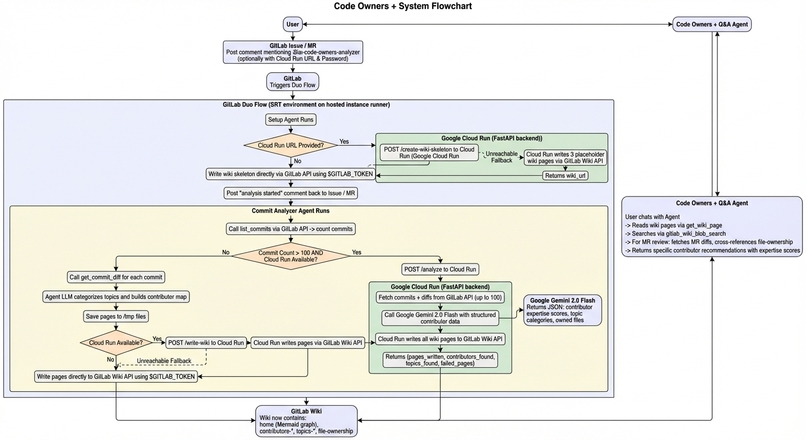
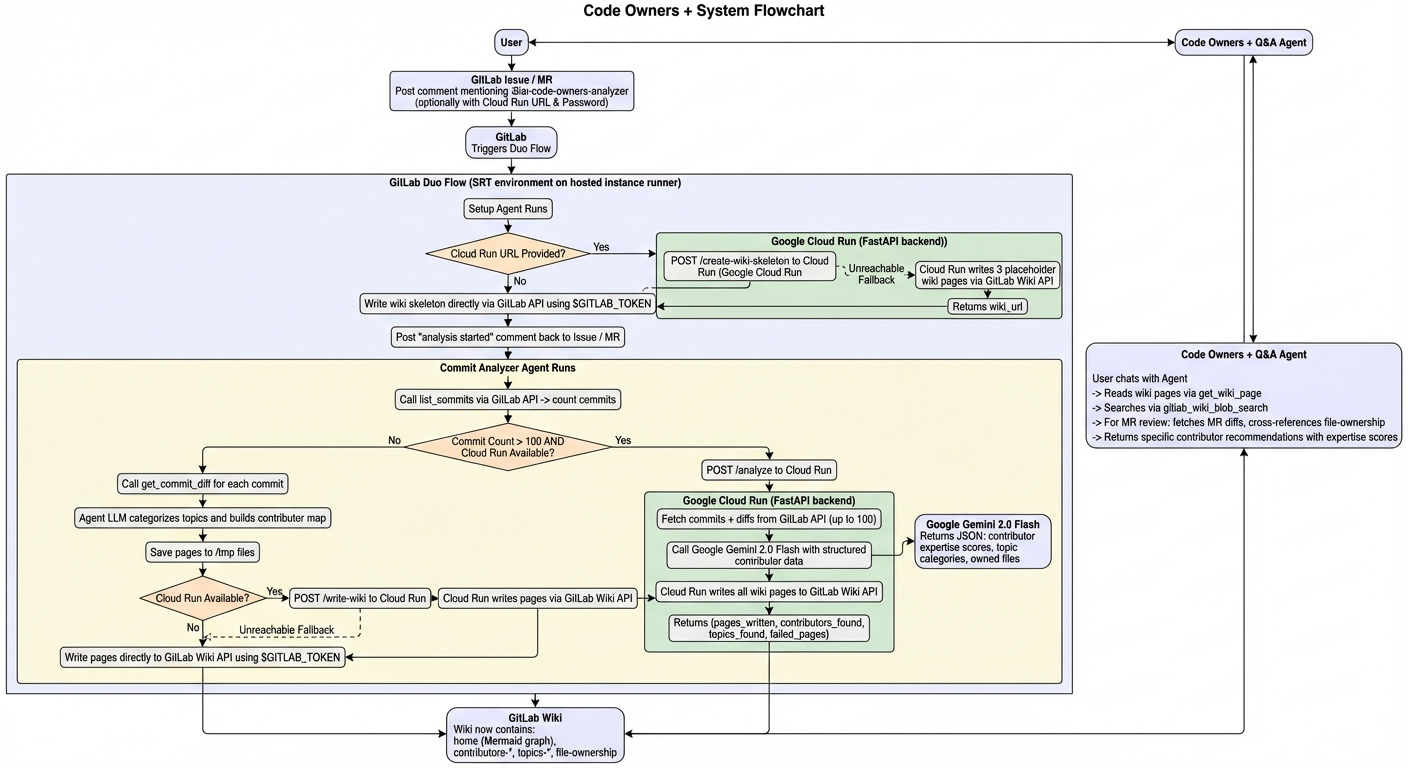
Flow Chart
-
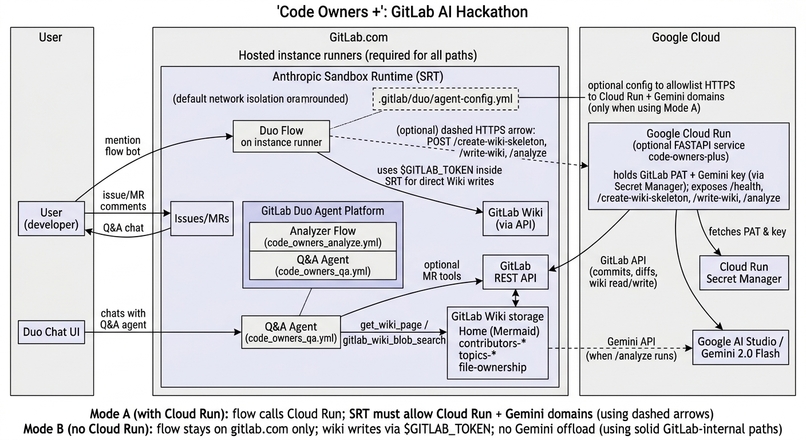
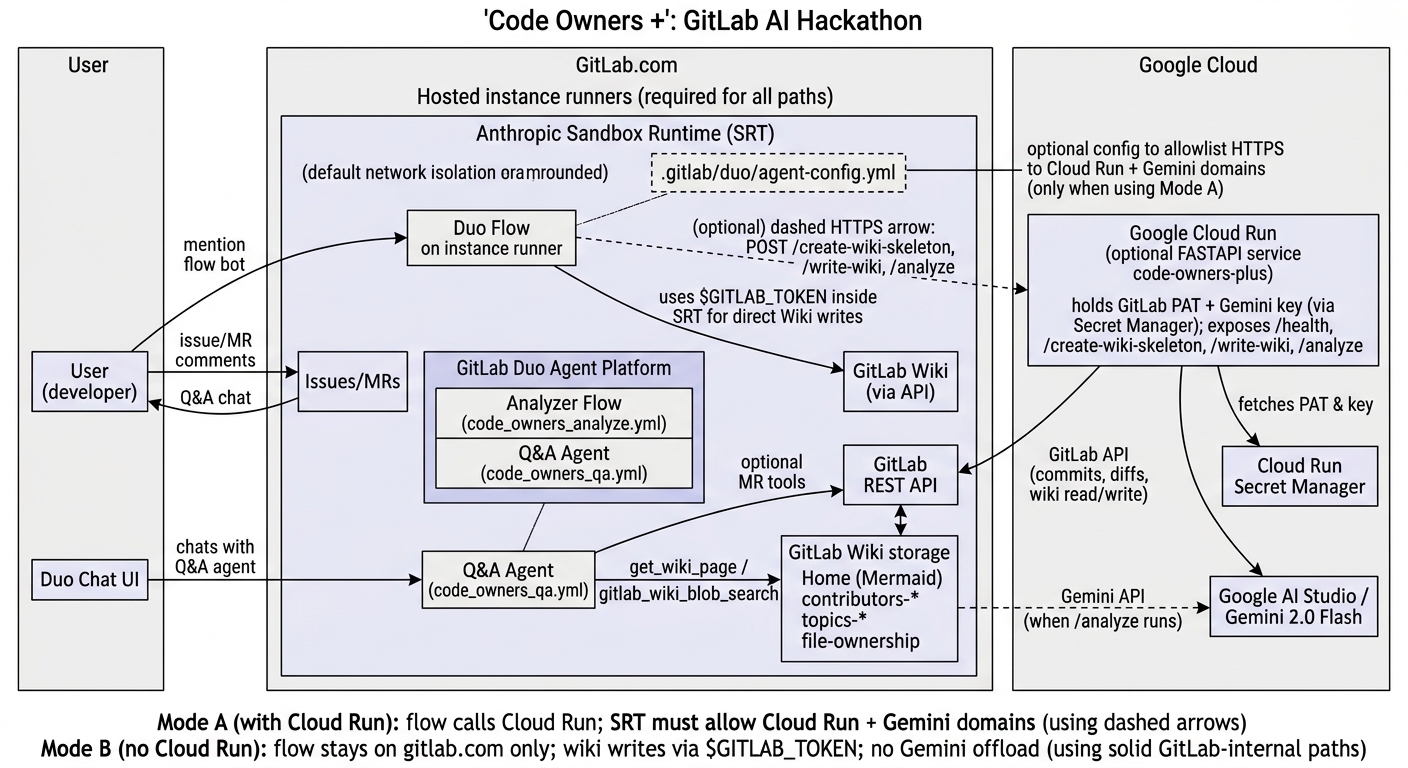
Architecture Diagram
Inspiration
Every engineering team has the same problem: you don't know who knows what.
Code Owners Plus helps you create a knowledge graph of code owners and feature topics from git commits (topics extracted from commit messages + files changed). It stores the knolwedge graph, along with other helpful info (ex. code quality report, topic deepdives, etc.) in the wiki of the Gitlab repo. And you can ask questions about it.
Gitlab already has a feature called Code Owners; we are further enhancing with AI. The answer to "who should I ask about this?" is already in your commit history. Every git log is a hidden expertise map. Code Owners Plus makes that map visible.
What it does
Code Owners Plus helps you create a knowledge graph of code owners and feature topics from git commits (topics extracted from commit messages + files changed). It stores the knolwedge graph, along with other helpful info (ex. code quality report, topic deepdives, etc.) in the wiki of the Gitlab repo. And you can ask questions about it.
Code Owners Plus is a two-part system built on the GitLab Duo Agent Platform:
1. The Analyzer flow (flows/code_owners_analyze.yml): Triggered by mentioning the bot in any GitLab issue or MR comment, it analyzes the repo's commit history and writes a living knowledge graph to the project's Wiki:
- Home page — a Mermaid diagram showing every contributor connected to their topic areas, with a summary table of commits and expertise
- Per-contributor pages — expertise scores by area (1–10), files owned, AI-generated summary of what they work on
- Per-topic pages — which contributors work in each area (authentication, API, frontend, CI/CD, etc.) and the key files involved
- File ownership page — a table of every file in the repo mapped to its primary author by commit count
For large repos (>100 commits), analysis is offloaded to a Google Cloud Run backend - the Duo flow calls Cloud Run over HTTPS for wiki writes and /analyze when users provide their service URL and API key. For smaller repos, or when Cloud Run isn't configured, the flow runs entirely within GitLab's hosted runners using only $GITLAB_TOKEN — no external dependencies required.
2. The Q&A agent (agents/code_owners_qa.yml): A persistent chat agent that reads the Wiki to answer questions like:
- "Who should review MR !42?" (fetches the MR's changed files, looks up their owners in the file-ownership page)
- "Who has the most expertise in authentication?"
- "What has Alice been working on recently?"
- "Who owns src/payments/stripe.py?"
How we built it
The system has three layers:
Layer 1 — GitLab Duo Flow (flows/code_owners_analyze.yml): A two-agent flow written in GitLab's YAML agent definition format. The setup agent validates inputs, creates the wiki skeleton, and posts a notification. The commit_analyzer agent counts commits, chooses the analysis path, and orchestrates the output. The agents use run_command to execute Python scripts (using only urllib.request from the standard library, because the SRT environment has no curl or requests available) to call Cloud Run or the GitLab API directly.
Layer 2 — Cloud Run backend (cloud-run/main.py): A FastAPI service deployed on Google Cloud Run. It exposes four endpoints:
POST /create-wiki-skeleton— creates placeholder wiki pages immediately, so the user sees something right awayPOST /write-wiki— accepts pre-formatted wiki pages from the inline agent and writes them to GitLab via the REST APIPOST /analyze— the full pipeline: fetches up to 200 commits + their file diffs, constructs a structured contributor map, sends it to Gemini 2.0 Flash for analysis, and writes all wiki pages
The GitLab token and Gemini API key are stored in Google Secret Manager and injected as environment variables at deploy time — they never appear in code or comments.
Layer 3 — Q&A agent (agents/code_owners_qa.yml): A simple but powerful agent that uses get_wiki_page and gitlab_wiki_blob_search to answer ownership questions. For MR review recommendations, it uses list_merge_request_diffs to get the changed files and crosses them against the file-ownership wiki page.
The network access problem was solved by discovering GitLab's agent-config.yml network policy file, which allowlists specific domains for outbound HTTPS from within the SRT sandbox.
Challenges we ran into
The runner constraint was the most surprising. We initially assumed a Google Cloud Runner — provisioned via GitLab's own Google Cloud integration using GRIT and Terraform — would be able to run Duo flow jobs. It can't. After setting up the runner, tagging it with gitlab--duo, and watching it successfully pick up a flow job... it immediately failed with duo_workflow_not_allowed. Duo Workflow jobs are locked to GitLab's own instance runners. This cost us significant time and sent us down a research rabbit hole to understand what was actually happening. The key was to just put a network config file with:
network_policy:
include_recommended_allowed: true
allowed_domains:
- code-owners-plus-525282283411.us-central1.run.app
- generativelanguage.googleapis.com
The SRT network sandbox was the second wall. Once we were back on instance runners, every outbound HTTP call to Cloud Run returned HTTP 403 from proxy. The error message was opaque and didn't suggest the fix. We had to dig through the Duo Agent Platform documentation to find the agent-config.yml network policy mechanism — which, once found, was a one-line fix.
Accomplishments that we're proud of
- It actually works end-to-end. A single comment in a GitLab issue produces a fully-populated, cross-linked Wiki knowledge graph with a Mermaid diagram, contributor pages, topic pages, and a file ownership table.
I can see real use cases and value proposition for Code Owners Plus.
What we learned
- GitLab Duo Agent Platform internals: how flows are scheduled, why they require instance runners, how the SRT sandbox works, what
agent-config.ymldoes, and how to write multi-agent flows that pass structured state between components.
What's next for Code Owners Plus
I'm here to show what's possible. Excited to see where Code Owners Plus goes from here through other developers!

Log in or sign up for Devpost to join the conversation.