-
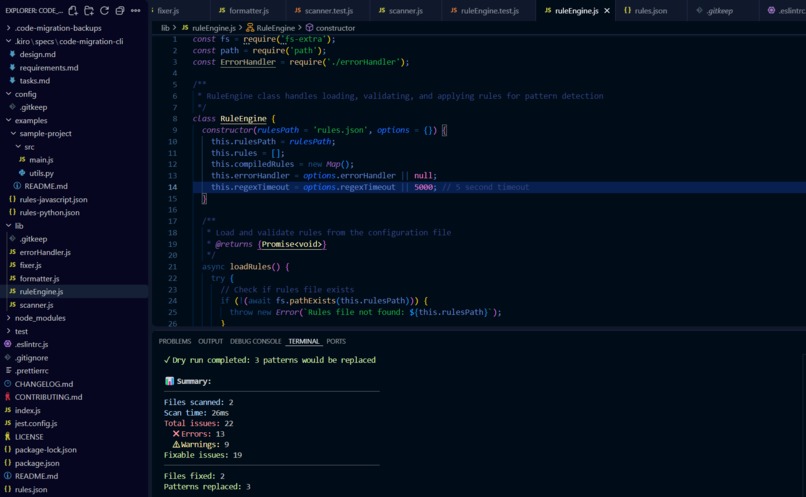
This screenshot shows the work flow and output of my project
Inspiration
Code Migration CLI Tool Inspiration :
The inspiration came from working with legacy projects where I noticed a lot of deprecated code and outdated APIs. Manually searching and updating them was time-consuming and error-prone. This motivated me to build a CLI-based automation tool that could scan projects, detect deprecated patterns, and migrate them to modern alternatives.
What I Learned :
How to build command-line tools in Node.js.
Designing a rule engine for automated code refactoring.
Writing modular, testable scripts for maintainability.
Deepened my understanding of deprecated vs modern practices in JavaScript and Node.js.
🛠️ How I Built It
Used Node.js for CLI functionality.
Implemented a rule engine where each rule matched a deprecated pattern (like var → let/const).
Integrated file system scanning using fs and path modules.
Added automated testing with Jest to ensure safe migrations.
Provided clear logs and reports to track changes.
Challenges I Faced :
Handling complex nested code structures without breaking the syntax.
Balancing between automation and developer control (e.g., not replacing too aggressively).
Ensuring compatibility across different Node.js project setups.
Debugging CLI arguments and file path issues on different OS environments.
Example Transformation :
For example, the tool automatically migrates deprecated variable declarations:
// Before var count = 10;
// After let count = 10;
And ensures outdated methods are updated to modern equivalents.
Key Takeaway :
This project taught me how to combine automation, software design patterns, and developer empathy to create tools that make life easier for engineers maintaining large codebases.

Log in or sign up for Devpost to join the conversation.