Inspiration
My inspiration for Code Art Studio came from the desire to bridge the gap between visual creativity and the technical world of coding. I noticed that many designers find code intimidating, and many developers struggle to create visually appealing layouts from scratch. I wanted to create an intuitive, hands-on tool that makes learning web graphics fun by instantly connecting a creative action (drawing) to its underlying code. It’s designed to be a playground for visual learners and a rapid prototyping tool for developers, making web design more accessible and demystifying how the visuals we see on screen are built.
What it does
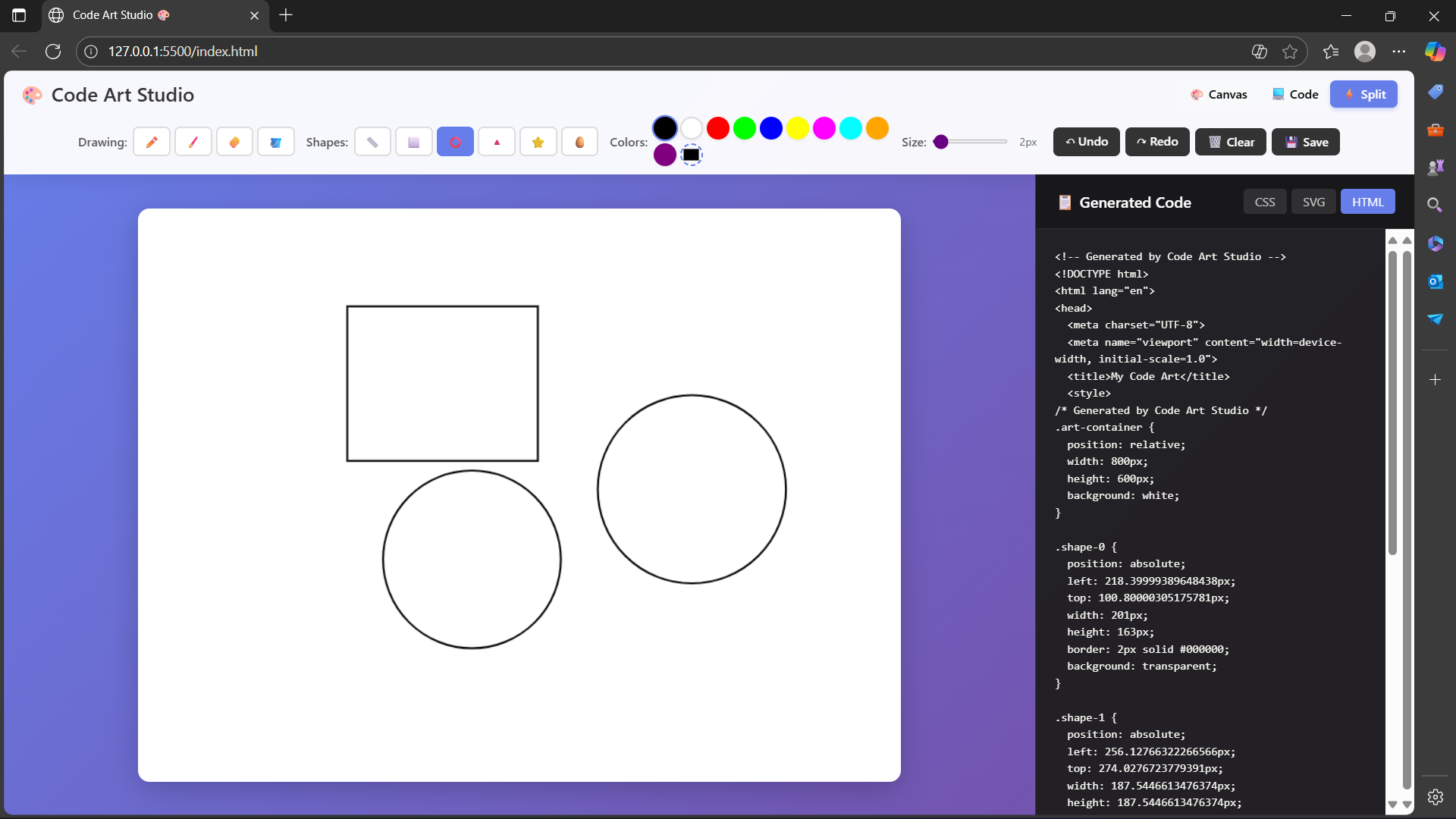
Code Art Studio is a web-based drawing application that acts as a real-time translator between art and code. It provides a full suite of tools, including a pencil, brush, various geometric shapes, and a paint bucket. As a user draws on the canvas, the application instantly generates clean, corresponding HTML, CSS, and SVG code. Users can visually design web elements, icons, or abstract art and immediately see the code required to build them. The application also supports a full undo/redo history, allows saving the artwork as a PNG, and is fully responsive for a seamless experience on both desktop and mobile devices.
How I built it
I built this project from the ground up, embracing a "vanilla" stack to demonstrate a strong command of core web technologies without relying on external frameworks.
The application is structured with semantic HTML5, styled with modern CSS3 (using Flexbox and Grid for responsiveness), and powered by JavaScript (ES6+).
The entire drawing engine is built on the HTML5 Canvas API. This API handles all rendering of paths, shapes, and pixel data manipulation for features like the bucket-fill tool.
All interactivity, from tool selection to the real-time code updates, is handled with vanilla JavaScript, which directly manipulates the DOM. The state management, especially for the undo/redo system, was custom-built to track every action as a data object.
Challenges I ran into
The journey wasn't without its technical hurdles. One of the biggest challenges was implementing a robust undo/redo system. My initial, simpler approach using image snapshots (toDataURL) quickly proved flawed as it didn't sync with the vector data needed for code generation. Refactoring this into a state-based system, where an array of shape objects is the "single source of truth," was a significant architectural challenge that required careful data management.
Another challenge was generating meaningful CSS for complex shapes. While CSS for rectangles is easy, creating triangles and stars from a single div required using advanced tricks like the zero-dimension border method and the clip-path property.
Accomplishments that I'm proud of
I'm particularly proud of the real-time code generation feature. Seeing the CSS and SVG update instantly as you draw is the most satisfying part of the project and brings the original vision to life. It feels magical.
Another accomplishment is having built this entire feature-rich application without relying on any front-end frameworks like React or Vue. This forced me to manage state and handle all DOM updates manually, which greatly deepened my understanding of how JavaScript interacts with the browser.
Finally, I'm proud of offering multiple code outputs (CSS, SVG, and HTML). This makes the tool genuinely versatile for different use cases, whether for a student learning CSS properties or a developer needing to grab a quick SVG icon.
What I learned
This project was a tremendous learning experience. I gained a deep mastery of the HTML5 Canvas API, moving beyond basic drawing to understand its state machine, how to manage transformations, and how to manipulate pixel data directly with getImageData.
Perhaps the most valuable lesson was in application state management. The shift from a simple undo system to a structured history array taught me the vital importance of having a single, immutable source of truth in building interactive applications.
Lastly, I learned how to programmatically construct SVG data strings, particularly for the and elements. Understanding how to build these complex strings from a series of coordinates is an incredibly powerful skill for generating dynamic and scalable web graphics.
What's next for Code Art Studio
The journey for Code Art Studio isn't over. The next steps involve adding more professional features to make it an even more powerful creative tool:
Fill Color & Gradients: Implementing a second color picker for filling shapes to allow for more complex and complete designs.
A Layer System: Introducing a layer panel so users can work on different parts of their drawing independently, a hallmark of professional art software.
Project Saving/Loading: Allowing users to save their entire canvas state (the array of shapes) as a JSON file, so they can close the browser and resume their work later.
More Tools: Adding a text tool and more complex shape tools (like a configurable polygon tool) are high on the priority list.