-
-
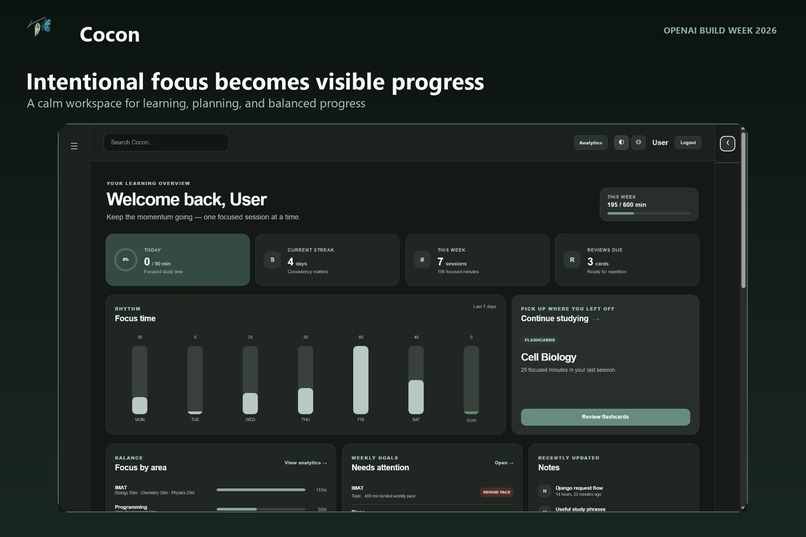
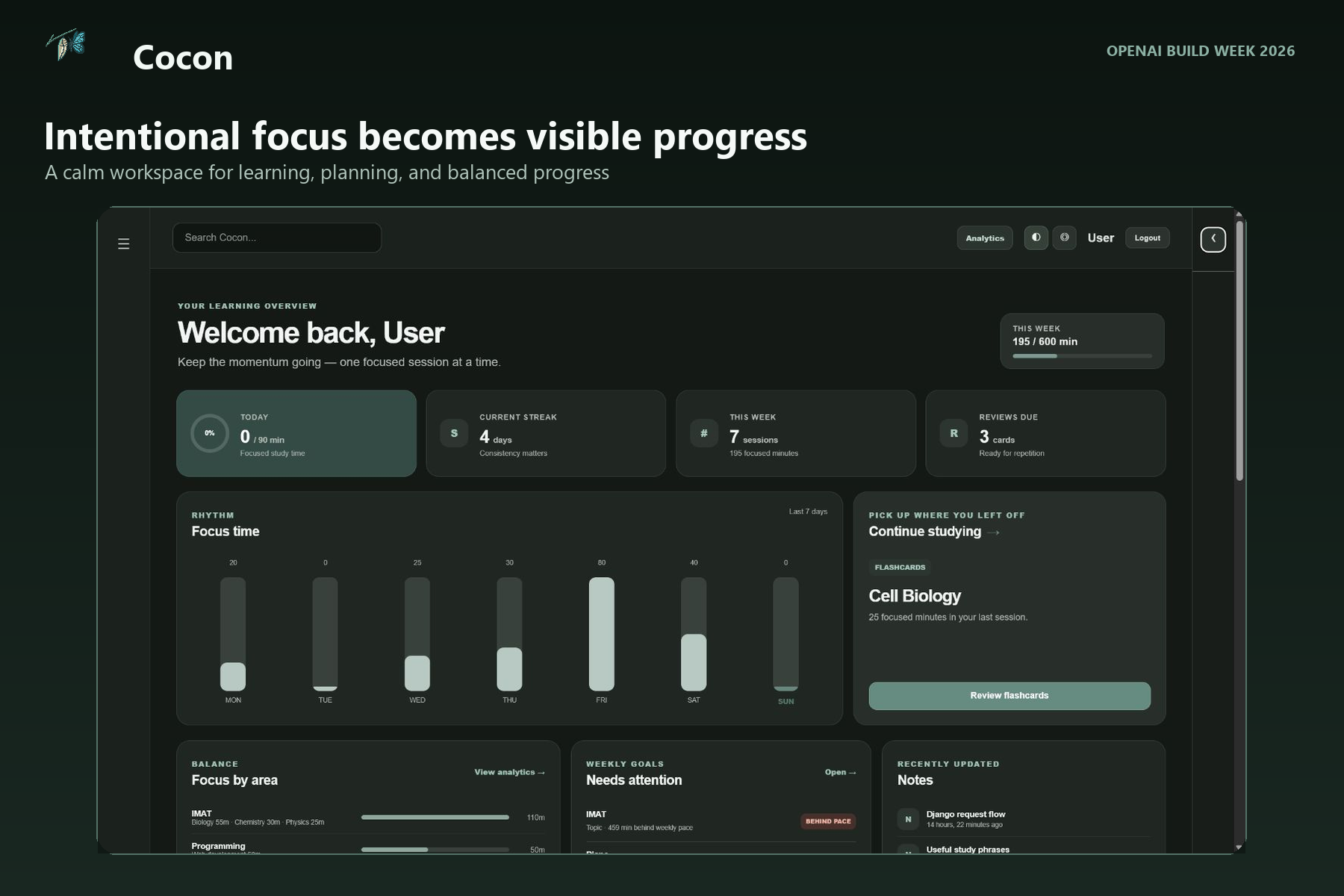
Cocon turns intentional focus into visible progress.
-
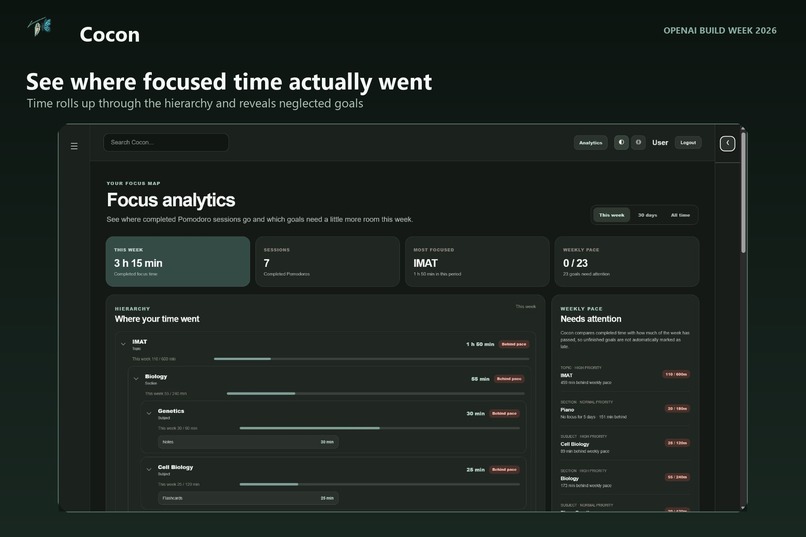
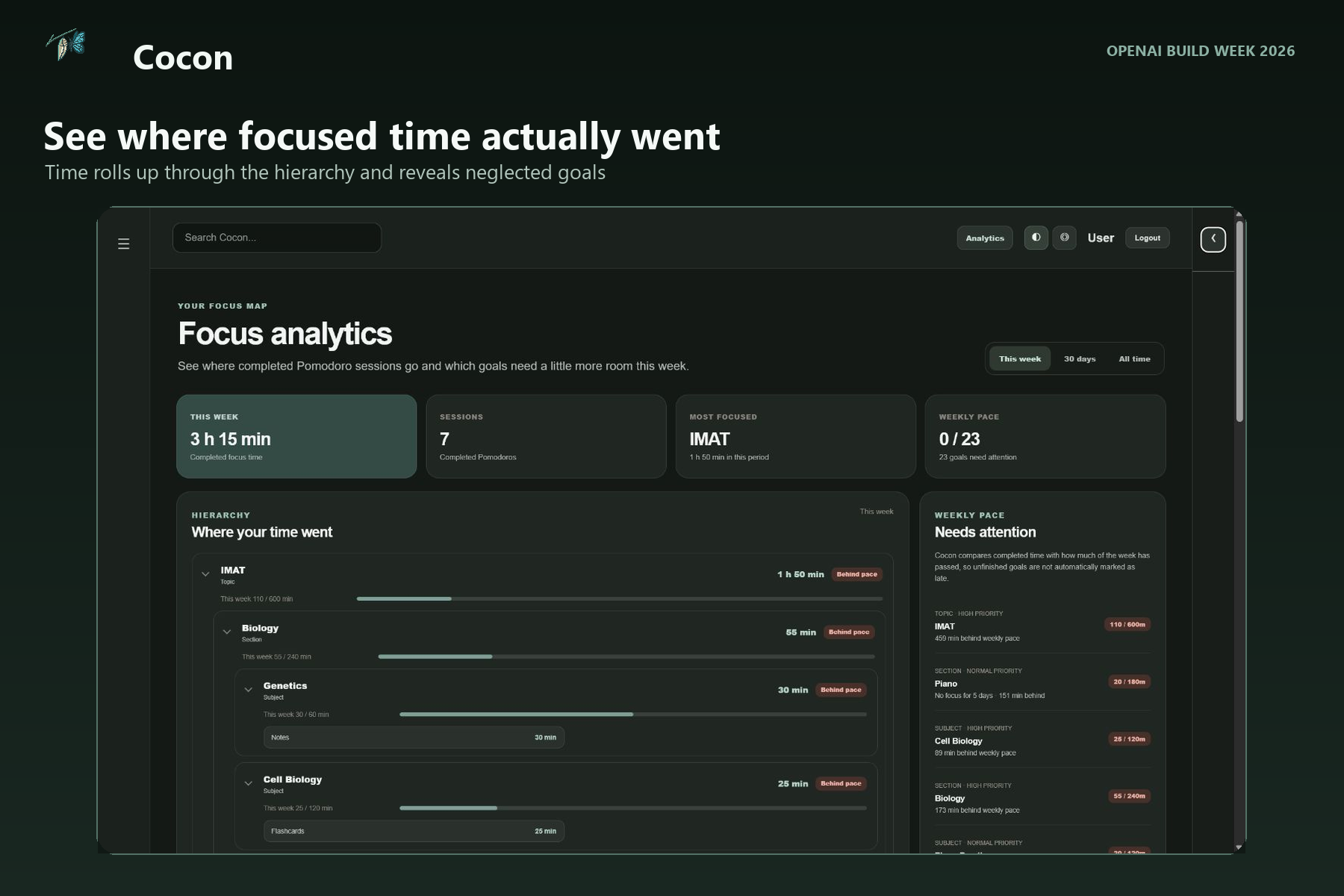
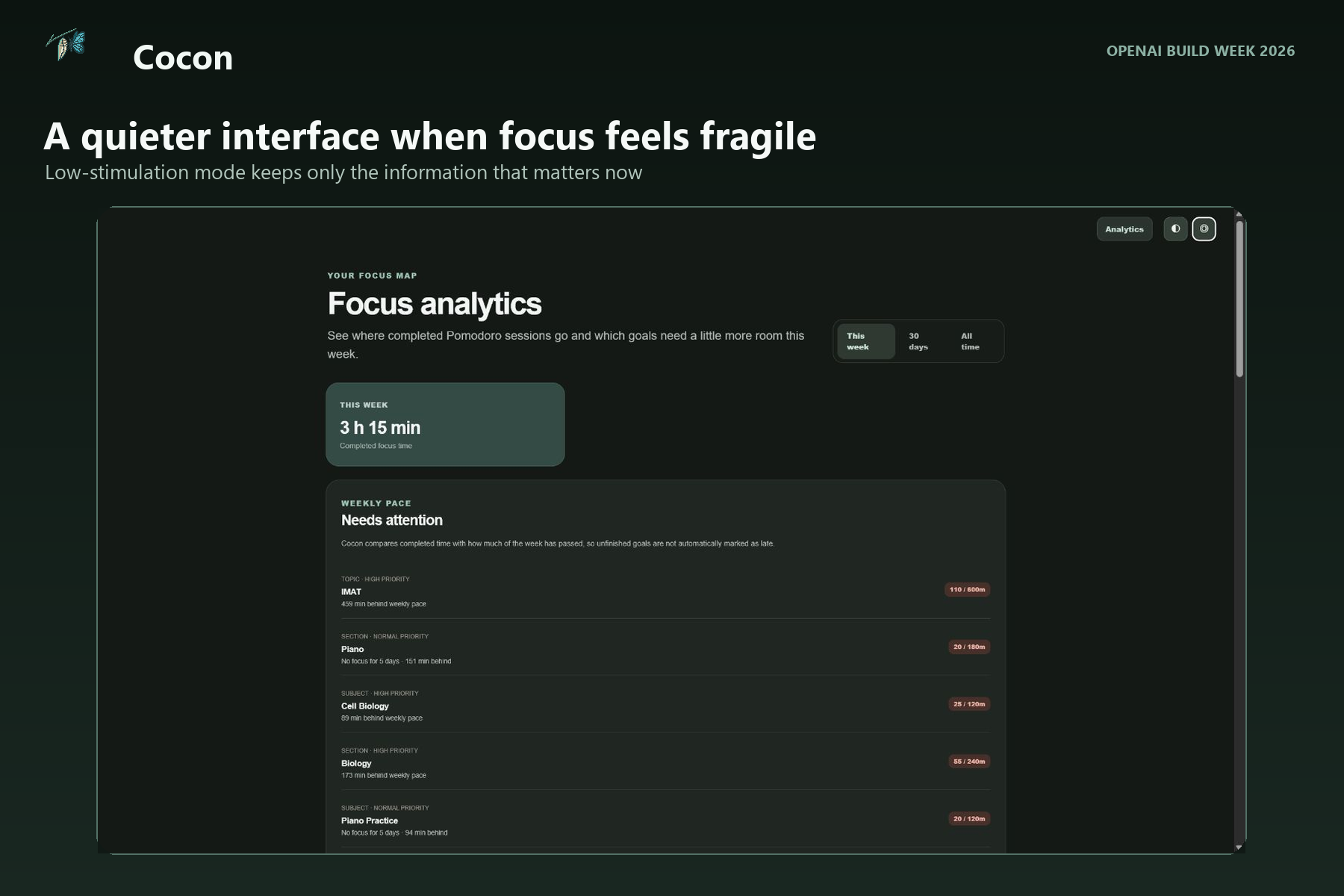
Hierarchical analytics show where focused time actually went.
-
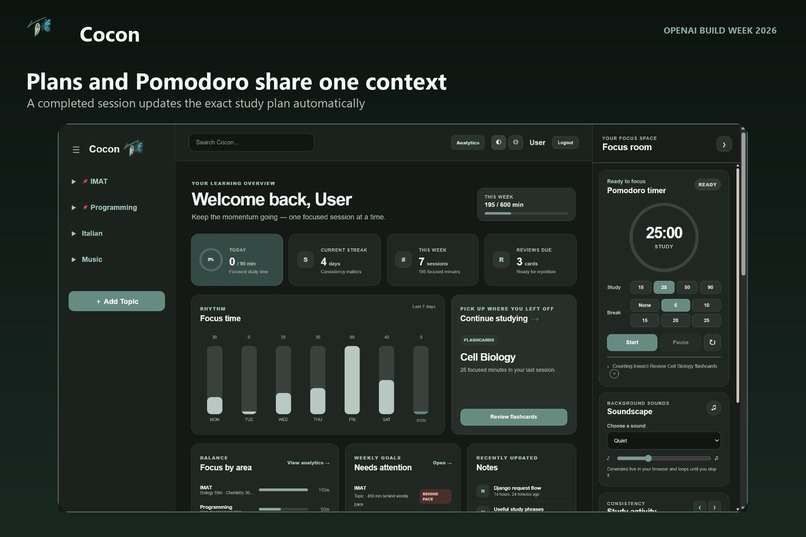
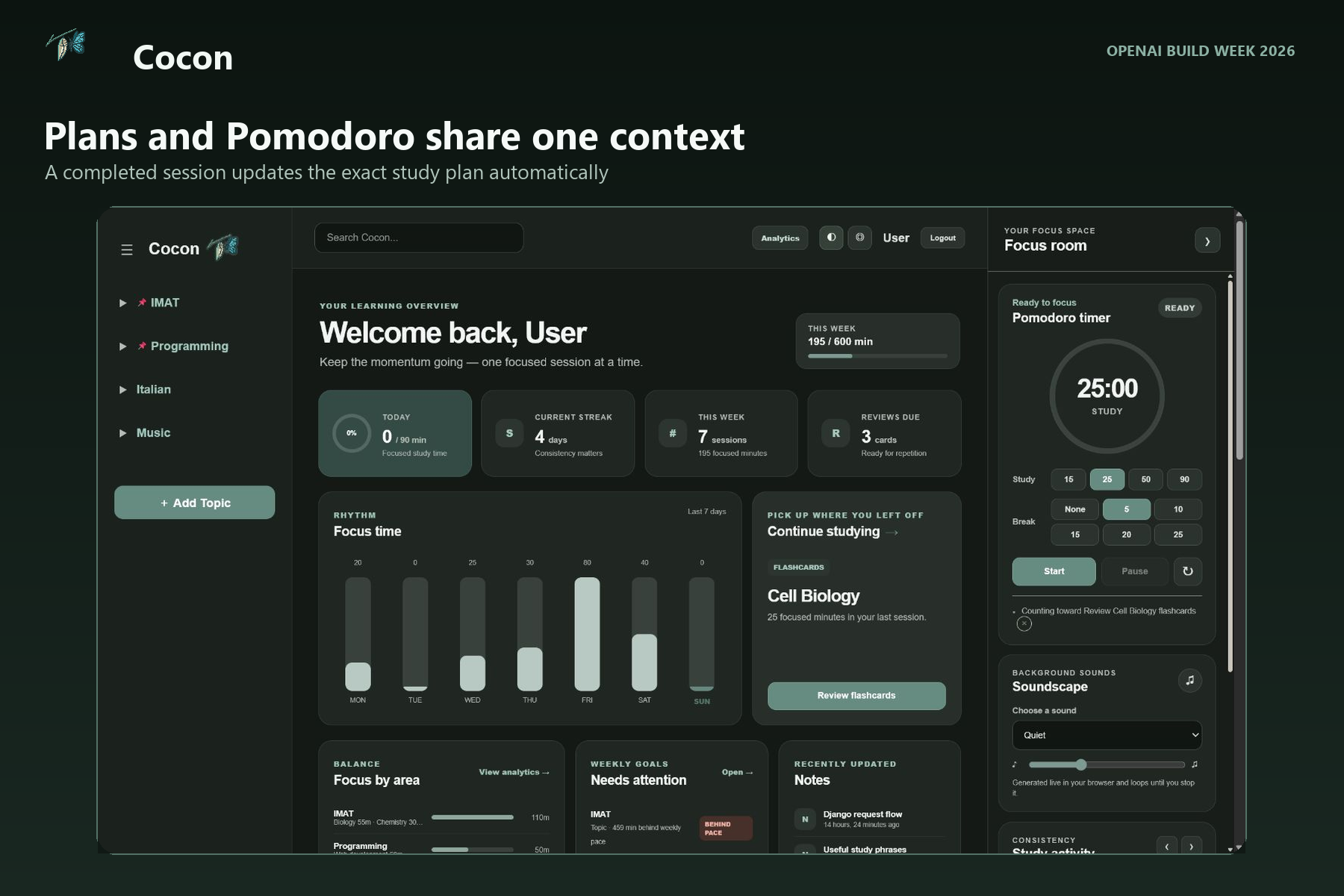
Study plans and Pomodoro sessions stay connected in one context.
-
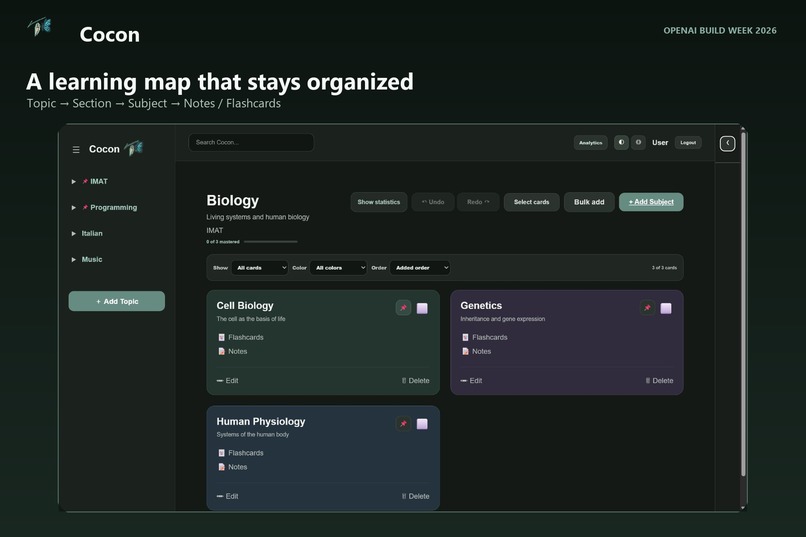
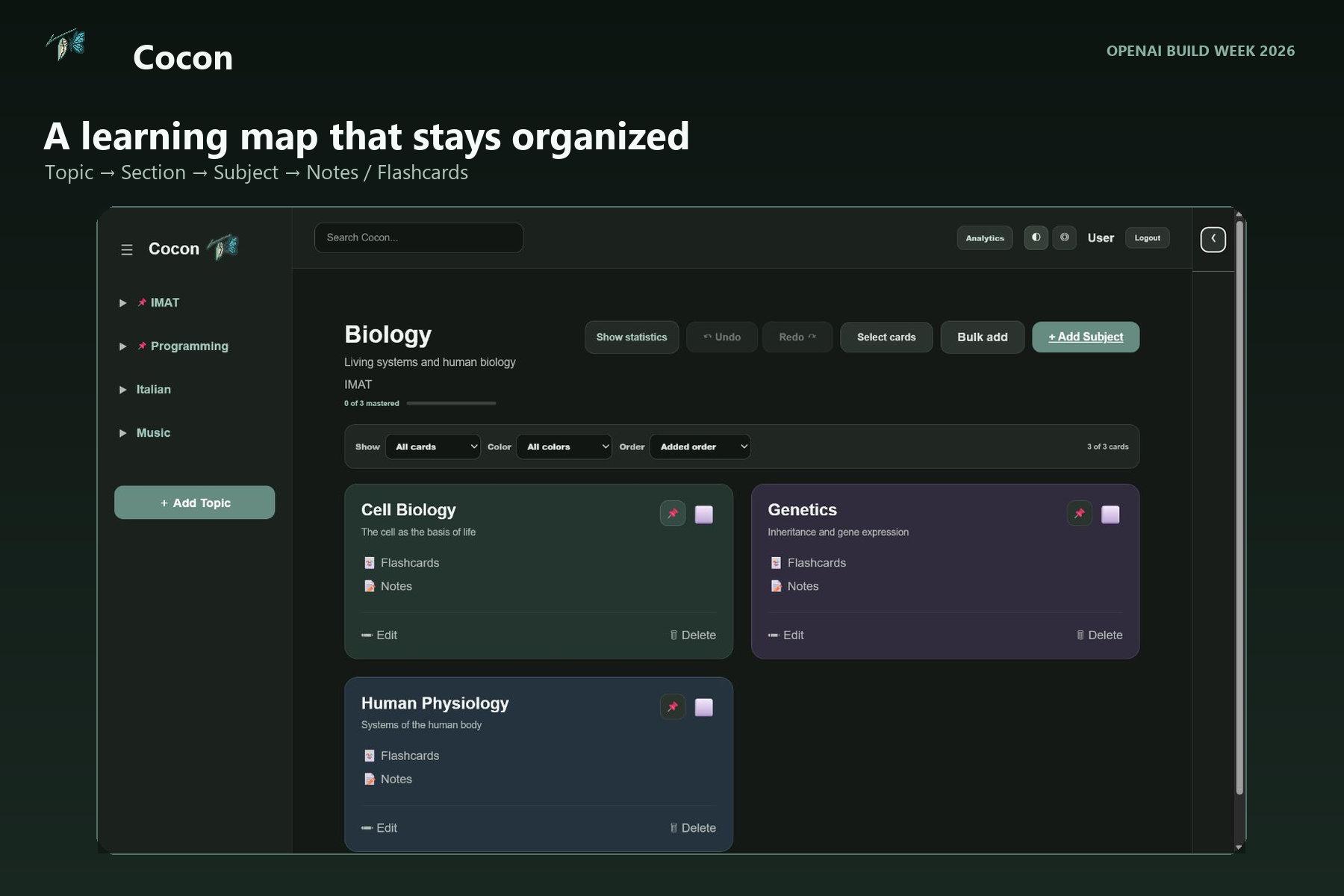
Topics, sections, and subjects keep every learning resource organized.
-
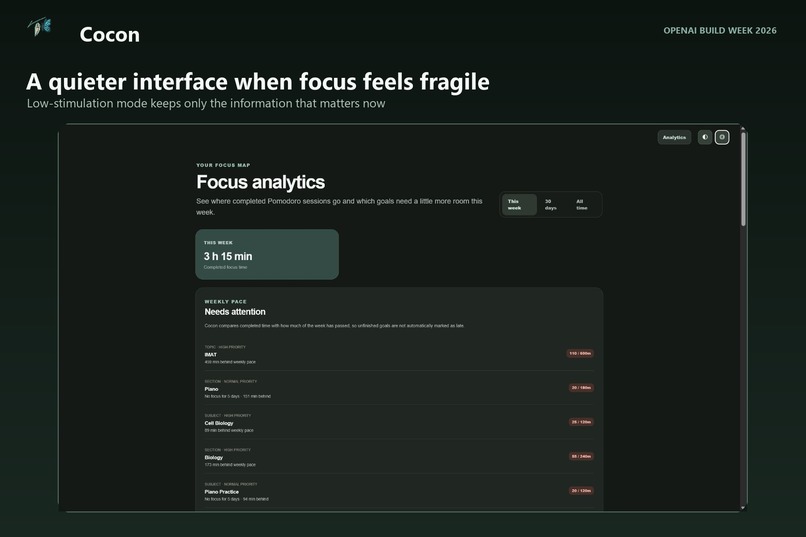
Low-stimulation mode reduces pressure while preserving progress.
Inspiration
I built Cocon because hyperfocus can make productive time surprisingly hard to understand.
I study programming, prepare for the IMAT, learn languages, play musical instruments, and exercise. I can spend hours deeply focused on one of those areas and only notice later that another important goal has received almost no attention. My materials were also divided between Pomodoro timers, browser tabs, books, notes, flashcard tools, and planning apps.
There was another problem: completed work quickly became invisible. A finished project can feel as if it appeared from nowhere. Knowledge can feel as if it does not count because I no longer remember every evening spent building it. When only unfinished tasks remain visible, it becomes easy to believe that I have done very little even when the evidence says otherwise.
I wanted one place where studying and the evidence of studying remain connected. Cocon is designed to answer not only "How long did I focus?" but also "What was that time for, where does it belong, and what have I actually been building?"
At the same time, statistics can become another source of pressure. Some days a detailed dashboard is motivating; on other days, seeing goals, streaks, and a long task list makes beginning harder. That is why Cocon also has a low-stimulation mode. Progress continues to be recorded, but the interface can become quiet and leave only the next step.
What it does
Cocon connects the complete study loop in one workspace:
- Organize learning as Topic -> Section -> Subject -> Notes / Flashcards.
- Capture materials, references, PDFs, images, quick notes, and flashcards in the exact context where they belong.
- Plan a task for a searchable topic, section, subject, or activity.
- Start a persistent Pomodoro session that records intentional focus rather than passive time with a website open.
- Attribute completed time to the current context and roll it up through the hierarchy.
- Use the dashboard to see progress, balance, planned work, review backlog, and areas that have received less attention.
For example, 25 minutes spent reviewing Cell Biology flashcards contributes to Flashcards, Cell Biology, Biology, and IMAT. If a matching study plan exists, the same completed session updates that plan automatically without duplicating the time.
Cocon also includes bulk subject creation with an editable preview, subtitle presets, card colors, filters, undo and redo, spaced flashcard reviews, looping browser-generated soundscapes, light and dark themes, collapsible navigation, and a low-stimulation interface.
How the project evolved
Cocon was not created from a single prompt. I spent months building its first version feature by feature with ChatGPT while learning Django and gradually understanding the architecture the product actually needed.
During that process, I used Gemini as an independent reviewer. It helped me question decisions, find gaps, and compare possible approaches instead of blindly accepting every generated solution. Those early experiments were important because they helped me understand both Django and the product problem in much greater detail.
During OpenAI Build Week, I used GPT-5.6 through OpenAI Codex as a codebase-wide engineering collaborator. Instead of treating each feature as an isolated request, Codex could inspect the existing architecture, follow relationships between Django models, views, templates, JavaScript, and tests, and help turn months of experiments into one coherent application.
I remained responsible for the original problem, product decisions, visual direction, priorities, and continuous real-world feedback. The strongest changes came from actually using Cocon, noticing one concrete point of friction, and then working with Codex to understand and verify the complete workflow.
How I used GPT-5.6 in Codex
GPT-5.6 in Codex helped me::
- audit and refactor the existing Django architecture;
- translate real usage problems into bounded product changes;
- design hierarchical focus attribution and automatic study-plan progress;
- preserve focus context as a learner moves between a section, subject, notes, and flashcards during one Pomodoro session;
- create safe database migrations without discarding existing local data;
- repair navigation, ownership checks, dark-mode contrast, responsive layouts, and low-stimulation controls;
- add regression tests and verify fresh installations;
- exercise complete workflows in a real browser and catch problems that unit tests alone did not reveal.
One example came from a browser audit of study planning. Django accepted a 15-minute plan, but the browser silently rejected the same value because the HTML minimum and step constraints were incompatible. Walking through Cocon as a new user exposed the mismatch, and the correction was then protected by a regression test.
Another important issue appeared during real study use. A timer could begin in Biology and continue while I moved into Cell Biology notes and flashcards, but the original session stored only its starting location. We redesigned the session to contain context segments. It remains one Pomodoro for streaks and the calendar, while its focused time is attributed accurately to the places where the work happened.
How it was built
- Python 3.12 and Django 6
- SQLite for local development
- Vanilla JavaScript, HTML, and CSS
- Server-side ownership validation for user-created learning data
- Persistent timer state and focus-session API endpoints
- Context segments for hierarchical focus attribution
- Automatic plan progress without double-counting one session across multiple matching tasks
- 66 automated tests and GitHub Actions
- Fresh-database migration verification
The repository is local-first. Personal databases, uploaded study materials, environment files, and secrets are excluded from Git.
Challenges
The hardest technical question was defining what "study time" means. Counting time merely because the site is open would reward inactivity, so Cocon records time only through a Pomodoro session that the learner deliberately starts. The next challenge was making that time meaningful at every level of the hierarchy without inflating it or applying the same session to several competing plans.
The hardest product question was how to provide useful depth without making the application emotionally exhausting. Goals and analytics can help a learner rebalance attention, but the same information can feel like a demand to be productive. Collapsible panels, progressive disclosure, consistent empty states, and low-stimulation mode allow the complexity to exist without forcing the user to see all of it at once.
This led to an important principle: Cocon should show evidence, not judgment. Its purpose is not to say "You failed to do enough." It should say, "This is where your energy went, and this is the progress that might otherwise have been forgotten."
Accomplishments
- Focus time is connected to the exact learning context in which it was spent.
- Time rolls up from an activity to its subject, section, and topic while remaining explainable.
- Study plans and completed Pomodoro sessions form one automatic feedback loop.
- A large syllabus can be imported and organized without creating every subject card manually.
- A feature-rich dashboard can be reduced to a quiet starting point without losing the user's work or progress.
- The application remains useful without publishing personal notes, uploads, or statistics.
- The repository can be cloned, migrated from an empty database, and verified with one test command.
What I learned
I learned that effective AI collaboration still requires clear human direction, real usage, and product judgment. AI could implement and connect systems much faster than I could alone, but it could not decide what Cocon should mean to the person using it.
The best workflow was iterative: use the application, notice a real problem, describe the expected behavior, inspect the architecture, make a scoped change, and verify the complete journey. Tests protected known behavior, while browser walkthroughs revealed whether the product was actually understandable.
I also learned that productivity software does not have to create more pressure. Sometimes the most helpful interface is the one that continues doing its work quietly while asking less from the user.
What is next
The next step is to keep using Cocon and strengthen reliability before expanding its scope. Planned improvements include profile and backup controls, responsive mobile use, and longer-term monthly and yearly analytics that make accumulated effort easier to recognize.
I also want to add optional gentle care reminders for people who can remain in hyperfocus for a long time. After sustained active focus, Cocon could quietly suggest water, movement, rest for the eyes, or a real break without punishment or breaking a streak.
Later, an AI-assisted learning-map generator could turn a syllabus into an editable preview of topics, sections, subjects, and starter flashcards. Any AI output would remain optional and require confirmation before entering the workspace.
Shareable summaries and social features may eventually exist as a separate, opt-in layer. The private focus workspace will remain the core of Cocon.
The long-term vision is simple: Cocon should turn focused time into visible proof of progress, then become quiet when seeing all that progress feels like too much.

Log in or sign up for Devpost to join the conversation.