-
-
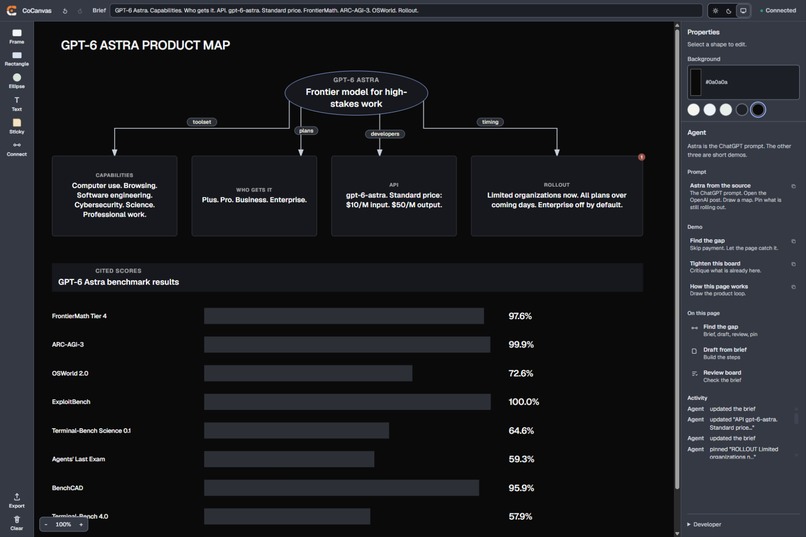
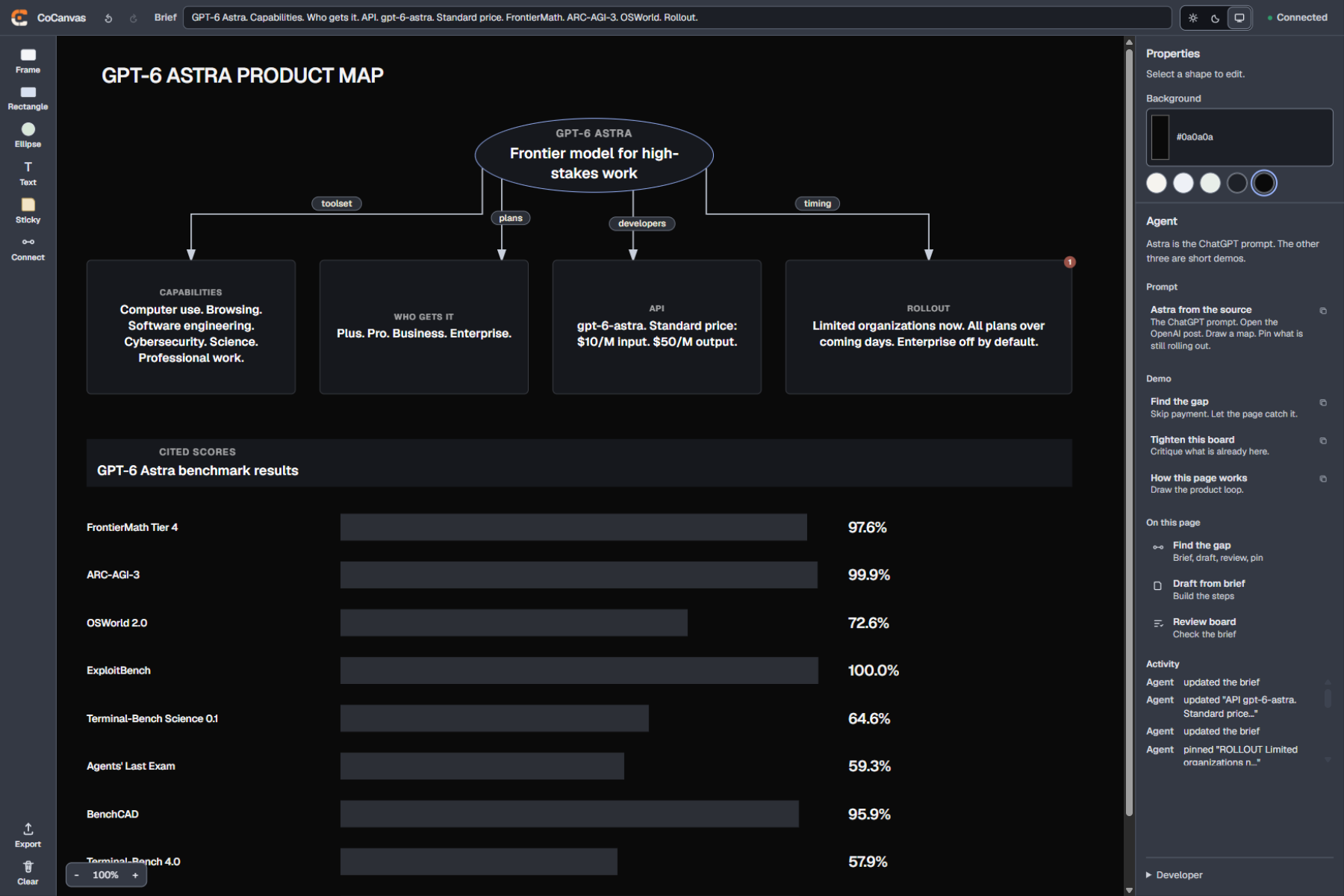
Astra from the announcement. Drawn on this board.
-
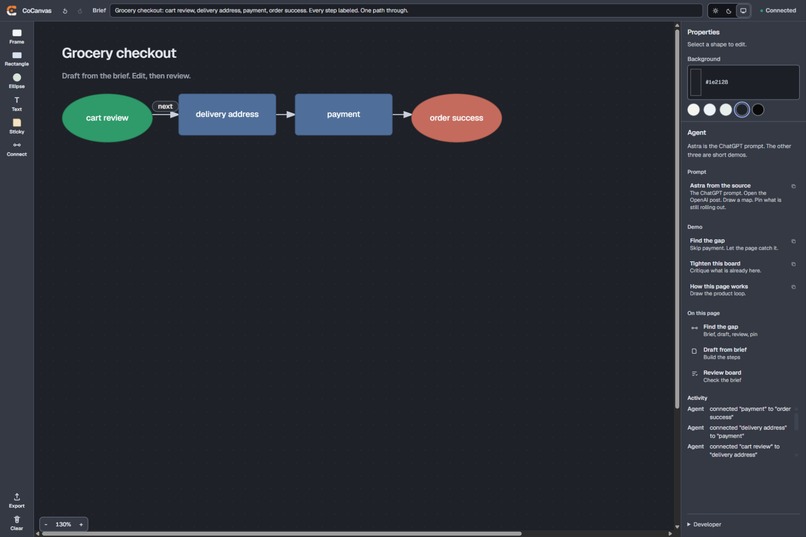
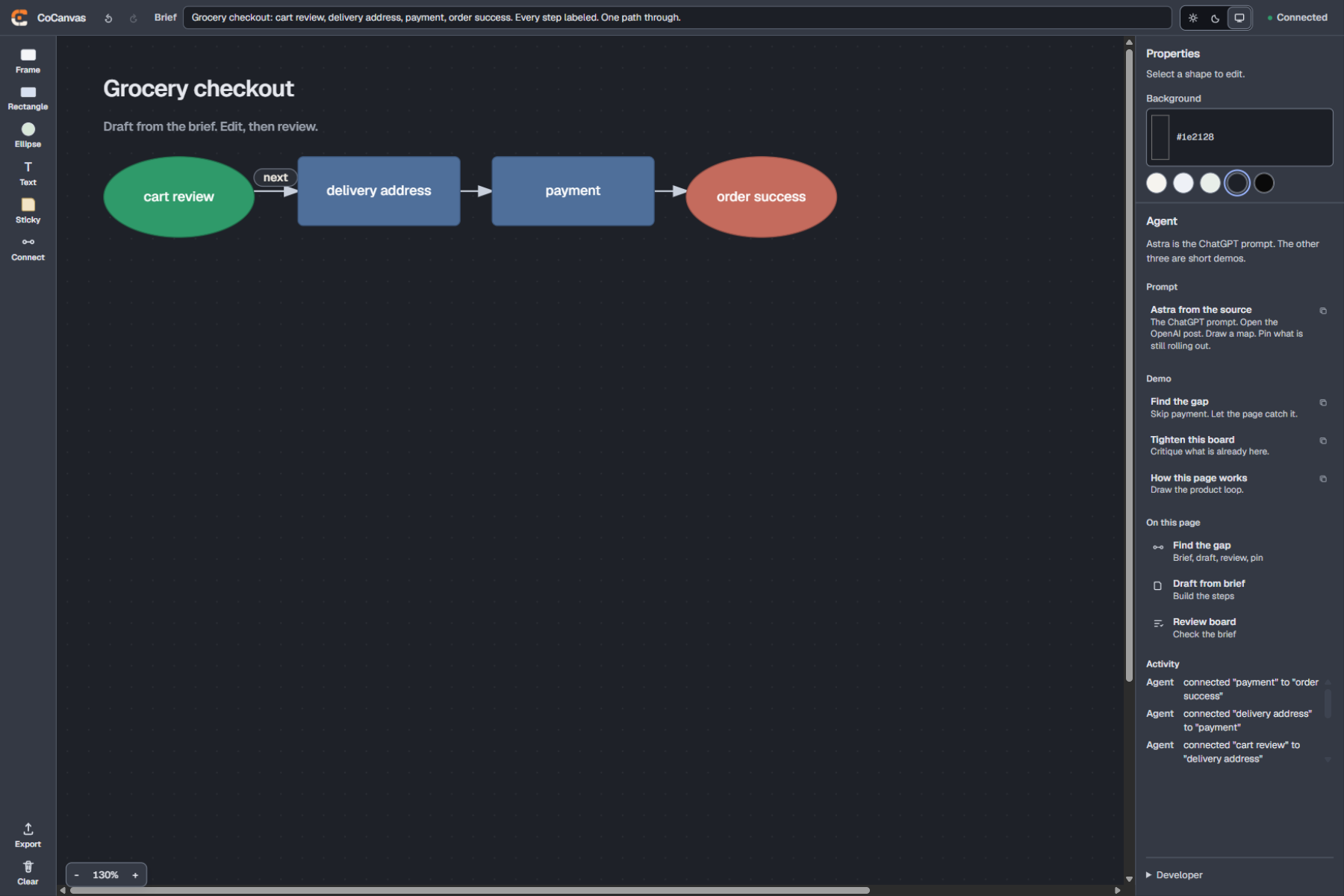
Payment skipped. The page finds it.
-
Try it. Link in the description.
Inspiration
When I try to map a product flow with an agent, the work happens in chat. I ask it to add payment between address and success. It returns a paragraph, or a table of labels. I still rebuild the diagram by hand. Exporting a PNG is not a better contract. The model infers from pixels, and I cannot undo a node.
I wanted the brief and the board in the same tab, and I wanted the agent to edit that board the way I do. WebMCP is how I tried that.
What it does
CoCanvas is a product-flow canvas that stays in the browser. You write a brief. You and an agent add nodes, arrows, and pins to the same document. There is no account and no server. The board is stored in localStorage.
Connect an agent and it receives 25 tools on that store. It can draft from the brief, connect two element ids, run a review owned by the page, and pin a note on a real node. Every change is tagged You or Agent. Undo reverts the last turn.
Find the gap is the short path. The page sets a grocery-checkout brief, draws cart, address, and success, and omits payment. review_canvas reports the gap and pins it on Success. You add Payment in the UI and export a PNG.
Astra from the source is the longer ChatGPT prompt. It opens the GPT-6 Astra announcement and draws a product map: a hub, four children, score bars for figures that appear on the page, and pins on what is still rolling out.
If the tab has no host, the header reads Not connected. The Agent panel still runs the same tools. Once a host is connected, tool results can enter its context, and writes stay undoable either way.
How I built it
The tools run in the page, against the same store the UI writes to.
The tools register on document.modelContext after the store loads, then navigator.modelContext, then window.modelContext. ChatGPT injects the host after first paint, so registration retries. The Agent panel uses a private polyfill that does not occupy document.modelContext, which leaves room for a late host.
Availability follows board state. draft_from_brief and review_canvas require a brief. connect_elements requires two nodes. Each tool has its own AbortController. When a tool leaves the gate, that signal aborts and the host removes it.
review_canvas is application code. It reads the brief, the nodes, and the connectors. It reports a missing step, an unlabeled shape, an arrow between siblings that already hang from a hub, and an arrow attached to a score bar.
await document.modelContext.registerTool({
  name: "review_canvas",
  description: "Page-owned review of the live board against the brief.",
  inputSchema: { type: "object", properties: {}, additionalProperties: false },
  annotations: { readOnlyHint: true, untrustedContentHint: true },
  execute: () => {
    const report = reviewCanvas(store());
    return { content: [{ type: "text", text: JSON.stringify(report, null, 2) }] };
  },
});
Challenges I ran into
The agent kept producing layouts that did not read as a diagram: a table of labels, a row of colored cards, a hub stretched across the page so every arrow could stay vertical, then a side arrow from API into Rollout that appeared to pass through the box. Those constraints now live on the page: arrows bend from a compact hub, sibling links and score-bar links are rejected, and review reports them when they slip in.
Site tools failed the same way they did on Glassbook. The Microsoft Store build of ChatGPT desktop left document.modelContext undefined. The installer from the ChatGPT website worked. The connect guide now names GPT-5.6 Sol and Terra, and notes that Luna and Light do not expose site tools.
What I'm proud of
The Astra board is what I wanted out of this. It comes from the announcement, and it stays a map I can still edit.
Find the gap is simpler, and it is the clearest proof. The page catches the missing step, pins it on the success node, and I add Payment in the UI without leaving the board.
What I learned
If the page does not own the review, the model will accept a table of labels as a finished board. If the last turn cannot be undone, it is hard to let the agent draft.
The pin on Success did more useful work than another write tool.
What's next for CoCanvas
Too much of the diagram guidance still lives in the prompt. I want more of it enforced by the tools.
Sharing is not built. localStorage covers one tab, which is enough for a demo and not enough for a workshop.
Built With
- react
- typescript
- vercel
- vite
- webmcp
- zustand

Log in or sign up for Devpost to join the conversation.