Object and lane detection for self-driving cars
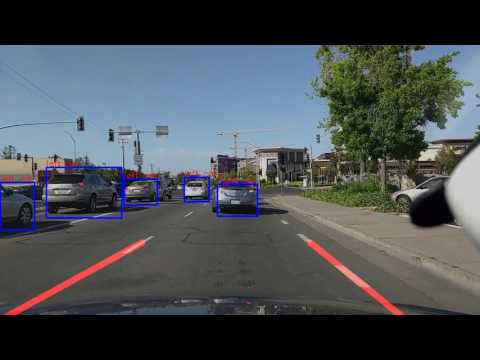
Object and lane detection for videos and/or images using py-faster-rcnn and OpenCV.
Object detection is based on the research conducted by Shaoqing Ren, Kaiming He, Ross Girshick, Jian Sun (Microsoft Research) described in this paper.

Installation
Install pre-requisites
- Install the following packages if not already installed
  sudo apt-get update
  sudo updatedb
  sudo apt-get install libgflags-dev libgoogle-glog-dev liblmdb-dev python-pip cmake cython python-opencv
  sudo apt-get install python-setuptools libgfortran3 build-essential gfortran python-all-dev libatlas-base-dev
  sudo apt-get install libprotobuf-dev libleveldb-dev libsnappy-dev libopencv-dev libhdf5-serial-dev protobuf-compiler
  sudo pip install numpy
Install CUDA
You can refer this to install CUDA for your system. Or, you can follow steps given below:
- Note: Depending upon platform and CUDA version, below names and deb package will defer.
  sudo apt-get install nvidia-cuda-toolkit
  sudo apt-get install --no-install-recommends libboost-all-dev
  wget https://developer.nvidia.com/compute/cuda/8.0/Prod2/local_installers
  sudo dpkg -i cuda-repo-ubuntu1404-8-0-local-ga2_8.0.61-1_amd64-deb
  sudo apt-get install cuda
- Add following lines in ~/.bashrc
  export CUDA_HOME=/usr/local/cuda-8.0
  export LD_LIBRARY_PATH=${CUDA_HOME}/lib64
  PATH=${CUDA_HOME}/bin:${PATH}
  export PATH
- Source the bashrc file
source ~/.bashrc
Build modules
Clone this repository
git clone https://github.com/onkarganjewar/cmpe295-masters-projectBuild cython modules
cd faster-rcnn-resnet/lib/
make
Update Makefile.config (Sample Makefile.config can be found here)
cd ../caffe-fast-rcnn/
cp Makefile.config.example Makefile.config
# In your Makefile.config, uncomment following lines
WITH_PYTHON_LAYER := 1
USE_CUDNN := 1
Build Caffe and Pycaffe
  cd faster-rcnn-resnet/caffe-fast-rcnn
  mkdir build
  cd build/
  cmake ..
  make all
  make install
  make pycaffe
Demo
- Store the input files at
cd faster-rcnn-resnet/data/input/
- Run the demo
cd faster-rcnn-resnet/tools/
  # When input is ONLY image files, run this command
  python demo.py

  # When input is ONLY video files, run this command
  python demo.py --vdo
- Retrieve the output files stored at
cd faster-rcnn-resnet/data/output/
Output video
Click on the thumbnail below to play the sample output video on YouTube.

Log in or sign up for Devpost to join the conversation.