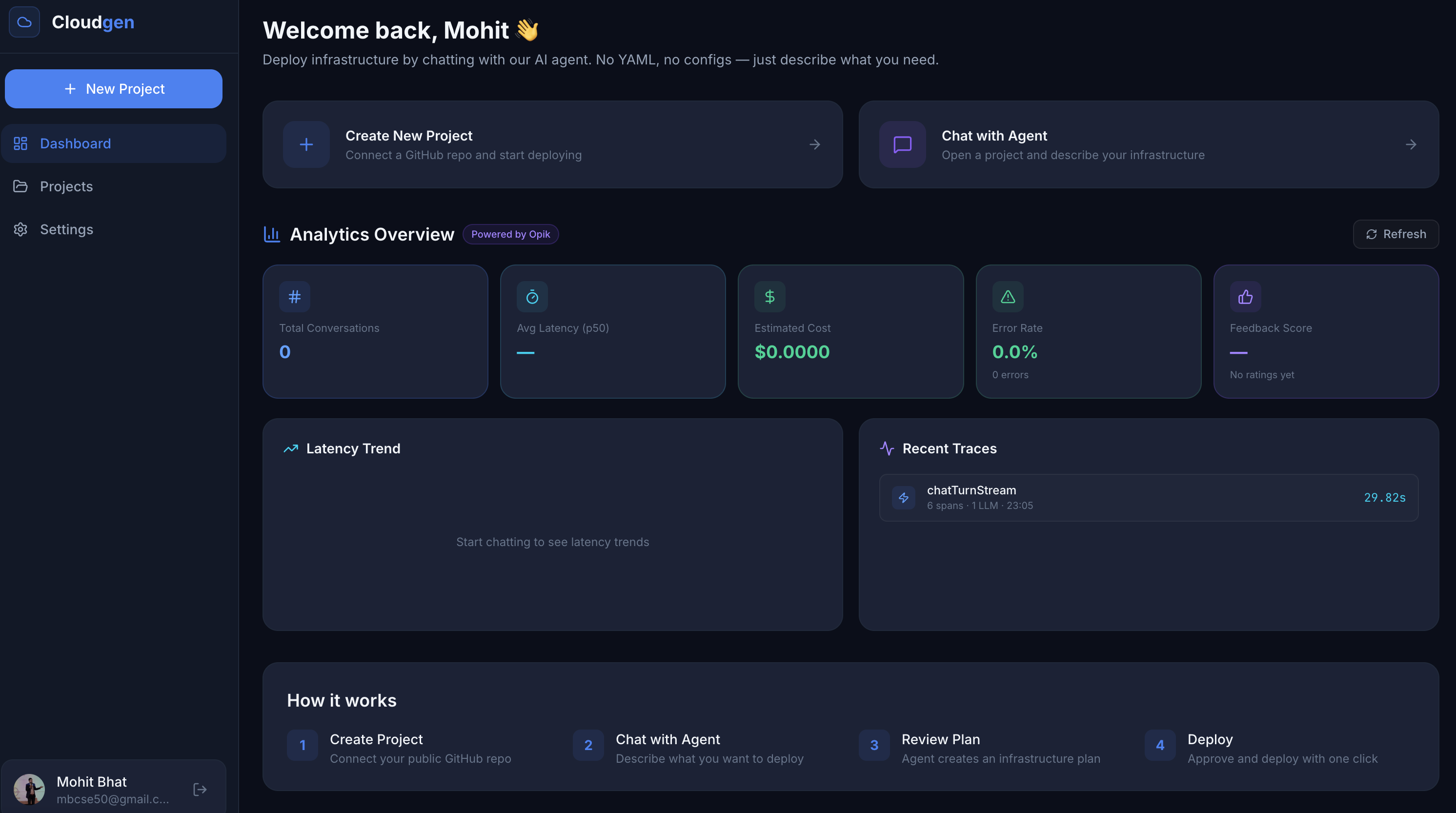
☁️ Cloudgen Agentic Cloud Platform
Deploy infrastructure by talking to an AI agent. No YAML. No configs. Just chat.
📌 The Problem
Deploying even a simple application to the cloud today requires:
- Writing Dockerfiles, YAML manifests, and IaC templates
- Navigating complex dashboards across AWS / GCP / Azure
- Manually provisioning databases, caches, compute, and networking
- Understanding container orchestration, port mappings, reverse proxies, and health checks
For a developer who just wants to ship their app, this is too much friction.
Small teams and indie developers often spend more time wrangling infrastructure than building product. The gap between "I have a repo" and "it's live on the internet" shouldn't require DevOps expertise.
💡 Our Solution
Cloudgen is a chat-first cloud control plane where users describe their infrastructure needs in plain English, and an agentic AI pipeline analyzes their repository, generates a deployment plan, and provisions real infrastructure — all with human-in-the-loop approval.
"Deploy my Next.js app from GitHub with a Postgres database for 500 users"
→ Cloudgen analyzes the repo, generates a resource plan with cost estimates, and after approval, provisions containers, databases, and networking automatically.
✨ Product Features
| Feature | Description |
|---|---|
| 🗣️ Chat-to-Deploy | Natural language interface, describe what you need, get a deployment plan |
| 🔍 Smart Repo Analysis | Auto-detects runtime (Node.js/Python), framework, build commands, and Dockerfile presence |
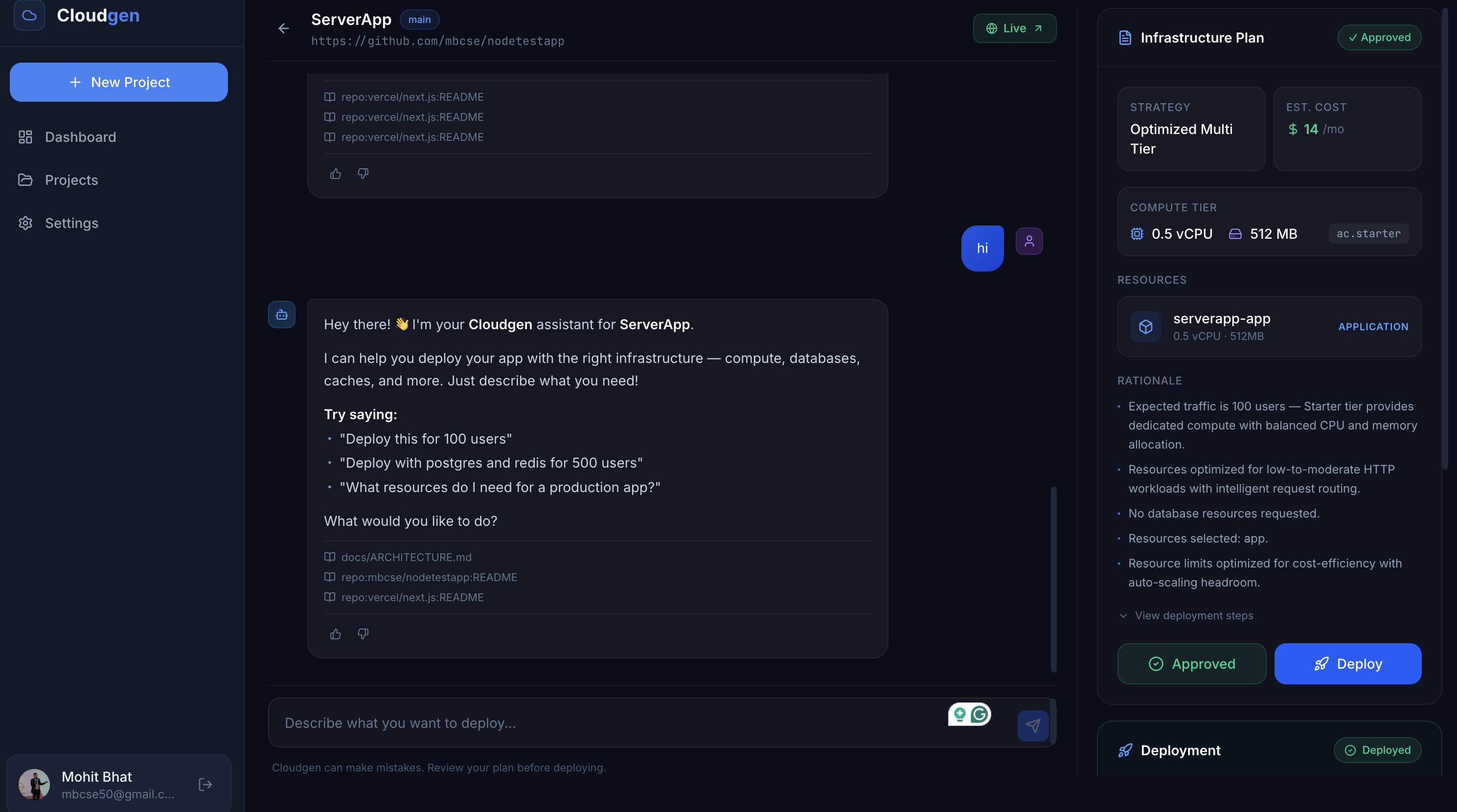
| 📋 Plan Review & Approval | Every deployment requires explicit human approval, see resources, rationale, cost estimates, and YAML steps before anything runs |
| 🐳 Multi-Resource Provisioning | Deploy App Services, Compute Instances, PostgreSQL, and Redis from a single conversation |
| 💰 Cost Estimation | AI-powered resource sizing with tiered pricing (ac.starter, ac.pro, ac.business) |
| 📡 Live Deployment Logs | Real-time streaming logs as containers build and start |
| 🔗 Endpoint Discovery | Automatically returns live URLs and connection strings after deployment |
| 🧠 RAG-Powered Context | Internal docs and repo READMEs are indexed for smarter, context-aware responses |
| ⚡ Graceful Degradation | Works without an LLM API key using deterministic heuristic fallbacks |
🏗️ Architecture Overview
┌─────────────────────────────────────────────────────────────────┐
│                        Next.js Frontend                         │
│   Dashboard  ·  Chat UI  ·  Plan Review  ·  Deployment Logs    │
└──────────────────────────────┬──────────────────────────────────┘
                               │ REST API
┌──────────────────────────────▼──────────────────────────────────┐
│                     Fastify API Server                          │
│                                                                 │
│  ┌──────────────────────────────────────────────────────────┐   │
│  │               LangGraph Chat Orchestrator                │   │
│  │                                                          │   │
│  │   Parse Intent ──► RAG Retrieval ──► Plan Generation     │   │
│  │        │                                    │            │   │
│  │        ▼                                    ▼            │   │
│  │   ┌─────────┐   ┌──────────────┐   ┌────────────┐       │   │
│  │   │ Intent  │   │    Repo      │   │  Capacity  │       │   │
│  │   │ Agent   │   │  Inspector   │   │   Agent    │       │   │
│  │   │         │   │    Agent     │   │            │       │   │
│  │   └─────────┘   └──────────────┘   └────────────┘       │   │
│  │        Gemini 2.0 Flash  /  Deterministic Fallback       │   │
│  └──────────────────────────────────────────────────────────┘   │
│                                                                 │
│  ┌──────────────┐  ┌──────────────┐  ┌──────────────────────┐   │
│  │   Deployer   │  │  RAG Engine  │  │   Prisma + Postgres  │   │
│  │  (SSH + Docker)│  │  (pgvector)  │  │   (Control Plane DB) │   │
│  └──────┬───────┘  └──────────────┘  └──────────────────────┘   │
└─────────┼───────────────────────────────────────────────────────┘
          │ SSH
┌─────────▼───────────────────────────────────────────────────────┐
│                    EC2 Runtime Host                              │
│                                                                 │
│   ┌─────────┐  ┌──────────┐  ┌─────────┐  ┌────────────────┐   │
│   │ App     │  │ Postgres │  │  Redis  │  │   Compute      │   │
│   │Container│  │Container │  │Container│  │   Instance      │   │
│   └─────────┘  └──────────┘  └─────────┘  └────────────────┘   │
│                        Nginx (reverse proxy)                    │
└─────────────────────────────────────────────────────────────────┘
🧠 How It Works — Technical Deep Dive
1. Chat Orchestration (LangGraph)
The core of Cloudgen is a stateful LangGraph pipeline (agent.ts) that processes every user message through a directed graph of nodes:
START ──► parse_intent ──► retrieve_context ──► route_intent
                                                    │
                                    ┌───────────────┼────────────┐
                                    ▼               ▼            ▼
                              generate_plan    answer_question   ...
                                    │
                                    ▼
                                save_plan ──► respond ──► END
parse_intent— Regex + heuristic parser extracts repo URLs, expected user counts, database requirements, and whether the user wants to plan, deploy, or ask a questionretrieve_context— Queries the RAG index (pgvector cosine similarity) for relevant internal docs and repo READMEsgenerate_plan— Invokes the multi-agent planning pipeline when a provisioning intent is detectedrespond— Streams a contextual reply back using Gemini, or falls back to a templated response
2. Multi-Agent Planning Pipeline
When a deployment intent is detected, three specialized agents collaborate (planning.ts):
| Agent | Role | Output |
|---|---|---|
| Intent Agent | Extracts high-level goals — expected users, latency sensitivity, which resources are needed (app/postgres/redis/instance) | IntentAgentOutput |
| Repo Inspector Agent | Fetches the GitHub repo structure, package.json, Dockerfile, and requirements.txt to infer runtime, framework, build commands, and app port |
RepoInspectorOutput |
| Capacity Agent | Takes the outputs of the previous two agents and determines resource sizing (CPU, memory, replicas), tier selection, and cost estimation | CapacityAgentOutput |
Each agent calls Gemini 2.0 Flash via a structured JSON prompt (llm.ts). If no API key is available, each agent has a deterministic fallback so the system remains fully functional without any LLM.
The pipeline produces:
- A
DeploymentPlanstored in Postgres - A YAML step file (
deployment-plans/<plan-id>.yaml) describing the exact Docker commands to execute
3. RAG Engine (pgvector)
Cloudgen uses Retrieval-Augmented Generation to ground agent responses in real documentation (rag.ts):
- Internal docs (architecture, runbooks) are chunked and embedded into pgvector
- Repository READMEs from connected GitHub repos are fetched and indexed
- At query time, a deterministic 64-dim embedding is computed and a cosine similarity search retrieves the most relevant chunks
- Retrieved chunks are injected as context into the LLM prompt and returned as citations in the chat response
4. Deployment Executor (SSH + Docker)
After plan approval, the Deployer (deployer.ts) triggers the Executor (executor.ts):
- SSH tunnel to the runtime EC2 host using key-based authentication
- Clone the GitHub repo on the remote host
- Auto-generate Dockerfile if missing (for Node.js repos)
- Build the Docker image
- Provision each resource as a Docker container with CPU/memory limits:
docker runwith--cpus,--memory, port mappings- Postgres containers use
postgres:16-alpine - Redis containers use
redis:7-alpine - Compute instances use
ubuntu:22.04with long-running entry points
- Health check — polls the container endpoint until it responds
- Configure Nginx reverse proxy route (optional)
- Return endpoints — live app URL + database/cache connection strings
5. Data Model (Prisma + PostgreSQL)
The control plane persists all state via Prisma ORM (schema.prisma):
| Model | Purpose |
|---|---|
Project |
A linked GitHub repo with name, slug, branch |
ChatSession |
Conversation thread tied to a project |
ChatMessage |
Individual messages with role and citations |
DeploymentPlan |
AI-generated plan with inputs, decision, cost, rationale |
Deployment |
Execution record with status, logs, and live URLs |
RagDocument / RagChunk / RagEmbedding |
RAG corpus with pgvector embeddings |
🛠️ Tech Stack
| Layer | Technology |
|---|---|
| Frontend | Next.js 15, React, Tailwind CSS, NextAuth.js |
| Backend | Fastify 5, TypeScript, Zod validation |
| Agent Framework | LangGraph (stateful graph orchestration) |
| LLM | Gemini 2.0 Flash (streaming + structured JSON output) |
| Database | PostgreSQL + pgvector (control plane + RAG) |
| ORM | Prisma with raw SQL for vector operations |
| Deployment Runtime | Docker containers on EC2 via SSH |
| Monorepo | npm workspaces |
🚀 Getting Started
Prerequisites
- Node.js 20+
- PostgreSQL 15+ with pgvector extension
- (Optional) Gemini API key for AI-powered planning
- (Optional) EC2 host with Docker for live deployments
Setup
# Install dependencies
npm install

# Generate Prisma client
npm run db:generate

# Run database migrations
npm run db:migrate -- --name init

# Seed initial data
npm run db:seed

# Start development servers
npm run dev
Environment Variables
Create apps/api/.env:
DATABASE_URL="postgresql://postgres:postgres@localhost:5432/cloudgen"
PORT=4000

# LLM (optional — system works without it via fallbacks)
GEMINI_API_KEY=""
GEMINI_MODEL="gemini-2.0-flash"

# Runtime deployment host (leave host empty for mock mode)
RUNTIME_SSH_HOST=""
RUNTIME_SSH_USER="ubuntu"
RUNTIME_SSH_PORT="22"
RUNTIME_SSH_KEY_PATH="/path/to/key.pem"
RUNTIME_BASE_DIR="/tmp/cloudgen-apps"
RUNTIME_PUBLIC_BASE_URL="http://your-ec2-ip"

# Resource limits
ACTIVE_APP_CAP="8"
Services
| Service | URL |
|---|---|
| Web Dashboard | http://localhost:3000 |
| API Server | http://localhost:4000 |
| Health Check | http://localhost:4000/health |
📡 API Reference
| Method | Endpoint | Description |
|---|---|---|
POST |
/api/projects |
Create a new project (link a GitHub repo) |
GET |
/api/projects/:id |
Get project details |
GET |
/api/projects/:id/resources |
Get provisioned resources for a project |
POST |
/api/chat |
Send a chat message (triggers planning if needed) |
GET |
/api/sessions/:id |
Get full chat session history |
POST |
/api/plans/:id/approve |
Approve a deployment plan |
GET |
/api/plans/:id/steps |
Get YAML deployment steps for a plan |
POST |
/api/deploy |
Trigger deployment of an approved plan |
GET |
/api/deployments/:id |
Get deployment status and logs |
🔄 End-to-End Flow
User: "Deploy https://github.com/user/app with Postgres for 500 users"
  │
  ├──► Intent Parser: repo URL, 500 users, postgres needed
  ├──► RAG Retrieval: fetch relevant architecture docs
  ├──► Intent Agent: high-level goals + resource list
  ├──► Repo Inspector: Node.js, has Dockerfile, port 3000
  ├──► Capacity Agent: ac.pro tier, 1 CPU, 1GB RAM, ~$34/mo
  │
  ▼
Plan Generated:
  • App container (Node.js, port 3000)
  • Postgres container (postgres:16-alpine)
  • Estimated cost: $34/mo
  • YAML steps file written
  │
  ├──► User reviews plan + rationale
  ├──► User approves
  │
  ▼
Deployment:
  • SSH into EC2 host
  • Clone repo, build Docker image
  • Start app + postgres containers
  • Health check passes
  • Nginx route configured
  │
  ▼
Result: "Your app is live at http://host:21042 🎉"
🧪 Smoke Test
Run the full end-to-end flow against a running instance:
npm run smoke
This creates a project, generates a plan via chat, approves it, triggers deployment, and polls until completion.
📁 Project Structure
cloudgen-platform/
├── apps/
│   ├── api/                      # Fastify backend
│   │   ├── prisma/               # Schema + migrations
│   │   ├── deployment-plans/     # Generated YAML step files
│   │   └── src/
│   │       ├── agent.ts          # LangGraph chat orchestrator
│   │       ├── planning.ts       # Multi-agent planning pipeline
│   │       ├── llm.ts            # Gemini API wrapper + streaming
│   │       ├── intent.ts         # NL intent parser
│   │       ├── rag.ts            # RAG indexing + retrieval (pgvector)
│   │       ├── deployer.ts       # Deployment lifecycle manager
│   │       ├── executor.ts       # SSH + Docker remote executor
│   │       ├── sizing.ts         # Resource tier + cost calculator
│   │       ├── projects.ts       # Project CRUD
│   │       └── types.ts          # Shared type definitions
│   └── web/                      # Next.js frontend
│       ├── app/
│       │   ├── (dashboard)/      # Main dashboard views
│       │   ├── api/auth/         # NextAuth.js routes
│       │   └── login/            # Auth page
│       ├── components/           # React components
│       └── lib/                  # Shared utilities + types
├── docs/                         # Architecture + plan docs
└── scripts/
    └── smoke.sh                  # E2E test script
👥 Team
Built as a prototype demonstrating agentic AI for cloud infrastructure automation.
Built With
- gemini
- google-cloud
- langgrapgh
- nextjs
- node.js
- postgresql

Log in or sign up for Devpost to join the conversation.