-
-
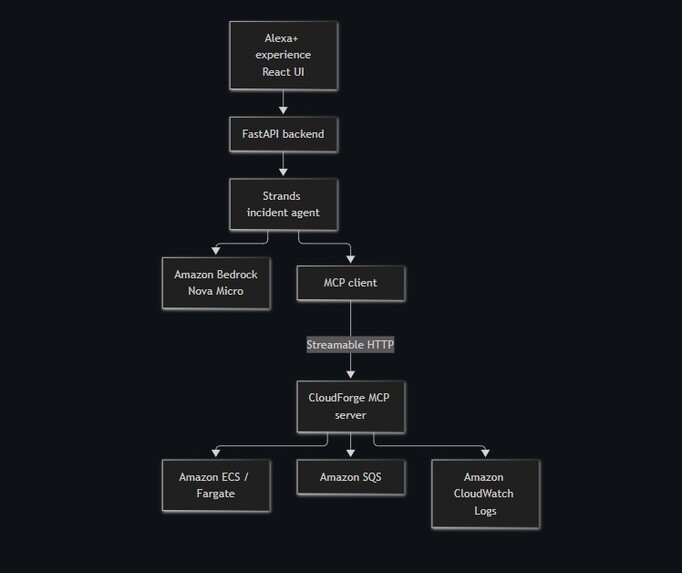
architecture for cloudforge.
Inspiration
Cloud incidents rarely explain themselves. An engineer often has to jump between compute status, queue metrics, and logs before they can understand why a system is failing. That process is especially difficult for developers who are still learning cloud infrastructure.
I built CloudForge to explore whether an Alexa+ compatible MCP server could turn that scattered investigation into one clear, conversational workflow. The goal was to let an agent gather real evidence from several AWS services, connect the signals, and explain the likely cause without giving it unrestricted access to the AWS account.
What it does
CloudForge investigates a deliberately broken order-processing pipeline running on AWS.
The demo environment contains:
- An orders worker running on Amazon ECS with AWS Fargate
- An Amazon SQS queue containing pending orders
- Amazon CloudWatch logs containing worker errors
- A simulated failure mode that prevents orders from being processed
A Strands agent uses three typed, read-only MCP tools to:
- Inspect the ECS service state
- Measure the SQS backlog
- Search CloudWatch for relevant errors
- Correlate the evidence
- Return a concise diagnosis and suggested next step
The agent cannot execute shell commands, call arbitrary AWS APIs, or modify infrastructure.
How I built it
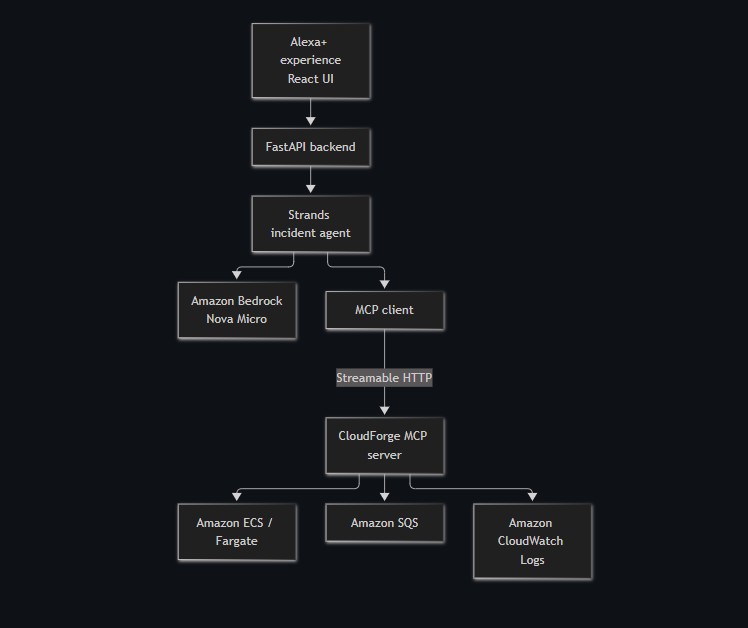
CloudForge follows this architecture:
React UI
    ↓
FastAPI backend
    ↓
Strands Agent + Amazon Bedrock
    ↓
MCP client over Streamable HTTP
    ↓
CloudForge MCP server
    ↓
Amazon ECS / Amazon SQS / Amazon CloudWatch
The order worker is a small Python application packaged as a Docker container and deployed to ECS/Fargate. It reads messages from SQS and normally deletes them after successful processing.
For the incident scenario, BROKEN_MODE=true makes the worker emit a simulated database connection error and leave each message unacknowledged. This creates a real queue backlog and real CloudWatch log evidence without requiring a database.
The MCP server is built with the official Python MCP SDK and exposes exactly three tools:
get_service_healthget_queue_statussearch_logs
Each tool has typed inputs, structured outputs, bounded queries, and read-only annotations. AWS access remains behind this MCP boundary.
The investigation agent uses the Strands Agents SDK with Amazon Nova Micro through Amazon Bedrock. Nova Micro was sufficient for this focused reasoning task while keeping inference costs low. The agent is also limited by model turns and output tokens to prevent accidental tool loops.
A React and TypeScript interface sends the investigation request through FastAPI and displays the resulting diagnosis, tools used, model turns, token usage, and stop reason.
Challenges I faced
AWS identity and IAM
As someone still learning AWS, one of the first challenges was understanding the difference between an IAM identity and a local AWS CLI profile. Creating an IAM user did not automatically make that identity available to local development tools.
I also had to add permissions gradually while keeping them narrowly scoped. ECS deployment, passing task roles, ECR access, Bedrock model discovery, and model invocation each required different permissions.
Container deployment
Docker Desktop initially failed because of a stale local runtime socket. After fixing that, Docker’s credential helper also failed while authenticating with ECR. I worked around it with an isolated, temporary Docker configuration containing a short-lived ECR authorization token.
SDK compatibility
The current MCP server SDK and the MCP client version supported by Strands could not coexist in one Python environment. Since I was already using uv, I declared the dependency groups as incompatible and ran the server and agent in separate isolated, locked environments.
This kept the MCP server on the required protocol version without forcing unsupported dependencies into the Strands process.
Distributed-system behavior
SQS counts are approximate, and messages that fail processing temporarily become invisible before returning to the queue. At first, this made a real backlog appear to disappear. Understanding visibility timeouts and eventual consistency helped me make the demo reliable and explain repeated CloudWatch errors correctly.
Cost control
Because this is a student project built with AWS credits, I treated cost as a design constraint. The worker uses the smallest Fargate configuration, CloudWatch retention is limited, Bedrock requests are bounded, and the ECS service is scaled to zero outside testing.
What I learned
The biggest lesson was that an agent is only as trustworthy as its tools and boundaries. Giving a model broad AWS access would have made the implementation easier, but it would also have made its behavior harder to understand and control.
MCP provided a useful security and design boundary. Each capability has a clear schema, a specific purpose, and a predictable result. Strands then handles the investigation while preserving evidence about which tools were actually called.
I also learned that convincing agent demonstrations depend on real system state. A diagnosis based on actual ECS status, SQS messages, and CloudWatch logs is much stronger than a scripted response or mocked dashboard.
Finally, I gained practical experience with IAM, ECS task roles, Fargate networking, ECR authentication, SQS delivery behavior, CloudWatch logging, Bedrock model invocation, and dependency management with uv.
What I am proud of
CloudForge demonstrates a complete agentic investigation rather than a basic question-and-answer wrapper. The agent gathers evidence across multiple AWS services, reasons over those signals, and produces an actionable explanation while remaining inside a small, read-only MCP surface.
The result is a focused Alexa+ MCP experience that makes cloud incidents easier to understand without hiding the evidence behind the answer.
Built With
- alexa
- amazon-web-services
- fastapi
- mcp
- react


Log in or sign up for Devpost to join the conversation.