Getting Clear at the Get-Go
As a fan of NYT's Connections game, my goal for this hackathon was to create a beginner-friendly and minimalist Python version of it.
As a product manager turned builder, for the past two years, LLMs have been my trusted companion in navigating the nuances of the coding landscape. Q Developer was my coding companion for this project. Much like IRL communication, clarity is key when interacting with LLMs.
My strategic vision for building this Python game
Start Small and build iteratively
Milestones to Achieve My Vision
- Level 1 - A (very) simple Python script that gets the job done
- Level 2 - A smarter Python script (with S3 integration)
- Level 3 - An interactive Streamlit interface to enhance user experience
- Level 4 - Cloud deployment
Setting the Stage for Success
Connections is a game that tests your ability to group words (of 4) into categories. You can play the real NYT game here https://www.nytimes.com/games/connections
In this project we use:
- Python: Core programming language for building functionality
- Streamlit: For creating an interactive user interface
- Q Developer: VS Code extension for seamless coding assistance
- AWS Services (S3): Data storage and integration
You can find link to my github repo in the Resources section.
Level 1: Starting Small and Simple
The goal for level 1 is to build a simple and functional Python script (with hardcoded categories)
Start with the right setup for success. Create a new directory with an empty game_l1.py file (i.e. l1 for level 1 game). As part of my setup, I used Q developer extension with VS Code.
In the Amazon Q chat, I asked my question to build a very simple connections game. Q suggested a version with hardcoded categories.
At this point, you may have to go back and forth to achieve the level of simplicity that desire in your project. In my case, I kept prompting Q to give me a simple enough version that achieves the following:
- Setup
- Hardcode categories and words in a dictionary.
- Flatten the dictionary values into a single list and shuffle them.
- Gameplay Loop
- Display the shuffled words to the player.
- Take in and validate their input
- Check if the input matches any category using set operations.
- Track Progress
- Remove correctly guessed categories from the remaining ones.
- End the Game
- Congratulate the player when all categories are grouped.
💡The code for this level 1 game is stored as game_l1.py in my Github repo.
To run the Level 1 file in your terminal:
python game_l1.py
Level 2: Integrating Amazon S3
The goal for level 2 is to build a dynamic Python script that loads categories from the cloud
Static games are fun - for a while. Enter AWS S3, cloud’s Swiss army knife for storage. I created a categories.json file with 50 categories and uploaded it to an S3 bucket.
This enhanced game includes the following capabilities:
- Fetching Categories
- Connect to S3 using Boto3.
- Retrieve the JSON file containing the categories.
- Parse the file and load categories into the game.
- Randomized Game Setup
- Randomly select four categories from the loaded data.
- Shuffle the words.
- Scalable Design
- The best part - no need to redeploy the app—just update the JSON file in S3!
I used Q in this part of the project for a smooth set up with S3.
💡The code for this level 2 game is stored as game_l2.py in my GitHub repo. It builds off of level 1 code.
💡💡Since this part involves sensitive information, such as the IAM access key and AWS service names, store them in a .env file and use .gitignore to exclude the file when pushing to GitHub
To run Level 2 file:
python game_l2.py
Level 3: Enhancing Interactivity with Streamlit
The goal for level 3 is to build an interactive user interface for our game
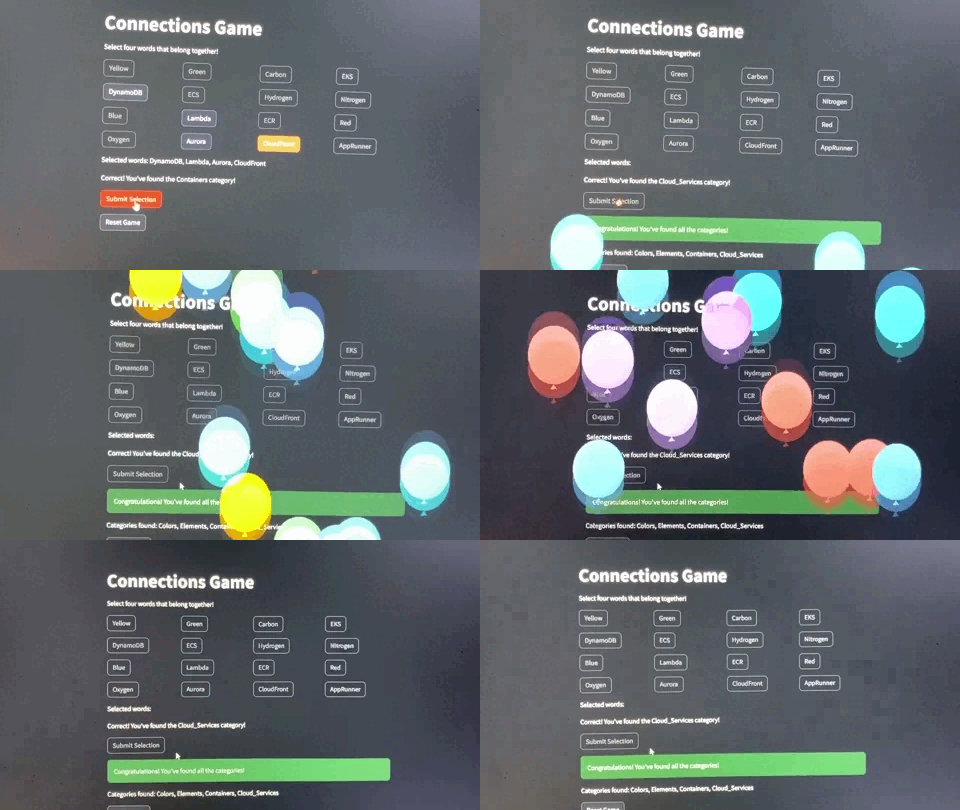
Now comes the fun part, turning our humble Python script into an interactive app. Streamlit makes this easy. I was particularly impressed with Q's answer to transforming my level Python 2 script into a fully functional Streamlit interface.
The celebratory balloon effect when winning the game is a delightful touch from Streamlit, and it's incredibly satisfying, I must say! ;)
Here are the key highlights:
- Fetch Data: Game data is fetched from a JSON file on AWS S3 for scalability.
- Randomized Gameplay: Four random categories are selected, and words are shuffled into a 4x4 grid.
- Interactive Selection: Players choose words they believe belong together.
- Feedback & Progress: Correct groups are marked, incorrect ones prompt retry, and progress is tracked.
- Win Condition: The game ends when all categories are identified, followed by a celebratory balloon effect.
- Reset: Players can restart for a fresh round.
💡The code for this level 3 game is stored as game_l3.py in my Github repo. It builds off of level 2 code.
💡💡To test Streamlit locally, store the variable names in a .streamlit/secrets.toml file instead of a .env file, ensuring they are accessible to Streamlit and use .gitignore to exclude the file when pushing to GitHub
To run level 3 file:
streamlit run game_l3.py
Level 4: Deploying in the ☁️
The goal for level 4 is to deploy the game on Streamlit Cloud
Ease of Deployment is where Streamlit truly shines. Here are the key steps:
- Push the code to GitHub.
- Deploy the app on Streamlit Cloud.
- Access the app via the provided URL.
💡The code for this level 4 game is stored as app.py in my GitHub repo. It builds off of level 3 code.
💡💡When deploying to Streamlit Cloud, update the secrets in the console via the st.secrets method to ensure they are securely accessed
The game is live, try it for yourself here
Final Thoughts and Resources
Starting simple and building iteratively is the key. With a code companion like Q Developer and a clear idea, you can go from idea to deployment in no time.
Try out the game for yourself and relish your win with the celebratory balloon effect 🎈🎈🎈🎈 🎉
Resources :
Built With
- boto3
- python
- s3
- streamlit


Log in or sign up for Devpost to join the conversation.