
CLOTHO: Classy Looks for Occasion, Taste, History & Outfits
CLOTHO is named for Clotho, the Greek Fate who began each life by spinning its thread. Here, the thread runs through your wardrobe and calendar, connecting what you own to the moments ahead while every final choice stays yours.
The short version
CLOTHO (Classy Looks for Occasion, Taste, History & Outfits) turns an owned wardrobe into a local-first, agent-ready decision system. An agent can search, constrain, plan, recolor, schedule, remember, import, and export. The person can inspect every result and decide what becomes durable.
The important distinction is simple: the agent proposes; the person decides.
The clearest demo is one request:
Plan seven days from September 2 for morning, day, and evening. Use a balanced palette, include headwear, avoid orange, and give me three strategies. Do not apply anything until I choose.
CLOTHO turns that request into three visible strategies covering 21 calendar moments. Each strategy carries scores, reasons, weather context, conflicts, and repetition tradeoffs. Nothing reaches the calendar until the person selects an option and explicitly applies it.
The problem
Wardrobe apps usually stop at inventory or inspiration. They do not coordinate the real constraints of getting dressed for a week: what is already owned, what is on the calendar, what the weather will do, which colors feel right, and what was worn recently.
That coordination is where an agent is useful, but a chat response is not enough. The agent needs bounded operations against the real product, visible results, and a human decision boundary before changing durable state.
What we built
| CLOTHO capability | What CLOTHO does | Why it matters |
|---|---|---|
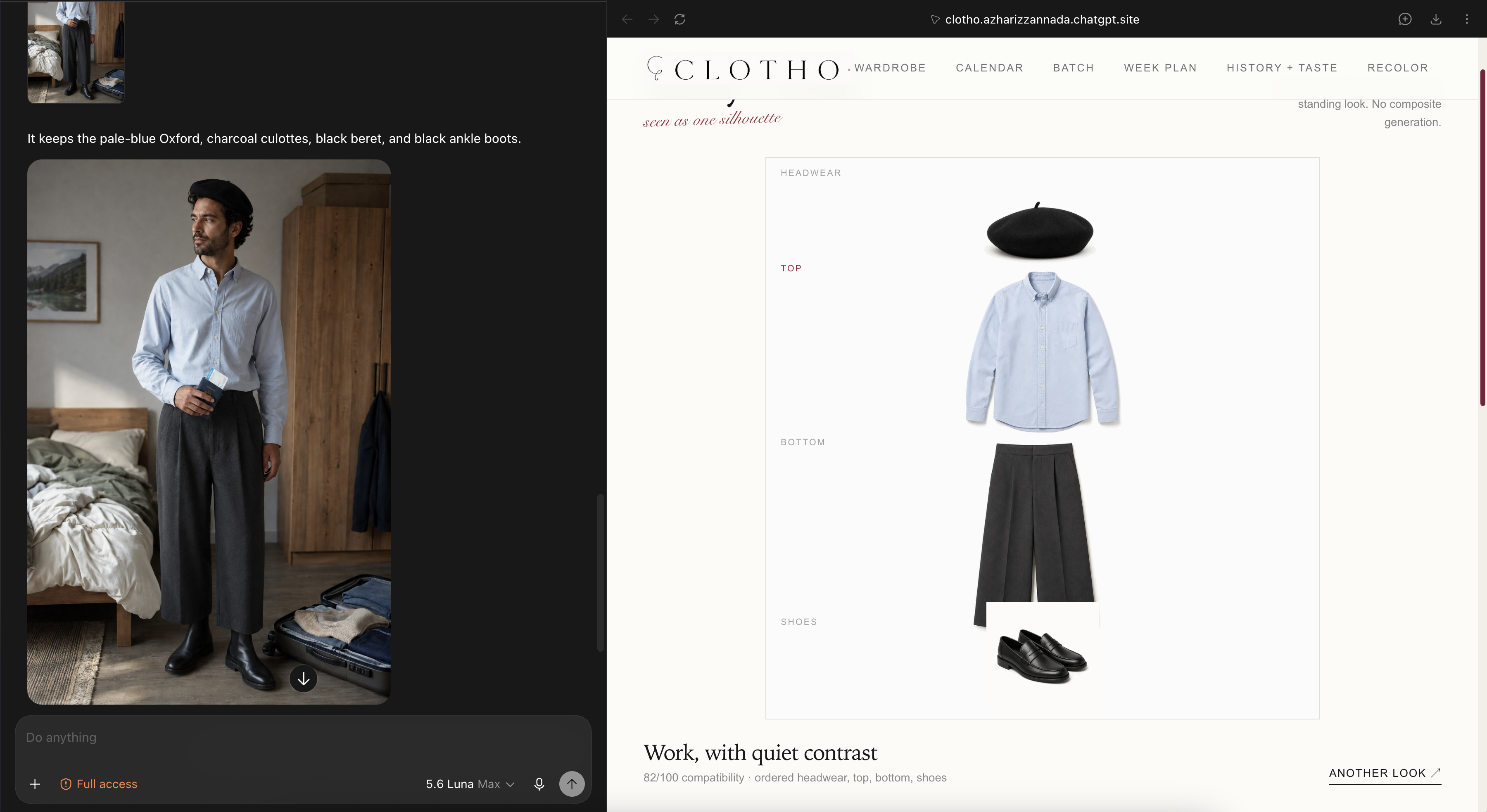
| Today | A composed look from actual catalog images for an occasion, date, time, palette, or constraint. | Start from what the person owns, not a generic generated image. |
| Wardrobe | Search and inspect 44 owned pieces across tops, bottoms, shoes, and headwear. | Keep every suggestion grounded in a visible wardrobe. |
| Batch | Up to 30 distinct candidates with scores, constraints, and a visible Use look action. | Compare a set of real options instead of accepting a roulette-wheel answer. |
| Week plan | Five- or seven-day proposals across morning, day, and evening. | Turn one request into a reviewable plan with tradeoffs. |
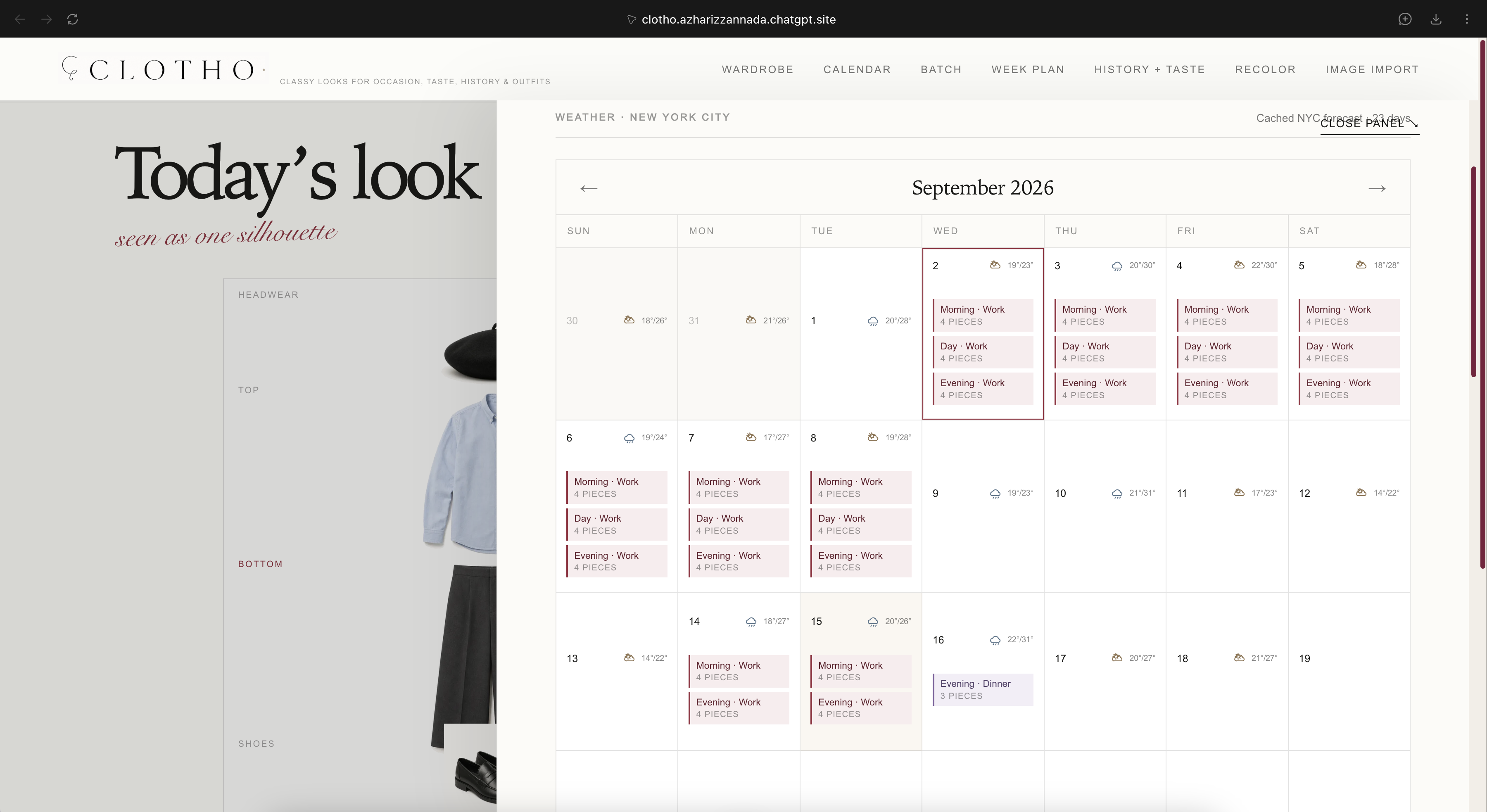
| Calendar | Apply, edit, inspect, and remove plans by date and daypart. | A proposed week becomes durable only through an explicit product action. |
| Recolor | A browser-canvas preview with a separate save-as-variant action. | Explore a color decision without silently mutating the wardrobe. |
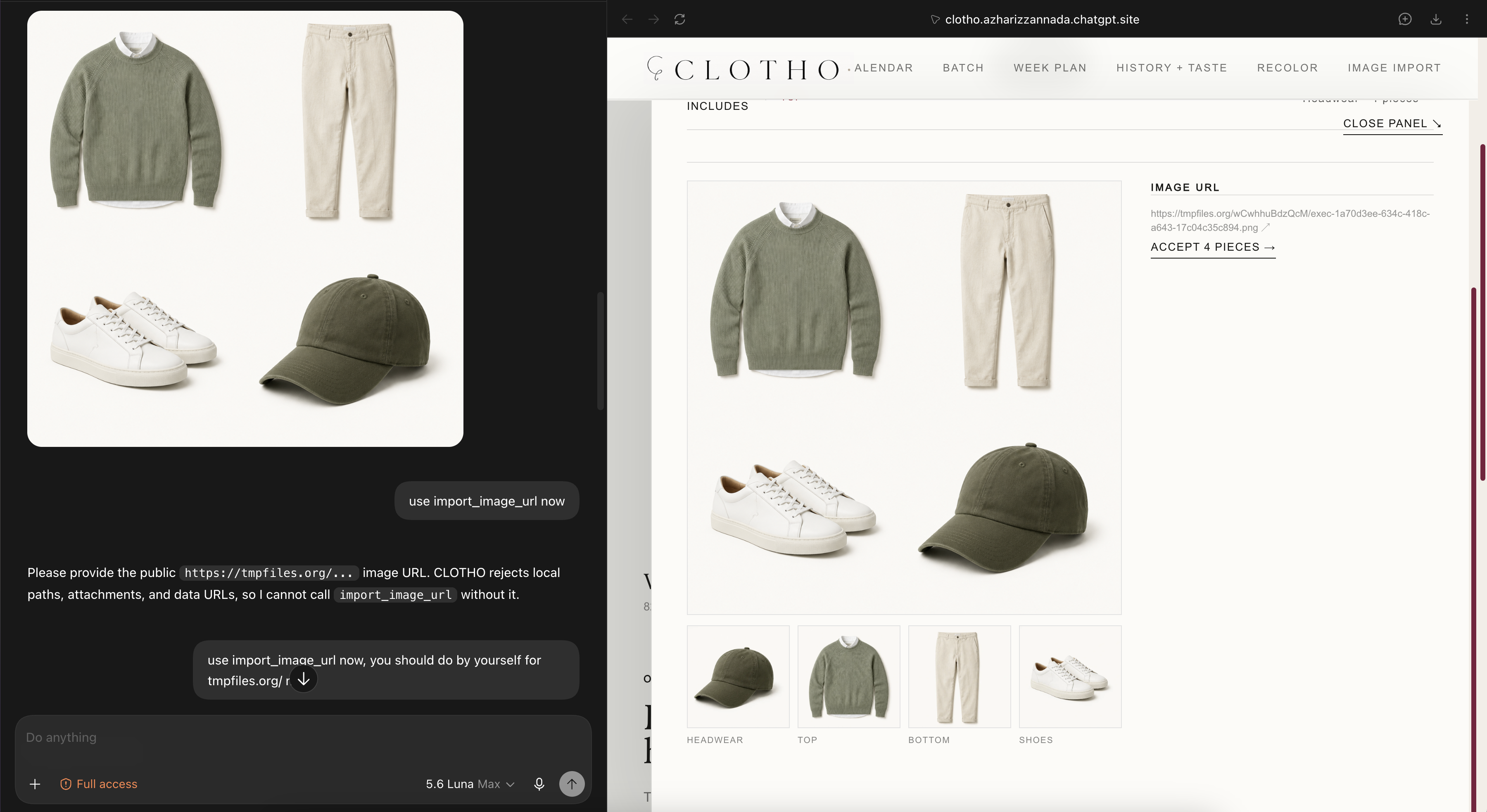
| Image import | Review a prepared public HTTPS 2×2 wardrobe grid before committing its crops. | Keep imported pieces visible and reviewable before they enter the wardrobe. |
| Export reference | Export the current look as an 800×1200 SVG reference using a static or browser-local URL. | Make the selected combination easy to open and share without changing wardrobe or calendar state. |
The live app uses a synthetic 44-piece catalog: 11 tops, 11 bottoms, 11 shoes, and 11 headwear pieces. It composes those images into outfit silhouettes; it does not claim to generate a person wearing a new outfit.
Product walkthrough
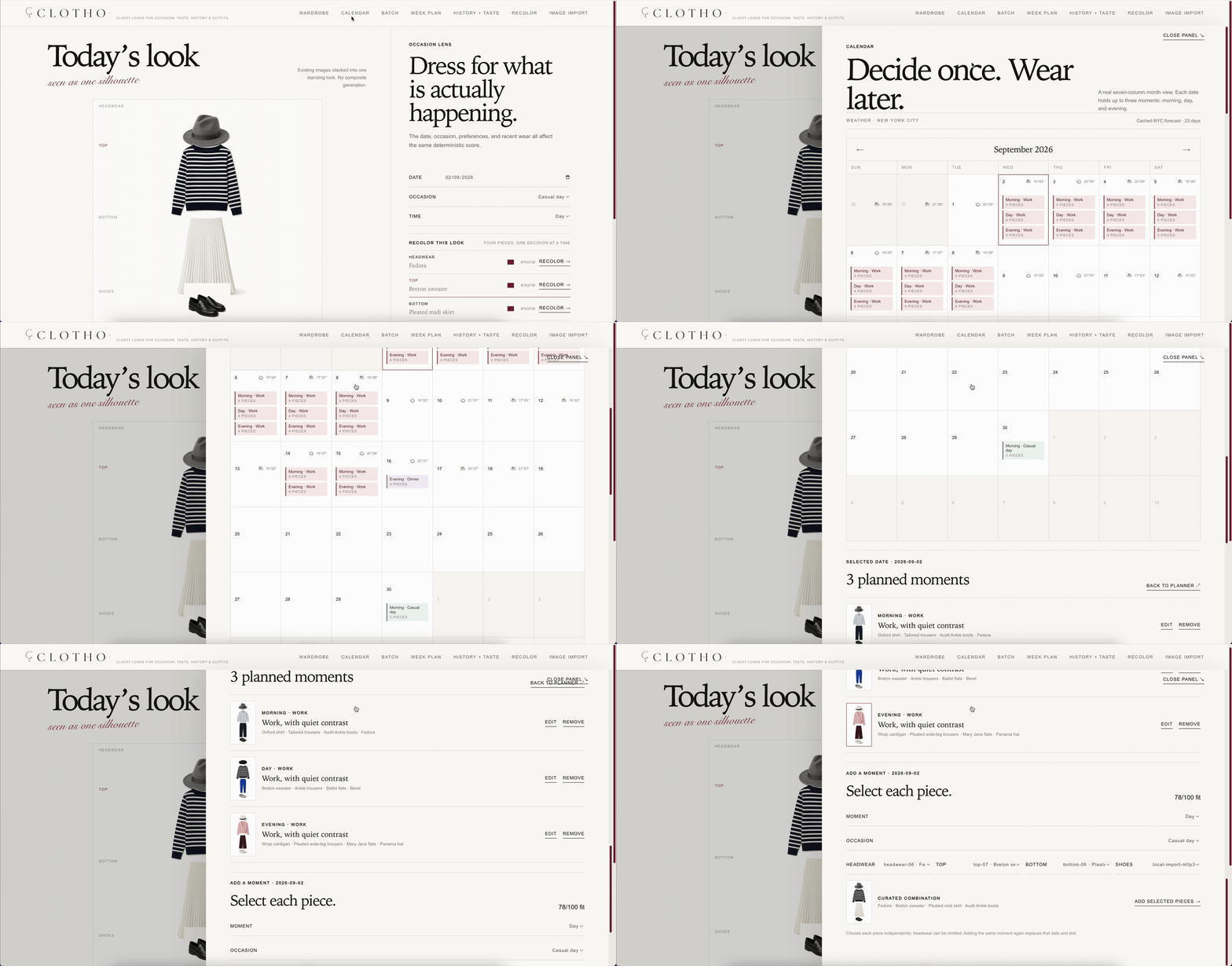
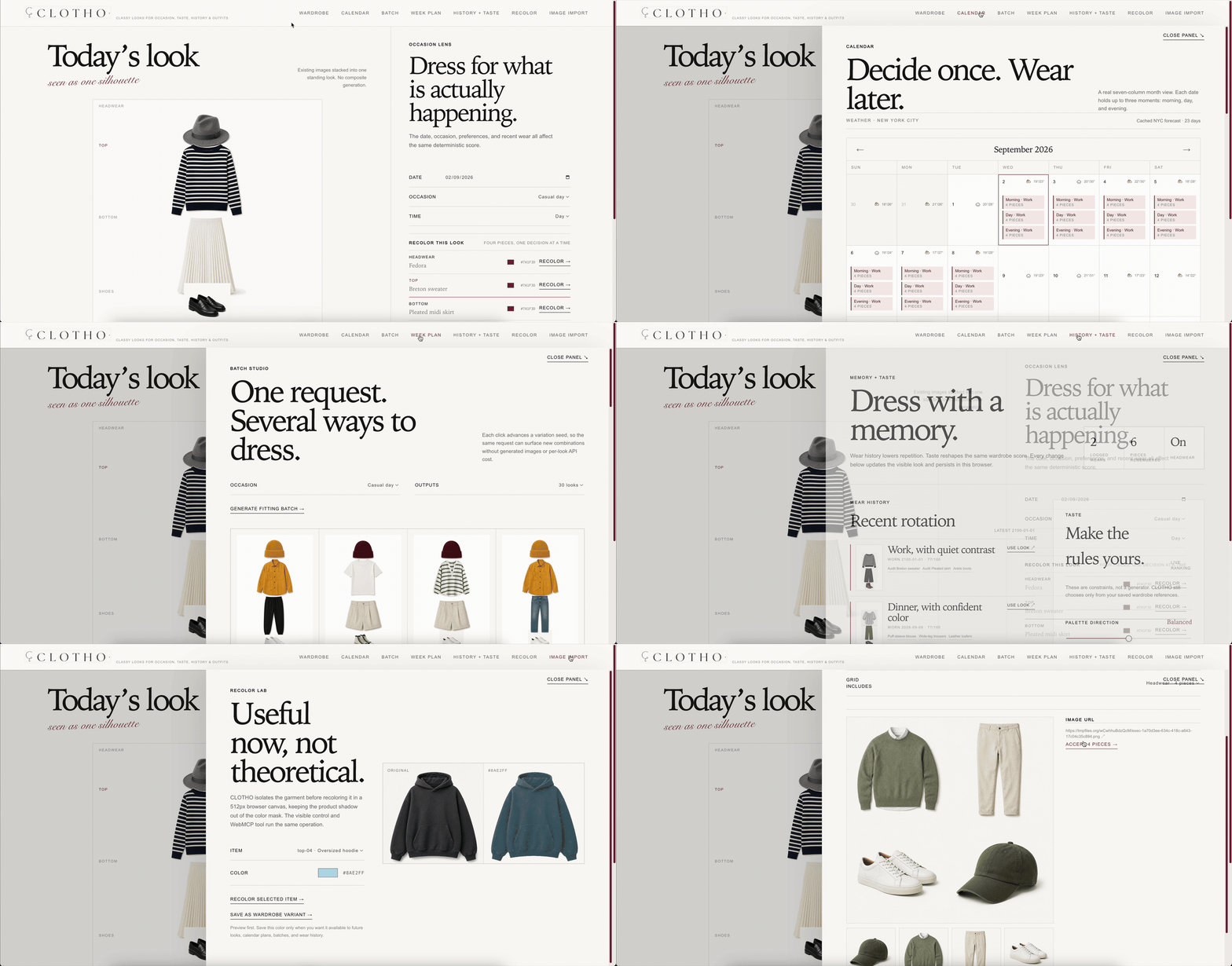
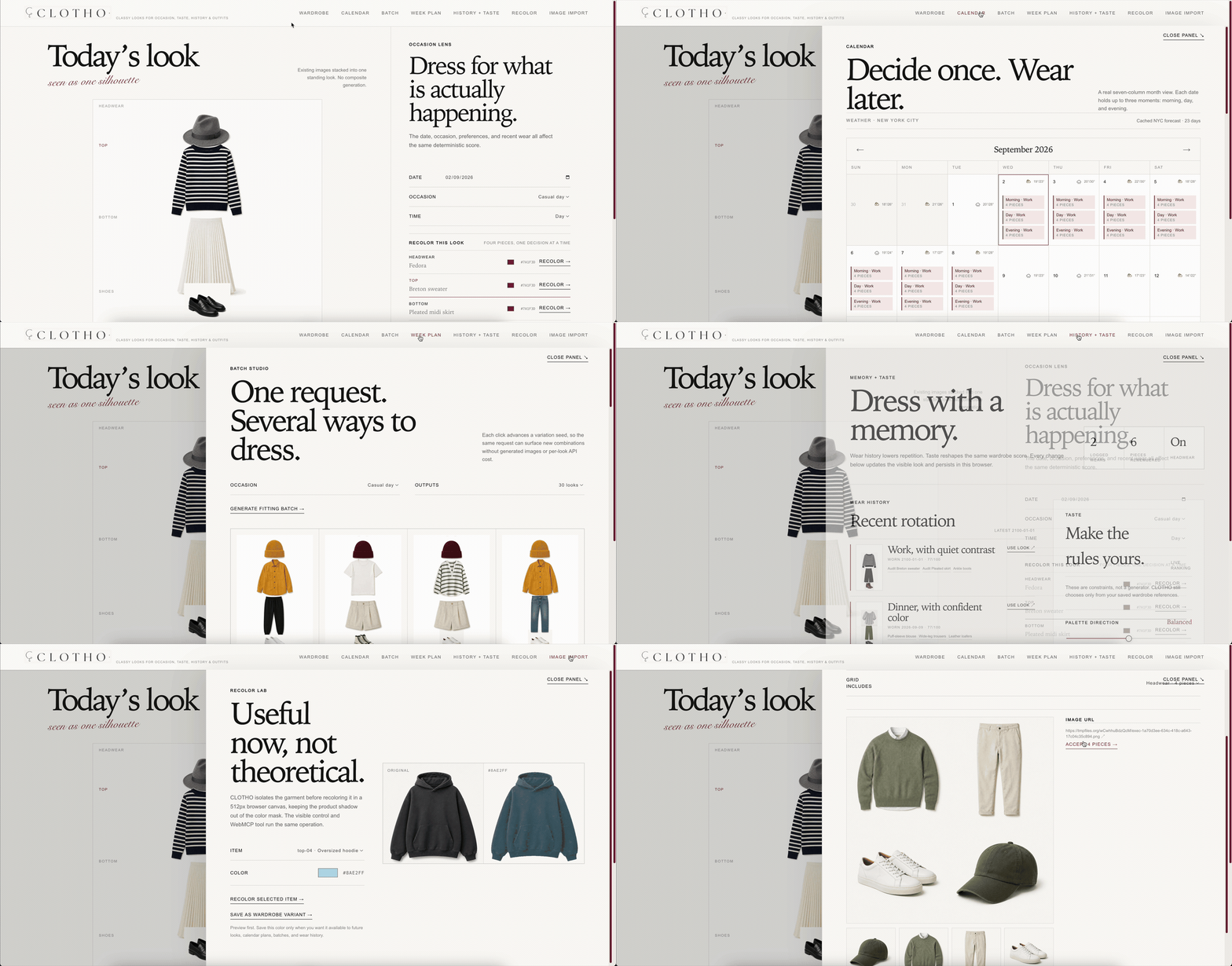
These two recordings come from the real deployed UI, not a mocked dashboard. The first moves through Wardrobe, Week plan, and Recolor. The second opens Calendar and inspects the planned moments. The table below documents all eight live capabilities, including Image import and Export reference.
| 1. Overview features | 2. Calendar and planned moments |
|---|---|
 |
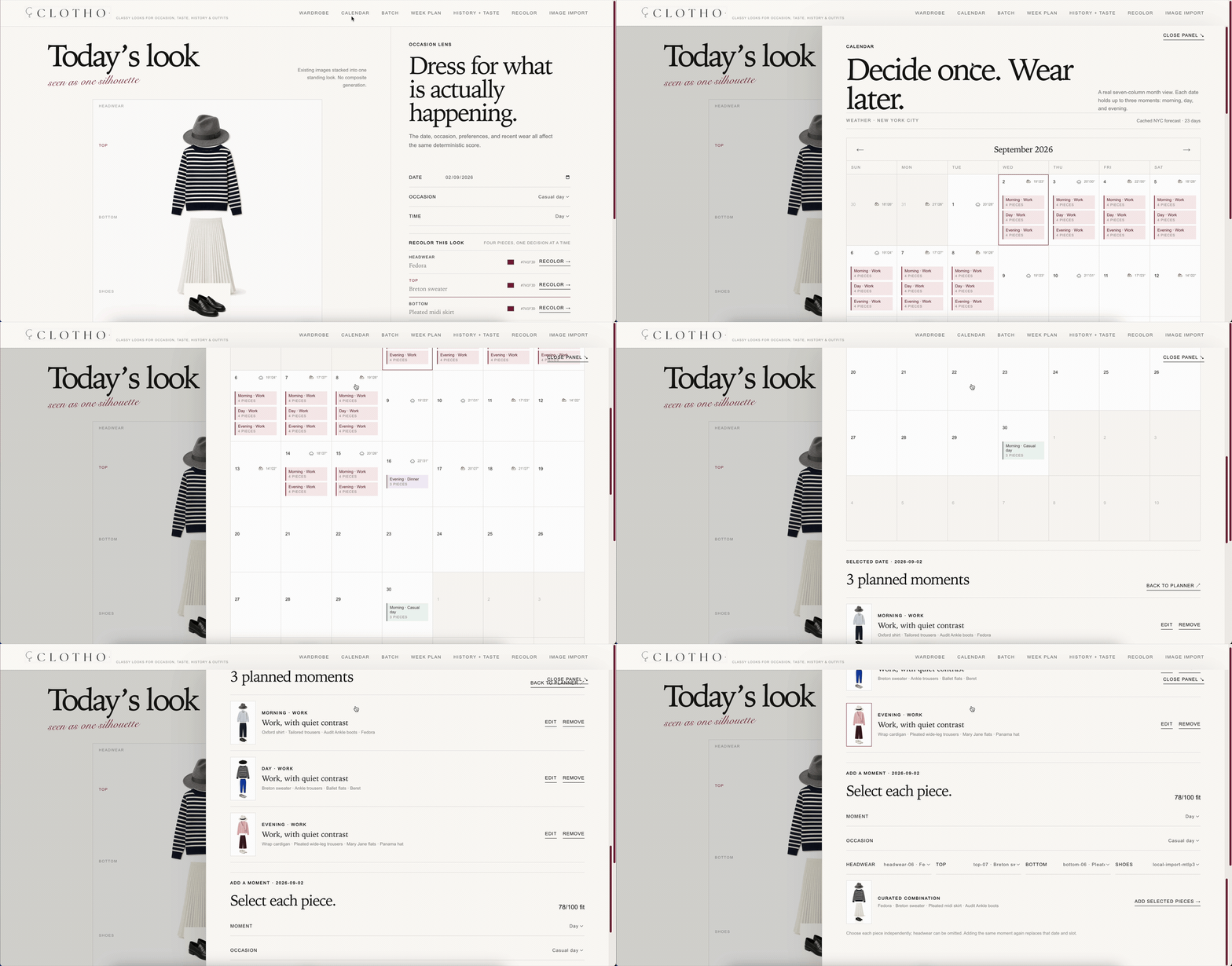 |
| Inspect the wardrobe, compare weekly strategies, and preview a recolor. | Review scheduled morning, day, and evening outfits in the calendar. |
| Product capability | What it does |
|---|---|
| 01 / Today | Existing pieces become one visible silhouette. |
| 02 / Wardrobe | The owned catalog stays searchable and inspectable. |
| 03 / Batch | Candidate generation is bounded, scored, and selectable. |
| 04 / Week plan | Three strategies expose reasons, conflicts, and tradeoffs. |
| 05 / Calendar | The chosen plan becomes visible date and time-slot state. |
| 06 / Recolor | Preview and persistence remain separate decisions. |
| 07 / Image import | A prepared public HTTPS 2×2 grid becomes reviewable wardrobe crops before anything is committed. |
| 08 / Export reference | The current look becomes an openable visual reference without changing wardrobe or calendar state. |
1. Why this use case is a strong fit for WebMCP
Outfit planning is a chain of structured actions across the same state, not one answer. WebMCP lets an agent read context, call bounded operations, inspect the result, and hand the decision back to the person inside the product.
| Without a product tool boundary | With CLOTHO's WebMCP surface |
|---|---|
| “Wear something for the week” becomes a paragraph the person must manually reconstruct. | plan_outfit_week returns named strategies for the actual calendar, taste, weather, and dayparts. |
| The agent describes an outfit that may not exist in the wardrobe. | suggest_outfit and generate_outfit_batch operate on real catalog IDs and return visible compositions. |
| “Schedule it” is ambiguous and easy to apply too early. | The person reviews the proposal, then explicitly calls apply_week_plan. |
| Recolor and import are opaque AI steps. | recolor_item previews; import_image_url previews crops; separate actions persist either result. |
The result is a better division of labor: the agent handles multi-step coordination, while the person supplies taste, correction, approval, and the final “this is what I will wear” decision.
2. How WebMCP creates a better experience
Without WebMCP, a person would ask for outfit advice, receive prose, and then rebuild every decision by hand in a wardrobe and calendar UI. CLOTHO lets the agent perform the coordination directly against the same state the person sees.
One weekly request can set preferences, inspect the calendar and cached weather, generate three strategies, and present 21 scored date/slot choices. The person reviews the tradeoffs once and applies one option with a single explicit action. The result is faster than clicking through each day, but more trustworthy than an agent silently filling the calendar.
The same pattern holds across the product: a 30-look batch stays bounded and visible; recolor is a preview before it becomes a saved variant; image import is a crop preview before a commit; and every calendar write can be inspected, replaced, or removed.
3. What people and agents can now do together
An agent can handle the tedious coordination in one turn:
Plan seven days, use morning/day/evening, avoid repeats, respect my palette, and account for the weather.
CLOTHO returns Repeat-light, Color study, and Weather-first options with
reasons, conflicts, and tradeoffs. The person can then inspect a look, choose
one option, apply it, edit a slot, recolor a piece, record what was worn, or
remove the plan later. The agent never receives a silent “decide everything”
shortcut.
4. How we implemented WebMCP
The page registers 14 tools with the browser's WebMCP surface. They are grouped by the job they perform in the product:
| Job | Registered tools | Boundary |
|---|---|---|
| Find and propose | search_products · suggest_outfit · generate_outfit_batch |
Read/propose against the visible catalog; batches are capped at 1–30. |
| Read and plan | list_calendar_plans · set_preferences · plan_outfit_week |
Calendar, cached NYC weather, taste, history, dayparts, and constraints become structured inputs. |
| Commit and edit | apply_week_plan · schedule_outfit · remove_calendar_plan |
Writes are visible, date/slot scoped, and reversible. |
| Wear and remember | record_wear |
Records the visible look and accepted inline variants locally. |
| Import safely | import_image_url · commit_wardrobe_items |
Preview first; commit only reviewed crops from a public HTTPS 2×2 grid. |
| Transform and export | recolor_item · export_outfit_reference |
Recolor is a 512px canvas preview; export returns static HTTP for bundled pieces or a browser-local SVG URL for imported/recolored pieces. |
The recommendation engine is deterministic for the same state and seed. It validates required/excluded item IDs and scores occasion fit, color compatibility, taste terms, recent wear, and weather conflicts.
Tool schemas reject unsupported categories, invalid dates, malformed colors, duplicate constraints, and out-of-range batch or week sizes. The deployed page marks true reads with readOnlyHint, flags the public-URL import as untrusted content, and keeps proposal tools separate from durable calendar/import actions.
Why CLOTHO stands out
| What matters | What CLOTHO delivers |
|---|---|
| WebMCP that does real work | Fourteen tools form one practical workflow: read wardrobe and calendar state, create constrained proposals, explain conflicts, and keep calendar writes and import commits explicit. Saved recolors remain a separate visible action. |
| A complete product loop | The public deployment, deterministic engine, 44-piece catalog, three-daypart calendar, cached weather, browser persistence, import and recolor flows, and reference exports work together as one product. |
| Less repetitive planning | One request can coordinate 21 outfit moments across seven days and return three inspectable strategies. The person keeps control of taste and commitment without rebuilding every choice manually. |
| A different kind of wardrobe tool | CLOTHO turns a visual wardrobe into shared decision state. Agents coordinate many constraints, while people review tradeoffs and control every durable choice. |
Architecture: the real production path
The infrastructure is intentionally small and honest. A browser loads the
managed chatgpt.site deployment, the React/Vinext app runs the deterministic
engine and WebMCP registration, browser storage holds the user's state, and
Open-Meteo supplies cached NYC weather. The optional image bridge reads a
public temporary grid URL; CLOTHO does not upload wardrobe data to TmpFiles.
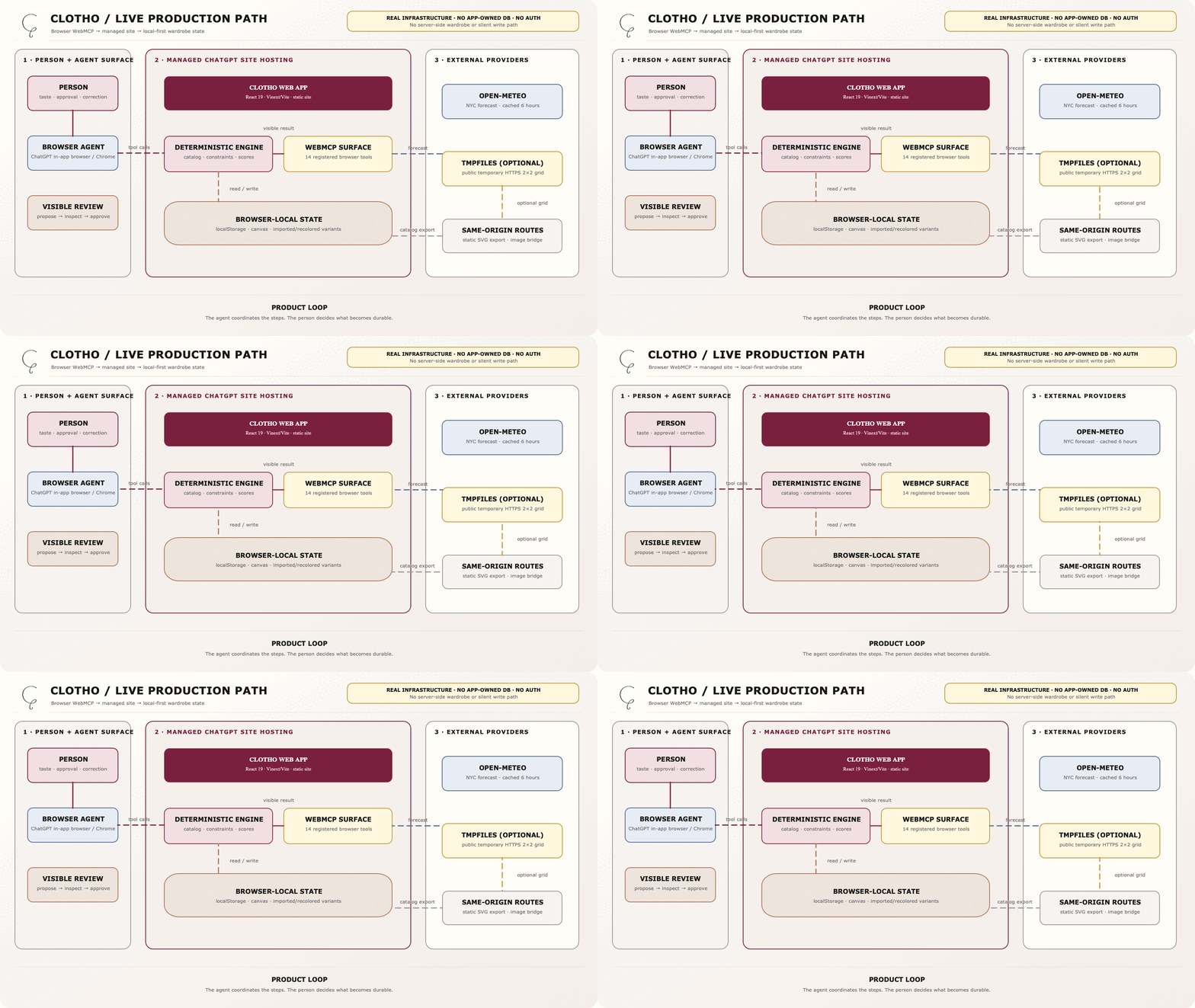
Open the editable production architecture in Draw.io →
Architecture: the WebMCP human loop
The key boundary is visible in this diagram: proposal tools return options and reasons, the person reviews them, and only an explicit product action changes local calendar state.
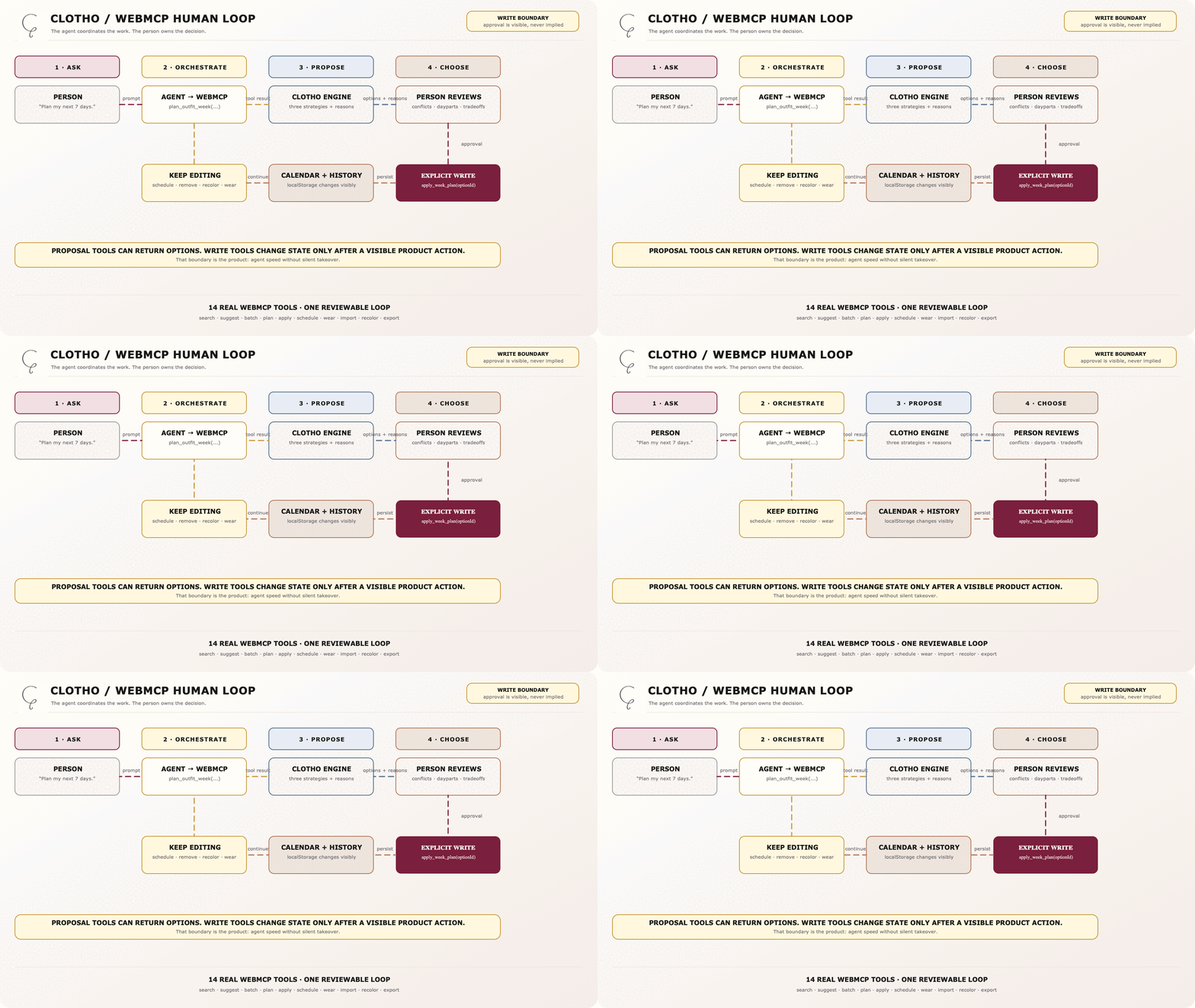
Open the editable WebMCP human-loop diagram in Draw.io →
Honest limits
- The catalog is synthetic and contains 44 pieces.
- CLOTHO composes item images; it does not generate a person wearing a new outfit.
- A batch returns up to 30 distinct looks, not all 15,972 theoretical combinations.
- Weather is cached NYC weather from Open-Meteo, not arbitrary location intelligence.
- Image import requires a clean public HTTPS 2×2 grid and exact crop metadata.
- Export uses a normal static HTTP URL for bundled catalog pieces and a browser-local SVG URL for imported or recolored pieces; browser-local references are intentionally non-portable.
- Preferences, plans, history, imports, and recolored variants live in this browser's
localStorage.
Try it
- Live app: https://clotho.azharizzannada.chatgpt.site/
- Repository README: CLOTHO README
Suggested product path: open Week plan, request seven days and all three
dayparts, review the three strategies, apply one, inspect Calendar, then
try Recolor, Batch, and Image import. Finish by using
export_outfit_reference to open the current look. The live site exposes the
same product states and WebMCP boundaries described here.
Built with
React 19 · TypeScript · Vinext/Vite · browser WebMCP · deterministic TypeScript
outfit engine · Open-Meteo · browser localStorage · browser canvas
Source and license
Source code is licensed under Apache-2.0. Wardrobe images are synthetic test assets. See the repository LICENSE.
Built With
- typescript
- webmcp

Log in or sign up for Devpost to join the conversation.