-
-
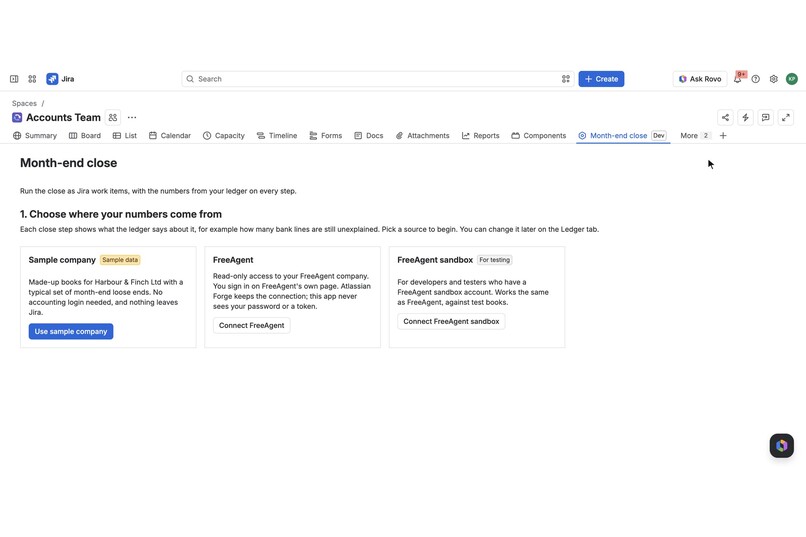
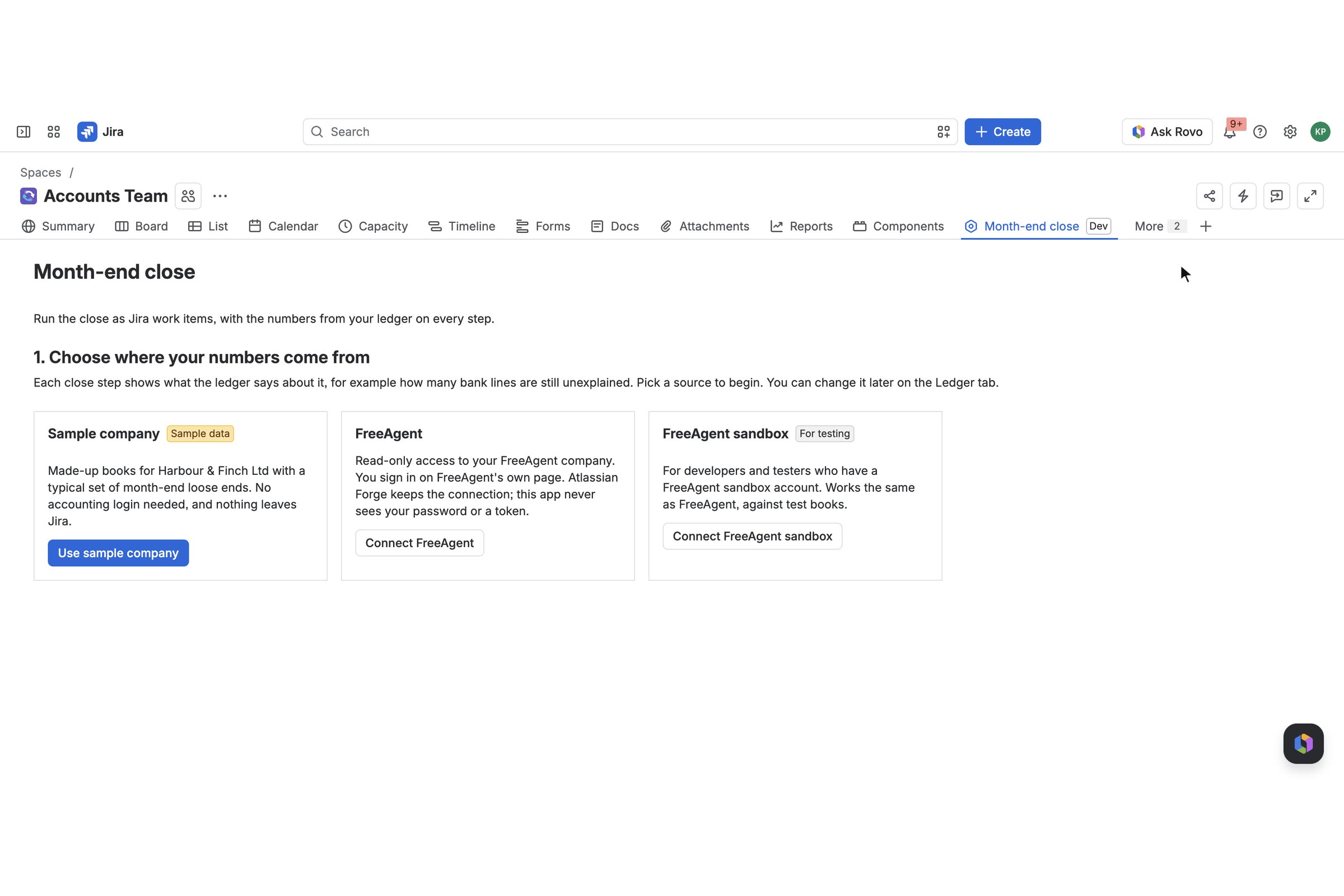
First run: use the sample company or connect FreeAgent. The sample needs no accounting login.
-
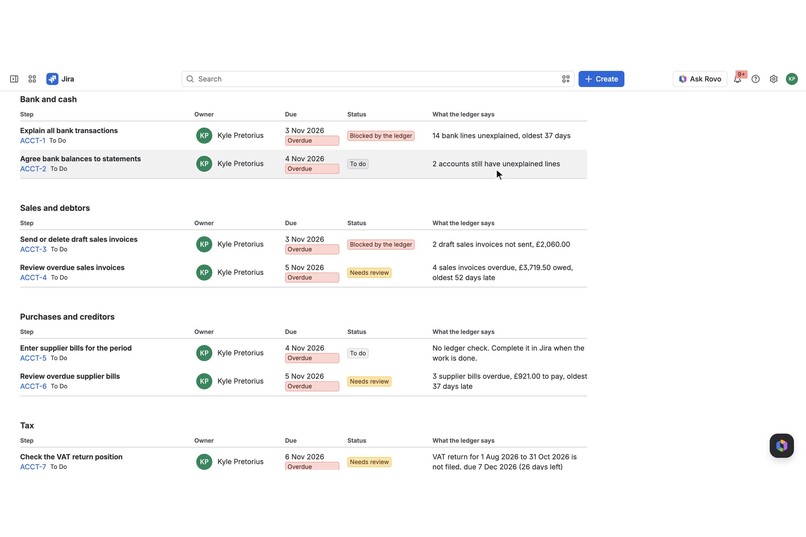
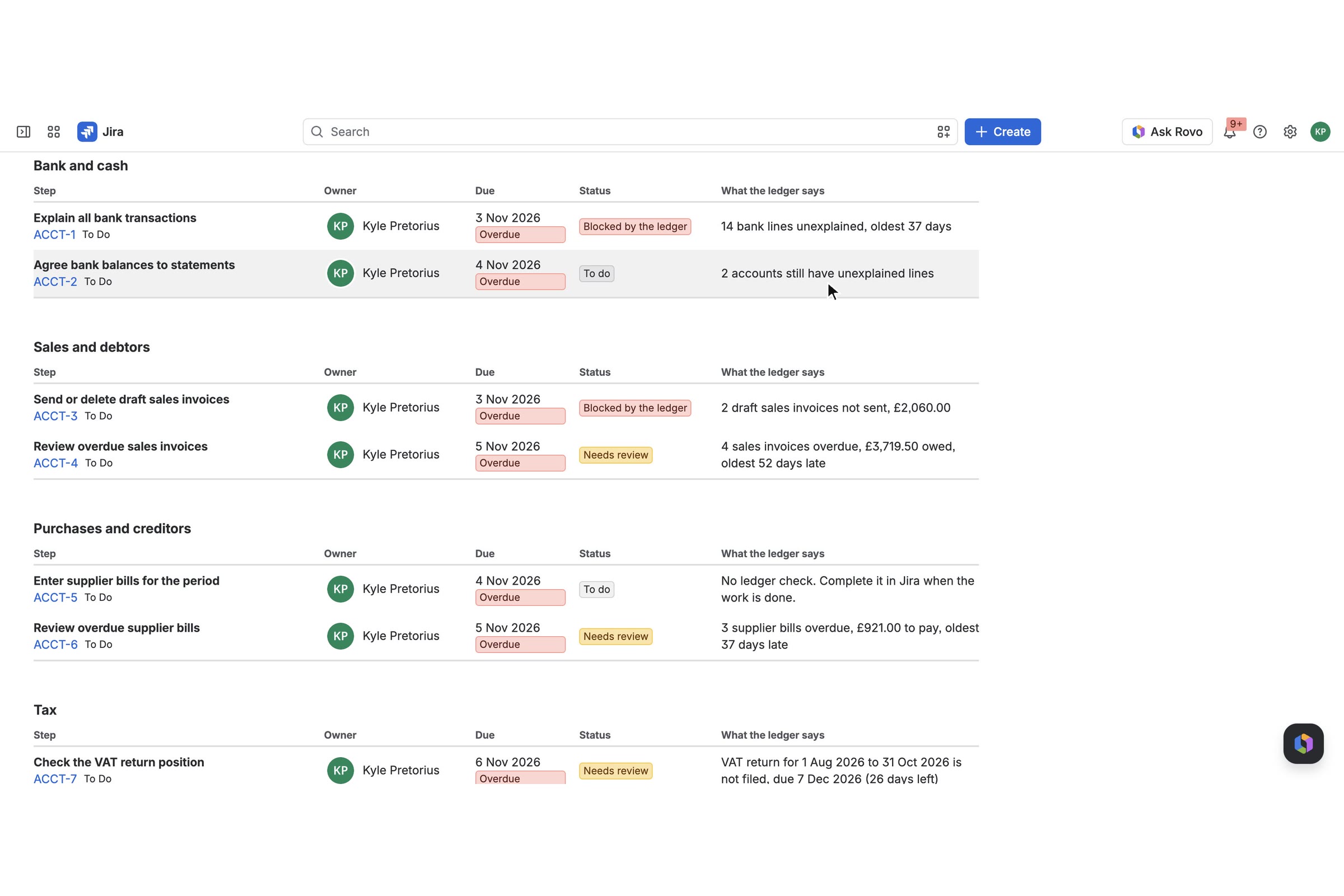
Close steps as Jira work items, each showing what the ledger says about it (sample company).
-
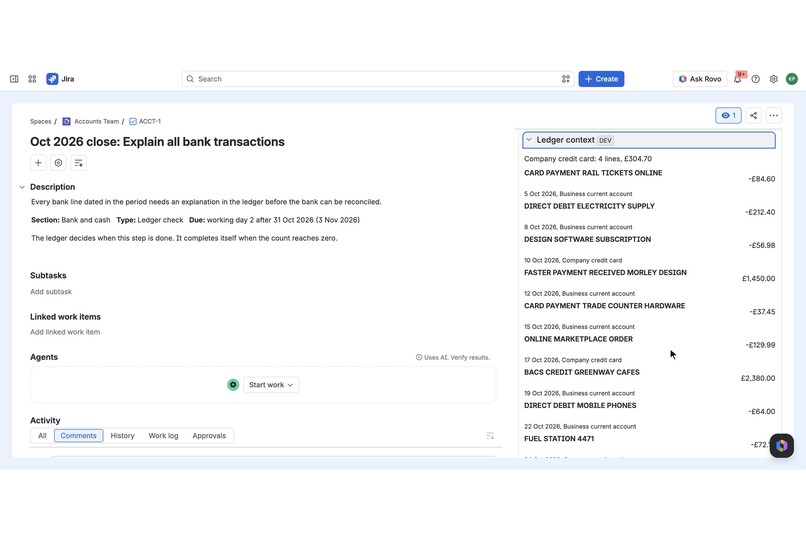
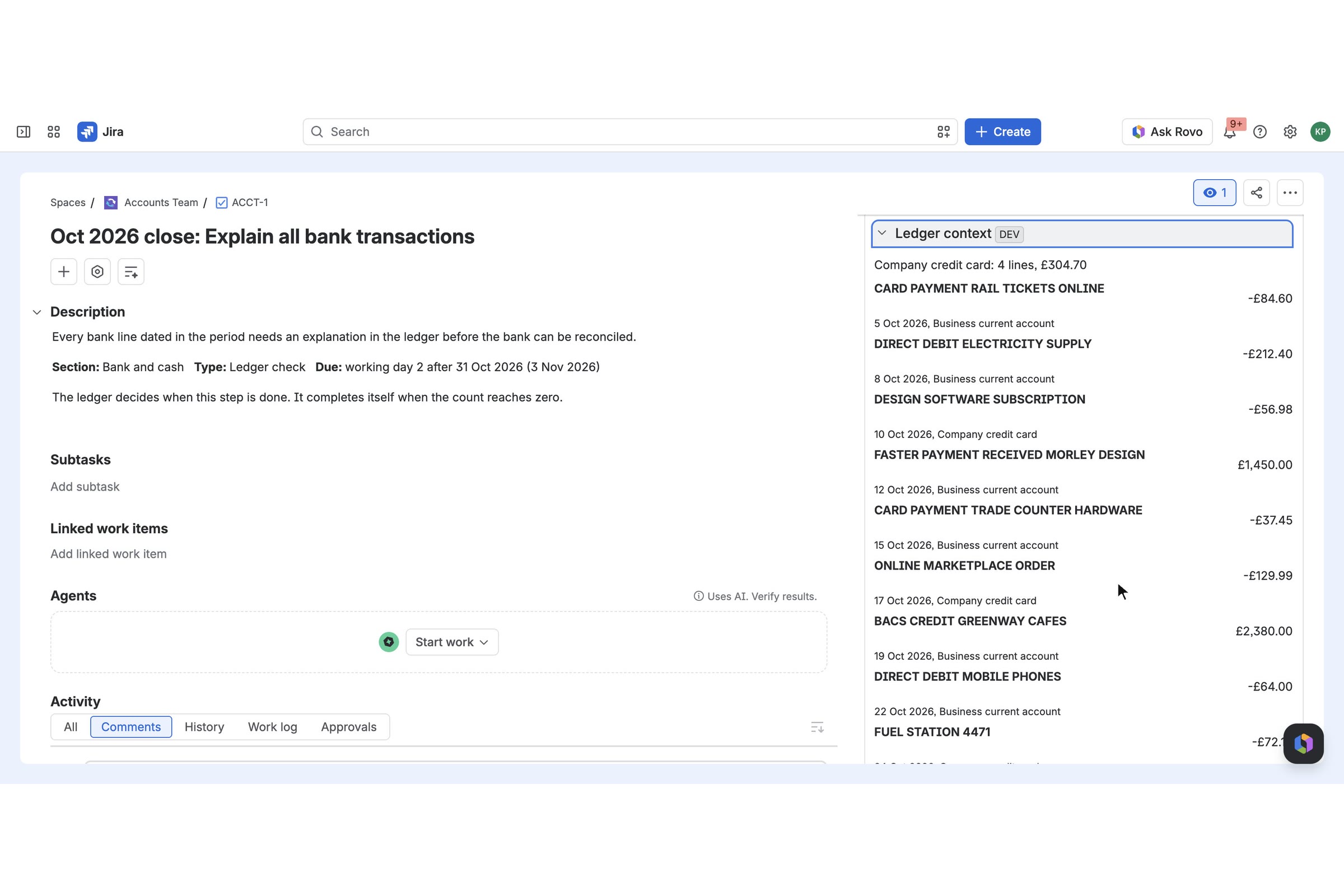
Ledger context panel on a work item: the bank lines behind "14 bank lines unexplained" (sample company).
-
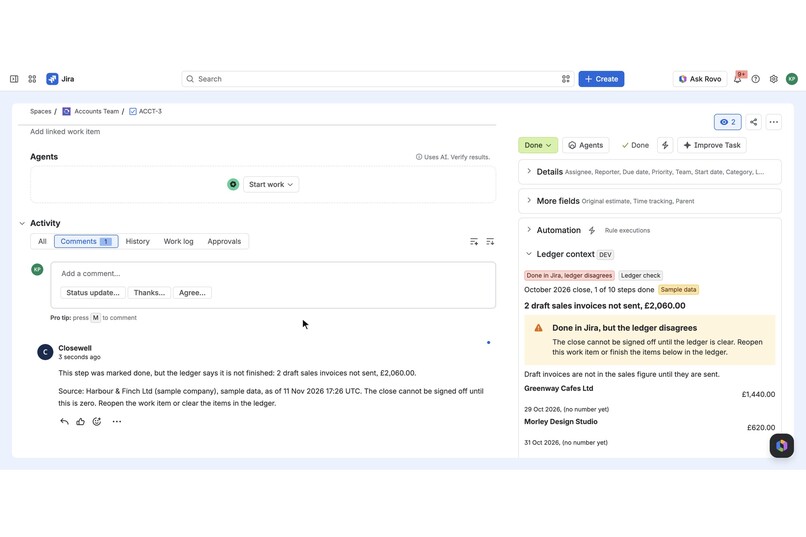
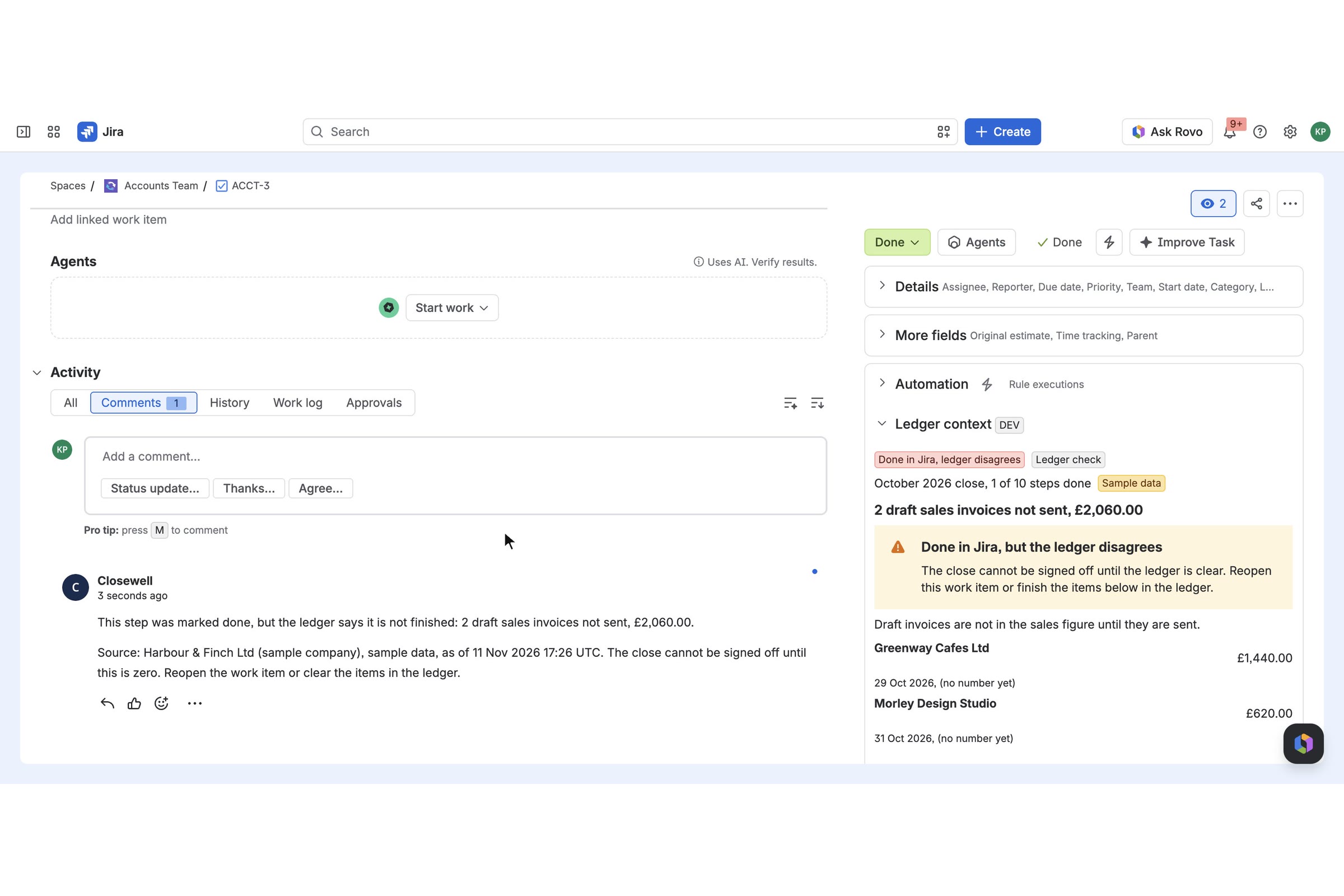
A ledger step marked Done too early: the app comments that the ledger disagrees and the panel flags it.
-
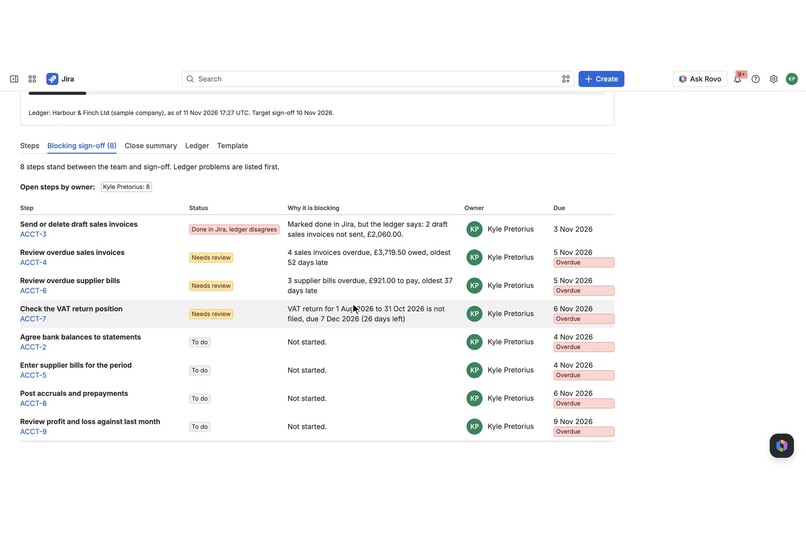
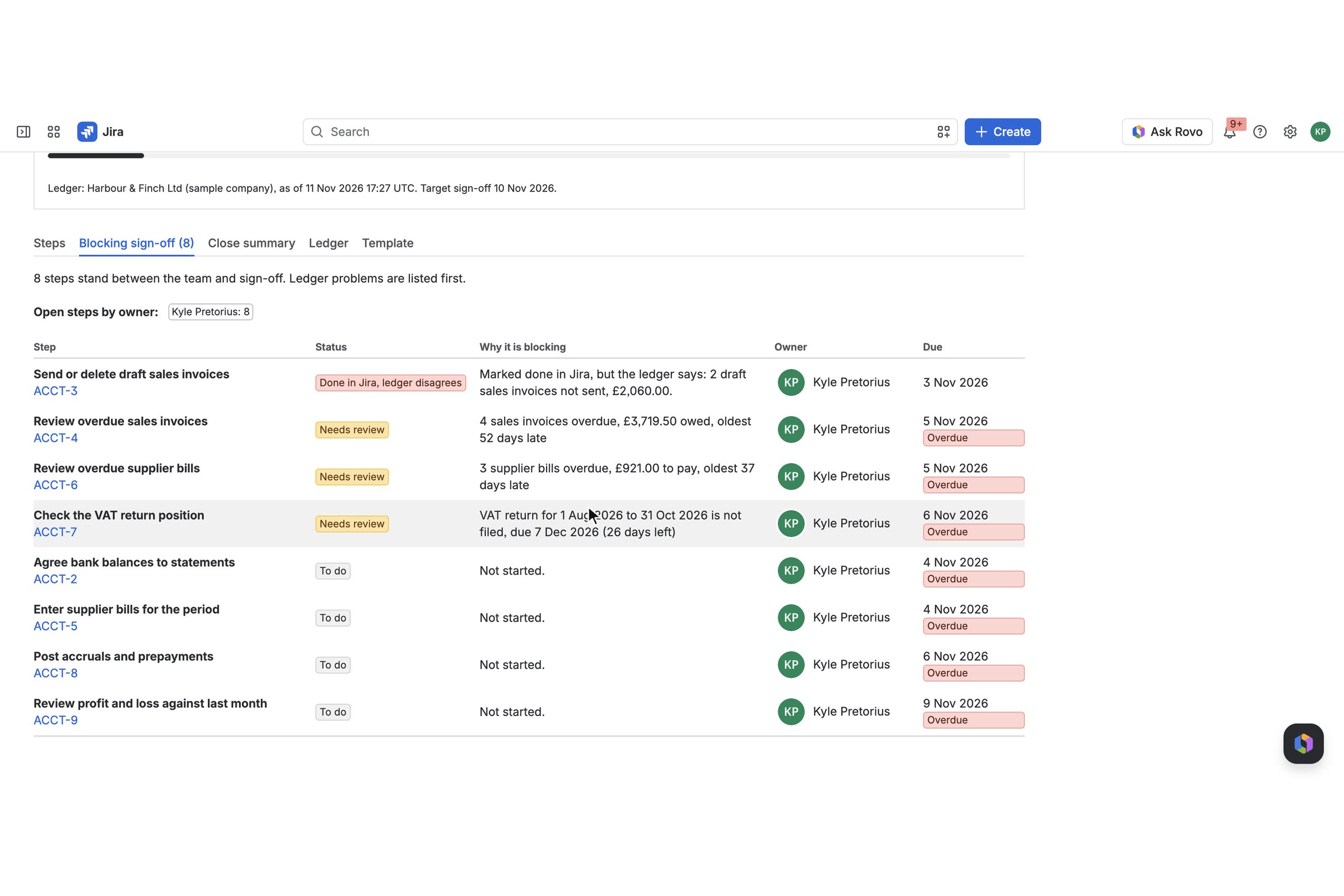
Blocking sign-off: every step in the way, ledger problems first, with the reason and the owner.
-
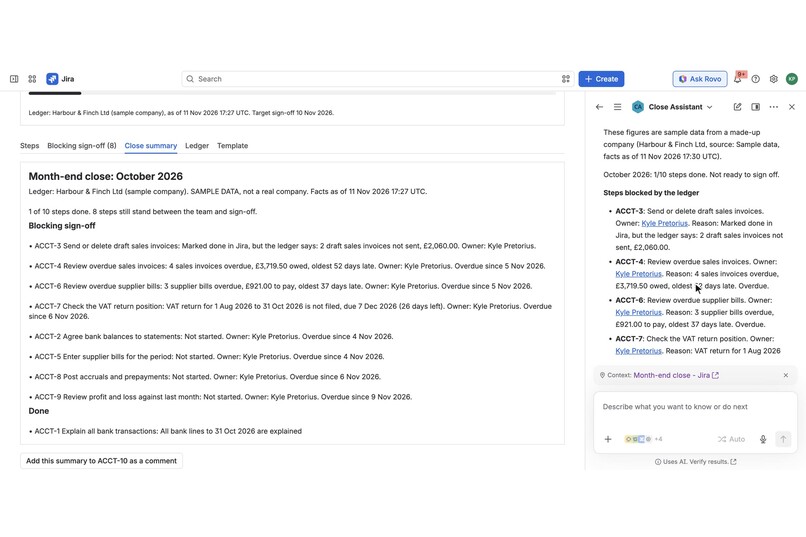
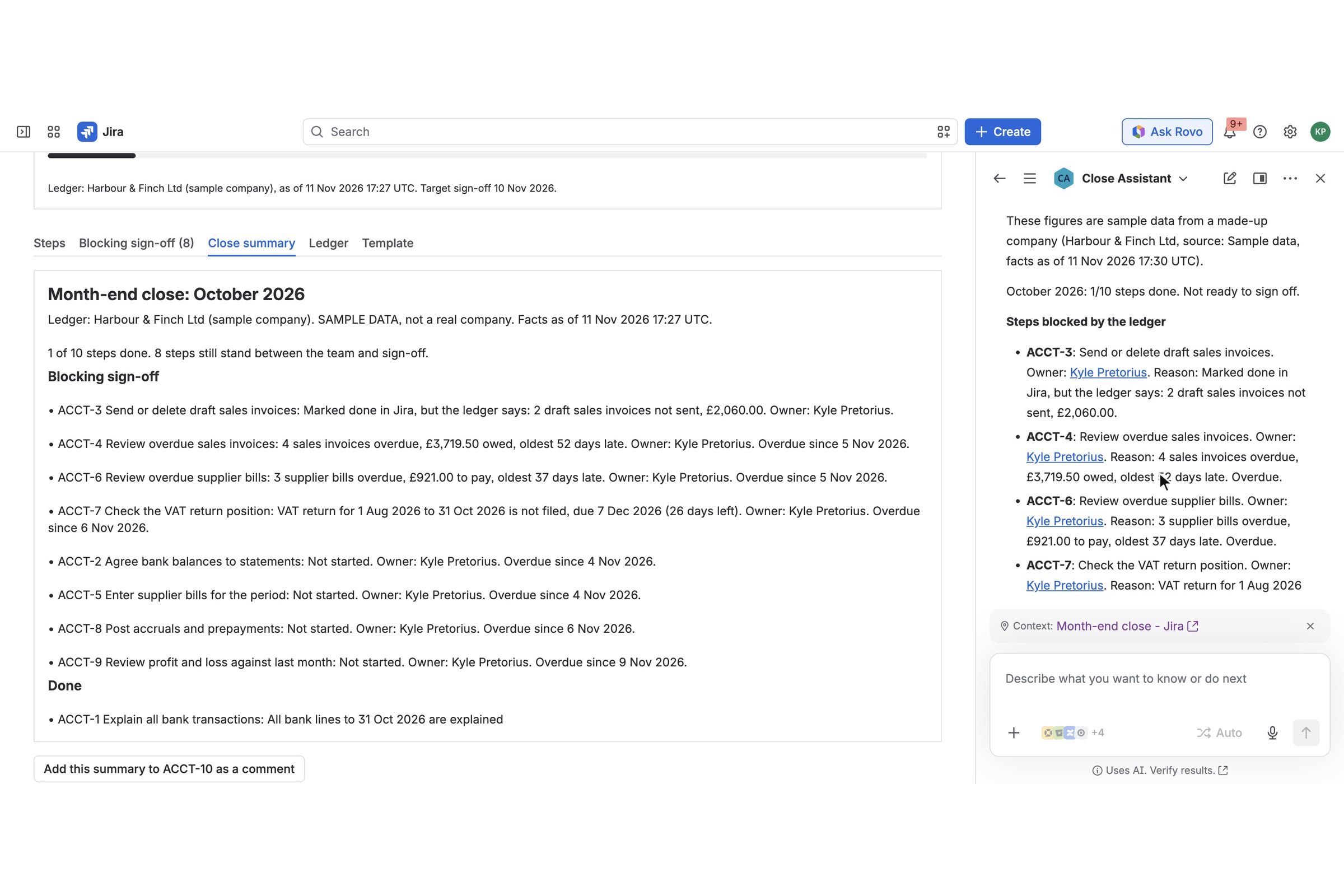
Close Assistant, a Rovo agent, answering "What is blocking the close this month?" through Forge actions.
-
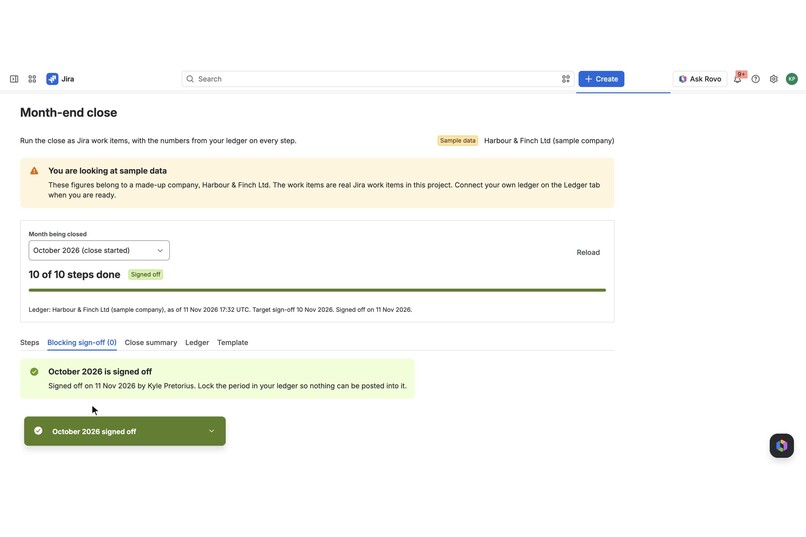
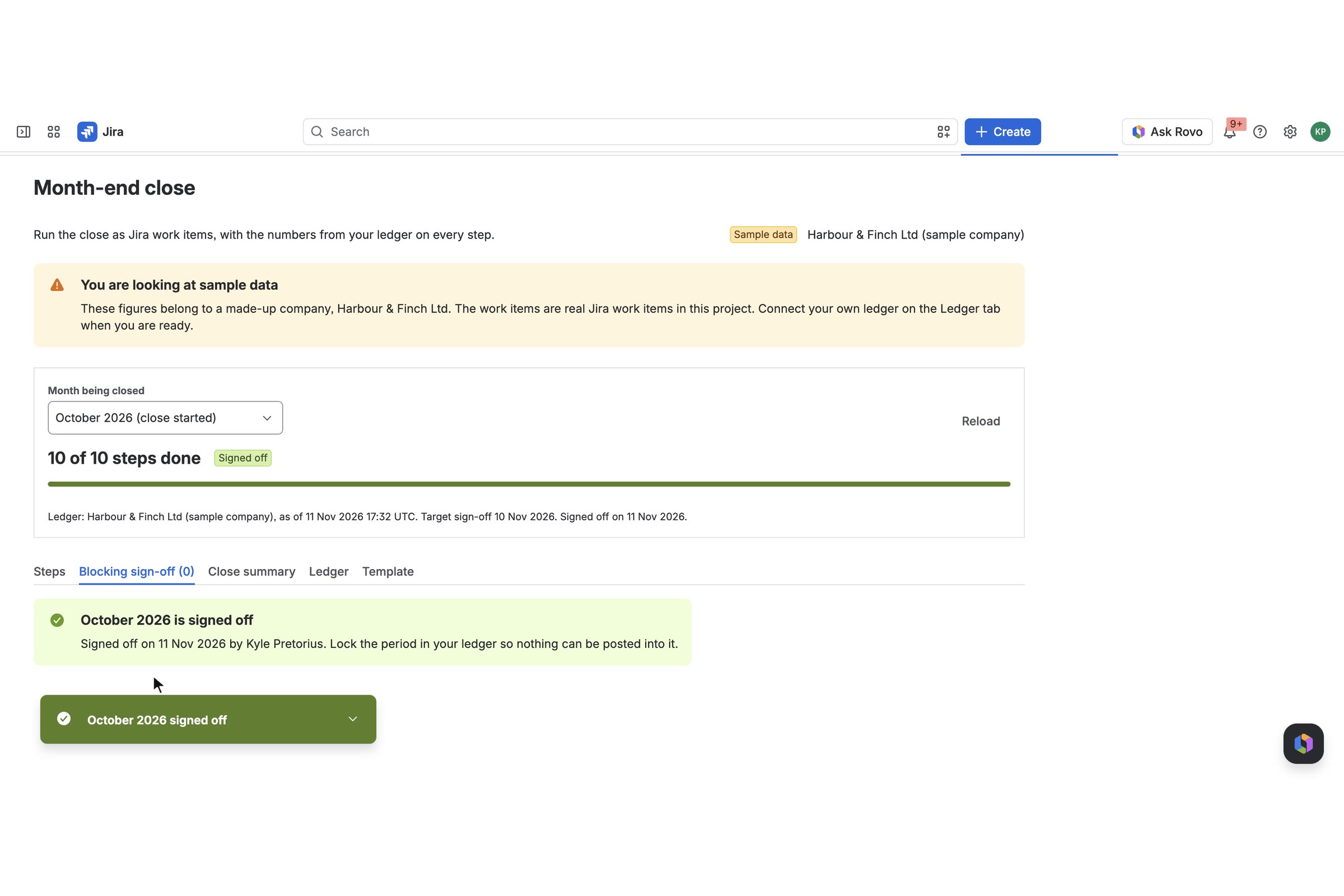
Signed off. Sign-off is only offered when nothing is blocking, and records who signed and when.
-
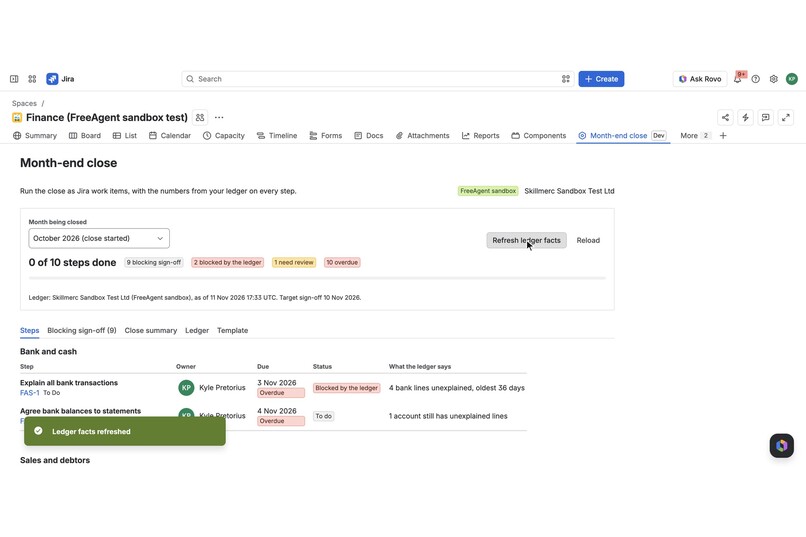
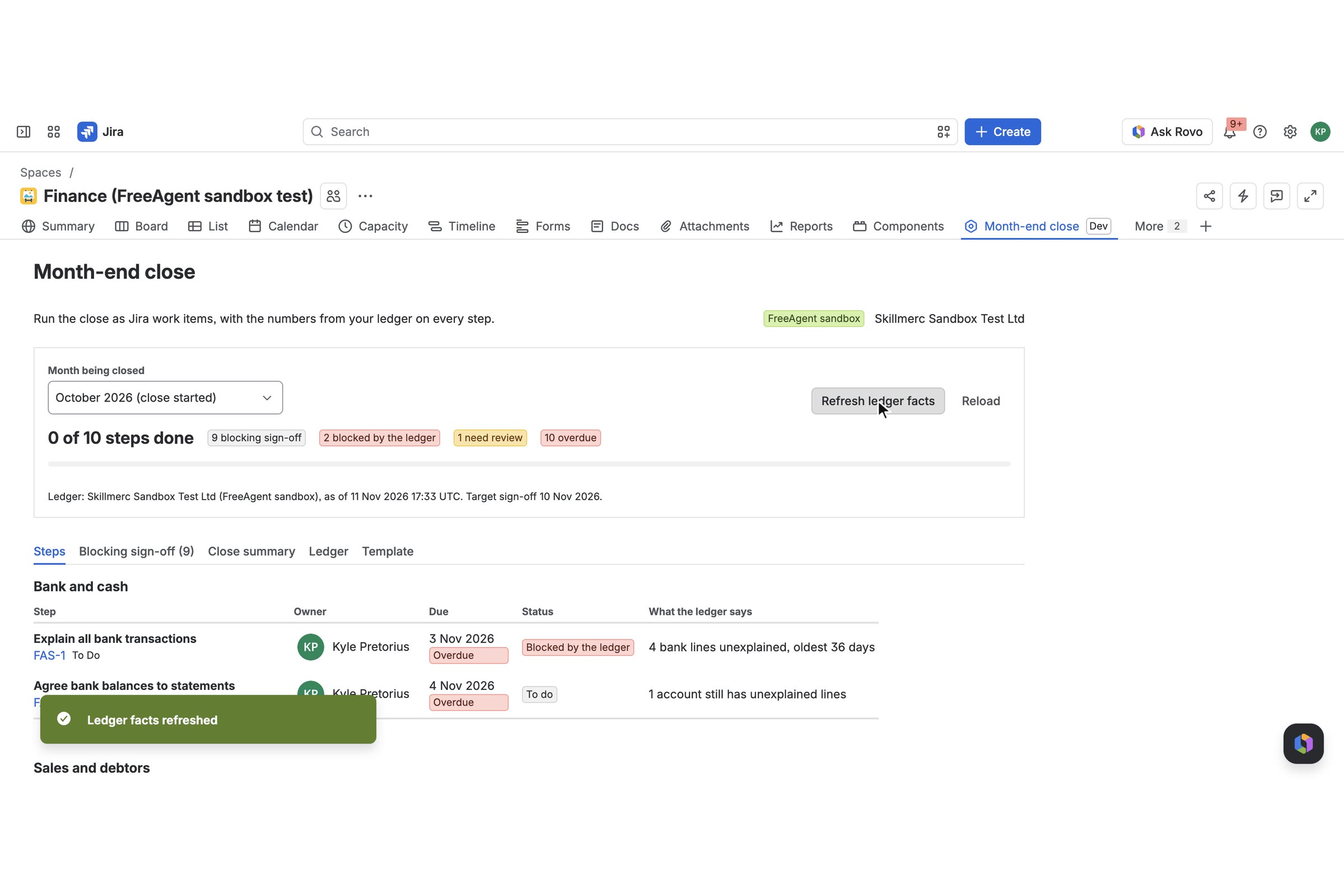
A FreeAgent sandbox company connected through Forge external auth, figures refreshed inside Jira.
Inspiration
A bookkeeper closing the month for a small company works from two places that never meet. The checklist sits in a spreadsheet or in someone's head. The numbers that decide whether a step is really finished sit in the accounting system: how many bank lines are still unexplained, which invoices are still drafts, what is overdue, whether the VAT return is filed.
So "Bank reconciled" gets ticked on the 3rd and unticked on the 5th when someone finds eleven unexplained lines. The person signing off cannot see what is actually holding things up or who owns it.
We build accounting integrations at SKILLMERC (FreeAgent and Sage connectors for online shops). Those connectors already read the facts a close depends on, so we pointed them at the checklist.
What it does
Closewell runs the month-end close as Jira work items and puts live ledger facts on the steps that depend on them. It is for bookkeepers and small finance teams who already run their work in Jira.
- Start a close for a month. One click creates a work item per step from a template (ten steps by default: bank, sales, purchases, tax, review, sign-off), with due dates counted in working days after the month end, an owner, labels and a parent epic where the project has one.
- Steps show what the ledger says. "Explain all bank transactions" shows "14 bank lines unexplained, oldest 37 days" instead of a tick box, with the lines themselves in the work item's side panel.
- Ledger checks complete themselves. When the count reaches zero, the app moves the work item to Done and leaves a comment saying why and where the figure came from.
- It disagrees out loud. If someone marks a ledger check Done while the ledger still shows open items, the app comments on the work item and the close page shows "Done in Jira, ledger disagrees". Sign-off stays blocked.
- Blocking sign-off. One tab lists every step between the team and sign-off, ledger problems first, with the reason, the owner and the due date.
- Close summary and sign-off. A plain summary can be posted to the sign-off work item. Sign-off is only offered when nothing is blocking, and records who signed and when.
- Close Assistant (Rovo agent). Ask "What is blocking the close this month?", "Explain the ledger numbers on this step" or "Draft the close summary for sign-off". The agent answers from the same data through three Forge actions and says when the figures are sample data.
- Sample company. No accounting login is needed to try it. "Use sample company" loads clearly labelled sample books, with buttons that stand in for the work a bookkeeper would do in the ledger, so you can watch steps react.
- FreeAgent. Connect a real FreeAgent company (or a FreeAgent sandbox) with read-only access. The app never changes the books.
Built by SKILLMERC with an AI coding agent; all features shown are implemented and tested.
How to install and try it (for judges)
You need a Jira Cloud site where you are an admin. No accounting login is needed. About three minutes. Step 8 needs Rovo on the site.
- Open the installation link: Install Closewell for Jira (short link to the same page: https://skillmerc.github.io/closewell/install/). Pick your site and install into Jira. Accept the scopes. The app asks to exchange data with
api.freeagent.comandapi.sandbox.freeagent.com; this is only used if you connect FreeAgent. - Open any Jira project (newer sites call it a space). Business or software, team-managed or company-managed all work. In the project's tab bar choose Month-end close. On a narrow window it sits under More.
- Click Use sample company. The page says clearly that the figures are sample data.
- On Start a close, leave the month as suggested, optionally pick yourself under "Assign the steps to", and click Start close for .... Ten work items are created in the project.
- Look at the Steps tab: two steps are "Blocked by the ledger", three "Need review". Open one of the linked work items and expand Ledger context in the right-hand panel to see the lines behind the number.
- Go to the Ledger tab and click Explain all bank lines. A flag says the step was completed from the ledger; the work item is now Done and has a comment from the app.
- In Jira, move "Send or delete draft sales invoices" to Done by hand. Within a few seconds the app comments that the ledger disagrees, and the Blocking sign-off tab shows it first.
- Open Rovo chat (Ask Rovo), switch the agent to Close Assistant and ask: "What is blocking the close this month?" Then try "Draft the close summary for sign-off".
- To finish the story: on the Ledger tab click the remaining sample buttons, mark the other steps Done in Jira, press Reload, and use Sign off on the Blocking sign-off tab.
Optional, real ledger: if you have your own FreeAgent account or FreeAgent sandbox, use Switch to another ledger on the Ledger tab, then Connect FreeAgent (or Connect FreeAgent sandbox). Jira shows "requires additional access"; click Configure access, sign in to FreeAgent and approve, then click the connect button once more. Access is read-only.
Notes: "Reset the sample ledger" on the Ledger tab puts the sample figures back. Removing the app removes its stored data; the work items stay in your project. Privacy policy: https://skillmerc.github.io/closewell/privacy/ Terms: https://skillmerc.github.io/closewell/terms/ Support: [email protected]
How we built it
Everything runs on Atlassian Forge. There is no server of ours.
Jira modules
jira:projectPage"Month-end close": first-run choice of ledger, start a close, the steps, blockers, summary, ledger settings and the step template.jira:issueContext"Ledger context": a side panel on every close step with the figures behind it. AdynamicPropertiesfunction sets the lozenge on the collapsed panel ("14 to clear", "4 to review", "Clear").jira:issuePanel: the same view at full width for teams that prefer it under the description.jira:entityProperty: each step carries aclosewell.stepproperty that is indexed, so JQL such asclosePeriod = "2026-10" AND closeStepType = "gate"works in filters and boards. The same property is the display condition that keeps the panels off every other work item.triggeronavi:jira:updated:issue: notices a ledger check being moved to Done while the ledger disagrees.
Rovo modules
rovo:agent"Close Assistant" with a prompt kept as a resource file.- Three
actionmodules backed by Forge functions:close-status,explain-close-step,draft-close-summary.
Platform services
- Forge key-value storage for close runs, the template, and the last ledger snapshot.
- Forge external authentication (
providers.auth, OAuth 2) for FreeAgent. Forge runs the sign-in, keeps the tokens and refreshes them. The app's code never sees a token, and its storage never holds one. - Jira REST as the user for creating work items and reading status, and as the app for the automatic completion and its comment, so the history shows who did what.
Scopes: storage:app, read:jira-work, write:jira-work, read:chat:rovo. Egress: api.freeagent.com and api.sandbox.freeagent.com only, and only when a ledger is connected. Because of that egress the app does not claim "Runs on Atlassian".
Code shape. The close logic (period maths, rules, step state, summary) is plain JavaScript with no Forge imports, and the service that ties it together takes its storage, Jira and ledger as arguments. That is why the whole flow, including sign-off and the agent answers, runs in 49 automated tests with an in-memory Jira. The FreeAgent connector is tested against responses recorded from the FreeAgent sandbox.
Best Agents: the Close Assistant
The app ships a rovo:agent named Close Assistant and three action modules that it calls:
close-status: steps done, ready to sign off or not, every blocking step with work item key, owner, due date and the reason from the ledger.explain-close-step: what one step is for, its Jira status and owner, the ledger headline, the individual bank lines, invoices or bills, and what happens next.draft-close-summary: the ledger source, steps done, blockers with owners and a ready-made plain summary.
The actions read the work item or project from the Rovo context when the user does not name one, so "Explain the ledger numbers on this step" works from an open work item. They are plain Forge functions over the app's own data.
The agent is a second way into a working product, not the product itself: every answer can be checked on the Month-end close page. It is told to use only figures an action returned, to say when they are sample data, and to say where and when they were read.
Checked on 11 Nov 2026 on a Jira site with Rovo: the agent appears in Rovo chat with its three conversation starters. "What is blocking the close this month?" returned the correct blockers, reasons and owners. "Draft the close summary for sign-off" returned the same figures as the Close summary tab. "Explain the ledger numbers on" a work item returned the overdue invoices behind that step. Each answer said the figures were sample data.
Challenges we ran into
- Per-user ledger access. Forge external auth belongs to the person who signed in, so a background job cannot read the ledger. We made that explicit instead of hiding it: figures are read when a connected person presses Refresh, then kept for the project with the time and source shown everywhere they appear.
- Work item panels need a click. A
jira:issuePanelonly appears after a user adds it. Ledger context has to be there without setup, so the main surface becamejira:issueContextwith a live lozenge, and the panel stayed as an option. - Projects differ. Some projects reject due dates or labels on create. The app retries without the fields Jira complained about and tells the user what was left out.
- An agent must not improvise numbers. The actions return complete, pre-worded facts (including "this is sample data" and "what happens next"), and the prompt tells the agent to use them as given.
Accomplishments that we're proud of
- A judge can install it, click "Use sample company", and see every feature without any accounting login.
- The real path is real: the same build read a FreeAgent sandbox company inside Jira through Forge external auth, and the figures matched a direct API run. The demo video shows that connection refreshing.
- The app tells the truth about its data: source, time read, and a sample-data label on the page, in the side panel, in comments and in the agent's answers.
What we learned
- Putting the reason next to the status changes the conversation from "is it done?" to "what is left?".
dynamicPropertieson an issue context panel is a cheap way to make a work item glanceable.- Keeping Forge at the edges and the logic pure made the app quick to test and safe to change.
Honest limits
- Ledgers in this version: the sample company and FreeAgent (live and sandbox). The live FreeAgent provider uses the same code and OAuth app as the sandbox, but we only had a sandbox company to test with.
- Real ledger figures are read when a connected person presses Refresh ledger facts. There is no background sync.
- Working days are Monday to Friday. Public holidays are not known yet.
What's next for Closewell for Jira
- Sage Accounting, Xero and QuickBooks connectors on the same snapshot shape.
- Per-client close runs for accounting practices that close many companies each month.
- Public holiday calendars and a team time zone for due dates.
- A period-lock check and a suspense-account check as further ledger rules.
- Marketplace listing.
Built With
- forge
- forge-external-auth
- forge-kvs
- freeagent-api
- javascript
- jira
- node.js
- rovo
- ui-kit
