Inspiration
I built ClinicFlow after speaking informally with doctors and assistants about how work moves through small clinics. Patient details, visit notes, documents, and follow-up tasks often pass between index cards, paper forms, Word files, and verbal reminders.
The problem was not simply a lack of software. Staff were concerned about complicated screens, difficult training, sensitive information being placed online, and another monthly subscription. They wanted something simple that followed the way they already worked while keeping the doctor in control.
ClinicFlow is meant to make everyday clinic work simpler. Instead of switching between paper records, Word files, and verbal reminders, staff can keep each visit, its documents, and follow-up in one clear flow. Reusable templates reduce repetitive typing, and everyone can see what has already been done and what needs to happen next. That means less time searching for information, fewer missed steps, and more time for the patient while the doctor remains in control of every clinical decision.
What it does
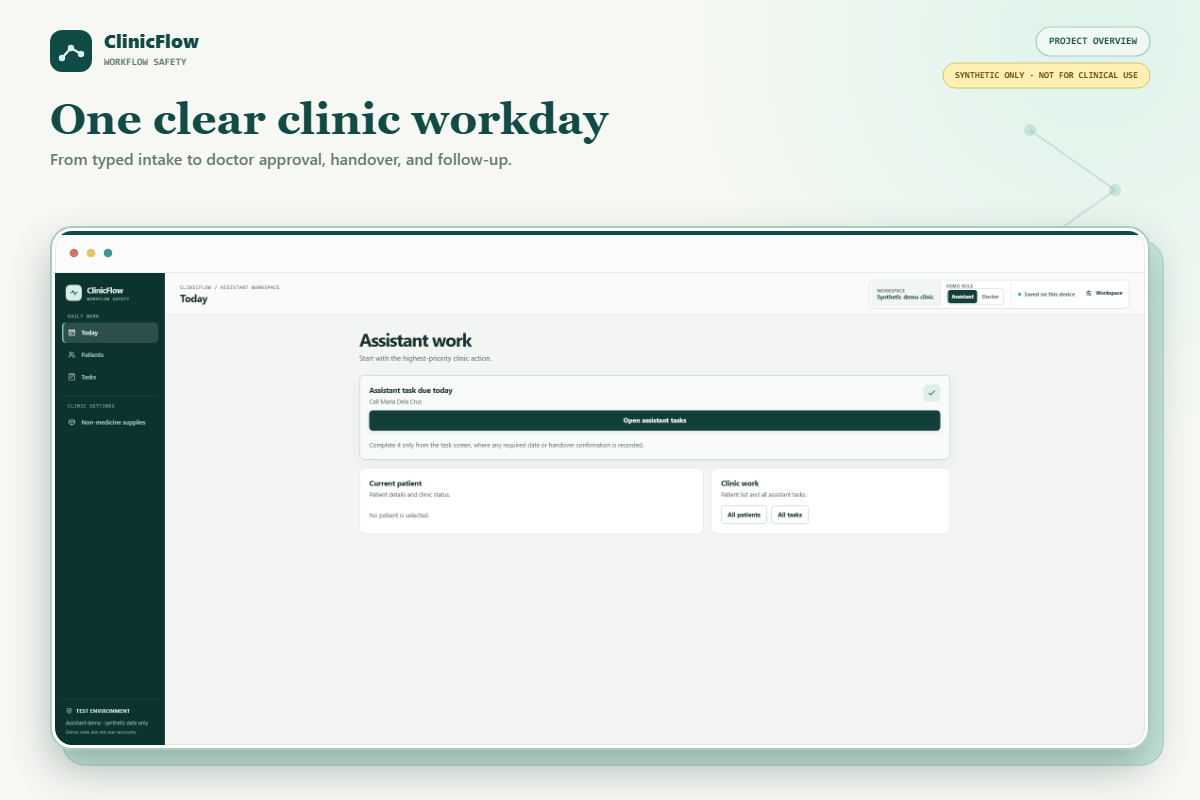
ClinicFlow turns a clinic visit into one clear workflow:
Assistant intake → Waiting for doctor → With doctor → doctor approval → Ready to give to patient → confirmed handover → follow-up
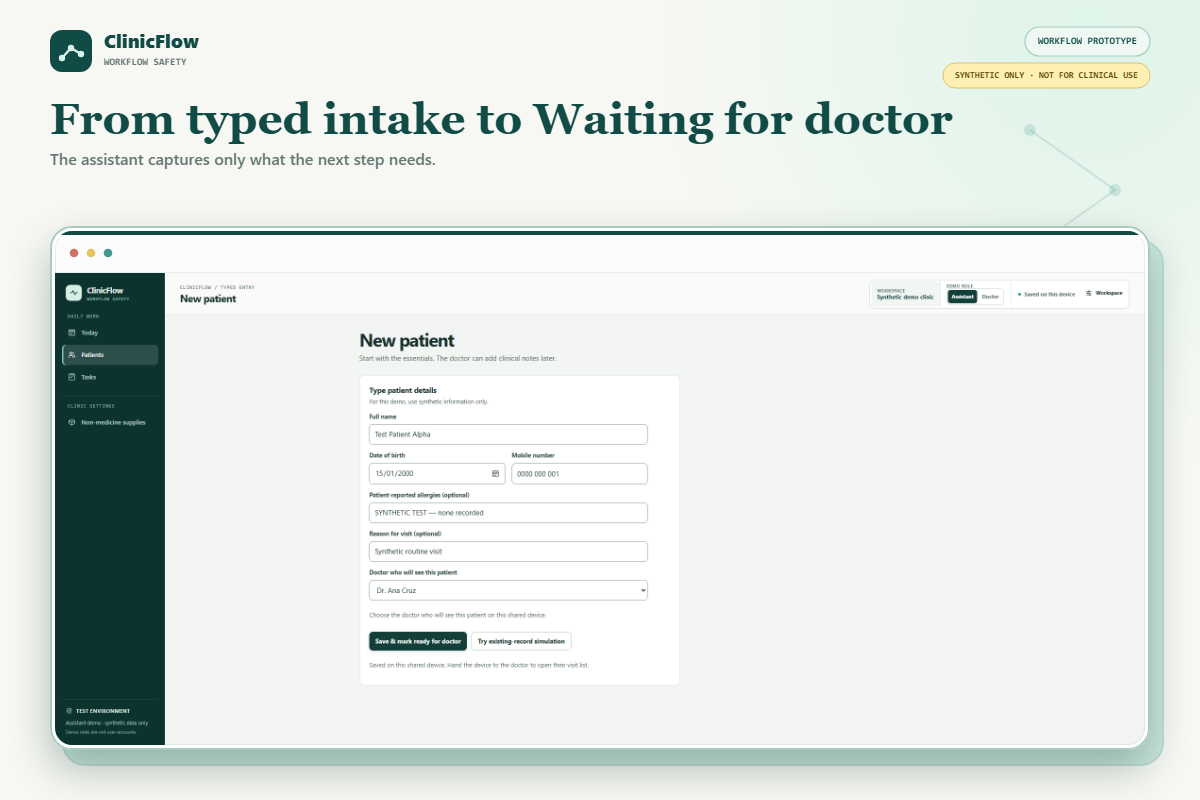
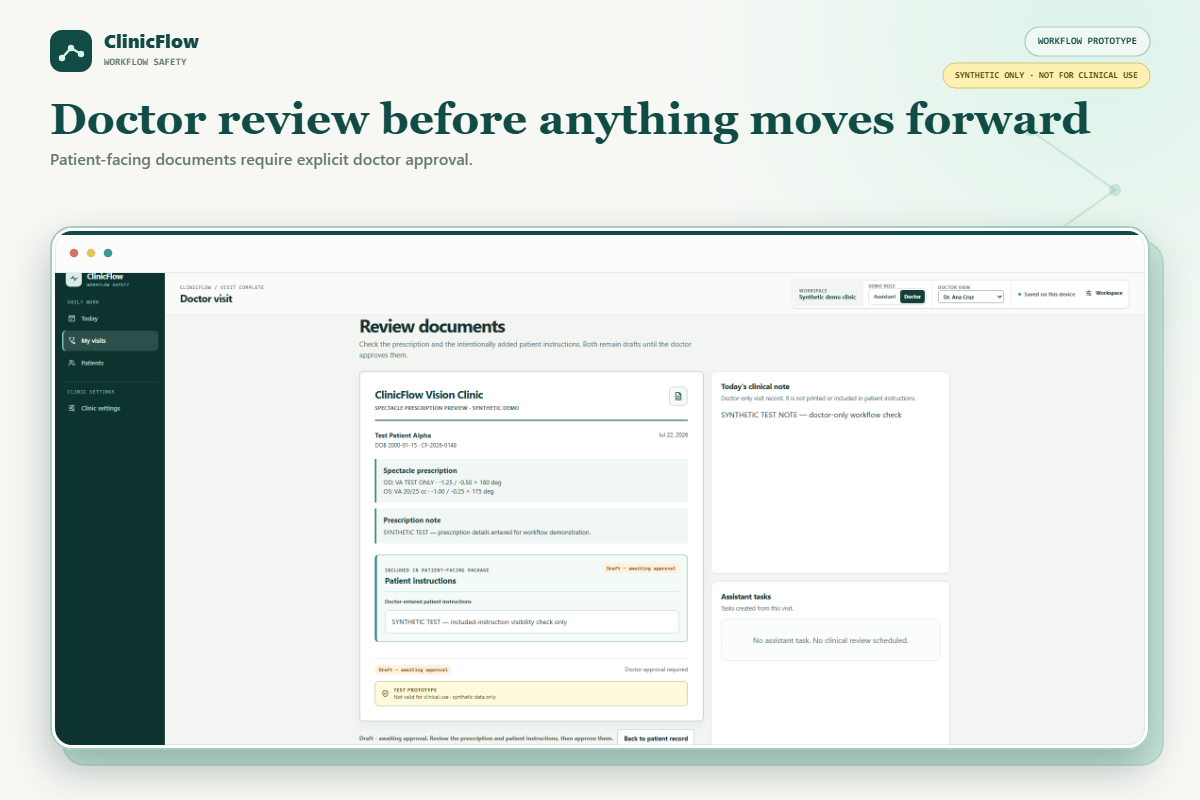
The assistant enters the basic patient details and selects Mark ready for doctor. The assigned doctor reviews the visit, records the doctor-only clinical note, selects the relevant patient documents, and approves the exact package.
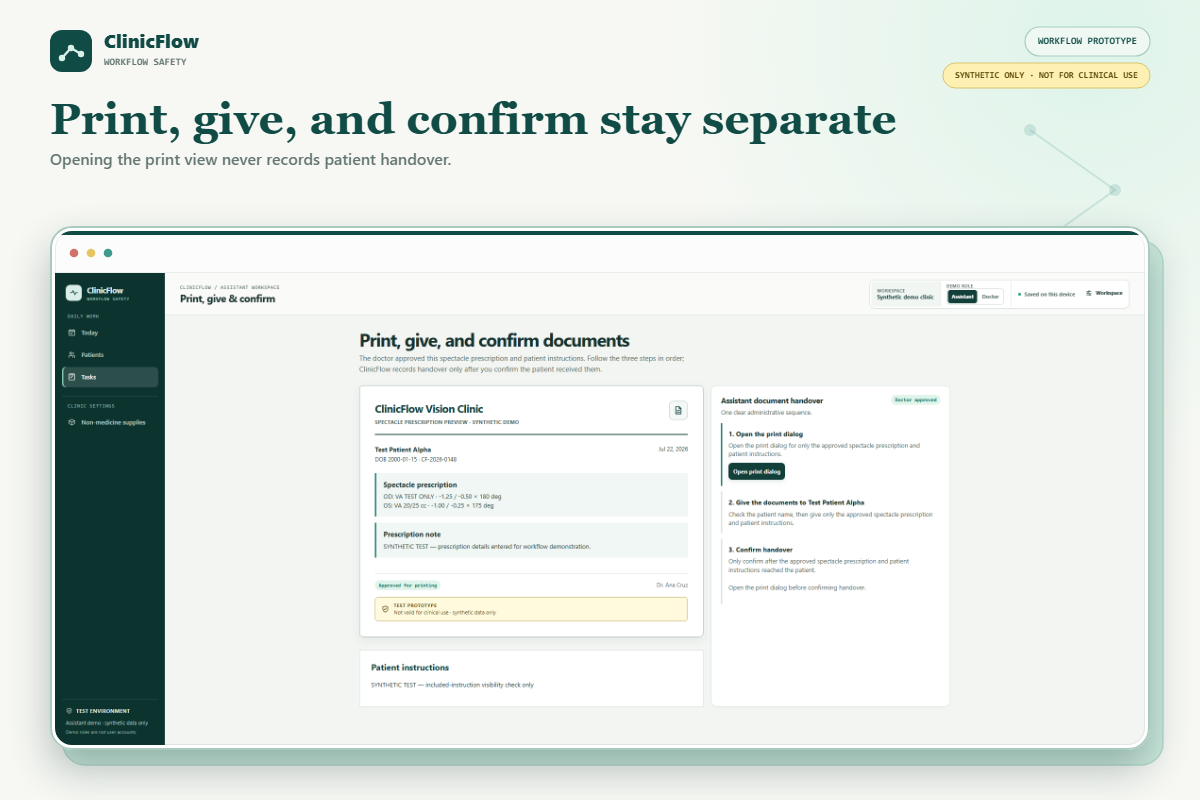
The assistant then follows three separate steps:
- Open the approved print view.
- Give only the approved documents.
- Confirm handover.
ClinicFlow never treats opening the print view as proof that something was printed, given, or received.
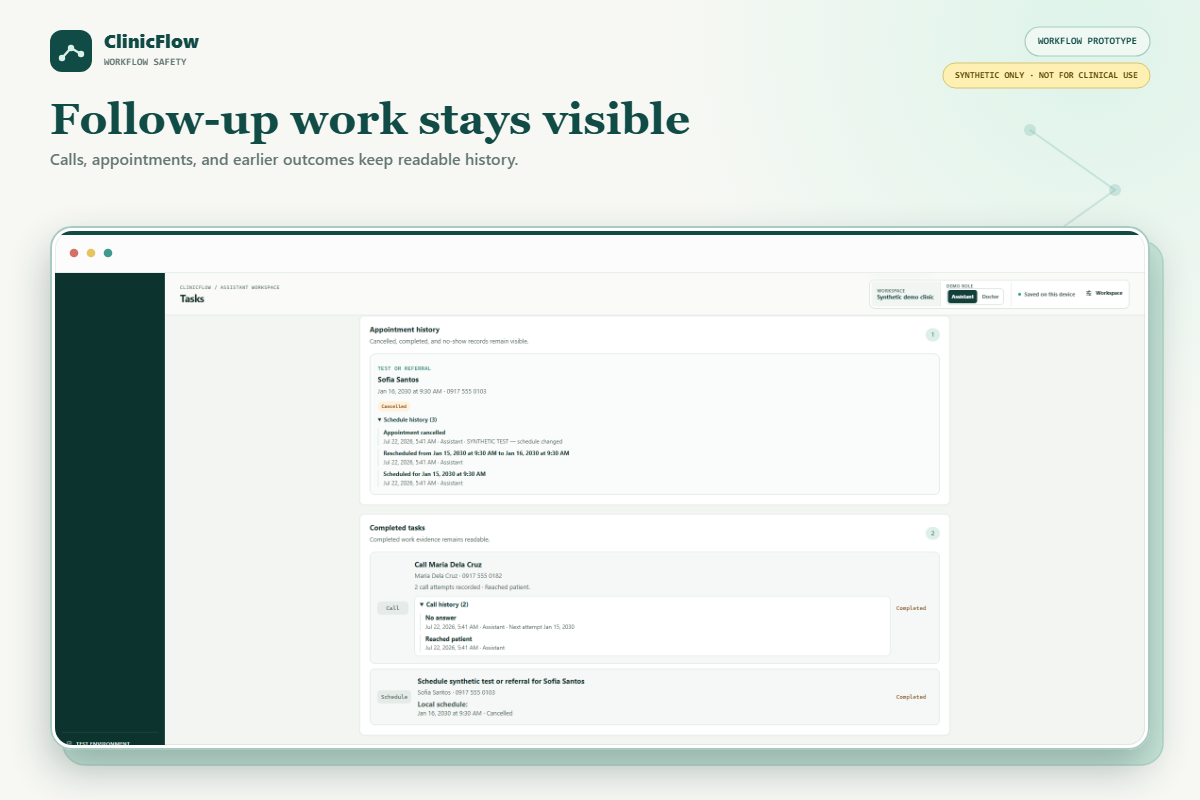
The application also handles everyday interruptions. Visits can be paused without losing work. Revisions preserve earlier approvals, while corrections after handover create linked versions instead of rewriting history. Follow-up work remains visible until staff records an outcome.
The staff application provides the complete workflow experience for solo doctors and shared-device clinics. It runs locally on one computer, uses bundled assets, saves the workspace in that browser, and does not require public internet at runtime.
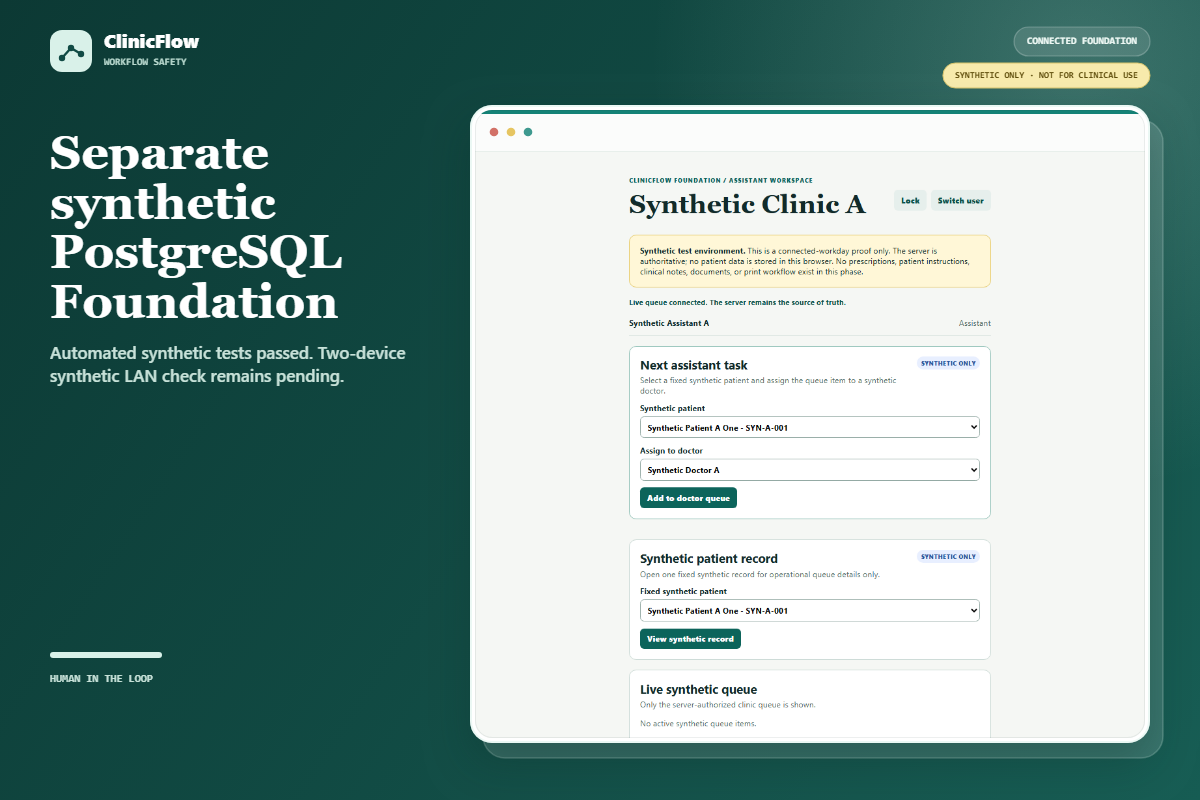
I also built a separate PostgreSQL Foundation for the connected workflow. It handles server-controlled staff roles, clinic separation, persistent sessions, conflicting actions, and reliable updates. It is designed for a private local network with a local database rather than cloud hosting, although connected devices still require the local host and clinic network.
The staff application demonstrates the complete product experience. The separate Foundation tests the server-side safeguards needed for a future connected version.
All demonstrations use clearly labelled synthetic/test-only data. ClinicFlow is a working hackathon prototype, not a full EMR or a system approved for clinical use.
How I built it with Codex
I used Codex and GPT-5.6 through two connected workstreams, with manual handoffs between them.
Planning and UX: I used one workstream to turn early doctor and assistant feedback into workflow requirements, clearer language, role boundaries, and safety decisions. This included keeping clinical decisions with the doctor, requiring explicit approval for patient-facing documents, and avoiding unnecessary complexity.
Execution and engineering: I brought those decisions into the main implementation workstream. Codex helped inspect and extend the existing codebase, implement the browser workflow and PostgreSQL Foundation, add safeguards, debug persistence and concurrency problems, design tests, run regression checks, and document the system.
After each implementation step, I brought the results, test findings, limitations, and new questions back into planning. That helped me decide what to improve next based on what was actually working.
Clinic feedback → planning decisions → implementation and tests → review results → next improvement
The two workstreams did not communicate automatically. I manually transferred the relevant decisions and results between them. I remained responsible for the scope, product choices, tradeoffs, and final approval throughout the project.
This approach let me use Codex for more than code generation. It became a structured development partner for product thinking, implementation, testing, and review.
Codex helped me:
- brainstorm product and workflow ideas;
- inspect the existing implementation before changing it;
- turn workflow decisions into concrete behavior;
- trace persistence and migration problems;
- reason about stale browser tabs and conflicting staff actions;
- implement role and clinic boundaries;
- design checks for failure and privacy behavior;
- review whether the result still matched the original product decisions; and
- document what was implemented, tested, and still pending.
Product Discovery & Workflow Design
The first chat focused on understanding the problem and designing the experience. I used it to turn clinic feedback into workflow requirements, question assumptions, simplify the language, and define the safety rules.
This helped me decide that:
- only the assigned doctor should approve patient-facing documents;
- the doctor’s clinical note should stay outside the printable package;
- paused work should never disappear;
- printing, giving, and confirming handover should remain separate actions; and
- corrections should preserve earlier approvals instead of overwriting them.
Implementation & Verification
The second chat focused on turning those decisions into working software. Codex helped me inspect and extend the existing codebase, implement the browser workflow, build the PostgreSQL Foundation, debug persistence and concurrency problems, and create focused checks for the most important rules.
I used a deliberate manual feedback loop between the two chats:
Clinic feedback → workflow decisions → implementation and testing → review results → next improvement
After major implementation steps, I brought the results, limitations, and test findings back into the planning chat. I used that review to decide what should be simplified, corrected, or tested next.
The two chats did not communicate automatically. I transferred the relevant context between them and remained responsible for the product direction, scope, tradeoffs, and final approval.
The staff application uses HTML, CSS, browser JavaScript, and Node.js. The separate connected Foundation uses Node.js and PostgreSQL. Codex helped with both the visible experience and the engineering underneath it, including persistence, permissions, stale actions, database isolation, failure handling, and testing.
Challenges I ran into
The hardest product challenge was making safety feel simple. Clinic work is frequently interrupted, but the interface still needed to show one obvious next action without hiding ownership, approval history, or unfinished work.
The hardest engineering challenge was handling stale or conflicting actions. Two people or two old browser tabs can act on the same visit. The connected Foundation therefore had to treat the server and database as authoritative rather than trusting what happened to be visible on one screen.
Another challenge was keeping the staff application and connected Foundation separate. The first demonstrates the complete user experience. The second tests persistence, clinic separation, concurrent actions, and failure behavior. Keeping that boundary clear prevented a convenient browser workflow from being mistaken for a deployed connected system.
Accomplishments that I'm proud of
I am most proud that ClinicFlow feels like one complete workflow rather than a collection of disconnected features. A visit can move from intake to doctor review, approval, handover, and follow-up while staff always know who owns the next action.
I am also proud of preserving details that workflow software often blurs:
- only the assigned doctor approves patient-facing output;
- the clinical note stays outside the patient document package;
- opening the print view, printing, giving, and confirming handover remain separate;
- paused visits keep their unfinished work; and
- corrections preserve the original approval and handover history.
The project also goes beyond a visual demo. I tested it at four levels: individual workflow rules, complete actions against PostgreSQL, safe client behavior when something fails, and encrypted HTTPS with live updates. In total, 300+ recorded automated checks passed, covering staff permissions, clinic separation, persistence, conflicting actions, privacy boundaries, and reliable refreshes.
To make the connected demonstration easier to operate, I also created a Windows launcher. It validates the local configuration, database, and HTTPS setup, starts the service in a visible window, supports browser-enrollment operations, and shuts the service down cleanly.
ClinicFlow - Testing Instructions
Synthetic / test data only. ClinicFlow is a hackathon prototype, not a clinical system, and contains no real patient data.
Repository access
The repository is private and has been shared with [email protected] and [email protected].
How to run it (about 2 minutes - no login, no database)
- Install Node.js 22.x.
- Download or clone the repository, then open a terminal in the project folder.
- Start the app:
node server.mjs
- Open http://127.0.0.1:3000 in a browser.
- On the first screen, choose Open synthetic demo clinic.
That is all it needs - no account, API key, database, or internet connection. The Assistant / Doctor button switches roles for the demo; it is not a real login.
What to try (the main workflow)
- As the Assistant: add a synthetic patient, then mark them ready for the doctor.
- Switch to the Doctor: review the visit, choose the documents, and approve them.
- Back to the Assistant: open the print view, give the documents, then confirm handover (three separate steps, on purpose).
- Watch the follow-up task appear in the queue.
Optional: connected multi-user version
Only if you want to test the backend. Needs Docker + PostgreSQL.
- Follow steps 1, 3, and 8 in
SETUP.md. - Sign in with these synthetic accounts (password:
synthetic-only-password): - Open two separate browser profiles to watch one shared queue update live between the assistant and the doctor.
(More synthetic test accounts are listed in foundation/README.md. You can ignore
the advanced HTTPS/network setup in SETUP.md; it is not needed to test the project.)
Need help?
Full setup steps and troubleshooting are in README.md and SETUP.md.
What I learned
I learned that small clinics do not necessarily need more features first. They need fewer steps, clear responsibilities, and a system that matches the way their staff already work.
I also learned that safety and usability can support each other. Clear ownership, explicit approval, preserved history, and one obvious next action can make a workflow both safer and easier to understand.
The best use of AI in this project was not replacing human judgment. It was helping me challenge assumptions, explore alternatives, implement safeguards, find edge cases, and test whether the result matched the original product decisions.
Using two focused Codex chats was especially useful. It kept product thinking separate from implementation detail while creating a continuous improvement loop between them.
What's next for ClinicFlow
The next step is validation rather than adding more features. I plan to run structured usability sessions with assistants, doctors, and solo doctors.
The long-term goal remains simple: give small clinic teams a calm workflow in which every handoff is visible, every patient-facing approval stays with the doctor, and every follow-up action has a clear owner.
Built With
- api
- codex
- css3
- docker
- events
- gpt-5.6
- html5
- javascript
- listen/notify
- localstorage
- node.js
- openai
- postgresql
- rest
- row-level
- security
- server-sent
- service
- worker


Log in or sign up for Devpost to join the conversation.