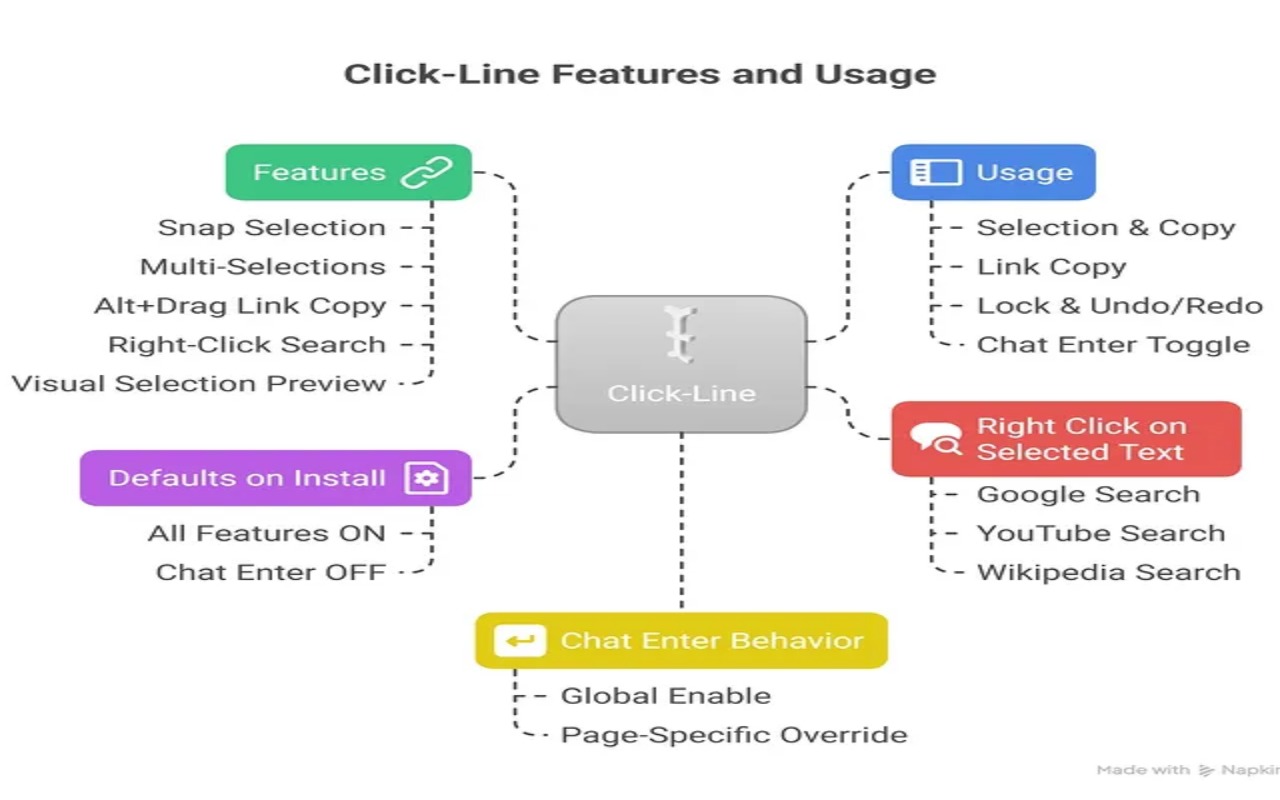
📌 About the Project: Click-Line
🚀 Inspiration
Click-Line was born out of frustration with messy, off-by-one text selections and endless copy-paste cleanup while working on research pages, docs, and chat apps.
I wanted three things:
- Clean, word-perfect selection — no dangling spaces or chopped words.
- Fast multi-selection — grab multiple snippets and copy them all at once.
- Smarter Enter key control — avoid fighting sites when sending vs. adding a newline.
That “one small annoyance, repeated thousands of times” feeling was the real spark behind this project.
🛠 How I Built It
🔹 Platform
- Chrome Extension (Manifest V3)
🔹 Architecture
- Content script
Handles selection snapping, multi-selection, highlighting, Alt+Drag link copy, and Enter behavior tweaks. - Background service worker
Powers right-click (context menu) search actions. - Popup UI (HTML/CSS/JS)
Settings, rules, and quick toggles.
🔹 Data Flow
- Settings stored in
chrome.storage.local - Live sync via
chrome.storage.onChanged - No
tabspermission or broadcasting
🔹 Selection & Highlighting
- Word snapping: via DOM Range API + configurable regex (e.g.,
\w\-) - Highlighting:
- Uses CSS Custom Highlight API when available
- Falls back to a lightweight overlay div system
- Uses CSS Custom Highlight API when available
- Performance: redraws handled with
requestAnimationFrame, scroll/resize safe
🔹 Editor Handling
- Smart Enter behavior
Enter= newlineShift+Enter= send
- Heuristics include:
enterkeyhintdetection (send,go,search)- helper text like “Shift+Enter to add a new line”
- Special case: ChatGPT (ProseMirror quirks → fixed spacing + true breaks)
- Exclusions: Code editors like Monaco, CodeMirror, Ace
🔹 UX Shortcuts
Ctrl+Drag→ add selectionsCtrl+C→ copy combined (newline / space / bullet separated)Ctrl+Z / Ctrl+Y→ undo/redoCtrl+Shift+L→ lock selectionsEsc→ clearAlt+Dragon a link → copy URL (subtle toast confirmation)- Context menu → quick search (Google / YouTube / Wikipedia)
🔹 Permissions
storage,clipboardWrite,contextMenushost_permissions: <all_urls>→ runs automatically everywhere- No:
tabs, optional permissions, remote code, or analytics
⚡ Challenges & Solutions
Consistent word snapping across complex DOMs
→ Robust Range boundary logic + TreeWalker fallbackReliable highlighting across browsers
→ CSS Highlight API where possible; overlay fallback otherwiseAvoid breaking site/editor behavior
→ Capture-phase key handling with strict editable checksProseMirror quirks (ChatGPT newlines/spaces)
→ Careful caret + node handlingPerformance with multiple selections
→ Batched DOM updates +requestAnimationFramerenderingChrome Web Store review hurdles
→ Trimmed unused code & permissions, aligned justifications with actual features
📚 What I Learned
- The CSS Custom Highlight API gives smooth UX with almost no DOM churn—but fallbacks are mandatory.
- MV3 service workers + content scripts work best when the heavy lifting stays in the content layer.
- Input behavior heuristics need to be conservative—editor ecosystems vary a lot.
- Fewer permissions + clear docs = easier reviews and higher user trust.
- Tiny UX touches (toast notifications, lock mode, undo/redo) add disproportionate value to perceived quality.
✨ That’s Click-Line: a small tool to fix the tiny paper-cuts of everyday browsing, so you can stay focused on your work instead of fighting the UI.


Log in or sign up for Devpost to join the conversation.