We have 2 videos and Devpost would only allow to post one, here are the links:
Video 1 - Us presenting the project: https://vimeo.com/267105352
Video 2 - A demonstration of Clerkexa: https://vimeo.com/267224817
Inspiration
When not in a place they know, people need to find a map or ask a person in order when they are looking for someone or something. In offices we need directions to find desks, elevators or even toilets. In public areas, shops, seminars, parties, competitions, games and all sort of events and places we will always at a moment look for something.
Finding our way can be difficult if there is no map or available people to tell us where to go.
Clerkexa is able to always help people find their way without requiring human's help or visual information.
Design your map on our website, set the locations of any interests point you want and give them names. Clerkexa will then tell people where are the things they are looking for.
What it does
Clerkexa gives directions to users who ask "her" where they can find something. Sentences such as "Where is " ; "Where can I find " will make her give people simple directions like "Go forward then left".
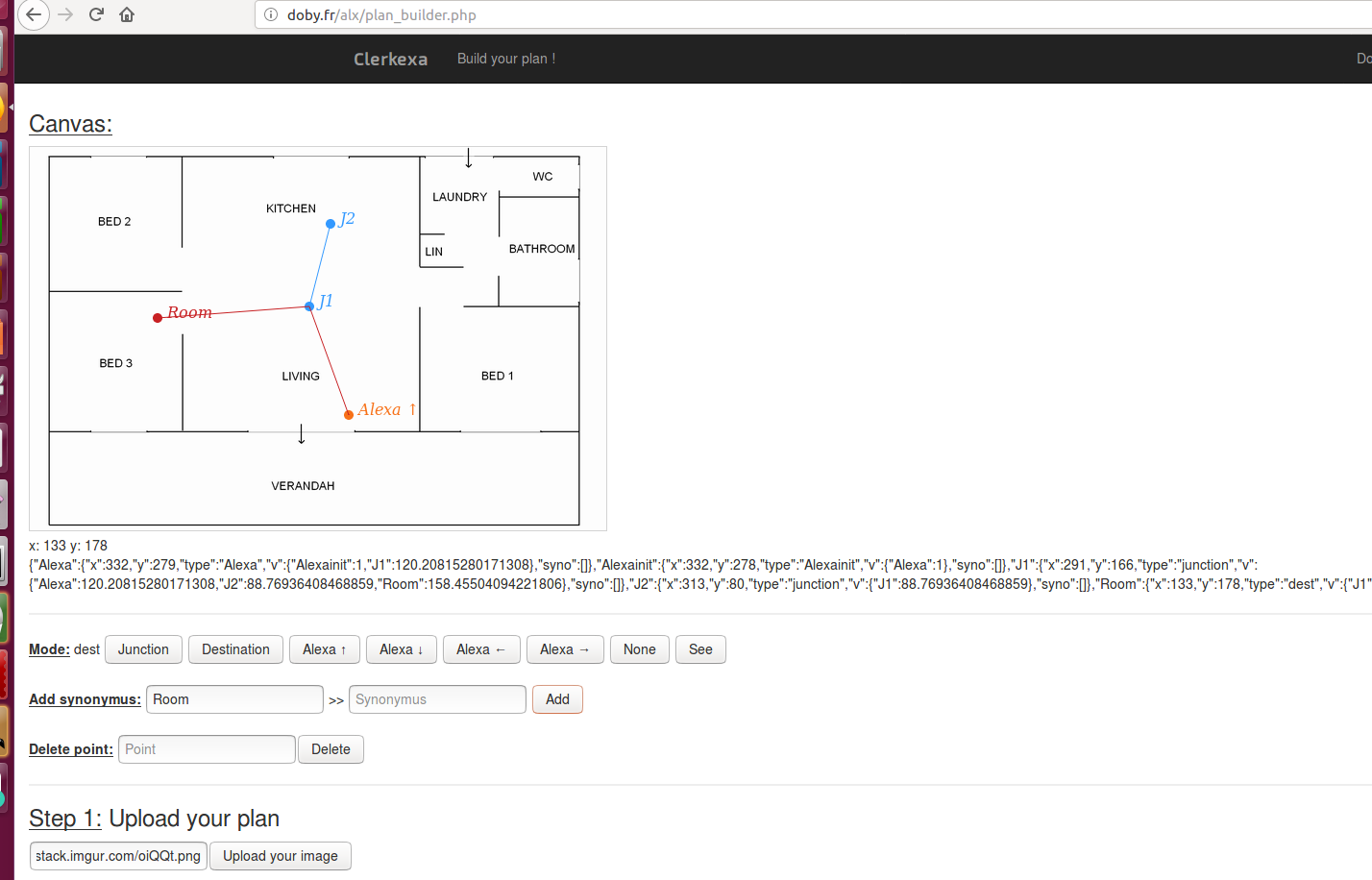
The possible destinations are defined on a map on our website plan builder interface: http://doby.fr/alx/plan_builder.php where the Alexa's owner can import the image of his choice and define locations and spoken words linked to the destinations.
The user after defining the map receives an email with his map number, he can then invoke the Clerkexa skill with "Guide me". Alexa will ask for his map number and once given will answer directions when asked for destinations put on the user's map.
Using the skill
To use the sill, you will first need to setup a map on our planbuilder webpage then you will be able to ask Alexa for your destinations.
Setup of the map
First you need to have an image of the map of the place you would like Clerkexa to work.
Then you need to setup your map on http://doby.fr/alx/plan_builder.php with theses steps:
1) Import your map
Put your map url in the step 1 section on the webpage http://doby.fr/alx/plan_builder.php and click upload (sometimes you may need to click twice).
2) Place Alexa on the map
Click on one of the four Alexa buttons with arrows under the map. The arrow selected will define the direction Alexa considers as "forward". Click on the map to place Alexa.
3) Define the junctions on your map (possible paths)
Put the junctions of your map. The junctions represent the potential changes of directions. The whole set of junctions will be all the potential paths Alexa will indicate to the user when asked for some place.
When defining junctions you will be prompted for nearest neighbors, the nearest neighbor of an element is the closest junction. This step is important for shortest path computation and Dijkstra algorithm wont be able to give path without this information.
The first junction you place should the closest junction to Alexa and its nearest neighbor Alexa.
To place a junction, click the junct button and click on the map.
Write the name of the closest junction when asked for the nearest neighbor (first junction needs "Alexa" as nearest neighbor, others will be J).
4) Define the destinations on your map (locations where Alexa will guide people).
When all your junction are placed, it is time to put the destinations on the map. The destinations are all the point of the map Alexa will give users instructions to go to.
To place a destination, click the dest button and click on the map, give it the name you want (Id of the destination).
As for junctions write the name of the closest junction when asked for the nearest neighbor, nearest neighbors can only be junctions.
5) Define the synonyms for your destinations (the words alexa will recognize as triggers for guiding to destinations)
On the Add synonymus line on the webpage for every destination you defined enter the name of the destination as Destination and the spoken words you wish Alexa to recognize for that destination. Click on add to register the synonym.
Example: If you named your destination "lift", you can add those pairs : "lift" - "lift" ; "lift" - "elevator"...
You can give as many synonyms you want to a destination and a destination must have at least one synonym.
6) Validate the map and get your map number by email
You will then receive an email on the adress you specified with a number. When initializing the skill you will need to tell Alexa this number.
Using Clerkexa
Put the Skill Clerkexa on your Alexa device and:
1) Say "guide me" to trigger the skill
2) Tell Alexa your plan number
Alexa will then ask for your plan number. You have received your plan number after validating your map on http://doby.fr/alx/plan_builder.php on the email you specified.
Answer to Alexa with "My plan number is [your_plan_number]".
Alexa will then indicate if she found your plan. If not she will ask you again for a plan number.
3) Ask Alexa for directions
You will then be able to ask Alexa for directions: "Where is [location]?" "Where can I find [location]?" and other alike sentences.
[location] spoken words are all the synonyms you have inputed in the plan builder.
Alexa will then give you directions if she recognized the spoken words or tell you if she did not get what you said.
4) Quit the skill
To quit the skill say "stop" or "thanks".
How we built it
We built an interface in javascript on http://doby.fr/alx/plan_builder.php that transforms the map the user defines in JSON. The JSON is stored in a SQL database with an ID sent by email to the user through a php script.
The Alexa skill set is linked to a python lambda function. When receiving the user ID, lambda sends a php get request with urllib open with the used id in url. The return of the request is the JSON code parsed into a python dictionary.
Clerkexa will then work with that dictionary when asked for directions translating spoken word to ids with their position data.
A Dijkstra based algorithm will determine the shortest path based on distances and neighbors. Then it wll translate it in directions such as forward, backward, left and right.
The output of the algorithm is then sent as speech to the user.
Challenges we ran into
Having all the elements connected and working was the biggest challenge.
Other challenges were how to link maps easily with users.
Modeling the plan builder output to a shortest path calculation was also challenging.
Accomplishments that we're proud of
We're proud of being able to submit our project because we heard late about this challenge.
When we saw the challenge we thought about Alexa being some of sort of "local gps" (without the localization but relatively to her position with other elements).
We then started to code it by parts with the plan builder, the shortest path finder, Alexa's skill set. When assembling parts we ran into new challenges and had to adapt elements at each step.
We are proud of having been able to build Clerkexa step by step and adapting ourselves.
What we learned
We learned how Alexa and the skill set work.
We also improved our skills in all the languages we used.
What's next for Clerkexa
We have a lot of work to do on Clerkexa.
First develop its core a bit more and the possibilities for map guidance and the output speech. The data map format could be improved
We also need to work on the plan builder to make it more user friendly and simpler.
The way we store and send map data can also be improved.
We will add multi-floors feature.
We also intend to migrate our project the most possible to python on amazon lambda.
Then when the direction function will be good and smooth we could add time information over the destinations. When asked for a place Alexa could tell people its closed.
When asked for a person Alexa could tell people he is in a meeting.
Alexa could be asked if someone is available or not.
We have lots of ideas and intents to improve Clarkexa because we believe it can be useful in a lot of situation and make things easier.
Built With
- aws-lambda
- html5
- javascript
- php
- python
- sql

Log in or sign up for Devpost to join the conversation.