-
-
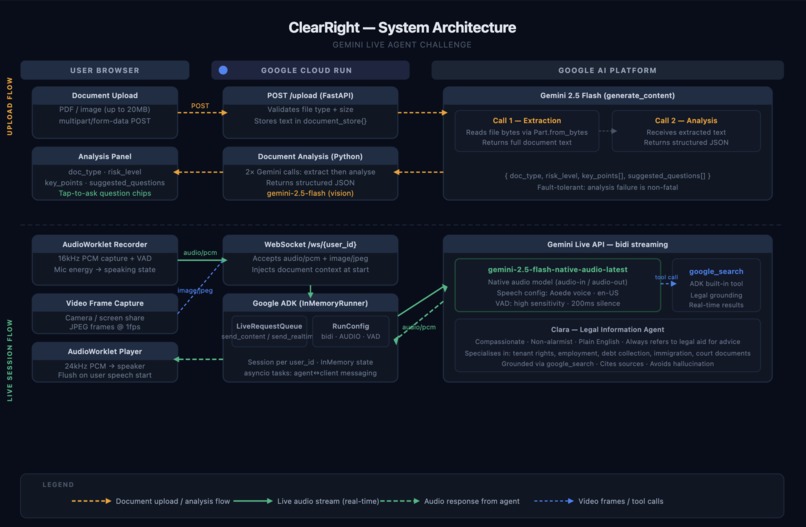
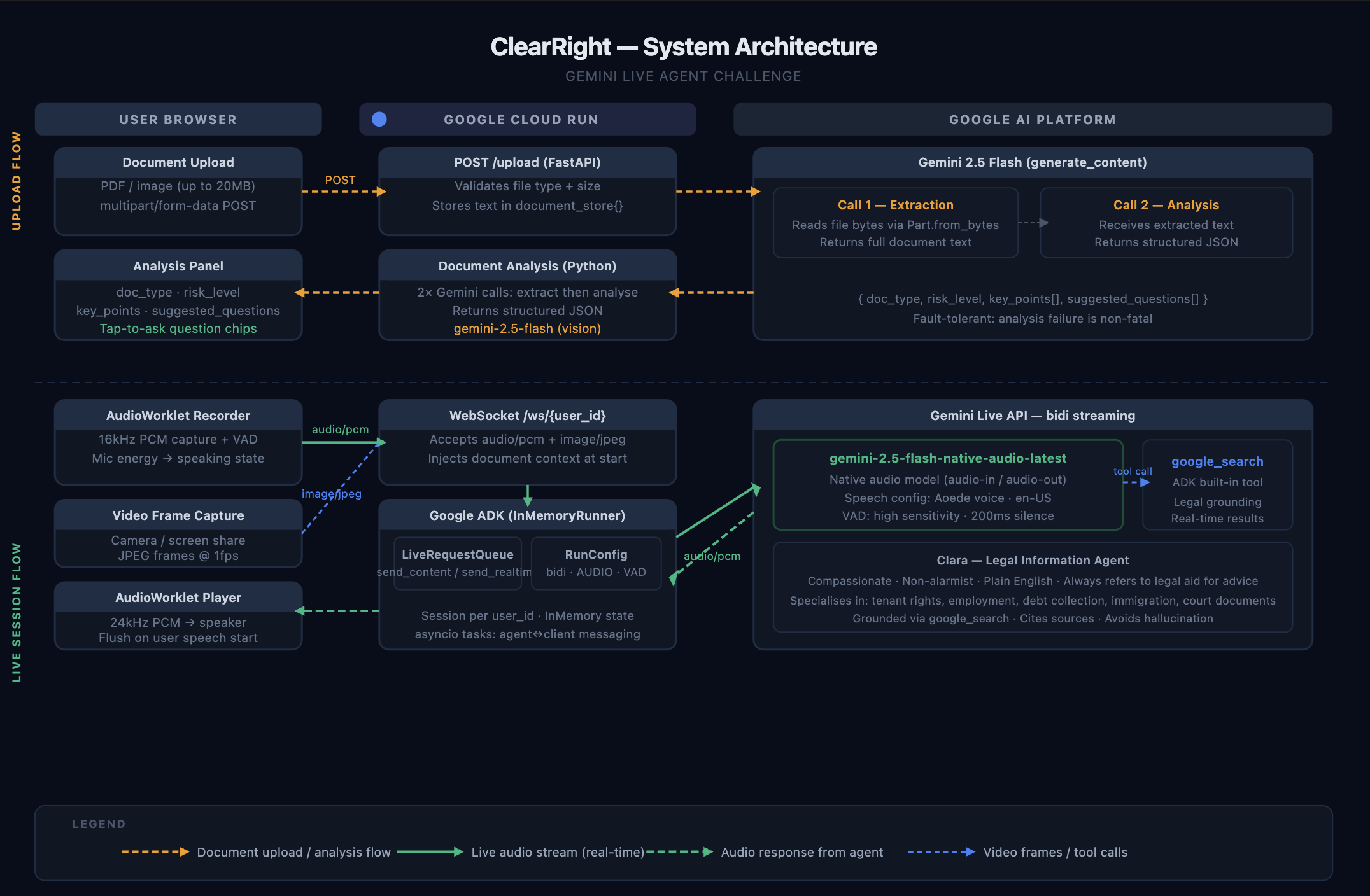
ClearRight Architecture
Inspiration
60 million Americans face civil legal crises every year without any legal representation. Eviction notices. Debt collection letters. Court summons. Insurance denials. Workplace termination letters.
These documents are confusing by design. Dense legal language, buried deadlines, and intimidating formatting leave ordinary people paralyzed, not because their situation is hopeless, but because they simply don't understand what they're reading. A single consultation with an attorney costs $200–$500 per hour. Legal aid organizations often have years-long waitlists. People lose their homes, their wages, and their rights because they couldn't decode a letter.
We built ClearRight because the gap between "having a legal problem" and "understanding your rights" should not cost $400. It should cost nothing.
What It Does
ClearRight is a real-time AI legal information assistant built around Clara, a voice-first agent that helps everyday Americans understand their legal documents and know their rights.
The experience has three stages:
1. Upload your document Drop in any PDF or photo of a legal document, a lease, an eviction notice, a court summons, an insurance denial letter. Within seconds, Gemini 2.5 Flash reads the document using multimodal vision and returns a structured analysis: the document type, a risk level (high / medium / low), the two most important things to know, and four document-specific questions the user should be asking.
2. Get an instant AI briefing Before saying a word, users see a clear analysis card in the interface. They know immediately what kind of document they're dealing with, whether it's high-risk, and what questions they should be exploring. The suggested questions are tappable, sending them to Clara with a single tap.
3. Talk to Clara
The user starts a voice session and talks naturally. Clara is powered by the Gemini Live API with native audio streaming, she hears the user, processes context in real time, and responds with spoken audio. The conversation is genuinely live: the user can interrupt, redirect, or ask follow-up questions mid-sentence. Clara uses the google_search tool via ADK to ground her responses in current law and cite real sources when needed.
Clara can see the document through the user's camera or screen share, can look up state-specific laws and deadlines in real time, and always ends substantive answers by directing users to free legal aid resources, because she provides legal information, not legal advice.
What Clara helps with:
- Eviction notices and tenant rights (Pay or Quit, Cure or Quit, Unconditional Quit)
- Debt collection letters — FDCPA rights, dispute windows, statute of limitations
- Lease agreement review — unusual clauses, security deposit rules, entry notice requirements
- Court summons and default judgment deadlines
- Insurance claim denial appeals
- Workplace termination and employment discrimination (EEOC, FMLA)
- Immigration document explanations
How We Built It
ClearRight is a full-stack application with two independently deployed Cloud Run services and a purpose-built audio pipeline.
Backend — FastAPI + Google ADK
The backend is a Python FastAPI application with two main endpoints:
POST /upload processes legal documents using Gemini 2.5 Flash's multimodal vision. It makes two sequential Gemini calls: first to extract the full text from the document (handling PDFs, JPEG, PNG, WEBP, HEIC), and second to produce a structured JSON analysis containing doc_type, risk_level, key_points, and suggested_questions. The analysis step is fault-tolerant, a parsing failure is logged but does not fail the upload.
WebSocket /ws/{user_id} manages live agent sessions. When a connection opens, the server starts a Google ADK InMemoryRunner session, injects the uploaded document as context, and prompts Clara to greet the user and summarise the document. Two async tasks then run concurrently: one forwarding client audio/video frames to the agent via LiveRequestQueue, and one streaming agent events back to the browser.
The ADK agent uses gemini-2.5-flash-native-audio-latest, a native audio model that processes audio directly without text intermediation — with the google_search built-in tool for real-time legal grounding.
RunConfig key settings:
streaming_mode="bidi"— full bidirectional streamingresponse_modalities=[AUDIO]— native audio output- VAD:
START_SENSITIVITY_HIGH,END_SENSITIVITY_HIGH, 100ms prefix padding, 200ms silence duration for low-latency response SpeechConfig: Aoede voice, en-US language
Frontend — Next.js + AudioWorklet
The frontend is a Next.js 15 application with a custom audio pipeline built on the Web Audio API.
Audio recording uses an AudioWorkletProcessor running at 16kHz that captures PCM frames, performs energy-based voice activity detection, and streams base64-encoded audio to the backend over WebSocket. Energy levels are reported back to the main thread for live microphone visualization.
Audio playback uses a second AudioWorkletProcessor running at 24kHz that receives PCM chunks from the backend, buffers them, and plays them back. On user speech detection, the playback buffer is flushed immediately to prevent audio overlap.
The useLiveConnection custom hook manages the full session lifecycle: WebSocket connection, media stream acquisition (camera or screen share), AudioWorklet setup/teardown, and document upload state.
Infrastructure
Both services are containerized and deployed to Google Cloud Run via an automated deploy.sh script using Cloud Build (no local Docker required). The script enables required GCP APIs, creates an Artifact Registry repository, builds images remotely, and wires the backend URL into the frontend at build time. Deployment is fully reproducible with a single command.
Tech stack summary:
| Component | Technology |
|---|---|
| Voice agent | Gemini Live API — gemini-2.5-flash-native-audio-latest |
| Document processing | Gemini 2.5 Flash — multimodal vision |
| Agent framework | Google Agent Development Kit (ADK) |
| Legal grounding | ADK google_search built-in tool |
| Backend | Python 3.11 + FastAPI + WebSockets |
| Frontend | Next.js 15 + TypeScript + Tailwind CSS |
| Audio pipeline | Web Audio API + AudioWorklet (16kHz in / 24kHz out) |
| Cloud | Google Cloud Run + Artifact Registry + Cloud Build |
Challenges We Ran Into
Native audio model and the event stream. The gemini-2.5-flash-native-audio-latest model processes and emits audio natively — which gives it extremely natural speech and low latency — but it means the ADK event stream carries only audio chunks. There are no text events, no function call events, and no transcription events surfaced through run_live(). Building a "conversation transcript" panel was not feasible with this model. We redesigned the right panel entirely around what we could provide: an upfront document analysis and interactive question chips — which turned out to be more useful to users anyway.
Audio pipeline cold start and context reuse. Chrome's Web Audio API has a quirk: closing and recreating an AudioContext after a worklet has been registered causes worklet registration failures on reconnect. We worked around this by suspending (not closing) AudioContexts between sessions, reusing the same context and worklet thread across reconnections.
VAD and the speech_end signal. The initial AudioWorklet implementation detected speech start and sent a flush signal to the player, but never sent a speech_end event back to the UI, leaving the "user is speaking" indicator permanently active after the first utterance. We fixed this by adding proper speech_end handling in the worklet's silence detection logic.
Cloud Build and environment variables. gcloud builds submit does not support --build-arg flags. We resolved this by writing the NEXT_PUBLIC_API_URL into a .env.production file in the client directory before submitting the build context, making the backend URL available to Next.js at build time.
ADK 1.26 and ThinkingConfig. We initially included ThinkingConfig(thinking_budget=0) in the agent's GenerateContentConfig to reduce latency. ADK 1.26 rejects this with a ValidationError stating thinking config must be set via LlmAgent.planner. We removed the config entirely and relied on the model's default behaviour.
Accomplishments That We're Proud Of
The audio pipeline works seamlessly. Interruptions, barge-ins, and natural conversational pauses all work correctly. Clara stops speaking the moment a user starts talking. The 16kHz/24kHz asymmetric sample rate pipeline with custom AudioWorklet processors delivers low-latency, high-quality audio in both directions.
Document analysis is genuinely useful. Judges and users see value before saying a word. The AI-generated risk level, key points, and suggested questions turn a passive "upload and wait" interaction into an active, informed starting point. The tap-to-ask chips make the most common user action a single tap.
Clara's persona holds up in conversation. The system prompt produces a genuinely warm, plain-English, non-alarmist voice that treats users with dignity. Clara doesn't lecture, doesn't use legal jargon without explaining it, and always ends by pointing users to free legal aid, reinforcing that this is information, not advice.
Fully automated cloud deployment. The entire infrastructure: APIs, Artifact Registry, Cloud Build, Cloud Run — is provisioned and deployed with a single script. Any judge can redeploy from scratch in one command.
What We Learned
The native audio model changes the UX paradigm. Designing for an audio-only event stream forced us to rethink the UI entirely. The instinct was to show a transcript; the right answer was to front-load useful structured information (the analysis card) and make the voice interaction feel seamless rather than visually narrated. Voice-first UX is genuinely different from chat-first UX.
ADK abstracts the hard parts, but the hard parts are still there. The Agent Development Kit handles session management, tool orchestration, and event routing elegantly. But understanding what events flow through run_live() for a native audio model versus a text-capable model required careful debugging with server-side event logging. Always log events during development.
Multimodal document processing is remarkably capable. Gemini 2.5 Flash's vision handles handwritten notes, photographs of physical documents, and scanned PDFs with high fidelity. The extraction quality was better than expected across a range of real legal documents.
Legal information tools need careful guardrails. The distinction between legal information and legal advice is not just a disclaimer — it shapes every aspect of Clara's persona, what she will and won't say, and how she directs users to real help. Getting this right was as important as the technical implementation.
What's Next
- Persistent sessions — Allow users to return to a conversation about their document across multiple sessions with memory.
- Document comparison — "Here's my old lease and my new lease — what changed?"
- State-specific legal aid directory — Automatically surface the correct legal aid organization based on document type and detected state.
- Mobile app — The voice-first interaction model maps naturally to mobile; a native app would lower the barrier for the users who need this most.
- Multi-language support — Legal document complexity is compounded by language barriers. Extending Clara to Spanish and other languages is an obvious high-impact next step.
Built With
- artifact-registry
- audioworklet
- fastapi
- gemini-2.5-flash
- gemini-live-api
- google-adk
- google-cloud-build
- google-cloud-run
- next.js
- python
- tailwindcss
- typescript
- web-audio-api
- websockets


Log in or sign up for Devpost to join the conversation.