-
-
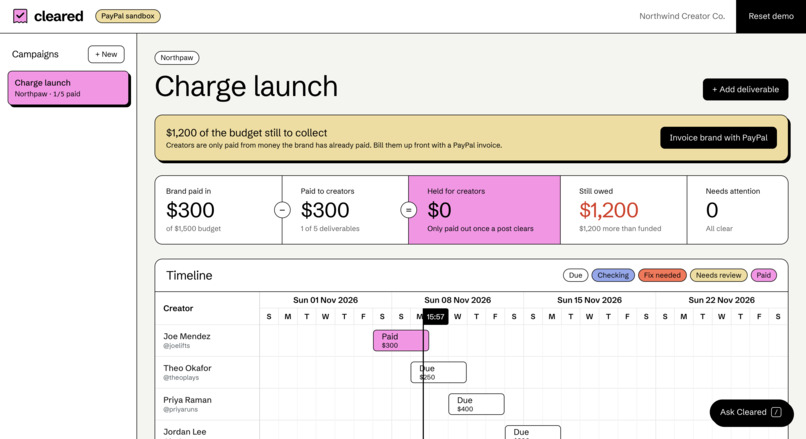
Agency View
-
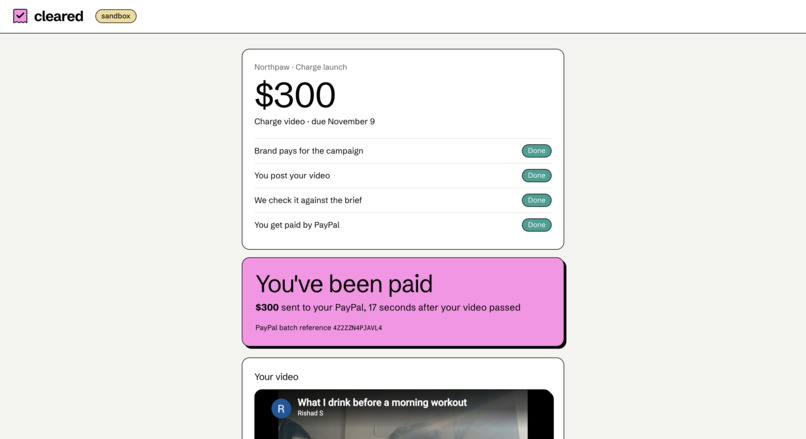
Creator View
Inspiration
Sponsored YouTube videos are a large part of how many creators earn money, but the process after a video goes live is still mostly manual. Someone at the brand or agency watches each video, compares it with the brief, checks that the creator disclosed the sponsorship the way the FTC requires, emails the creator about any fixes and then sends the payment by hand, which often leaves creators waiting a month or two to be paid. The most common compliance problem also tends to get missed in that process, where a creator praises the product for most of the video and mentions the sponsorship near the end, even though the rules say the disclosure should come before the endorsement.
My goal with Cleared was to automate that whole stretch, so that a video is checked against the brief and the rules as soon as the creator submits it and, if it passes, the creator is paid through PayPal within a minute or so.
What it does
I built Cleared for agencies that run sponsored campaigns for brands. It checks each creator's video against the brand's brief and the FTC's disclosure rules, and pays the creator through PayPal once the video passes.
A campaign starts with the agency sending the brand a PayPal invoice for the budget, because I set Cleared up to pay creators from money the brand has already paid rather than from the agency's own account. The agency pastes in the brand's brief, Gemini turns it into a checklist of requirements that can be verified, such as showing the product on camera, tagging the brand in the description and including the campaign link, and Cleared adds the FTC disclosure requirements to that checklist regardless of what the brief says.
Each creator has a page where they submit the link to their video once it's live, and Cleared then runs two sets of checks in parallel. Code reads the YouTube data, including the description, tags and the "includes paid promotion" setting, while Gemini watches the video and reports when the product appears, whether the brand is mentioned and when the creator says the video is sponsored. Results usually arrive in about fifteen seconds and show the evidence for each check, with a clickable timestamp that moves the video to the relevant point. When something fails, Gemini drafts a short message telling the creator what to change. Fixes to the description can be re-checked in a second or two, while problems inside the video require a new upload.
I kept payment decisions with code rather than the AI. A payment is sent through PayPal Payouts when every check has passed, the brand's money has arrived and the fee is below a safety limit, and in my testing creators were paid about twenty seconds after the money was released. If the brand hasn't paid its invoice when a video passes, the payment is held and released automatically once the invoice is paid.
I also added Ask Cleared, an assistant built on PayPal's Agent Toolkit that answers questions about invoices and campaigns, such as whether the brand has opened its invoice or which creators are due this week, using live PayPal data. It can send the brand a payment reminder when asked but has no way to move money, so a request to pay a creator gets an explanation that payments follow verified work.
The main dashboard view is a Bryntum Scheduler timeline with a row for each creator and a bar for each video, coloured by its current status.
How I built it
I wrote the backend in Node.js and Express, using SQLite through Node's built-in driver to store campaigns, deliverables, checks, invoices, payouts and an event log. PayPal Invoicing v2 covers the brand's side: Cleared creates and sends the invoice, tracks its status and credits the campaign inside a database transaction when it's paid, so a payment can't be counted twice. PayPal Payouts covers the creator's side, and I gave each payout its database record as the batch ID along with a PayPal request ID, so a retry or crash can't pay a creator twice.
For the assistant I used the invoice tools from PayPal's Agent Toolkit and wrapped them so they see the invoices Cleared created and nothing else in the PayPal account, which keeps the assistant's answers consistent with the dashboard. I wrapped the reminder tool the same way.
I use Gemini for four tasks: turning the brief into a structured checklist, watching the YouTube video from its URL, writing fix messages for creators and running the assistant's tool calls. The YouTube Data API provides the description, video length and paid promotion flag. I built the frontend with React and Vite, used the Bryntum Scheduler for the timeline, and designed the creator's page for phones, since that's where most creators will open it. The app is deployed on Render, and in demo mode it accepts PayPal sandbox email addresses and nothing else, limits requests and AI calls per day, and has a reset button that returns the demo to a clean state.
Throughout the build I kept the same split which was the AI judges what happened in the video and code decides whether money gets sent so Gemini reports what it saw and when, and a small policy file with no AI in it makes the payment decision.
Challenges I ran into
Detecting whether a disclosure exists was straightforward, but checking whether it came early enough depends on timing and took more work. I had Gemini return a timestamp for each finding, compared those timestamps in code, and discarded any timestamp past the end of the video. If Gemini reports a requirement as met without a timestamp, I mark the check as unsure and send it to a person instead of triggering a payment.
Gemini's free tier allows twenty video analyses a day on the main model, and I ran through that quickly during testing. To work within the limit, I save each analysis by video and checklist, so a creator who fixes their description is re-checked without the video being watched again. I also added a fallback to a lighter model for when the main one is busy or out of quota, plus a time limit so a slow response can't leave a check stuck.
PayPal's toolkit is designed for the Vercel AI SDK, which wasn't passing back the "thought signatures" that newer Gemini models require between tool calls, so the assistant failed partway through conversations. I wrote a separate loop that returns the signatures correctly while still running the toolkit's tools unchanged.
I also ran into a race condition where the background worker and a button click could both register a paid invoice at the same time. I fixed it by making the crediting step a single transaction and guarding the payout release so it runs once per video.
Accomplishments that I'm proud of
With Cleared, a creator can go from submitting a link to receiving money in their PayPal sandbox account in under a minute, with no manual steps when everything is correct. It catches late disclosures to the second and links to that point in the video, which is easy to miss when reviewing videos by hand. I also got the three PayPal products working as one flow, with Invoicing collecting the brand's money, Payouts paying creators and the Agent Toolkit answering questions about both, while the assistant has no ability to make payments.
What I learned
The main design question I worked through was where the AI's role should end. Having a model read the brief, watch the video and draft messages saves a lot of time, but giving it control over payments would turn any mistake it makes into a financial one. Separating judgment, handled by the AI, from the payment decision, handled by code, made the system easier to trust and easier to explain.
What's next for Cleared
Next I plan to add support for TikTok and Instagram Reels, which have their own disclosure tools, and to let brands pay invoices by card so one campaign payment can be split across many creators. I also want to add disclosure rules for other regions, such as the UK's ASA guidance and EU rules, applied based on where each creator is located, along with a per-campaign report a brand could give to a regulator showing that every video was checked and when.

