-
-
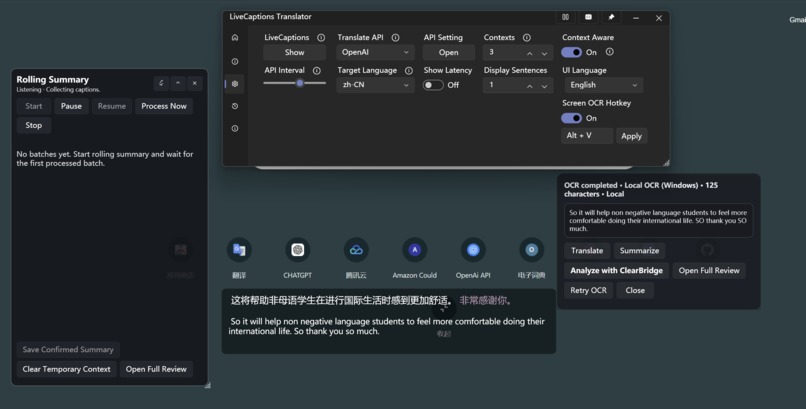
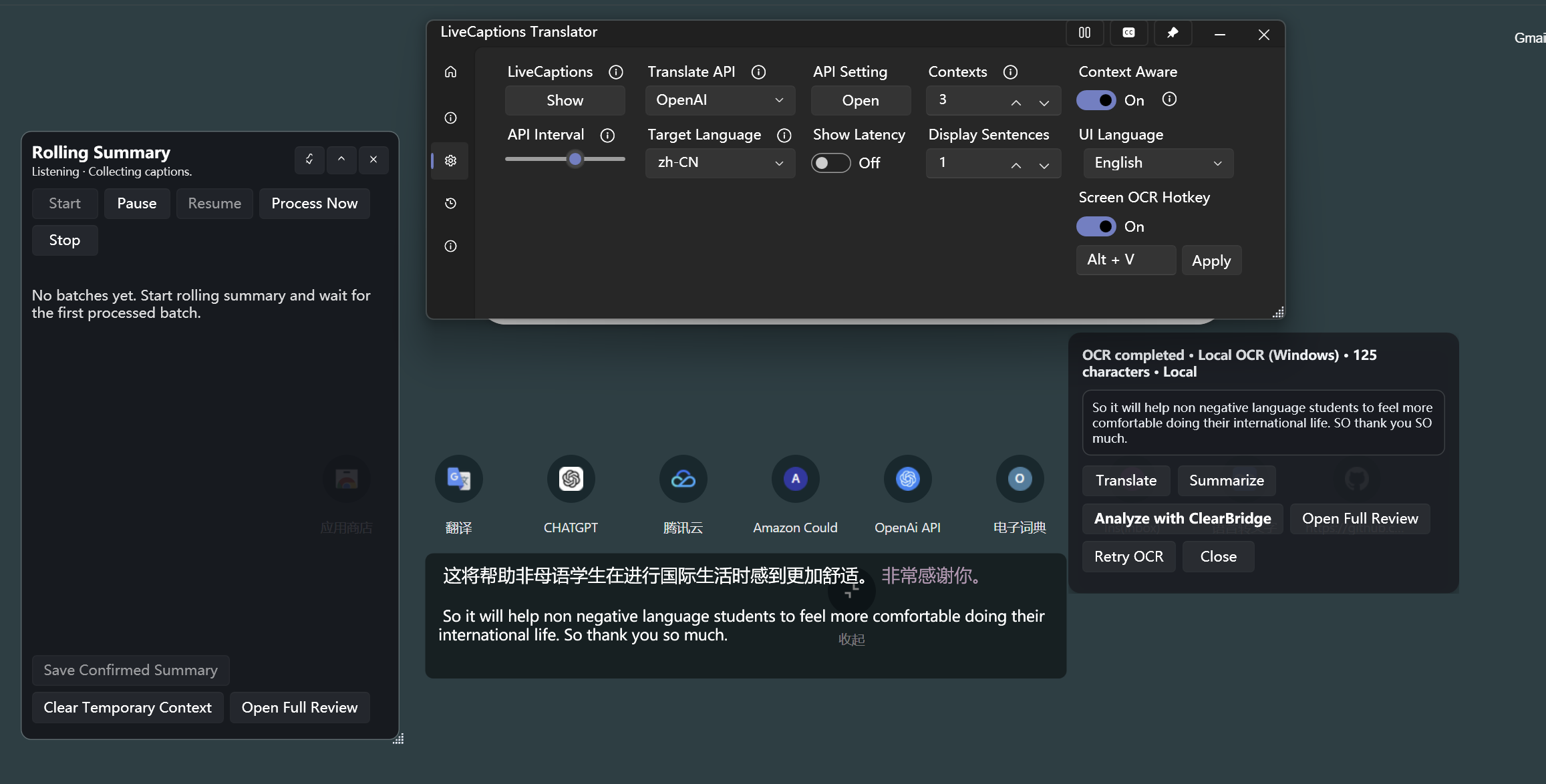
ClearBridge rolling summary, live captions, OCR, and multilingual analysis interface.
Inspiration
Many multilingual students and community users receive important information through school notices, emails, screenshots, scanned documents, and live captions. A normal translation tool may translate the words, but it often does not clearly explain what the user must do, when they must do it, what documents are required, or which parts are uncertain.
This problem is especially serious when a missed deadline, incorrect location, or misunderstood warning can cause a student or family to lose access to an opportunity or service.
We created ClearBridge to turn complicated multilingual information into clear, source-backed next steps.
What it does
ClearBridge is a Windows desktop application that analyzes notices, on-screen text, and live captions.
It can produce:
- A concise summary
- Priority level
- Key points
- Action steps
- Deadlines and dates
- Locations
- Required documents
- Warnings
- Unclear or missing information
- Source evidence from the original text
Users can enter text directly, capture a region of the screen with OCR, upload an image, analyze selected caption ranges, or use the Rolling Summary overlay to process live captions in batches.
ClearBridge supports English, Simplified Chinese, and Arabic interfaces and outputs.
How we built it
ClearBridge was developed as a modified Windows WPF application based on the open-source LiveCaptions Translator project.
We added a structured AI analysis pipeline that sends selected text to an OpenAI-compatible language model and requires a strict JSON response. The response is parsed into separate fields such as actions, deadlines, warnings, unresolved questions, and source evidence.
The application includes:
- Local OCR using Windows OCR APIs
- Optional cloud vision OCR with user confirmation
- OpenAI-compatible AI providers
- Structured JSON parsing and retry logic
- Caption snapshot and range-selection logic
- Rolling caption summarization with compressed in-memory context
- Source-evidence validation
- Human confirmation before saving
- Local history for confirmed results
- Multilingual WPF localization
- Automated audit tools and GitHub Actions validation
Human-in-the-loop design
ClearBridge does not automatically perform actions for the user.
Users choose when analysis starts, can review and edit OCR text, compare results with the original source, inspect unclear items, and decide whether to save the result.
Cloud OCR requires explicit confirmation before an image is uploaded.
Rolling Summary results are temporary by default and are saved only when the user selects “Save Confirmed Summary.”
Responsible AI
We designed ClearBridge around specific failure risks.
An AI model may miss a deadline, confuse a location, incorrectly merge conflicting information, or present uncertain information too confidently.
To reduce these risks, ClearBridge:
- Shows source evidence from the original input
- Separates unclear information from confirmed information
- Requires user confirmation before saving
- Does not automatically execute external actions
- Does not advance rolling-summary state after failed or cancelled requests
- Does not silently replace failed real AI results with mock output
- Restricts source evidence to text from the current input batch
- Uses strict JSON validation and one controlled retry for invalid output
- Keeps temporary rolling context in memory and clears it when the app closes
AI-generated content may still contain errors, so users are instructed to verify important information before acting.
Challenges we faced
One major challenge was keeping AI output structured and trustworthy across different providers and languages. Some models returned invalid JSON, translated JSON keys, or paraphrased source evidence.
We addressed this by strengthening prompts, adding strict parsing, limiting retries, and validating evidence against the original input.
Another challenge was processing live captions without repeatedly sending the full transcript. We created a rolling system that combines each new caption batch with a compressed background context, while keeping temporary data in memory only.
We also had to support OCR, caption analysis, multilingual UI, cancellation, failure recovery, and desktop overlays without creating duplicate AI requests.
Accomplishments
We completed:
- Text-based ClearBridge analysis
- English, Chinese, and Arabic interface support
- Local screen-region OCR
- Optional AI vision OCR
- OCR translation, summarization, and analysis
- Manual caption-range analysis for up to 400 sentences
- A floating Rolling Summary window
- Source-backed evidence validation
- Human confirmation and review flows
- Memory-only temporary context
- Automated Phase 4 and Phase 5 audit tools
- Real API testing with synthetic multilingual data
- A self-contained Windows release package
What we learned
We learned that responsible AI is not only a warning message. It requires product decisions that control what happens when the model is uncertain, incorrect, unavailable, or inconsistent.
We also learned that translation alone is not enough. Users often need help understanding what information means and what they should do next.
What is next
Future development could include:
- Broader real-world classroom and community testing
- More languages
- Improved accessibility and multi-monitor support
- Better long-document workflows
- Continuous region-based OCR monitoring
- Deeper integration with the original C3 desktop assistant
- More offline and local AI options

Log in or sign up for Devpost to join the conversation.