Inspiration
Clearbit is quite possibly the best way to get more information about a lead or customer, and their Slack integration makes life easier for sales people so I decided to bring their lookup functionality into Cisco Spark.
What it does
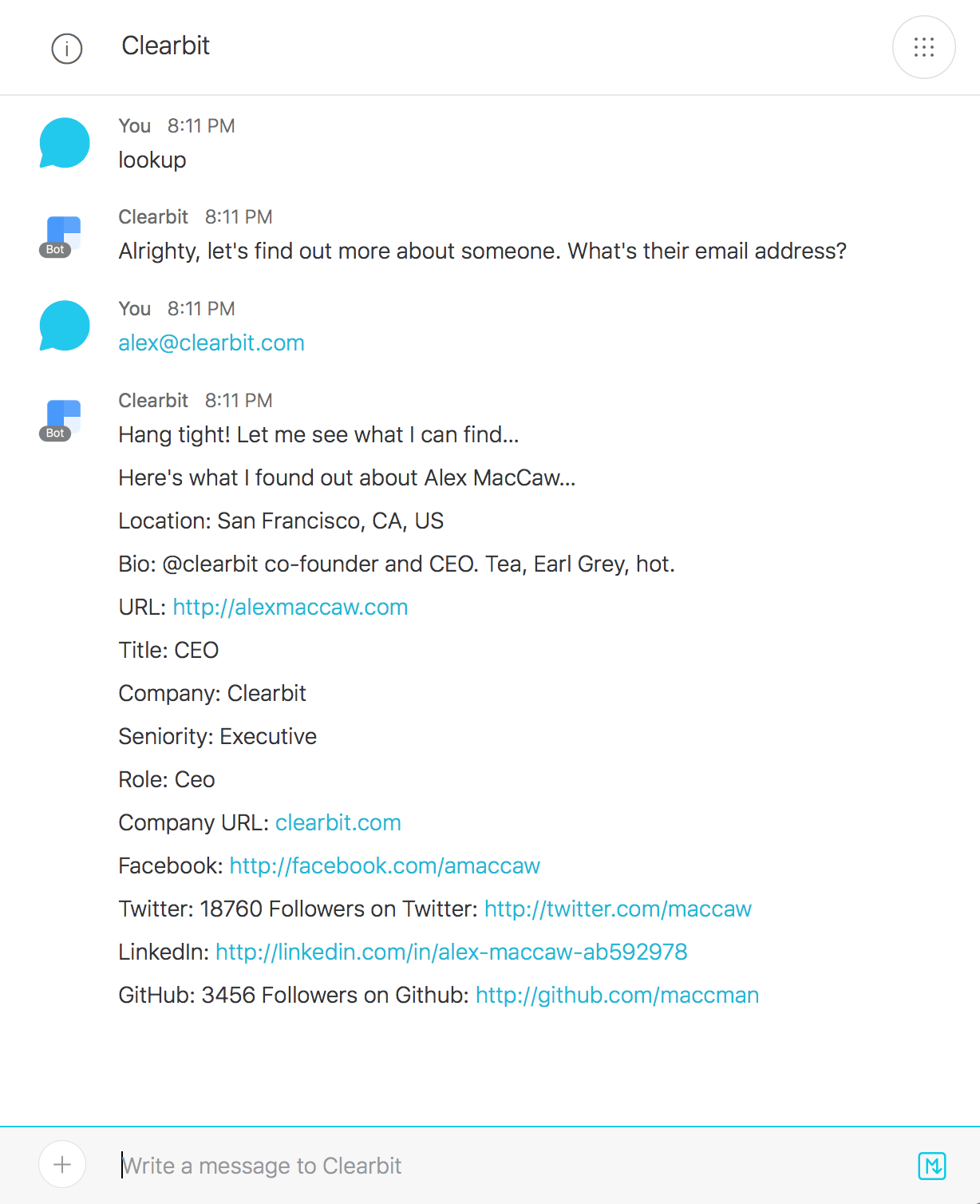
The Cisco Spark Clearbit Bot allows sales people to instantly build a customer profile of any hot lead or customer using their email address. When a sales person enters a lead or customer email address in Cisco Spark the Clearbit Bot returns all of the relevant information about that person such as location, job title, company, seniority, and social media profile links. This allows your team to immediately identify high value prospects and easily assess trends in new user signups.
How I built it
I built this bot by creating a BitKit bot with a custom skill that calls out to the Clearbit API with the email address entered by the Cisco Spark user. The Clearbit API returns a response containing structured data about the owner of the email address and the Bot converts that into a human readable response.
Clearbit
New user just signed up? About to jump on a call with a prospective customer? The Clearbit Bot for Cisco Spark is here to help you by telling you more about your leads and customers.
The Clearbit Cisco Spark integration transforms an email address into a complete user profile, enriching your customer understanding, and delivering that data directly to Cisco Spark where your team can take action.
With nothing more than an email address you can identify an individual with an enriched user profile, which includes the individual's details, as well as complete company intelligence, allowing your team to immediately identify high value prospects and easily assess trends in new user signups.
Clearbit searches hundreds of data sources in real-time for every contact, so you get the most comprehensive, up-to-date profile possible.
To instantly enrich an email, use the lookup command: @Clearbit lookup
Try It
To use, add the Clearbit Bot ([email protected]) to your Cisco Spark team. Invite the Clearbit Bot to a space and send the Bot a message like so: @Clearbit lookup. Or, open a private message with the Clearbit Bot and say lookup. The Clearbit Bot will then prompt you for the email address to look up.
Getting Started
There are a few steps to get started on working with the Clearbit bot:
Installing Clearbit
Clone this repository:
git clone https://github.com/pcheek/clearbit.git
Install dependencies, including Botkit:
cd clearbit
npm install
Environment Setup
You need to define these environment variables:
access_token
public_address
secret
studio_token
clearbit_publishable_key
clearbit_secret_key
Botkit Setup
You need to import the Botkit script named 'lookup' into Botkit Studio. You can find the export in: /scripts.json
Usage
To use, add the Clearbit Bot ([email protected]) to your Cisco Spark team. Invite the Clearbit Bot to a space and send the Bot a message like so: @Clearbit lookup. Or, open a private message with the Clearbit Bot and say lookup. The Clearbit Bot will then prompt you for the email address to look up.
Todos
- Add company information to enriched profile in Cisco Spark.
- Add support for Clearbit's Prospector solution.
About Clearbit for Cisco Spark
The Clearbit Cisco Spark Bot is a project for the Cisco Spark Industry Challenge


Log in or sign up for Devpost to join the conversation.