-
-
Cleanroom
What it does
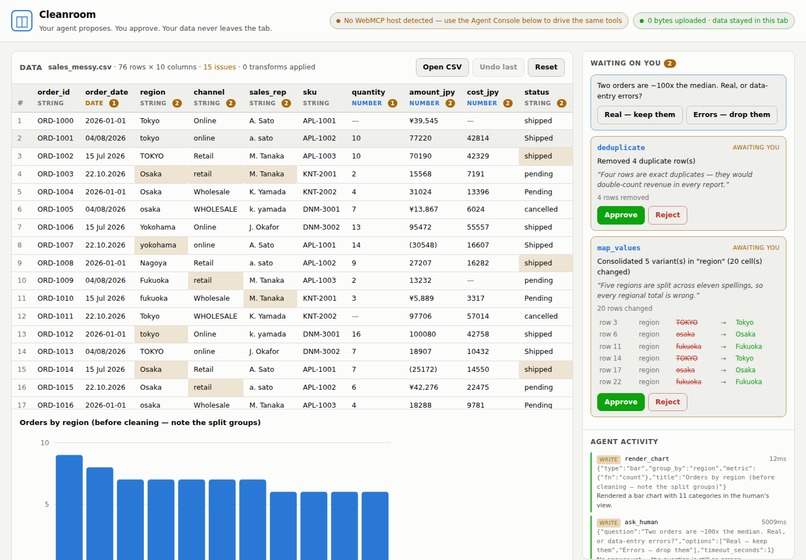
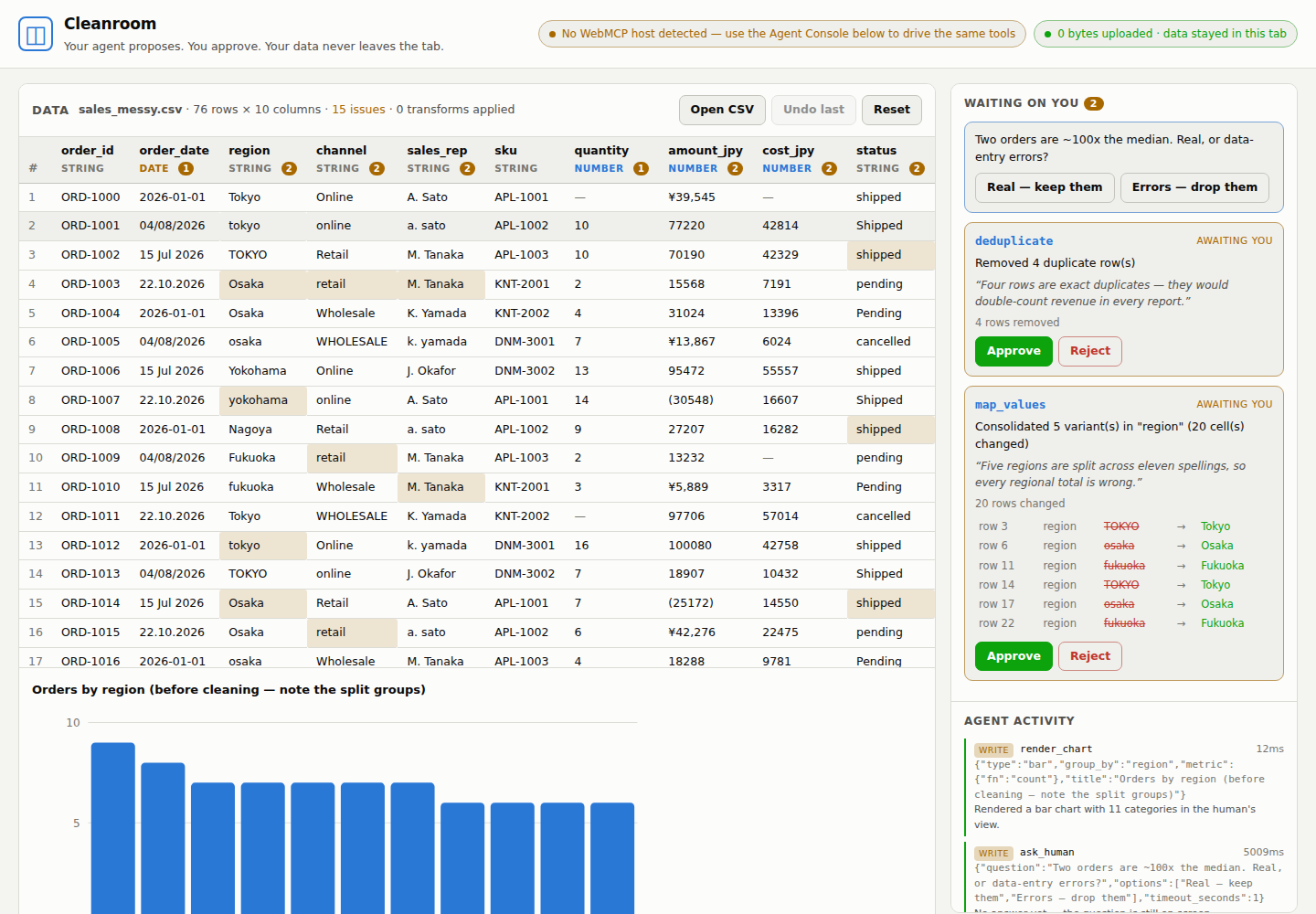
Cleanroom is a data-cleaning workbench for messy CSVs. You drop a file on the page and an agent in your browser profiles it, finds the concrete problems, queries and charts it, and proposes the fixes — without the file ever being uploaded anywhere.
The design rule is one sentence: reads are free, writes are proposals.
No tool mutates your table. When the agent wants to change something it computes the exact
before/after diff, puts a card in front of you with its reasoning, and stops. You click Approve or
Reject. undo is deliberately not exposed as a tool — the ability to walk a change back belongs to
the person, not the model.
The problem it solves
Every analyst has the same bad afternoon. A CSV arrives and before you can answer one question you
have to fix it: regions spelled five ways, amounts stored as ¥39,545, four date formats in one
column, duplicate rows silently doubling your revenue.
An LLM is excellent at spotting exactly these problems. But letting one help has meant either uploading your data to a server or code interpreter — a non-starter the moment the file has customer names, salaries or anything your compliance team has an opinion about — or pasting a sample and hand-applying the suggestions yourself, which is the automation you wanted, gone.
Cleanroom is the third option: the agent gets tools, not your data.
Why this is WebMCP and could not be a server MCP
This is not a remote MCP server with a web page bolted on. It structurally could not be one.
The agent and the human operate on literally the same JavaScript object. One store is the single source of truth; the UI renders it and the tools operate on it. When the agent proposes a change the approval card appears in the human's rail in the same tick — no sync, no polling, no second copy that can drift. A remote agent cannot have that property, because a remote agent needs a copy.
And everything a server MCP would need — upload, storage, auth, per-seat infrastructure — is simply absent. It's already your browser and already your session. The whole app is a static file.
The privacy receipt
The claim is "your data never leaves this tab," and a claim is worth nothing, so the page proves it.
Before any other module loads, Cleanroom instruments fetch, XMLHttpRequest, sendBeacon and
WebSocket and counts every outbound request. The count is in the header, and the agent can read it
too, via a get_privacy_receipt tool — so when you ask "did my data go anywhere?" it answers with a
verifiable number instead of a promise.
It reads zero because there is nothing to send it to: no analytics, no CDN, no webfont, no charting
library. Even the sample dataset is inlined as a string rather than fetched, specifically so the
ledger stays honest. The deployed site also ships connect-src 'none' in its CSP, so the browser
enforces it independently of our own code.
Being straight about the limit: this counts requests the page makes. It cannot police the browser itself or a malicious extension, and it isn't a substitute for a security review.
How I built it
Vanilla JavaScript, ES modules, no framework and no runtime dependencies — a dependency that phones home would undermine the entire premise. Roughly 1,800 lines across eleven modules: a RFC-4180-tolerant CSV parser, type inference and column profiling, an issue detector, fifteen pure transform operations with a diff builder, the store that holds the undo stack, the WebMCP tool layer, the UI, and hand-rolled inline SVG charts.
14 tools are registered — eight read-only, six human-gated.
Three implementation details did the most for how well an agent actually performs here:
- Every detected issue carries a
suggested_fix— a ready-to-usepropose_transformpayload. The agent goes from "what's wrong?" to a queued, reviewable fix in one hop instead of guessing at an API shape. This cut the model's flailing more than anything else I tried. - Errors are instructions. Every failure names the valid inputs —
Column "reigon" does not exist.
Available columns: order_id, order_date, region, …
— and is returned as text rather than thrown, so the agent reads the recovery path instead of hitting an opaque host error. - Results are context-window shaped. Profiles and aggregates are summaries by construction; raw rows are returned only on request and hard-capped at 200. A 100,000-row file is fully workable without a single row entering the model's context.
Challenges
WebMCP's API moved while it was being standardised — some hosts expose navigator.modelContext, the
current spec draft uses document.modelContext, and earlier builds took a batch provideContext({tools})
instead of per-tool registerTool. Rather than bet on one, the registration shim feature-detects all of
them and reports which it found, so the header tells the user the truth about their browser instead of
failing silently. Tool results are returned in three shapes at once — MCP-style content,
structuredContent, and a bare data object — so the same tool behaves identically across hosts.
The harder problem was designing the pause. An agent that has to stop and wait is easy to build badly:
it either blocks forever or barrels ahead assuming approval. propose_transform returns
pending_human_approval with an explicit next_step, and a separate await_decision tool blocks on the
human with a timeout and tells the agent what to say if it expires. Getting the agent to reliably not
assume its change landed was most of the prompt-shaped work.
What I learned
Designing tools for an agent is interface design, and the same thing that makes an API pleasant for a
junior engineer — good names, errors that say what to do next, results scoped to what you actually need
— is what makes a model competent instead of erratic. The suggested_fix field was the clearest
demonstration: same model, same data, dramatically better behaviour, purely from shaping the return
value.
The second thing: an approval gate makes an agent more useful, not less. Once a change is reviewable before it lands, you stop hedging your prompts and start letting it try things.
What's next
- Multi-table joins under the same proposal model — the agent proposes the key and shows you the match rate before committing.
- Recipe export — the change log is already ordered and structured; emit it as a runnable script so a one-off clean becomes a repeatable pipeline.
- Approval policies — "auto-approve whitespace fixes, always ask about dropped rows." The gate exists; this is a rule layer on top of it.
Try it
In ChatGPT's browser or Chrome with WebMCP enabled, open the page and ask:
"What's wrong with this data? Don't change anything yet — just tell me what you'd fix and why."
"Clean it up. Propose each fix separately so I can review them, and ask me before you touch anything that's a judgement call."
In any other browser the built-in Agent Console calls the same registered tool objects a host calls — an inspector, not a mock — so you can see exactly what the agent sees.
Built With
- cloudflare-pages
- css
- html
- javascript
- playwright
- svg
- webmcp

Log in or sign up for Devpost to join the conversation.