-
-
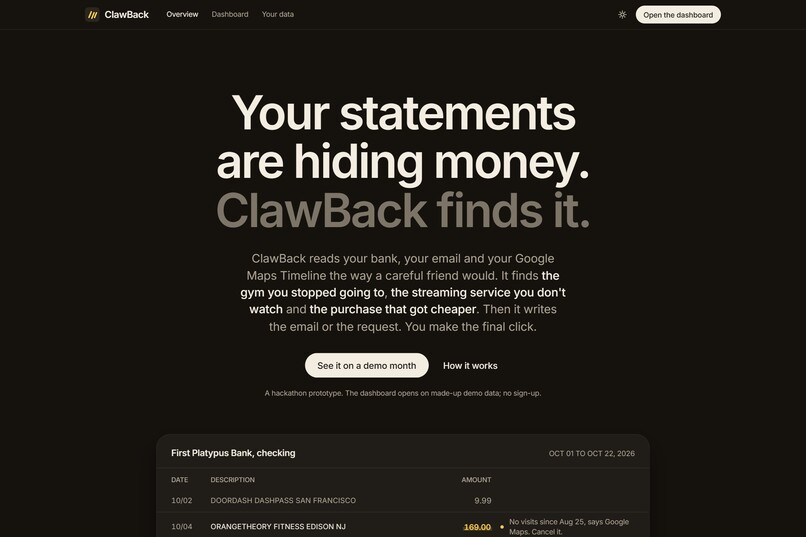
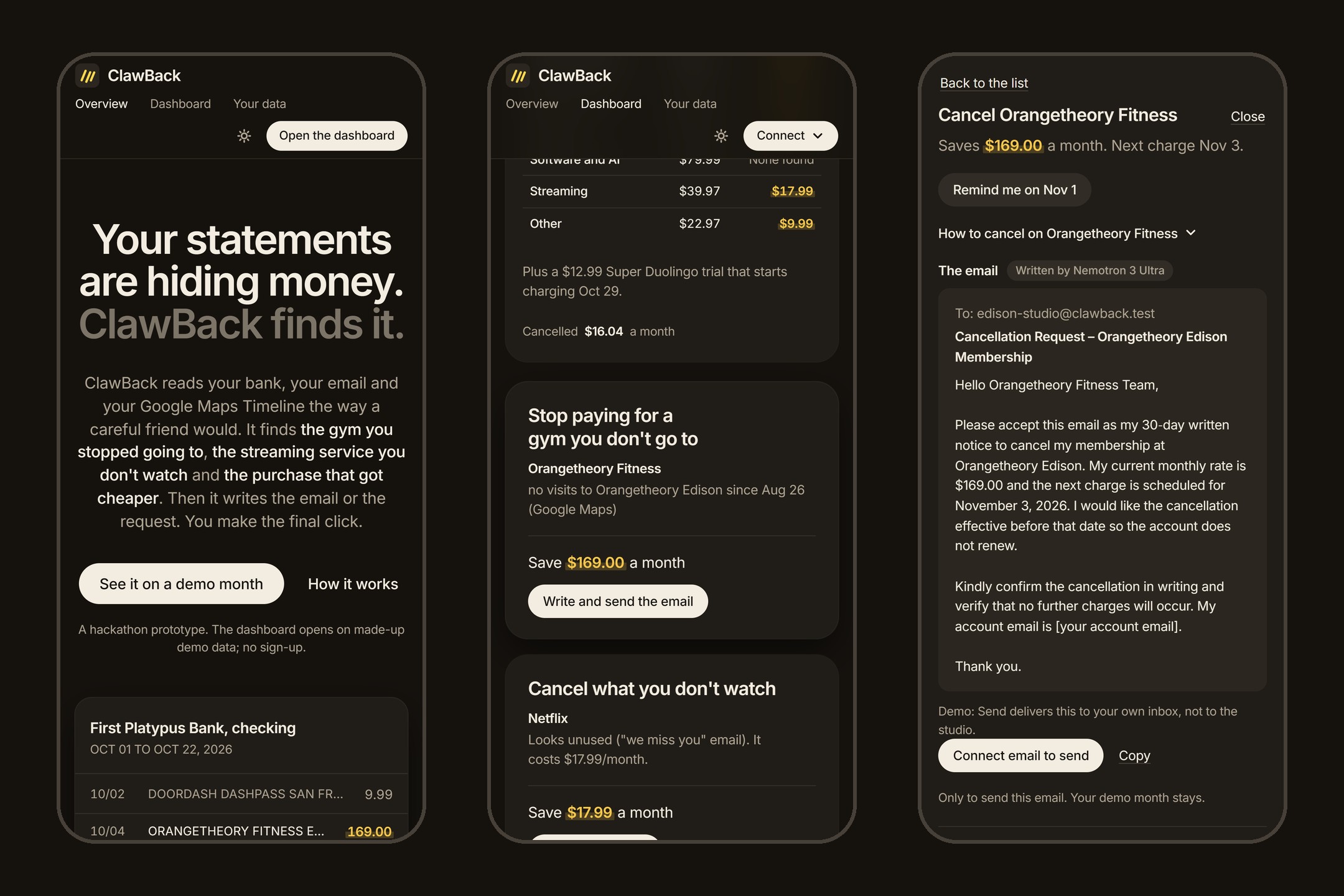
ClawBack reads your bank, your email and your Google Maps Timeline, and finds money you're wasting or are owed.
-
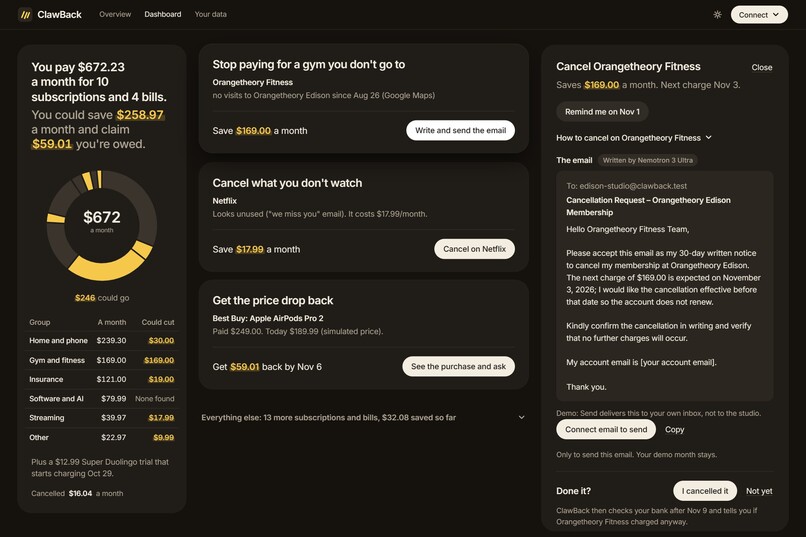
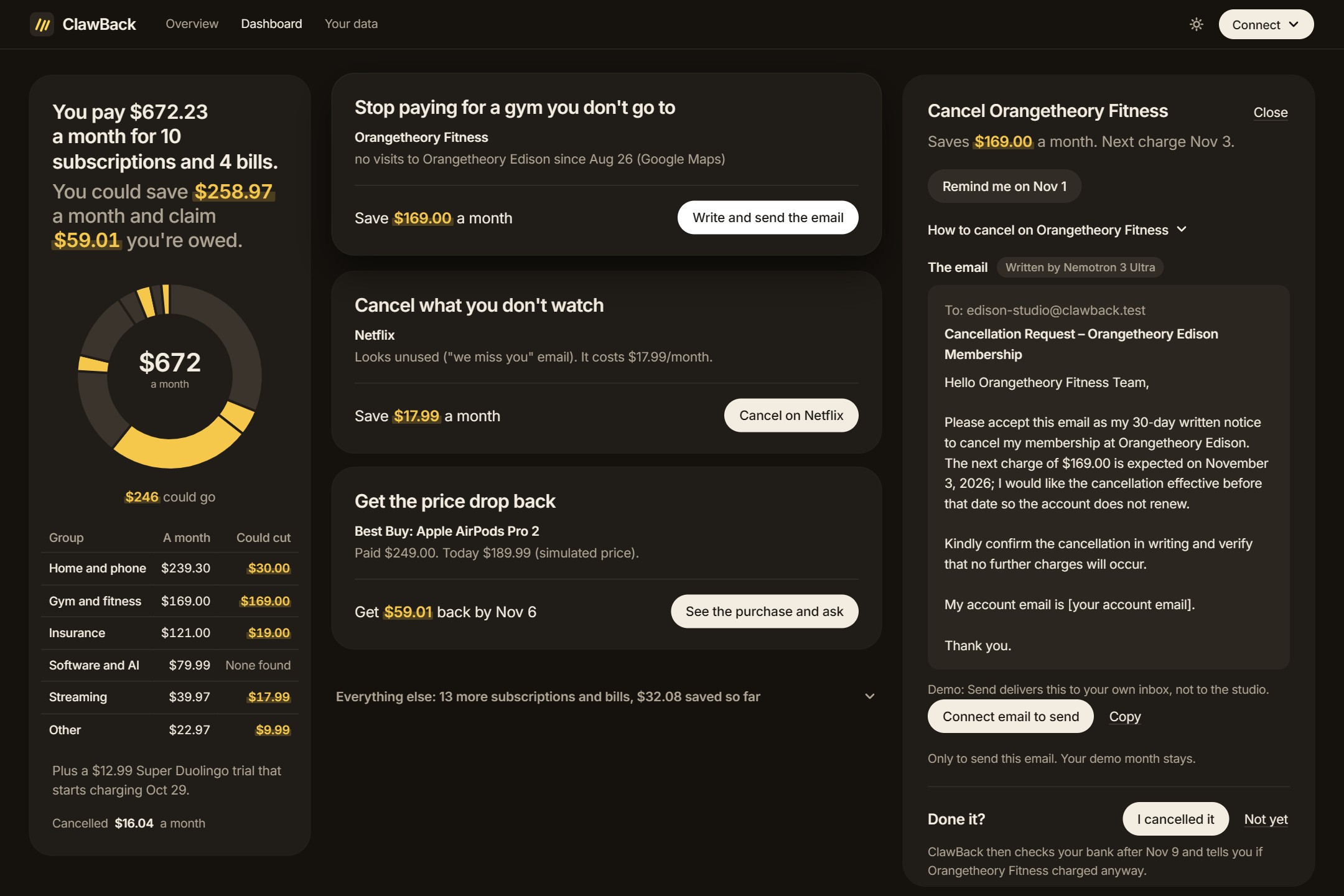
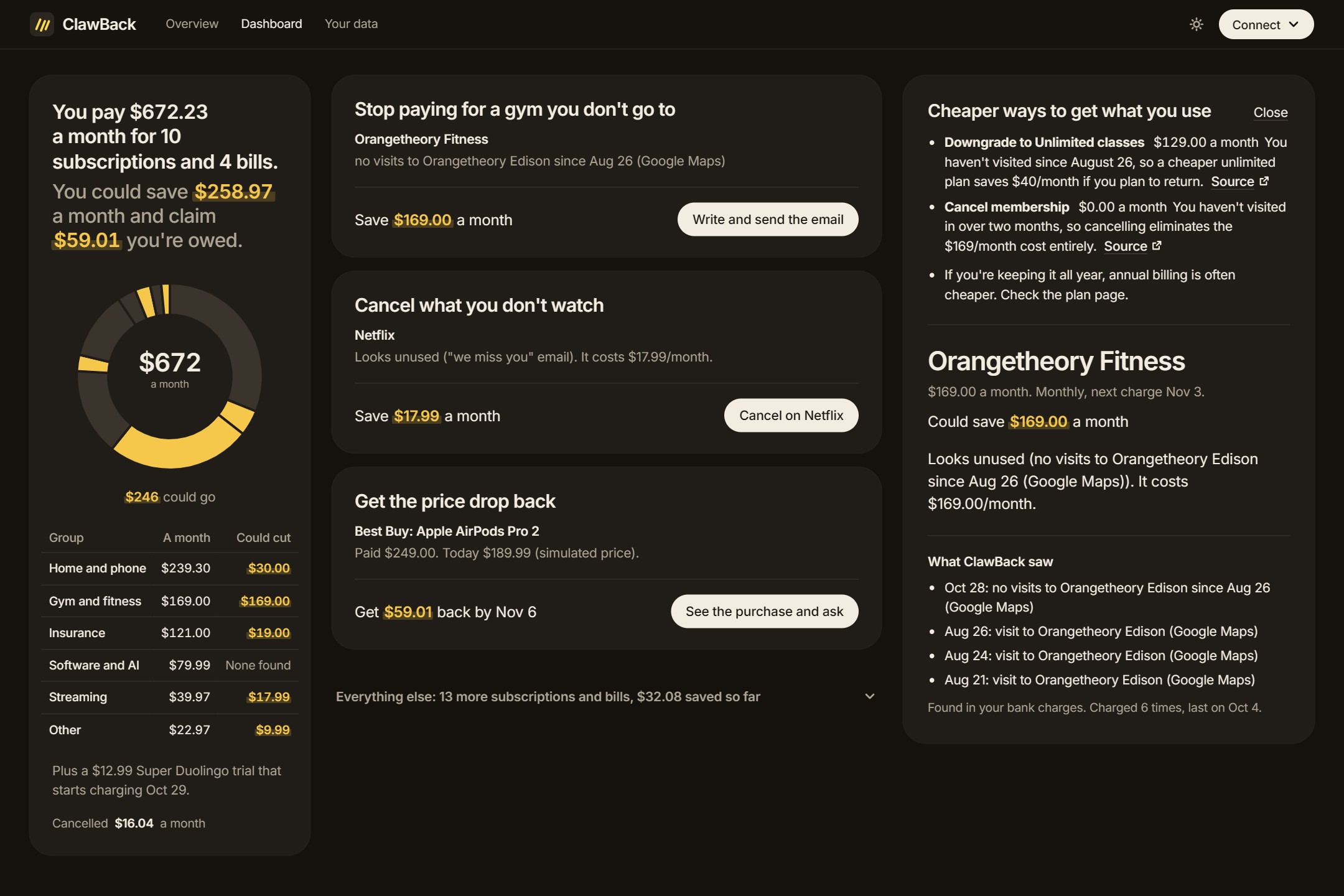
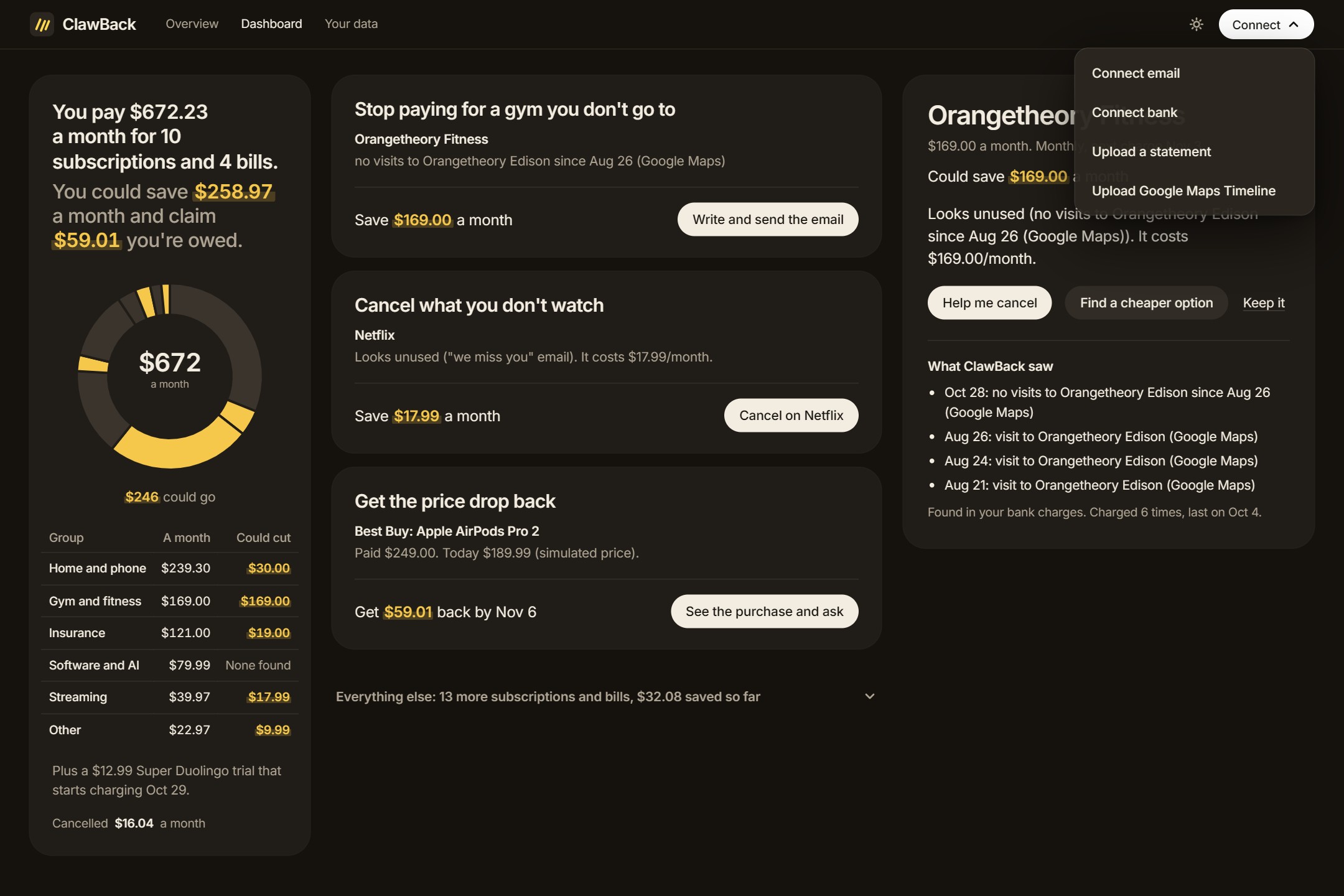
No gym visits since Aug 26, so Nemotron 3 Ultra writes the 30-day cancellation notice. It sends only when you click Send.
-
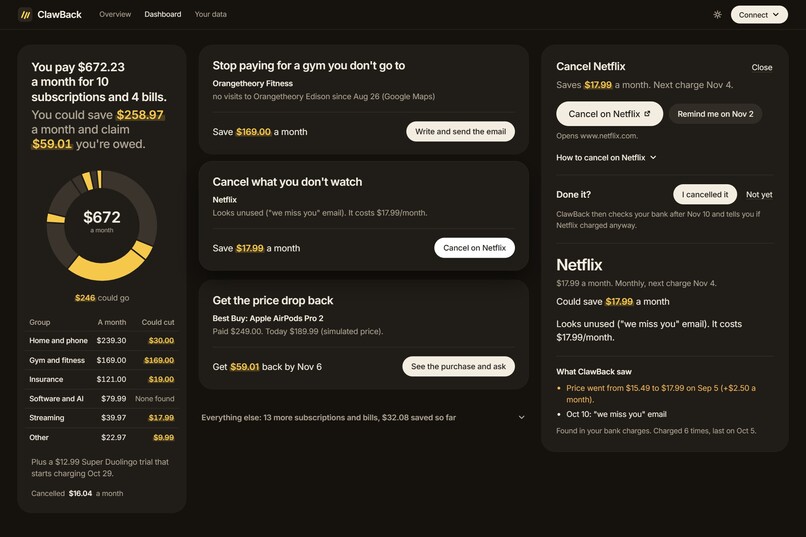
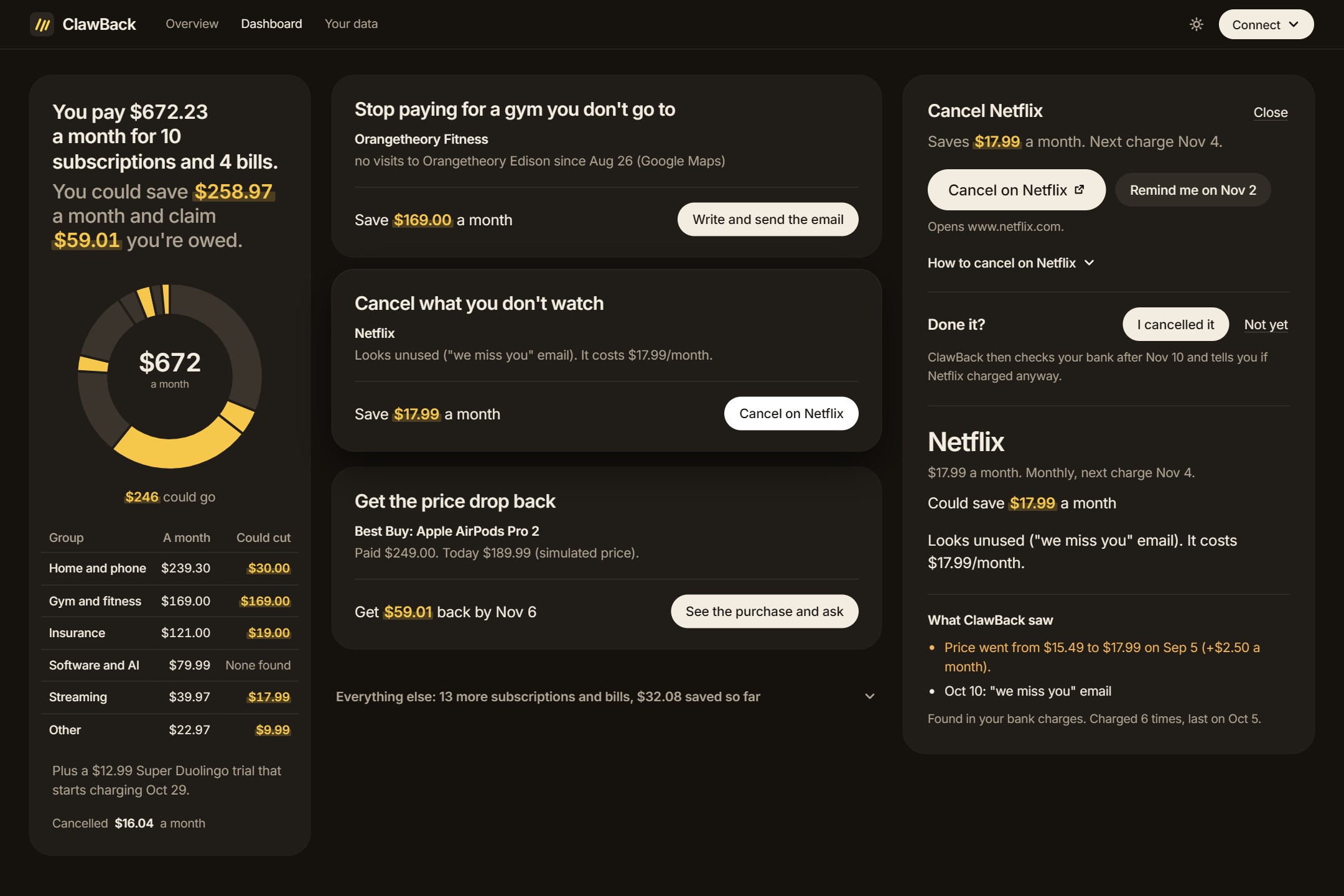
Netflix sent a "we miss you" email and raised its price. ClawBack opens Netflix's own cancel page and sets a reminder.
-
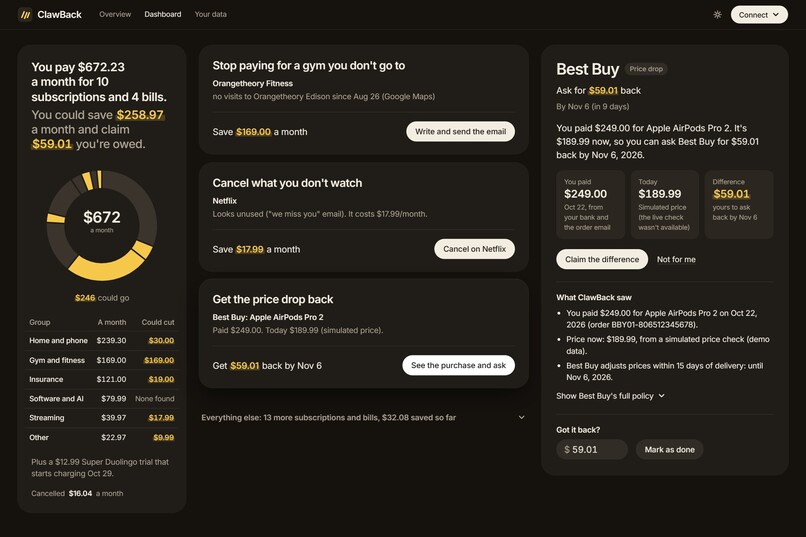
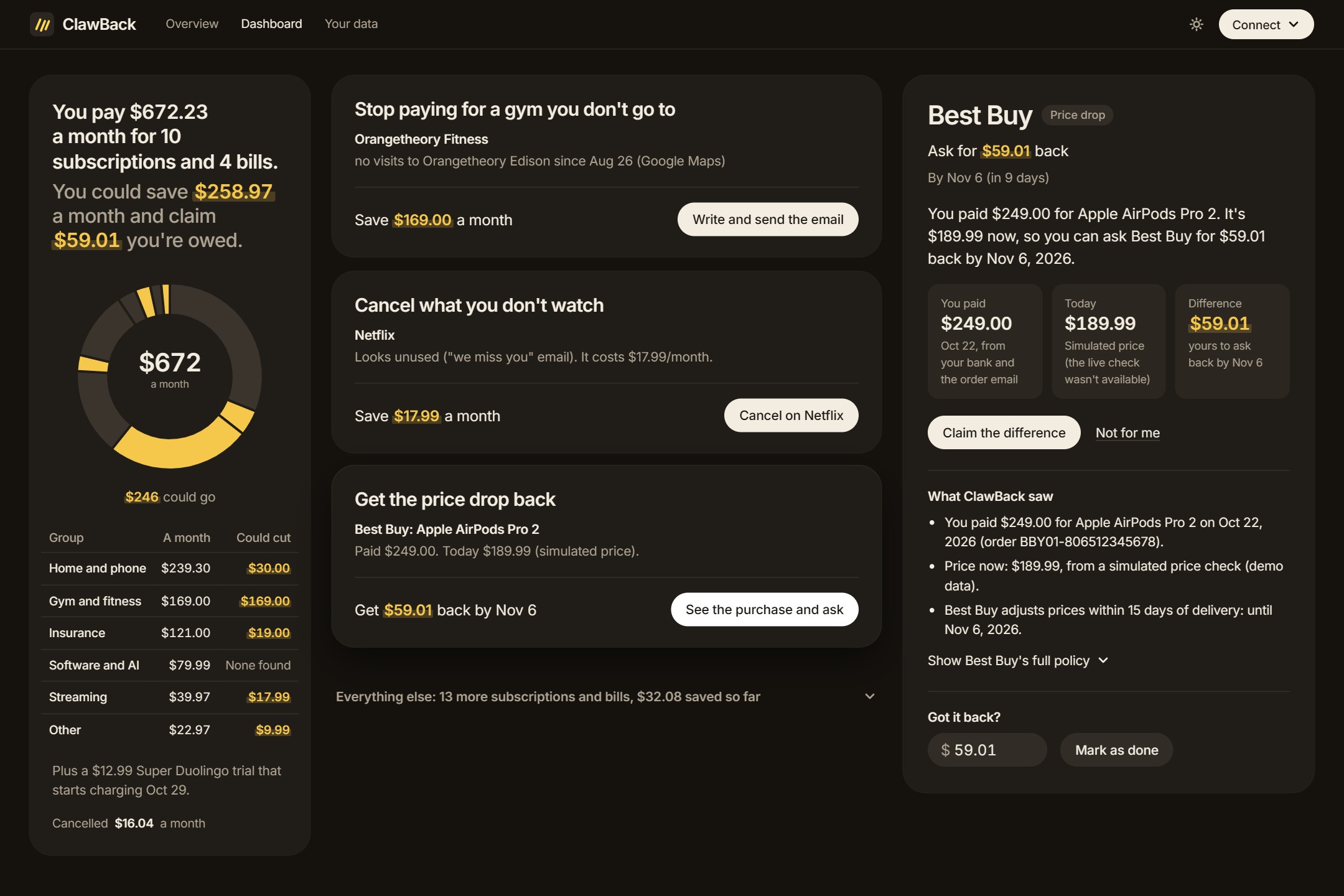
AirPods Pro 2 dropped $59.01 within Best Buy's 15-day window. ClawBack shows the deadline and writes the price-adjustment request.
-
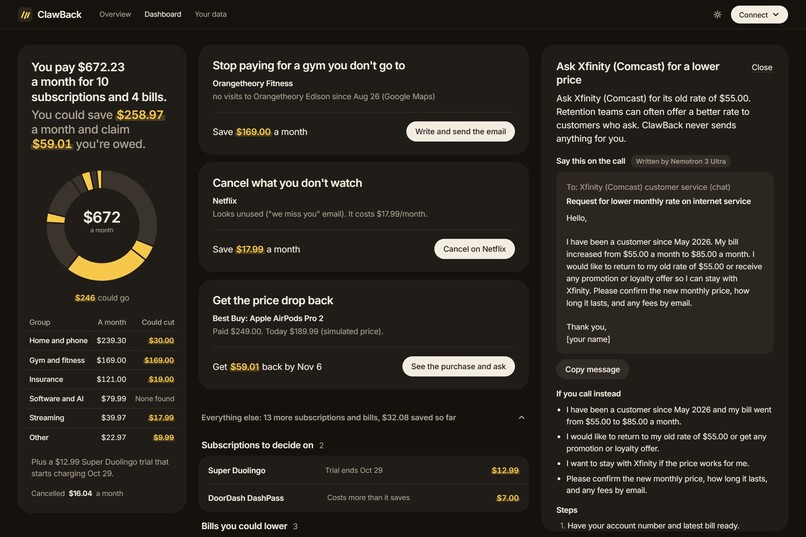
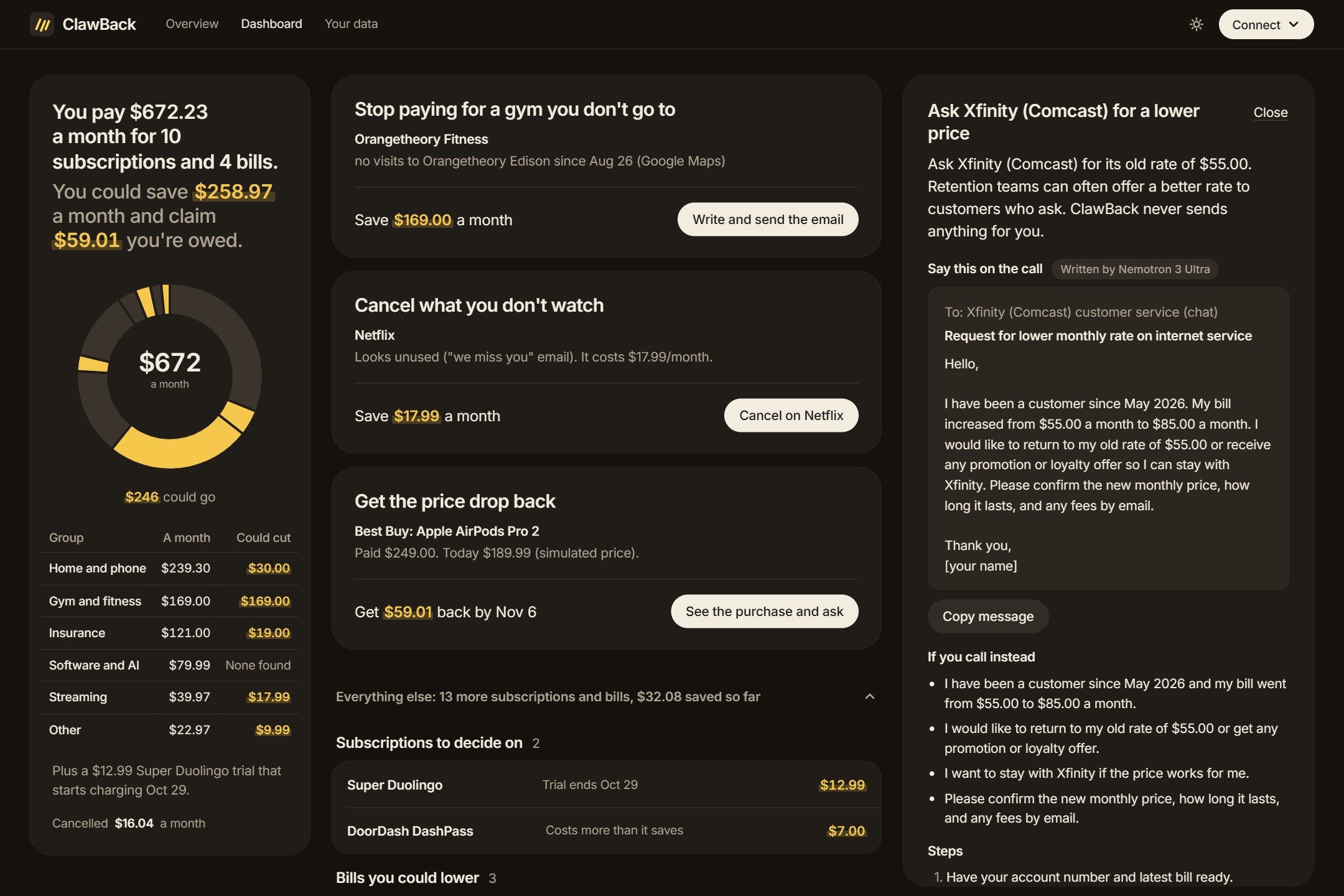
Xfinity's promo rate ended and the bill went from $55 to $85. Nemotron 3 Ultra writes what to say to get the old rate back.
-
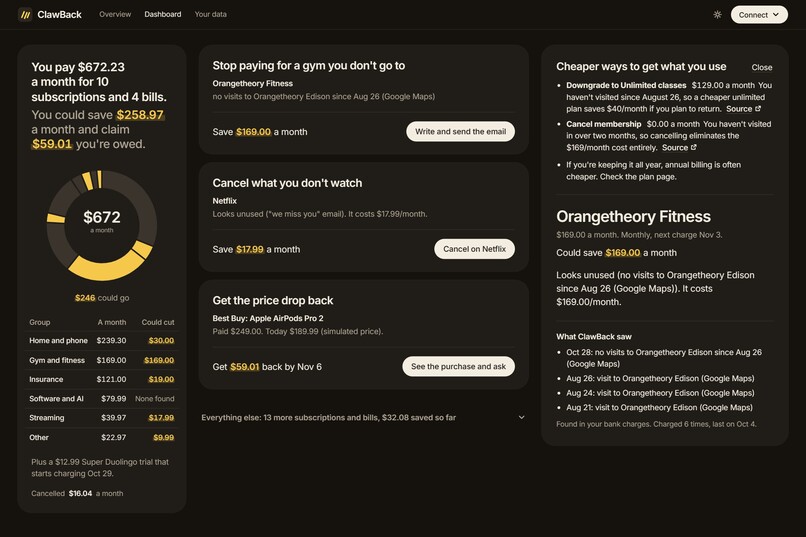
Find a cheaper option: Tavily finds the gym's current plans and Nemotron 3 Super turns them into cheaper ways to keep going.
-
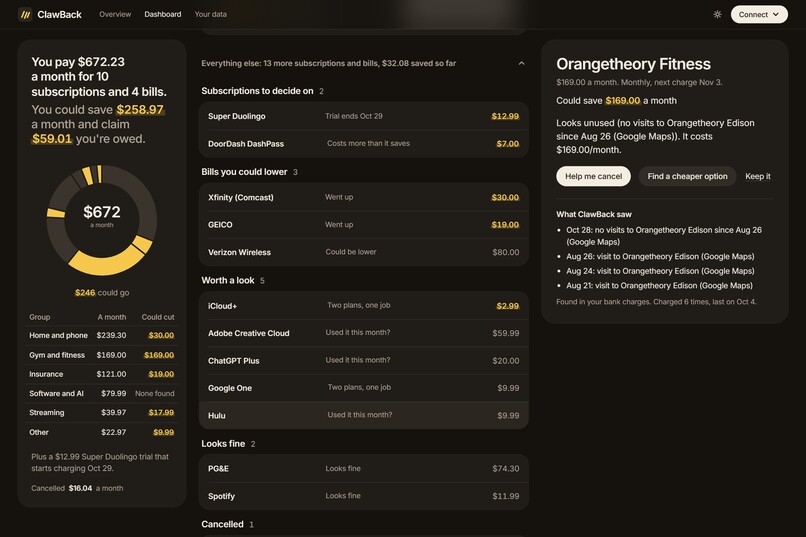
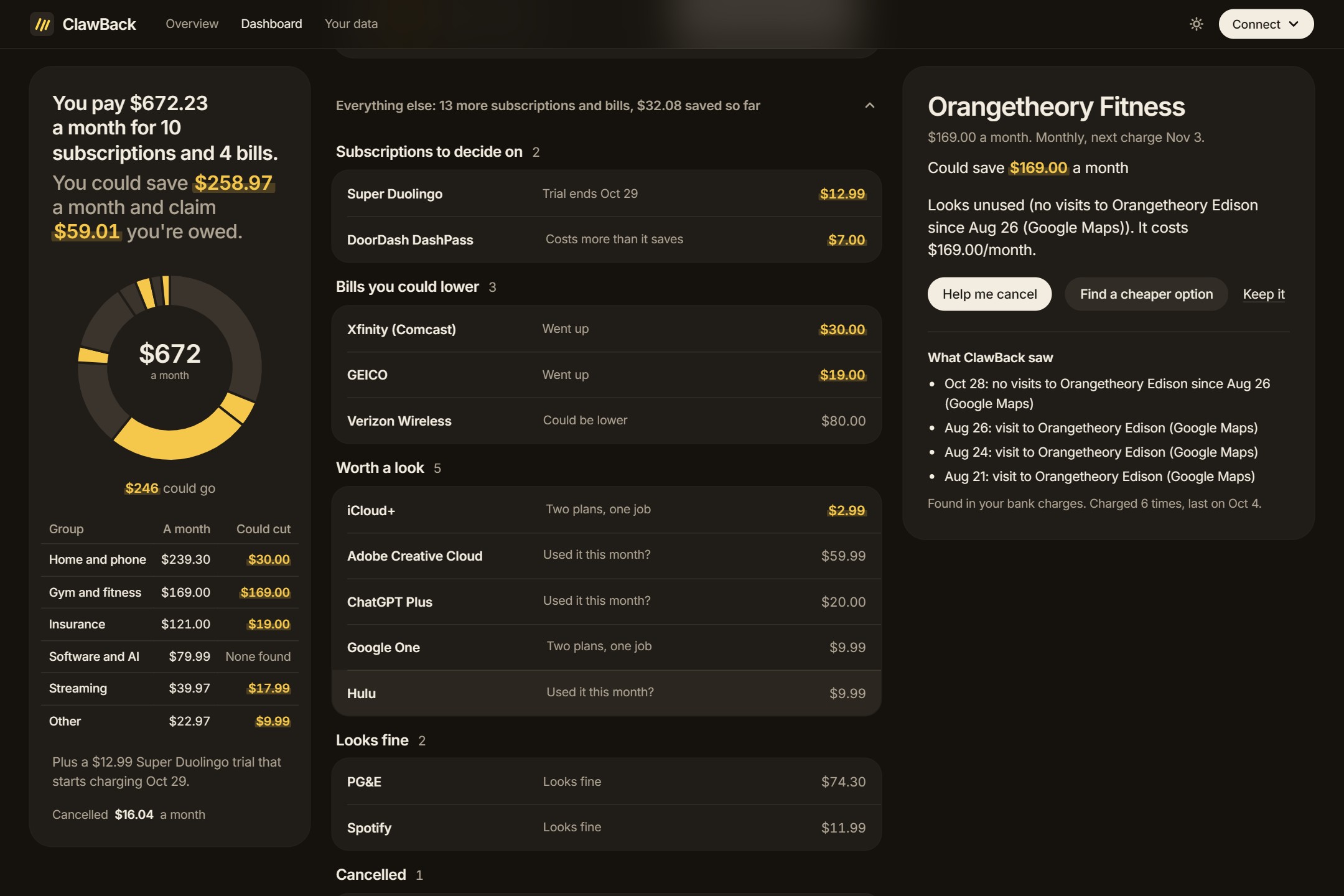
Everything else: trials about to charge, memberships that cost more than they save, bills that went up, and plans that overlap.
-
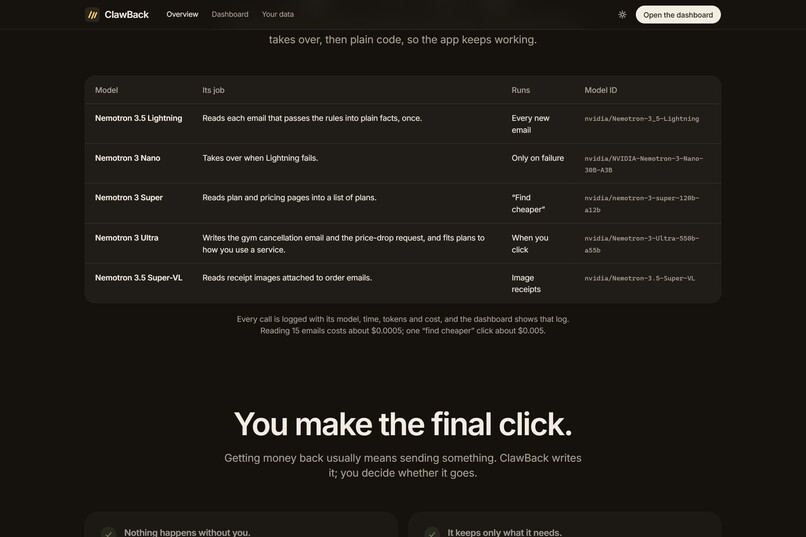
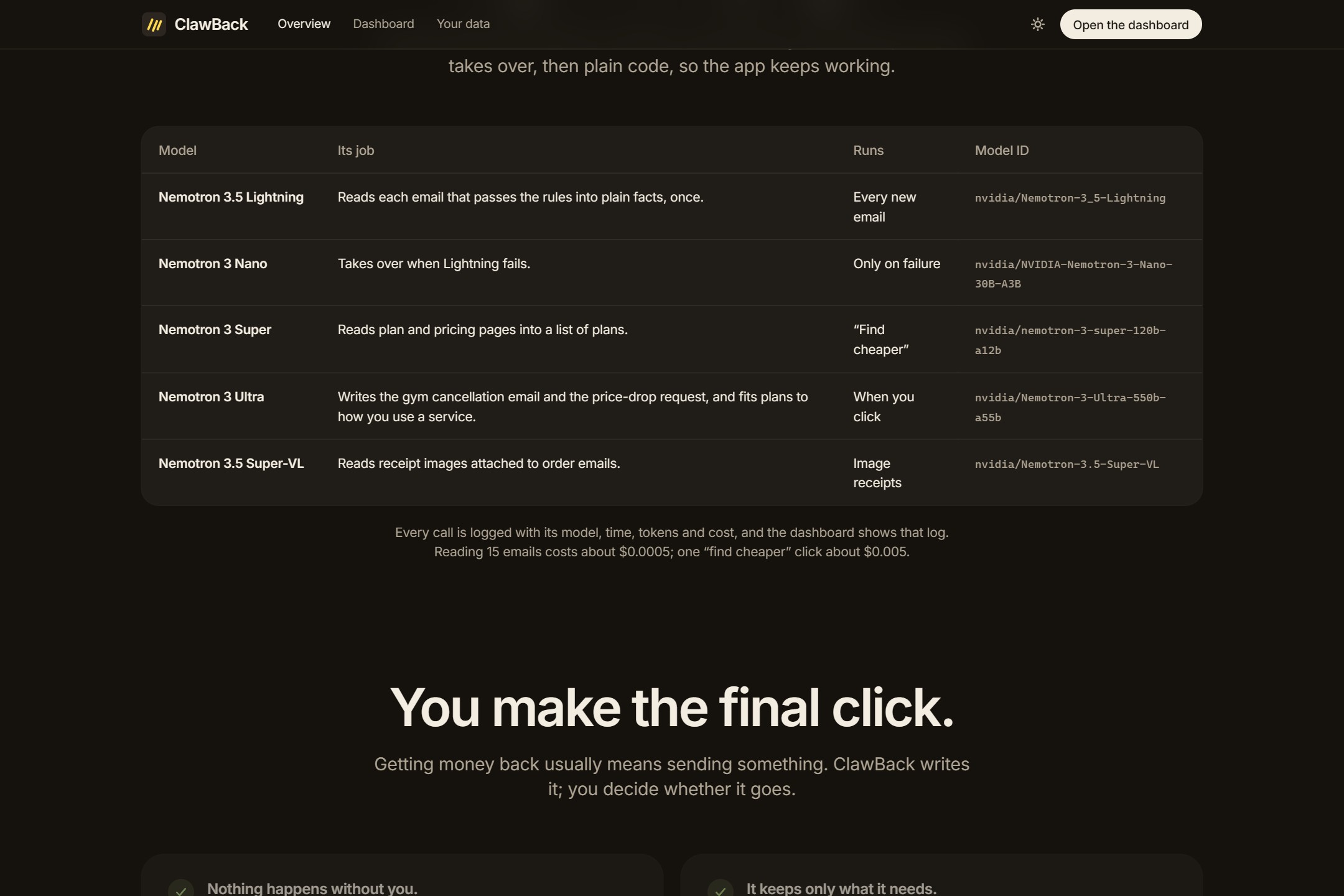
Five Nemotron models on Nebius Token Factory, each with its own job. If one fails, the next takes over, then plain code.
-
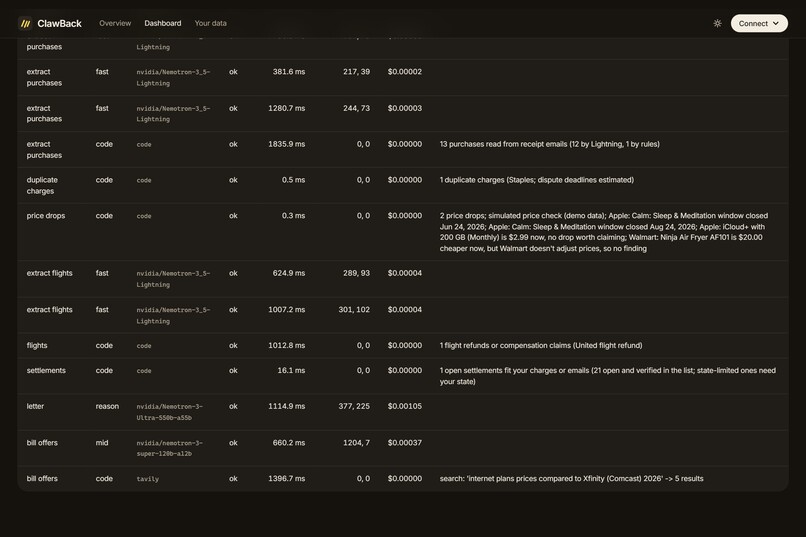
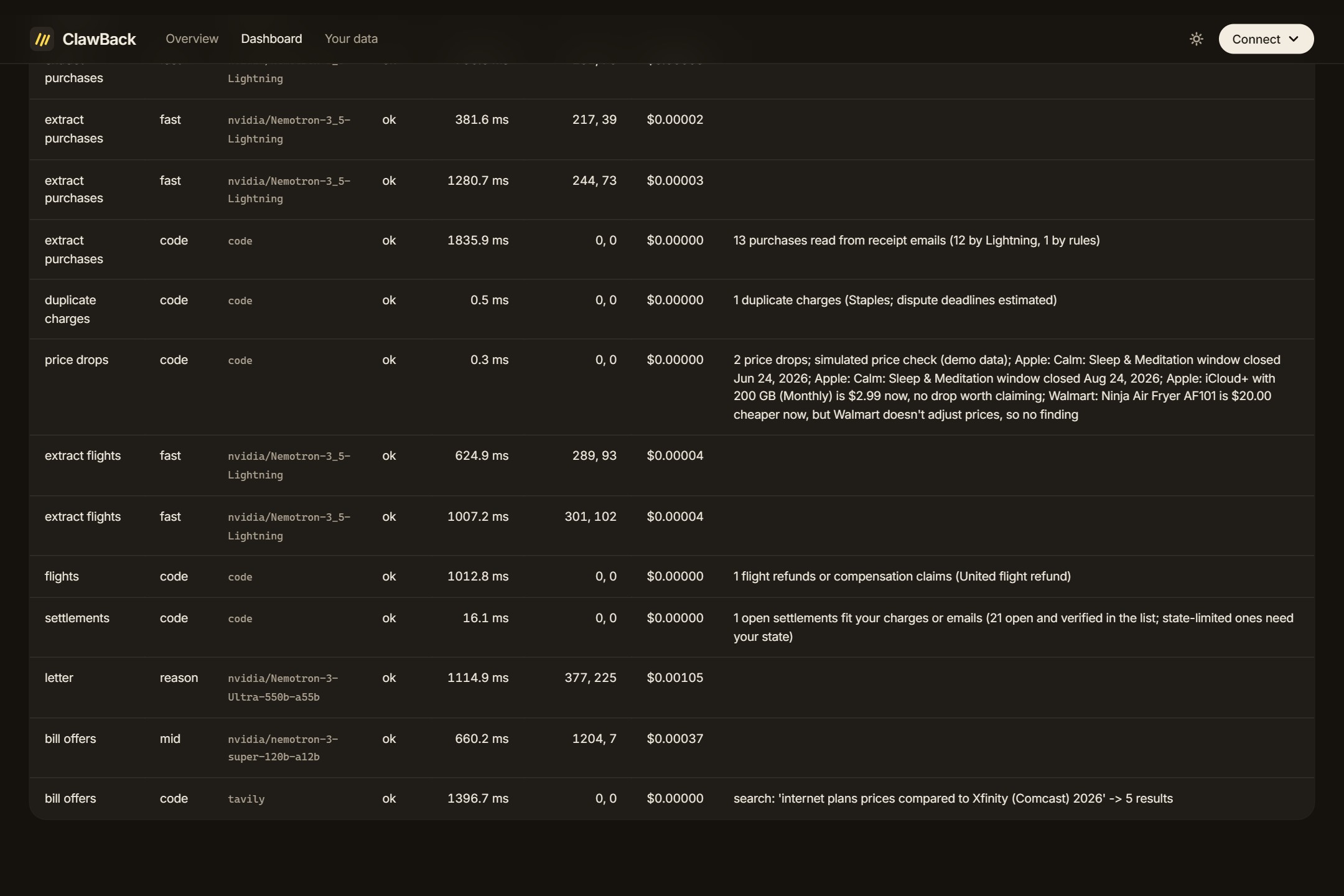
ClawBack logs every step with its model, time, tokens and cost. The whole demo month cost less than a cent.
-
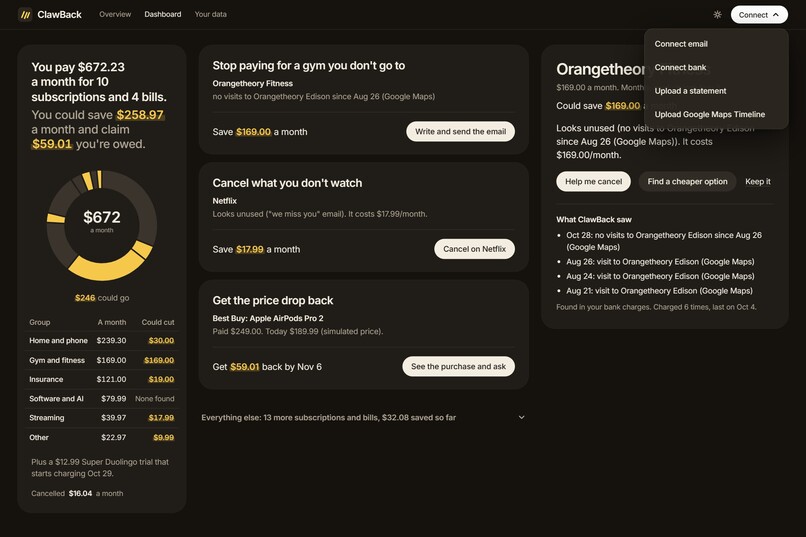
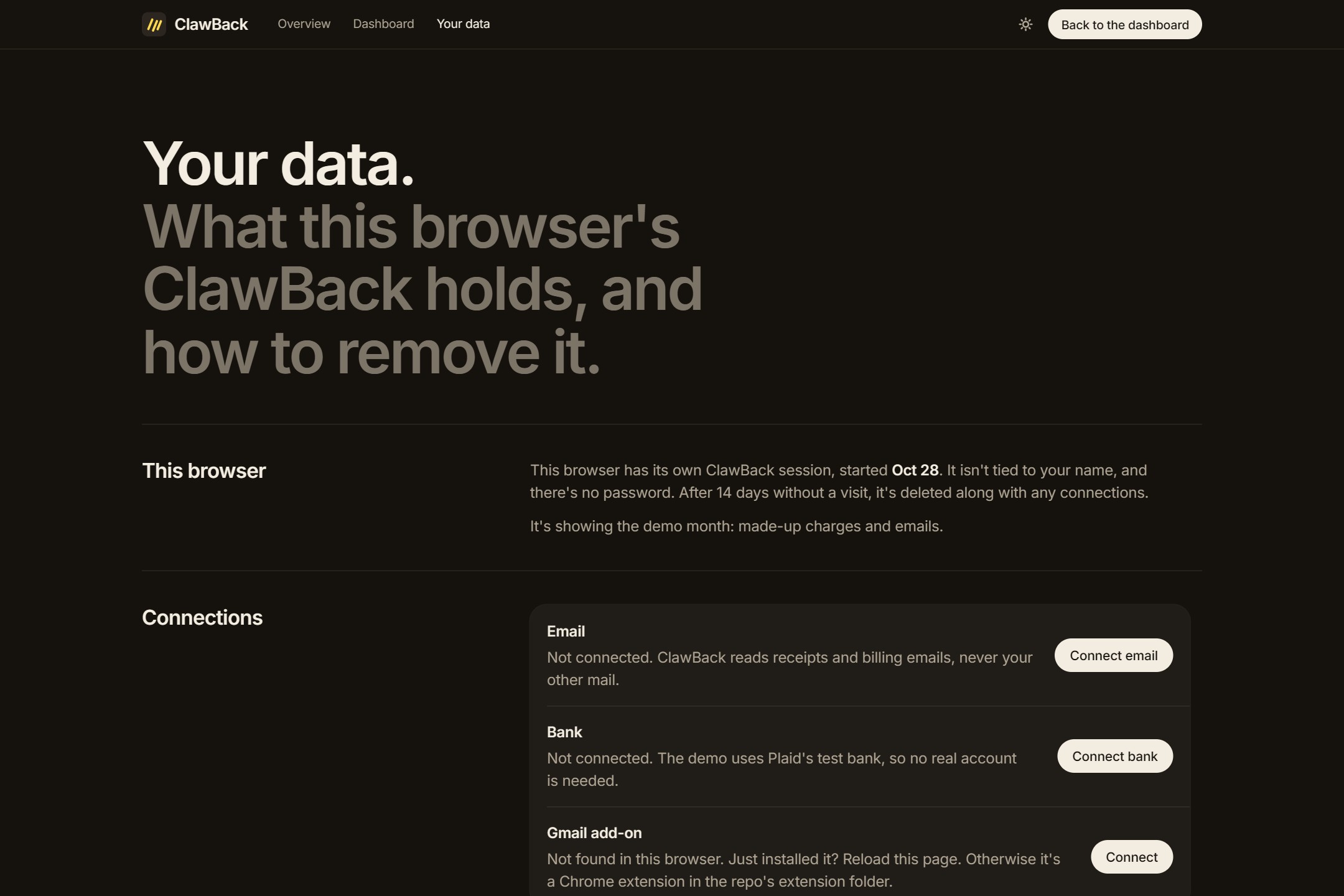
Connect your email (Nylas), your bank (Plaid's test bank), a statement, or your Google Maps Timeline export.
-
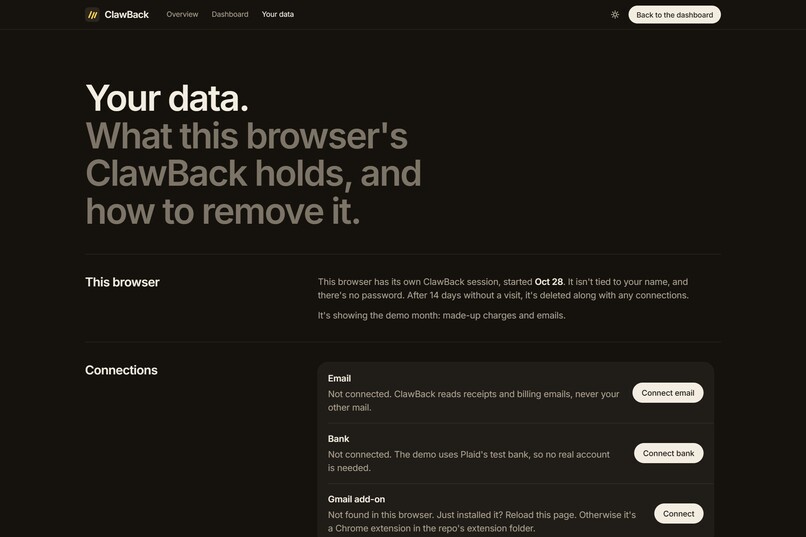
Your data: what ClawBack holds for this browser, what's stored, today's AI spend, and one button to delete it all.
-
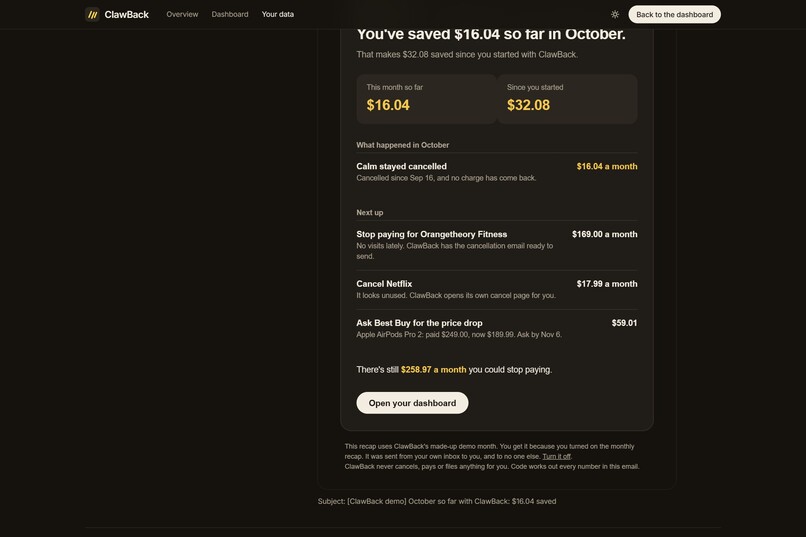
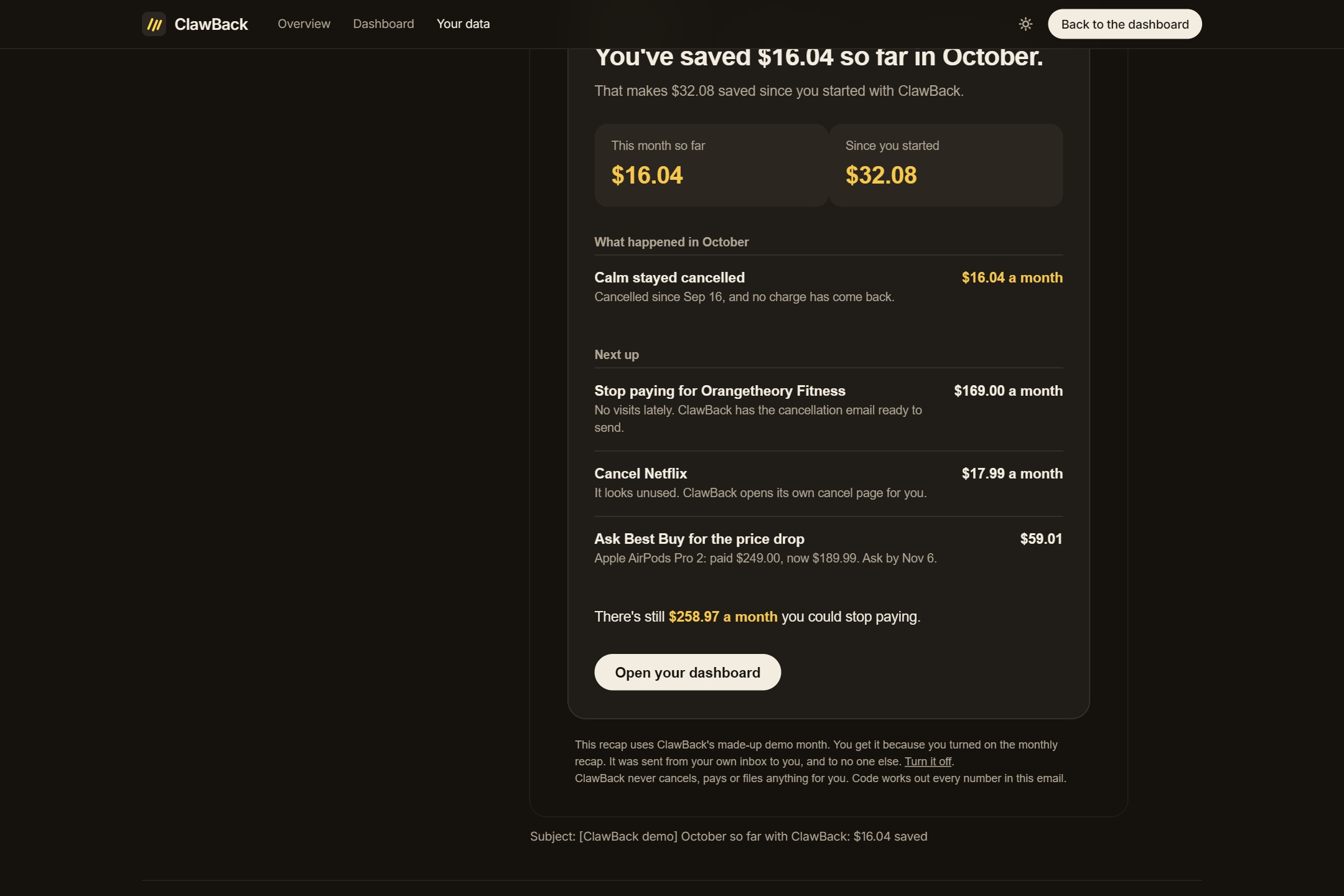
The optional monthly recap: what ClawBack saved you this month and since you started, sent from your own inbox to you.
-
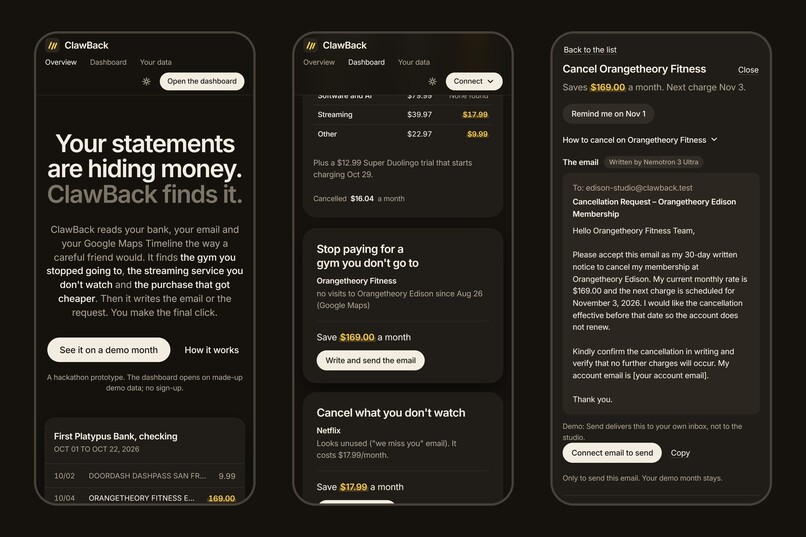
On a phone, ClawBack installs to the home screen like an app.
-
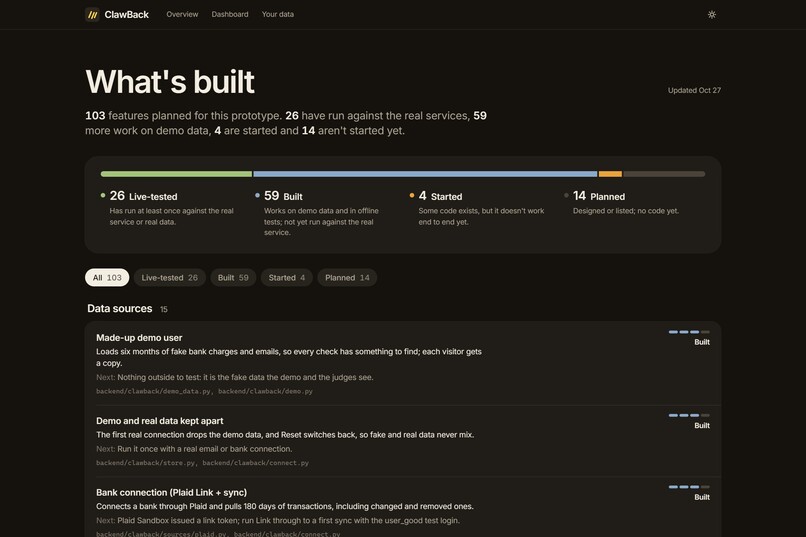
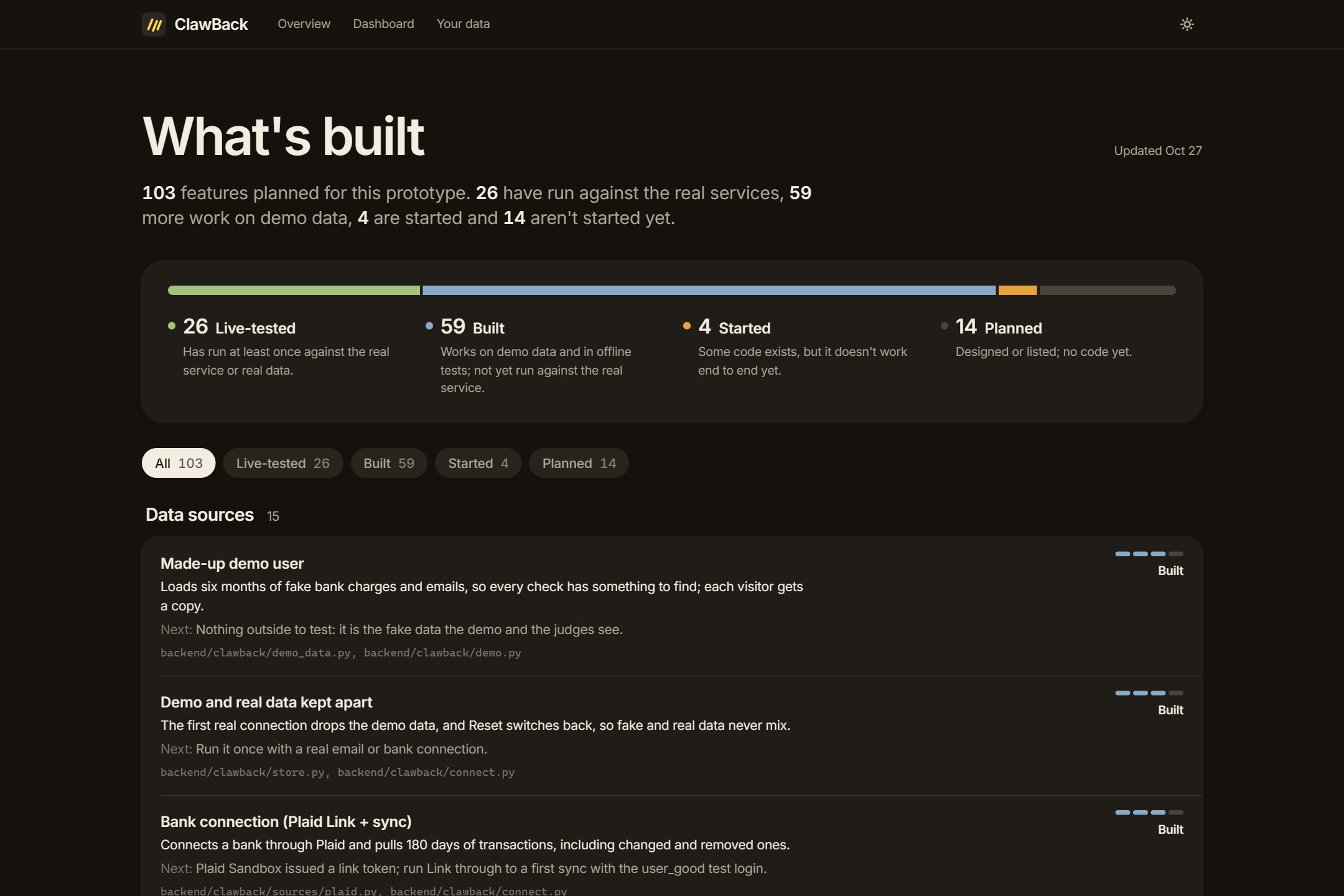
What's built: all 103 planned features, each marked live-tested, built on demo data, started or not started yet.
-
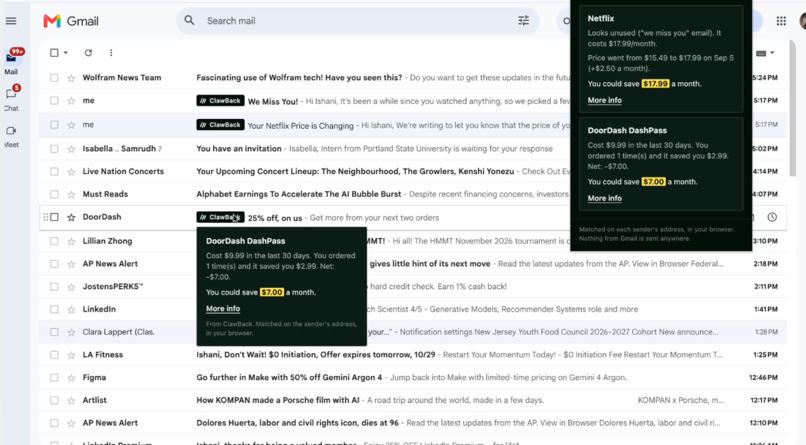
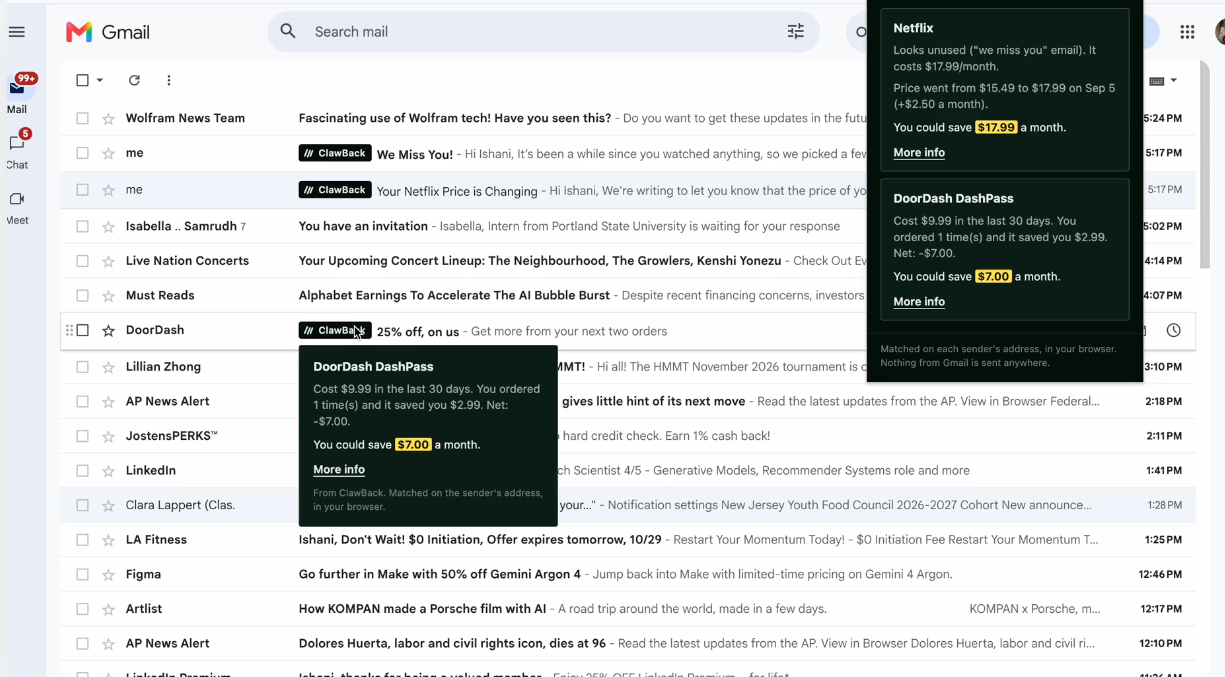
ClawBack monitoring your email through its chrome extension for money saving / subscription cancelling opportunities
Inspiration
Being a consumer right now means paying for a lot of small things. A new AI tool every month, a streaming service for one show, a gym membership from a January resolution, a gadget a micro trend talked us into. There are AI tools for almost everything now: tools that write code, and agents that book your dinner reservation. What we don't have is help keeping track of what all of it costs us.
Most people are bad at this, and it isn't laziness. Personal finance is rarely taught, and nobody has the attention span to read every bank statement line by line, match it against their inbox, and remember which store has a price-match window. So the money leaks out quietly: $17.99 here, $169 there.
ClawBack started as an insurance idea. Insurance payouts are hard to read and easy to leave unclaimed, and we wanted something that would find that money for you. We soon saw that the same reasoning works for any money you're owed or wasting: read the documents, check them against the rules, and do the paperwork for you.
Before building, we looked at what already exists. Rocket Money (formerly Truebill) is the best known: it reads your bank transactions, lists your recurring charges, and with a paid plan will cancel some subscriptions for you. It also negotiates bills like internet and phone, and takes a cut of what it saves you, which reviews put at 35 to 60 percent of the first year's savings. Trim and Billshark do similar bill negotiation. Paribus and Earny took a different slice: they read your purchase receipts and ask stores for money back when a price drops. Each of these tools handles one kind of money, from one source. A bank-only app can see that you pay a gym $169 a month, but it can't tell whether you still go. A receipt-only app can catch a price drop, but it can't see the streaming service that just raised its price and emailed you "we miss you." None of them shows you the proof behind a number, and the ones that act for you mostly do it out of sight, for a fee.
ClawBack puts all of it in one place. It connects securely to your email, your bank and your Google Maps Timeline, so it sees both what you pay for and what you actually use. When it finds money, it shows the evidence, such as your last gym visit, the price on the store's own page or the email that announced the price change. Then it prepares the next step and leaves the final click to you. It takes no cut of what you get back.
What it does
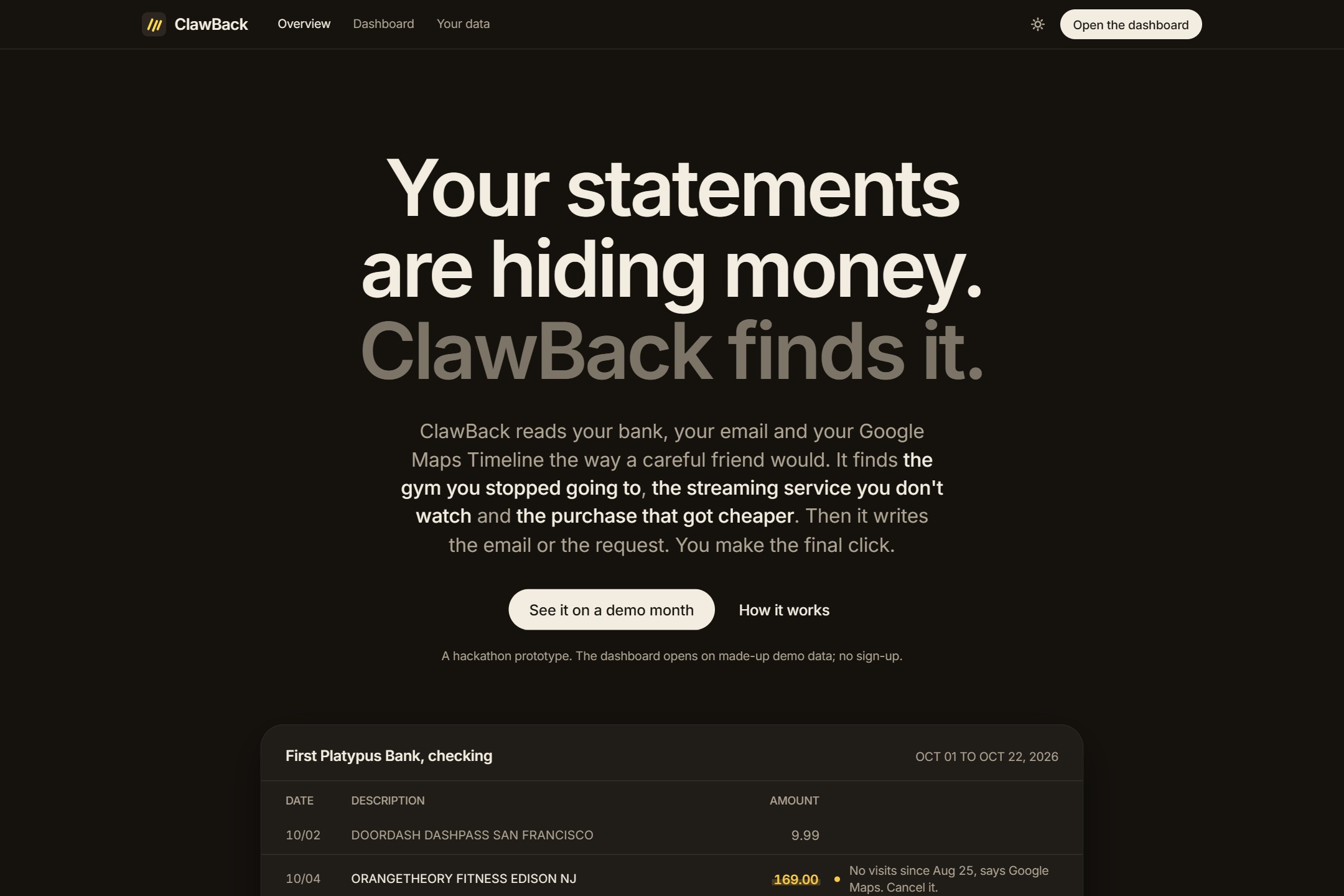
ClawBack connects to your email, your bank account and, if you choose, your Google Maps Timeline. It reads them together and looks for money you're wasting or are owed. Then it prepares the next step for you.
The first job is recurring charges. ClawBack finds every subscription and bill in your bank history, even when the bank shows a cryptic name like "SQ *ORANGETHEO" or the charge goes through Apple or Google Play. It then works out whether each one is still worth paying for. It looks for signs of use: receipts, "we miss you" emails, the visits in your Timeline, and a quick "did you use this?" check-in when nothing else settles it. It also flags a price that went up, a free trial about to turn into a charge, two services that do the same job, and a membership like DashPass that costs more than it saves you. For bills like internet, phone and insurance, it notices when a promotional rate ends or the price jumps, and it writes the talking points to ask for the old rate back.
The second job is one-time money you're owed. ClawBack catches duplicate charges and bank fees you can ask to have reversed. It finds purchases that dropped in price while the store's price-match window is still open, and it checks today's price live on the store's own site. It also looks for flight delays and cancellations that entitle you to a refund or compensation, and class-action settlements you may qualify for. Each one comes with a deadline, so you know how long you have.
For everything it finds, ClawBack shows its proof and does the legwork. It finds the real cancel page or the right email address, and it writes the cancellation notice, the refund request or the phone script. It tells you which rights your state gives you when you cancel. It can also look for a cheaper plan or alternative before you decide. It sends email only when you click Send. Once you say you've cancelled, it keeps watching your bank to make sure the next charge doesn't come, and when a refund lands, it adds it to a running total of what you've recovered.
ClawBack also comes to you. A Chrome extension adds a small ClawBack flag to Gmail emails from services it found money in. An optional monthly recap email sums up what you saved. On a phone, ClawBack installs to the home screen like an app.
You can try all of it on a made-up demo month without connecting anything. It has a gym you stopped going to, a streaming service that raised its price, and earbuds that got cheaper after you bought them.
How we built it
The backend is FastAPI and the frontend is Next.js. Email comes in through Nylas, banks through Plaid's sandbox, and live prices through Tavily search. Google offers no API for location history, so you export your Timeline from the Google Maps app and ClawBack keeps only the dates you visited a gym it knows. It discards the coordinates, the other places and the travel.
The AI runs on NVIDIA Nemotron models through Nebius Token Factory, and each model has its own job. Nemotron 3.5 Lightning reads emails into plain facts like prices, dates and "we miss you," and Nemotron 3 Nano takes over if Lightning fails. Nemotron 3 Super reads plan and pricing pages. Nemotron 3 Ultra writes the cancellation email and the price-drop request, and it runs only when you click. Nemotron 3.5 Super-VL reads receipt images.
Rules run first on every email, and a model sees an email only when the rules can't settle it. Every model returns strict JSON, and code computes every date and dollar amount, so a model never does arithmetic on your money. If a model fails, the next tier takes over, then plain code. The app keeps working with no model at all; the letters are just less tailored.
On a held-out test inbox, reading email cost
$$ \frac{\$0.057}{1{,}000 \text{ emails}} \approx \$0.000057 \text{ per email}, $$
and ClawBack flagged 79% of the problems with one false alarm. The dashboard logs every step with its model, tokens and cost.
Token Factory saved us time in a few places. One OpenAI-compatible client covers all five models, so moving a job to another model is a one-line change. Structured JSON output works the same on every model, so the fallback chain needed no special cases, and Zero Data Retention is a single setting.
Challenges we ran into
The Gmail extension took the most rounds. We started out planning to match flags to Gmail's own message IDs, until we remembered that the demo connects Gmail for sending only, so ClawBack never sees those IDs. The extension now checks each sender's address inside the browser instead. That also means nothing from Gmail ever leaves the page.
Getting the flag onto the screen was harder. Gmail's page has no public structure, and it keeps hidden copies of parts of each inbox row for its other layouts. Our first working flag landed in one of those copies, where nobody could see it, and we only found out after adding a console line that counted rows, senders and matches. Chrome had surprises of its own. An extension only runs in tabs opened after you install it, and reloading it leaves the old script running in every open tab, throwing "Extension context invalidated" once a minute. What we settled on is a card that pops up in the corner of Gmail whenever a flagged email is on screen. It works however Gmail lays out the row.
Plaid was the other long one, almost all of it in the edge cases:
- Right after a bank is linked, Plaid often has no transactions ready. ClawBack retries for about 15 seconds, then asks the person to press Sync.
- If Plaid's data changes while ClawBack is paging through the transaction cursor, the whole loop starts over.
- Each webhook arrives signed with a short-lived token that carries a hash of the body. We check the key, the signature, its age and the hash before acting on it.
- Card statement dates set the real dispute deadline, but they come from a separate Plaid product that many accounts lack. Every one of its error codes now means "fall back to an estimate" instead of a failed connection.
- Recurring-payment detection is a paid Plaid add-on, so we wrote our own. Our eval caught it misnaming app-store charges, and that led to a fix in the merchant matching.
Smaller ones:
- With thinking on, Nemotron 3.5 Lightning writes its reasoning straight into the answer, with no tags, and can burn the whole token budget. We hit this on the first live call. Thinking now stays off on that tier, and a guard in code enforces it.
- Connecting a real Gmail inbox used to replace the demo month. A send-only connection fixed that: a judge can send the gym email from their own account and still see the demo data.
- Every store, airline and card has its own window and fine print, so the rules live in a data file with an official source on each row. The date math stays in code.
- Plaid's production access and Gmail's restricted scopes both need reviews that take longer than a hackathon, which is why the demo runs on Plaid's test banks and the Nylas Sandbox.
Accomplishments that we're proud of
- All three jobs work start to finish. ClawBack writes the gym's 30-day cancellation notice and sends it from your inbox when you click Send. For Netflix it opens the service's own cancel page, and for Best Buy it checks today's price on bestbuy.com before asking for the difference.
- The Gmail extension flags emails from services where ClawBack found money, and nothing from Gmail reaches our server.
- Reading 1,000 emails costs about $0.057 on our held-out test inbox. Most mail never touches a model; Ultra runs only when someone asks.
- On that same inbox it flagged 79% of the problems, with one false alarm.
- Dates, dollar amounts and links come from code. No model writes them.
- You can see every step, the model that ran it and what it cost.
- With no keys at all, it still runs on rules and templates, and each key you add makes it better.
What we learned
- Building a browser extension: a Chrome extension splits into scripts that run inside the page and a background worker that talks to your server. Gmail's security rules can't block the worker, and that's also why a bookmarklet would have failed there. We drew the extension's UI in its own isolated layer so Gmail's styles couldn't touch it. Since a site you don't control can change its markup any day, we read as little of it as we could: the sender's address and nothing else.
- Nebius Token Factory: testing taught us two details. Reasoning tokens count inside the output tokens, and Super caches repeated prompts.
- Hosting: a small VM running Caddy, with a free sslip.io name, gets you HTTPS without buying a domain.
- Nylas: one hosted sign-in handles Gmail, Outlook, Yahoo and iCloud. Each action needs its own permission (sending needs
gmail.send), and connections expire, so build the "reconnect" path on day one. - Plaid: Link, the test banks, cursor-based sync and signed webhooks. For us, the edge cases took longer than the main flow.
- Tavily: a price counts only if it's written on the store's own page. A search snippet saying so isn't enough.
- Testing offline: every outside service has a fake, so all 848 tests run without a network. We quote accuracy only from a held-out set of emails we never tuned on.
- Who decides what: models read emails and write messages, and code owns dates, money and links. A cheap filter in front of a big model also changes what you can afford. Ultra on every email would be too expensive, but Ultra on the few things a person asks about is cheap enough to leave on.
What's next for ClawBack
Next steps
- Real banks: get Plaid Production access and support banks that sign you in on their own site, so people can link the accounts they actually use.
- Real inboxes: move from the Nylas Sandbox, which allows five connected accounts, to a paid plan, and pass Google's verification for Gmail.
- Our own money: run ClawBack on our own inboxes and banks, and report what it finds in a real month.
- Alerts that come to you: alerts already show in the app. Next they go out by email and push, so a trial that ends tomorrow doesn't wait for you to open the dashboard.
Future improvements
- A native phone app on the same backend, with push notifications, then the App Store and Google Play. ClawBack already installs to the home screen.
- More ways to tell what you use: optional connections to services that share usage data, like Spotify listening history, and a lookup that adds any gym or studio with its address and how it takes cancellations.
- A forwarding address for receipts, for inboxes that can't be connected.
- State refund rules written into the requests, such as New York's partial refund after a price increase you never agreed to.
- A small email filter trained on Nemotron's own labels. Past about 16,000 emails a day, it becomes cheaper than Lightning for the first pass.
Built With
- caddy
- chrome
- fastapi
- google-maps
- javascript
- letsencrypt
- nebius
- nebius-token-factory
- nemotron-3-nano
- nemotron-3-super
- nemotron-3-ultra
- nemotron-3.5-lightning
- nemotron-3.5-super-vl
- next.js
- nvidia
- nylas
- oracle-cloud
- plaid
- python
- react
- sqlite
- tailwindcss
- tavily
- typescript
- vercel

Log in or sign up for Devpost to join the conversation.