-
-
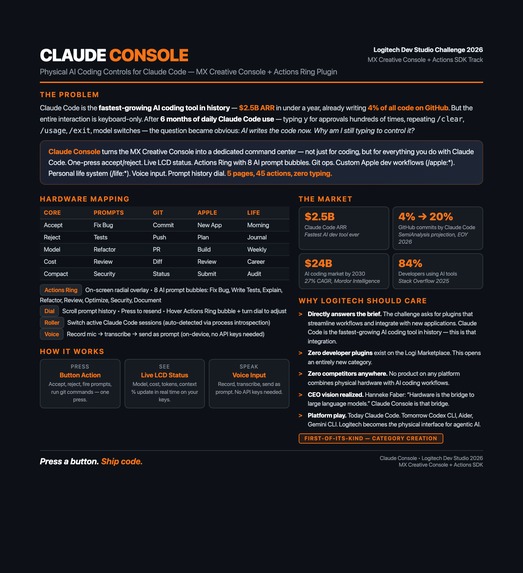
Claude Console — Physical hardware controls for Claude Code. Accept/reject with one press, live LCD status, voice input. Zero typing.
Inspiration
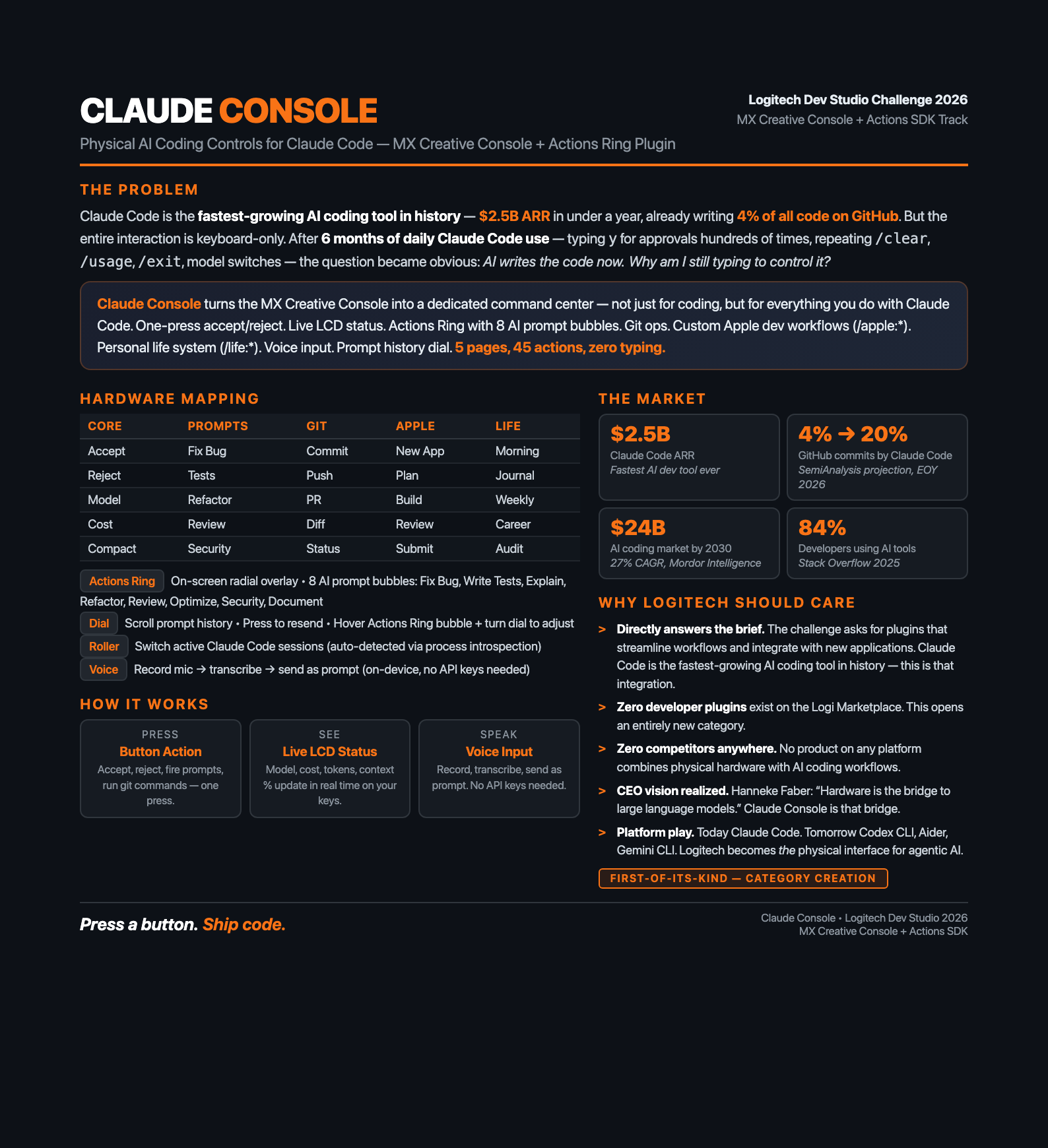
I use Claude Code every day — for building Apple platform apps and managing my daily life. I love it. But one thing consistently breaks my flow: every time Claude wants to read a file, edit code, or run a command, I have to stop thinking, read the prompt, type y, and hit Enter. Dozens of times per task.
Here's the thing: AI writes the code now. And when I need to give instructions, I can just speak them. So why am I still chained to a keyboard? What I actually need is a way to control AI — approve, reject, monitor, and steer.
When I saw the Logitech Dev Studio Challenge — 9 LCD keys, a dial, a roller — it clicked instantly. Green button to accept. Red button to reject. Voice for prompts. LCD keys for live status. That's how Claude Console was born.
What it does
Claude Console turns the MX Creative Console into a physical command centre for Claude Code. 9 LCD keys across 5 pages — Core Controls (Accept/Reject/Cost/Model/Compact), Quick Prompts (Fix Bug/Write Tests/Refactor/Explain), Git Ops (Commit/Push/PR/Diff), Apple Workflows (Plan/Build/Review/Submit), and Life Workflows (Morning/Journal/Weekly/Career). The dial scrolls prompt history, the roller switches between sessions. A Voice key on every page uses macOS dictation — press, speak your prompt, done. 45 actions, zero typing.
How I built it
The plugin connects to Claude Code through its official hooks and statusline APIs — when Claude asks for permission or updates its status, the plugin sees it instantly. Press Accept, and Claude proceeds. Press Reject, and it stops. Live session data like model, cost, and context usage updates on the LCD keys in real time. I built a browser-based simulator that mirrors the real hardware layout and uses the exact same protocol — every interaction you see in the simulator will work identically on the physical console. The entire project was built and validated using Claude Code itself.
This is a working concept validated through the simulator. The hypothesis is proven — the real hardware integration is the next step.
Challenges I ran into
No physical hardware. I don't have the MX Creative Console, so everything had to be proven through a browser simulator. Building something you can't physically touch or test requires trusting the protocol — if the simulator works, the hardware will too.
Multiple sessions. Claude Code can run in several terminals at once. Getting approvals, state, and commands to route to the right session without conflicts was tricky — each session needs its own isolated space.
Voice input. Turning a button press into a speak-then-send flow that feels instant — record, transcribe, and inject the prompt into Claude Code
Accomplishments that I am proud of
The entire concept works end-to-end in the simulator — accept, reject, voice input, live status, prompt history, session switching — all without touching real hardware. Voice input turned it from a button-press tool into a fully hands-free workflow.
What I learned
You don't need the physical hardware to prove a hardware concept — the right simulator can validate everything. Claude Code's hooks are powerful enough to support real-time hardware interaction, which I didn't know going in. And the biggest lesson: when AI writes the code, the interface shifts from typing to controlling — and physical buttons are a natural fit for that.
What's next for Claude Console
Testing on real hardware with live LCD rendering and haptic feedback. Smart permission previews that show exactly what Claude wants to do on the LCD before you press Accept. Customizable button profiles so developers can tailor pages to their own workflows. And ultimately, a Logi Marketplace release for one-click install. But first — I just want to use it myself. Every day I use Claude Code to build apps and run my life through custom workflows. Having a physical console for all of that is the whole reason I built this.
Built With
- .net-8
- applescript
- c#
- claude-code-hooks-api
- claude-code-statusline-api
- logitech-actions-sdk
- macos
- model-context-protocol-(mcp)
- node.js

Log in or sign up for Devpost to join the conversation.