
Classroom-to-Sheets - Integrate classroom details on Google Sheets ✅
💡Inspiration
📚 Since the start of the Pandemic, Google Sheets have been the GoTo place for us, students, to maintain class schedules. Generally, the sheet is prepared by the Class Representative and then shared with the class.
🎓 Still, we need to add upcoming assignments and certain class details manually.
⚙️ What it does do?
Classroom-to-Sheets is a google script that connects the Google Sheet with the corresponding Google Classroom account and integrates assignments and class details.
Features:
👩🏫 Get Class Details: It returns the classroom details along with the Class Teachers' details.

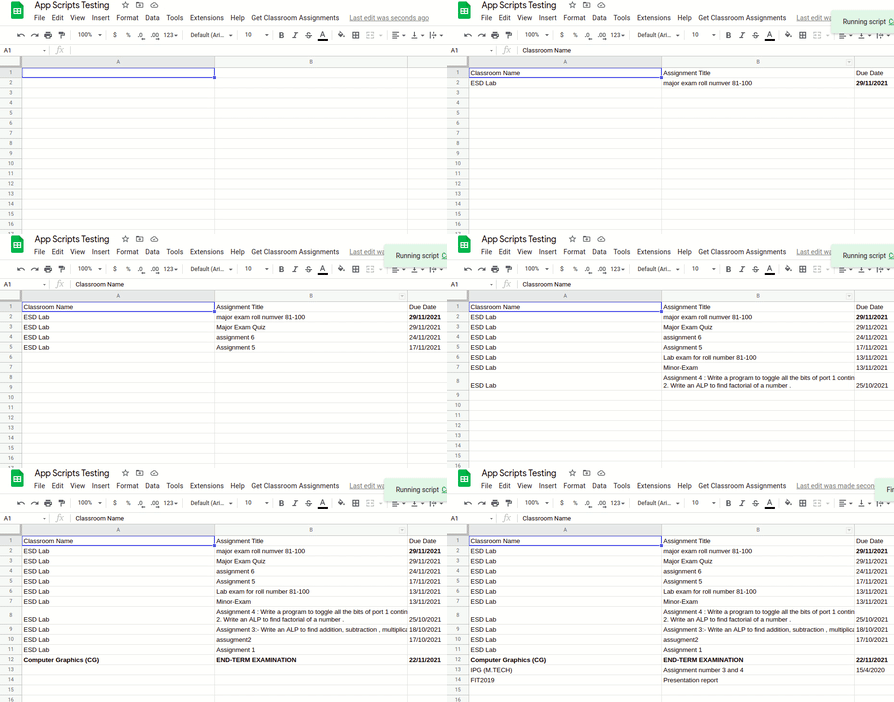
🔍 Insert Assignments: You can also insert assignments posted on the classroom in the sheet.

How we built it 👩💻
It is built using the: Google Classroom API , Google Spreadsheet API, Google App Scripts
Setting Up the Project
- Create a New Google Sheet
- In the Extensions Menu -> Select App Scripts

- App Scripts connected to the sheet will open up. Clear all the prewritten code and insert the following code into it.
- Click on Services on the left pane to add the Google Classroom API service.

- Save the script by clicking on Ctrl+S.
- Reload the Google Sheets. You will now find a new Custom Menu. If not, try to open the script once again.

- Run a task. For the first time, you will be asked for authorization. Provide all of them.
- All the Details will be displayed with a single click!
🚀 Use of Google Cloud
- I used Google Cloud Classroom API, Google Spreadsheet API, and Google App Scripts to integrate the services and create this Hack!
🚀 Use of GitHub
- To host my repository ofcourse :)
- I also hosted the website on Github Pages here
- I also used Canva (courtesy to Github Student Developer Pack!) to create the Video Thumbnail.
- JetBrains WebStrom to develop the code locally!
- Host the code and attach it on Github Gist as well.
Challenges I ran into 🙁
❗️Getting Started with Google App Scripts: I came accross this amazing platform by Google recently and I found very less projects already made using it. So, it was tough to "stackoverflow" the doubts, and I had to understand everything using the documentation. (Which is more than enough btw!)
❗️Providing Authorization: For a long time, the script was running on debugger but not on sheets. Lately, I found that authorization doesn't work with Custom Formulas, but with Custom Menu only. So I switched the complete code to Custom Menus.
Accomplishments that I'm proud of 😇
- I learned a new tech this weekend and I'll definitely use the product myself!
What I learned 🤔
- Google App Scripts: I have understood the concepts and after creating this little product, I'm looking forward to creating more complex scripts using it.
What's next for Classroom-to-Sheets - Integrate classroom details on Google Sheets ✅
A lot of things can be done with this project.
- Formatting of the rows inserted.
- Inserting at the desired location.
Built With
- classroomapi
- googlescripts
- spredsheetapi


Log in or sign up for Devpost to join the conversation.