Classic Settings
Helping users and organizations with the transition to Next-Gen projects on Jira Cloud
Inspiration
It started with our own need. We were just starting our new Jira instance with next-gen Software and Service-Desk projects, and soon missed some settings. While searching for solutions, we noticed a lot of users are looking for the same features. This lead to the community and it's leaders being very active on the subject, and a lot of effort by the Atlassian support team, which also inspired how we give support ourselves. The more we got into this subject, the more we realized this shouldn't be an issue blocking organizations from moving to next-gen projects.
All of this made us start to think about the app and if it can bring more value in the future, and that question got answered fast as we soon got to know AtlasKit and components like the user picker and the new awesome text editor. Combining this with existing API support meant we can actually give users a tool that is in Atlassian quality and really helps feel at home for new next-gen project administrators.
What it does
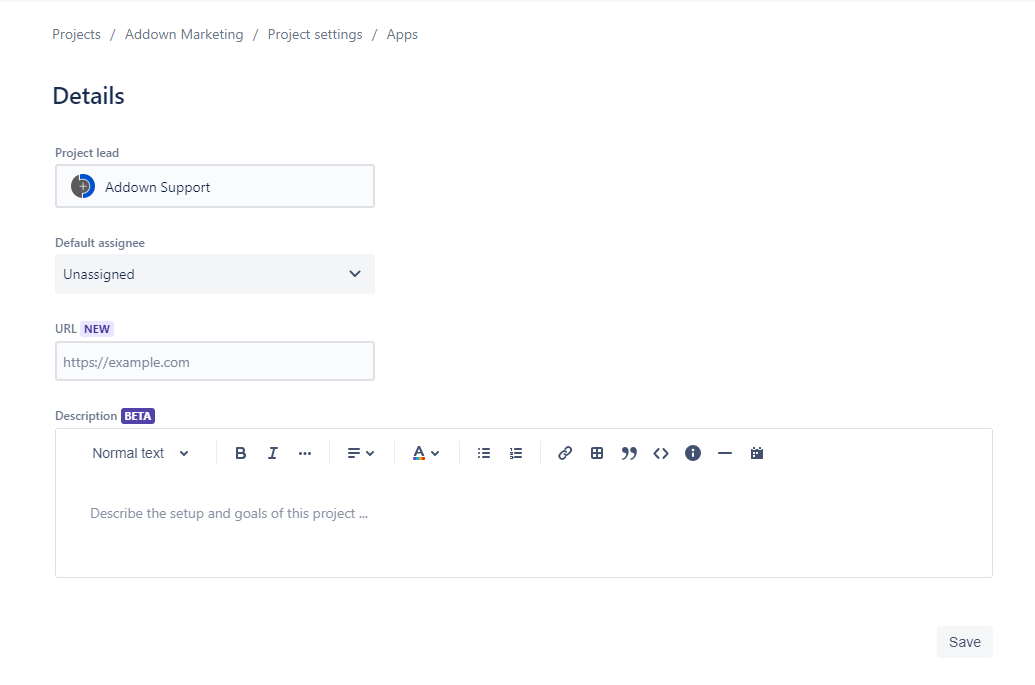
Next-Gen projects are different and not all the project settings fit in. That said, some missing settings from classic projects apparently can really fit well into next-gen, but yet are missing. Classic Settings brings them back...
- Projects lead
- Default assignee
- Project URL
- Project description
Everything functions exactly like it used to in classic projects, and all the effects on the system are the same. The only little bit we added is the new Atlassian Design look and feel, and giving the description fields more respect, hoping more more users will appreciate it.
How we built it
This of course started as a script that we used every time we needed, but when it was go time, there was no doubt. On the frontend, AtlasKit is here for us, and we're utilizing it to the fullest. On the backend, we turned to our trusted existing AWS infrastructure, and we only use Atlassian APIs to get the right results. And of course... Everything comes to life with Atlassian Connect framework.
Challenges we ran into
One might think we just copy pasted feature from classic projects, but this is not the case at all. Classic projects and next-gen have some inherent differences, and porting the fields was not that straight forward. Having to go over all of the different classic projects for testing, really makes you appreciate next-gen.
Accomplishments that we're proud of
The product is reaching 250 users in just a few months, and the reviews and community support really are amazing. There is nothing better than knowing you are really helping. We're also proud of how we changed some classic features just a bit to find the middle ground between being a familiar comfort and a gateway to the new and better. Every time we look at the menu entry "Classic settings" above "Project automation" it feel so natural.
To name a few more technical accomplishments:
- Getting on top of how to properly port permissions and other details from classic projects to next-gen.
- The new text editor from AtlasKit was a must for us, and integrating such a huge component is never trivial.
What we learned
Classic Settings is a different kind of product and so were the lessons we learned. We learned a lot on what it means to be a member of the Atlassian community, and the big efforts support teams invest. But the biggest take is how good it feels to just help the community. All the feedback really pushed us into giving the product more thought, making it a true help for the transition to next-gen.
Not your classic lessons learned ;)
What's next for Classic Settings
Keep on helping and find new ways to do so!
Like a lot of other developers, we are waiting for related APIs to mature so we can support more project settings. This will enable a whole new set of features to be made available for our users. But we're not stopping there. We're also exploring more elaborate ways of assisting with the transition to next-gen. Some outside of the project settings. And last but not least, we're very exited to see how our users use the new text editor and already have big plans for it.
A word from the author
Big thanks to all of our supporters out there in the Atlassian community! 💙
Built With
- amazon-web-services
- atlaskit
- atlassian
- atlassian-connect
- bitbucket
- css
- html
- javascript
- jira
- react


Log in or sign up for Devpost to join the conversation.