Inspiration
I noticed that arranging students in a classroom can take a lot of time, especially for group projects or exams. Teachers often have to manually consider friendships, conflicts, and seating preferences. I wanted to create a tool that makes this process faster, smarter, and more enjoyable, while also helping students sit in ways that improve learning and collaboration.
What it does
ClassCluster automatically arranges students in a classroom grid based on multiple factors:
- Friendships and conflicts
- Proximity to the teacher
- Skill levels
- Front/back seating preferences
- Optional adjacency requirements
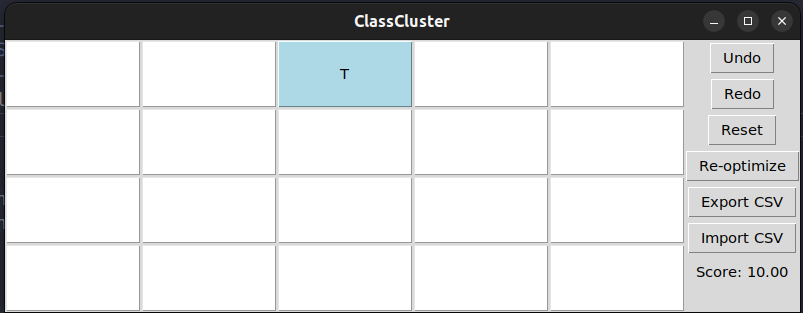
The system allows drag-and-drop rearrangement, inline student editing, real-time scoring, flashing indicators for conflicts or bonuses, and CSV import/export.
How I built it
Data structure:
- Created a
Studentclass to store name, skill, friends, avoid list, seating constraints, and proximity preferences. - Represented the classroom as a 2D grid with teacher positions fixed.
- Created a
Seating algorithms:
- Greedy placement to quickly find a good initial arrangement.
- Clustering logic to seat students together instead of filling left-to-right.
- Hill climbing for iterative improvement of the seating score.
- Greedy placement to quickly find a good initial arrangement.
GUI:
- Tkinter buttons as seats showing full student names.
- Click a seat to edit student information inline.
- Drag-and-drop students with a long press.
- Tooltips for detailed student info.
- Real-time scoring and flashing color indicators for bonuses/penalties.
- CSV import/export for saving/loading seating arrangements.
- Tkinter buttons as seats showing full student names.
Challenges I ran into
- Making drag-and-drop intuitive while keeping quick click for editing functional.
- Balancing the scoring system for multiple constraints (friends, avoid, teacher proximity, front/back preferences).
- Designing a dynamic inline editing panel for any number of students.
- Adjusting the algorithm so students cluster naturally instead of spreading across the classroom.
Accomplishments I'm proud of
- Implemented a fully functional seating optimizer with real-time feedback.
- Created a GUI that allows inline editing, drag-and-drop, tooltips, and live score updates.
- Developed a scoring system that balances multiple constraints effectively.
- Ensured students sit together in small groups, reflecting real classroom behavior.
What I learned
- How to combine algorithm design (greedy + hill climbing + clustering) with GUI development in Python.
- How to handle complex user interactions like drag-and-drop and inline editing.
- How to design scoring formulas that account for multiple, sometimes conflicting, constraints.
- Problem-solving skills for debugging and integrating GUI events, scoring logic, and algorithm updates.
What's next for ClassCluster
- Enhance clustering so friends always sit directly next to each other.
- Add support for multiple classrooms or flexible layouts.
- Include additional constraints like group projects, accessibility needs, or dynamic classroom events.
- Create a web version for teachers to use online with cloud saving and sharing.
Math/Logic Behind Scoring
The seating score (S) is calculated as:
$$ S = 10 + \sum_{\text{students}} \Big( B_\text{friends} - P_\text{avoid} + T_\text{teacher} - F_\text{front/back} \Big) $$
Where:
- (B_\text{friends}) = bonus for being next to friends
- (P_\text{avoid}) = penalty for sitting next to students to avoid
- (T_\text{teacher}) = adjustment for proximity to teacher
- (F_\text{front/back}) = penalty if front/back preferences are not respected
The score is clamped between 1 and 10 for consistent visualization.
Built With
- algorithm
- copy
- csv
- python
- random
- tkinter

Log in or sign up for Devpost to join the conversation.