Inspiration
Everything good you scroll past gets saved somewhere: a post that explained something perfectly, a reply you send every week, a PDF someone keeps asking you for, a thought from a walk. Then it scatters across Notes, screenshots, bookmarks, Files and the saved tab of five different apps. When you need it, you know you have it, and you can't find it.
I wanted one place for all of it, one that finds things the way you remember them and lets you use them again in one tap. That's Clarity.
It started as somewhere to keep my own links and files. The goal now is bigger: something useful to anyone with a phone. A student keeping lecture slides next to the video that finally explained them, someone running a small business with the price list they send every day, someone collecting recipes and ideas from TikTok. So I put my time into making every step as useful as it can be: saving from any app in one tap, finding from half a memory, and using it again in one tap.
What it does
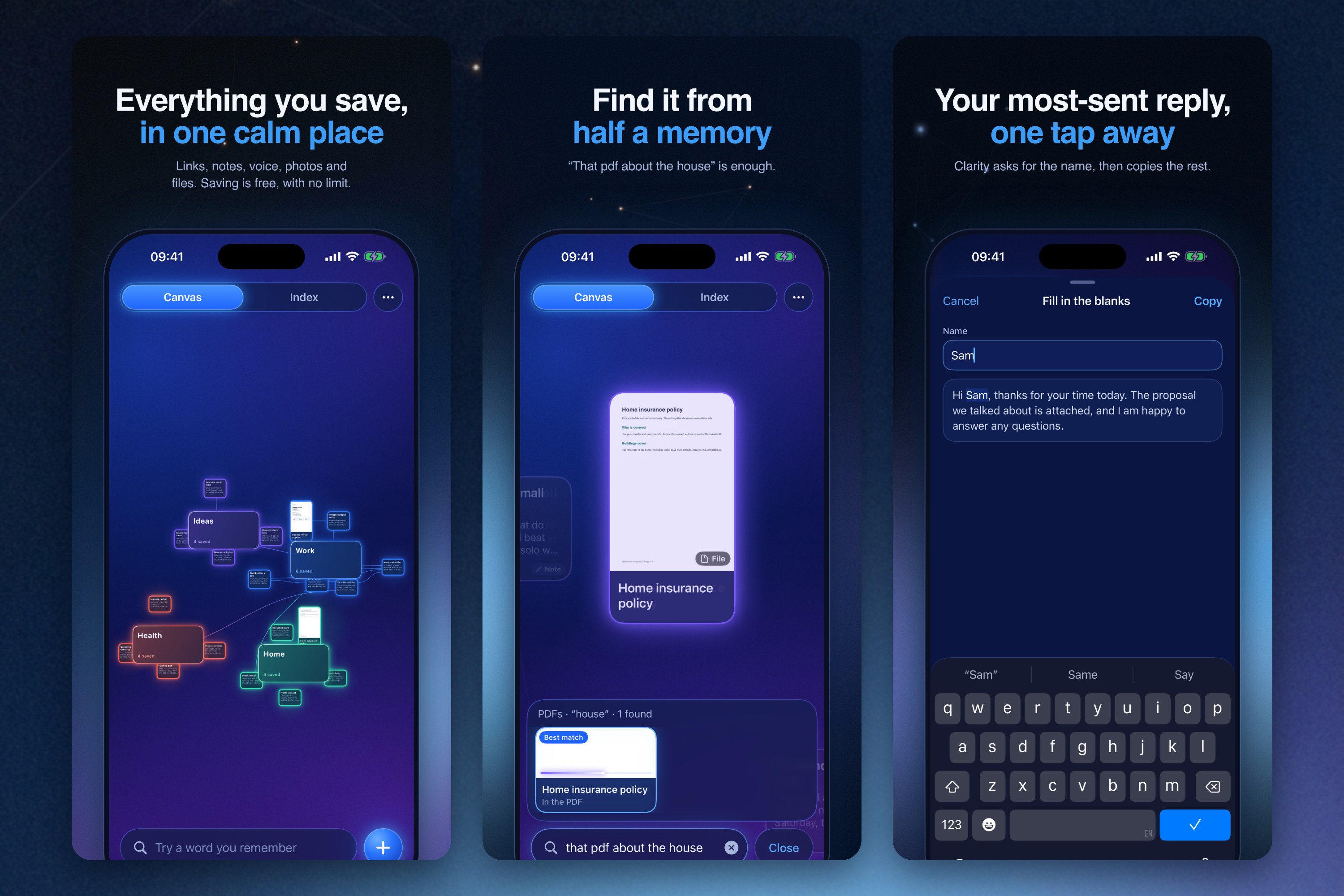
- Save from anywhere. The share sheet from any app, paste, drop, voice, photos, files and PDFs. Links arrive as full cards with a title, picture and the page text: articles, YouTube, TikTok, X, Reddit and Instagram.
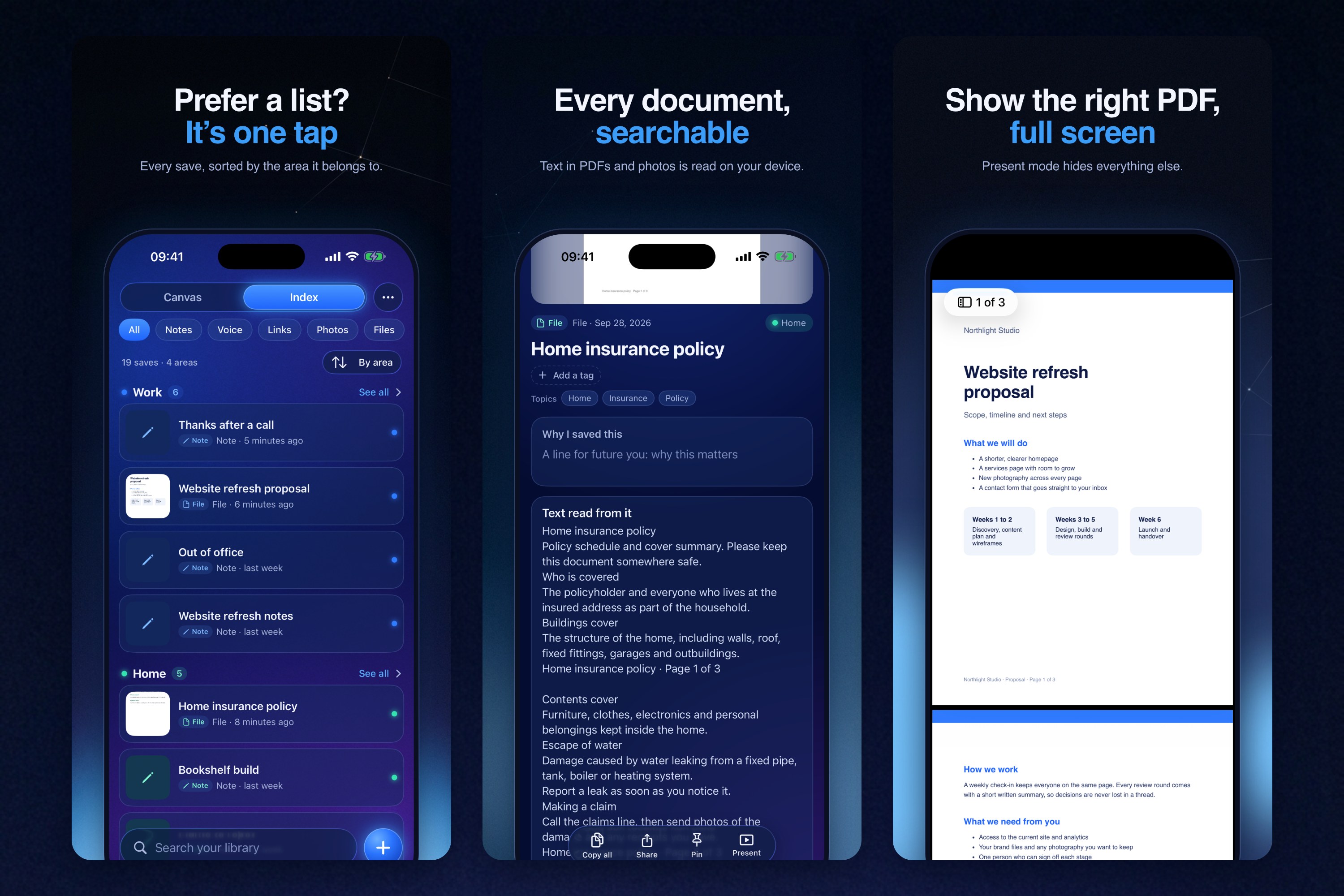
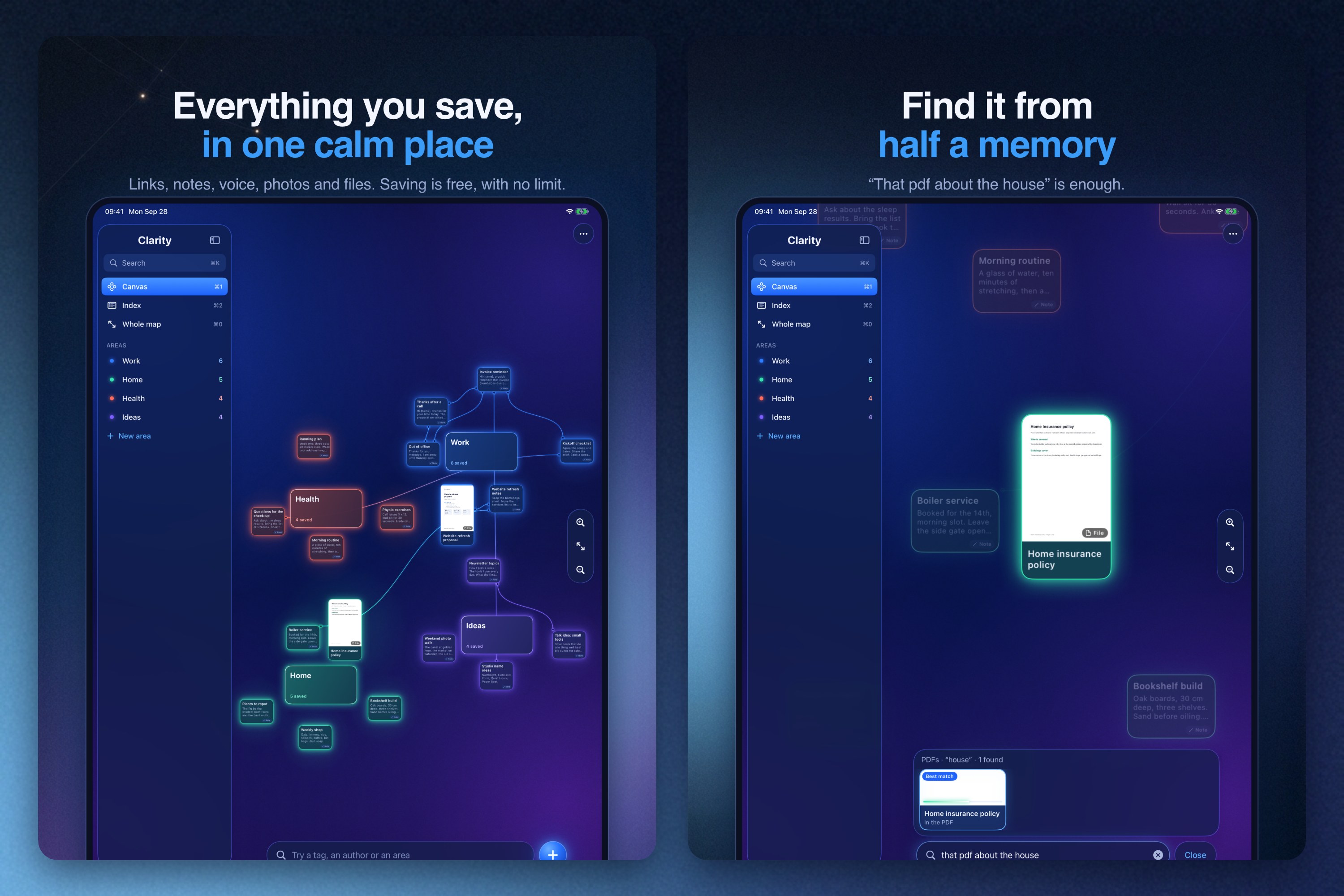
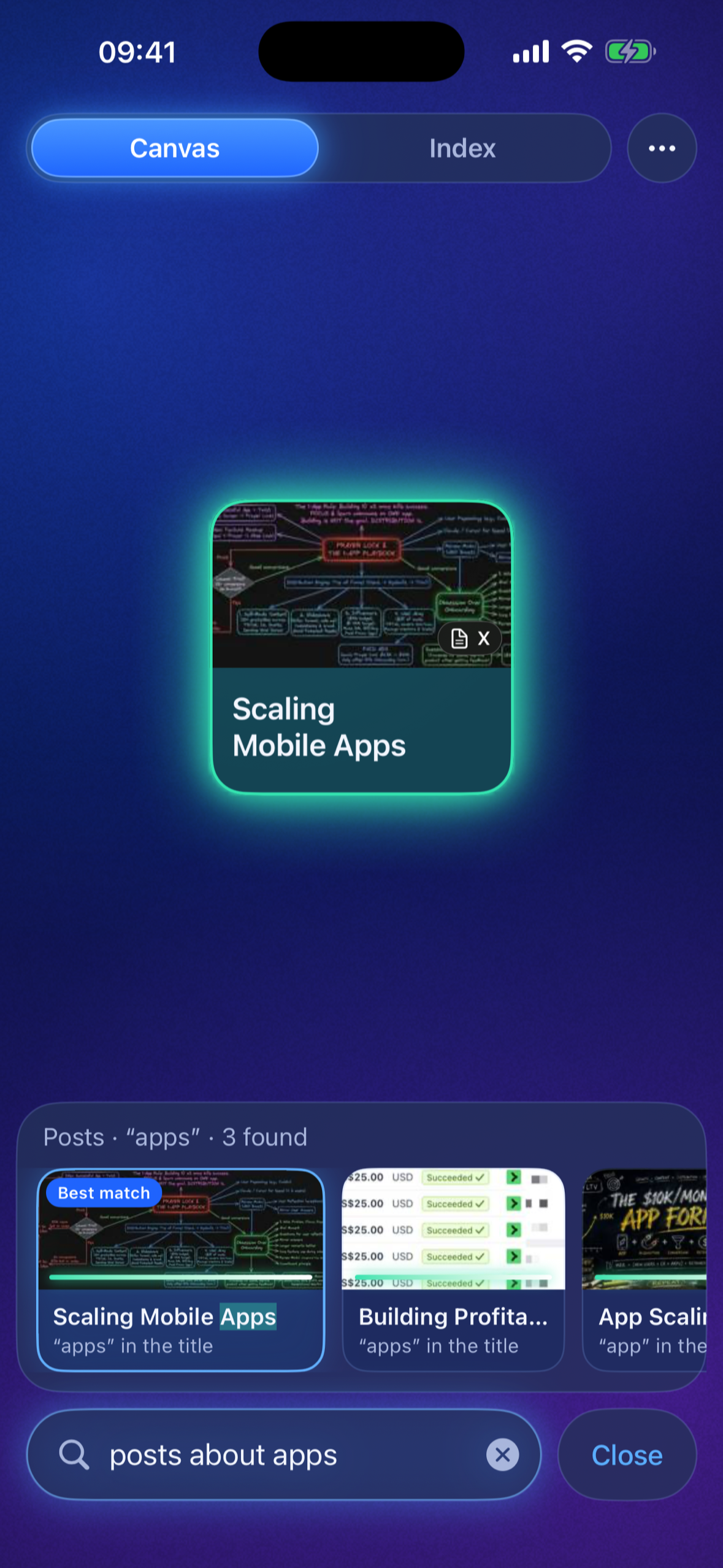
- Find it from half a memory. Results appear as you type, in under 80 ms over the whole library. Search understands time ("videos last week"), kind and source ("the pdf from the bank"), meaning, and the text inside images, video covers and PDFs. It shows what it understood ("Videos · last week · 2 found"), and when nothing matches it says so.
- Reuse in one tap. Tap a snippet to copy it. Templates with blanks like
{name}ask for the value first. Present mode shows a document full screen. - A canvas that organises itself. Every save lands on a canvas, grouped into areas of your life, each with its own colour, with lines between related saves. Index shows the same library as a list.
- Connections that explain themselves. Related saves are linked on the device for everyone. With Plus in 1.0.1, an AI check confirms each link and says why: "Backs up something you saved", "A stronger version of something you saved".
- Your library inside your AI. With Plus in 1.0.1, connect claude.ai or ChatGPT and ask questions that are answered from your own saves.
- Everywhere on the device. Shortcuts and Siri (Save, Find, Copy Snippet), widgets and Control Center for record, note and search. On iPad: a sidebar, a live canvas and the open card side by side, with keyboard shortcuts, hover and drag and drop.
- Private by default. Text reading, search by meaning and voice transcription run on the device. Sync goes through your own private iCloud, and you can export everything at any time.
How I built it
- I started in React Native with Expo, with a Cloudflare Worker behind it, and had it on TestFlight within the week.
- In September I rebuilt the app natively in SwiftUI. I designed every interaction in a web prototype first (canvas physics, springs, glow and search), then ported it one to one to iPhone and iPad from one codebase.
- Data: SwiftData with CloudKit private sync, and an App Group shared with the share extension and widgets.
- On the device: Vision for text and labels, PDFKit, NaturalLanguage embeddings for search by meaning, and on-device speech recognition.
- System: App Intents, WidgetKit (interactive and Control Center widgets) and Core Spotlight.
- Online: a Cloudflare Worker where Workers AI writes summaries and checks connections, plus an MCP server with OAuth so claude.ai and ChatGPT can search your library when you give it permission to access certain areas.
- I'm an 18-year-old student and I built Clarity on my own. I design and direct it, and AI coding agents write much of the code, so a big part of my job is writing clear specs, testing every build on my own phone, and using the iPad simulator on my Mac to test the iPad layout.
Challenges I ran into
- Starting again, natively. The React Native version worked, but the redesign I wanted, with physics, highlights and glow, needed native code. My first native attempt looked awful and I threw it away. What worked was building every interaction in a web prototype until it felt right, then porting the same spring maths, animations and interactions to SwiftUI one to one.
- The canvas froze my iPhone. The first native canvas redrew everything every frame. I rebuilt rendering so the canvas sleeps at rest and zoom holds 60 fps. Later a friend's iPad lagged while panning, so now shadows drop the moment the camera moves and come back when it stops.
- My AI provider changed the rules mid-build. On 14 September Google made prepaid billing mandatory for the Gemini API, and my account fell back to the free tier: 20 requests a day. I only caught it with a live end-to-end test. On the day I submitted 1.0, I moved summaries onto Cloudflare Workers AI so they keep working.
- Similarity can't be guessed. My first rule for "these two saves are related" was a similarity score of 0.75. Real related pairs that were worded differently scored 0.48 to 0.65, close to unrelated ones. So I measured instead of guessing: a lower bar finds candidates, then a second check decides.
- Areas that make sense. Grouping a real library automatically is hard. One early suggestion pulled unrelated saves into a single vague area, and new saves kept falling into it. I raised the bar on what counts as an area, and every suggestion now waits for you to accept it.
- Search that stays honest. Half-memory search is easy to make confident and wrong. Clarity shows what it understood and says when nothing matches.
- Never losing a save. Shares from other apps queue safely and import when Clarity opens, with clear states and retry.
- Keeping AI cheap enough for £7.99 a year. Every AI feature has to cost pennies per person. I measured it: checking one save's connections costs under a tenth of a cent, and catching up a 300-save library about 28 cents. Plus has monthly caps and a spending limit, and free users' links are made on the device with no server call at all.
- Finding the right price. 1.0 launched with 100 free saves. Saving is the habit, so in 1.0.1 it's free and unlimited for everyone, and Plus pays for the online AI, the part that costs money every month.
- Working with AI agents. Running five coding agents at once burned my whole five-hour usage window in about 25 minutes. I learned to keep one critical path, write tight specs, and check every build on my own phone before trusting it.
Accomplishments that I'm proud of
- I designed, built and shipped a native iPhone and iPad app to the App Store on my own, at 18.
- Search that answers half memories on the device, in under 80 ms.
- A canvas that holds 60 fps zoom on a phone and uses almost no CPU at rest.
- AI connections that cost under a tenth of a cent per save, each one checked before it's shown.
What I learned
- Test on a real phone early. The frozen canvas only showed up on the device.
- Tuning motion in a web prototype, then porting it one to one, saved me a lot of rework.
- Measure before you pick a number. My guessed similarity bar was wrong by a long way.
- Never depend on one AI provider.
- Saying "nothing found" builds more trust than a clever guess.
What's next for Clarity
- A Mac app with a menu bar and a global search hotkey. It already runs in development.
- AI summaries for free users, once I can bring the cost down.
- Search inside saved videos: on-screen text and speech, with timestamps.
- A Clarity keyboard for inserting snippets into any app.
Built With
- app-intents
- cloudflare-d1
- cloudflare-workers
- cloudkit
- core-spotlight
- mcp
- naturallanguage
- pdfkit
- revenuecat
- speech
- storekit
- swift
- swiftdata
- swiftui
- typescript
- vectorize
- vision
- widgetkit
- workers-ai

Log in or sign up for Devpost to join the conversation.