Inspiration
Student drivers are constantly expected to divide their attention between the road, navigation, their phone, and everything happening around them. We wanted to build something that reduces that distraction instead of adding to it.
That became Clarity SmartGlasses: a hands-free AI co-pilot designed for student drivers.
Our goal was to combine wearable hardware, computer vision, and voice AI so any driver could receive useful assistance without constantly reaching for a phone. We also wanted Clarity to remain useful when driving is over—whether that means quickly saving a note or getting step-by-step help after an accident.
Clarity is not designed to replace the driver or drive the vehicle autonomously. It is designed to support the person behind the wheel.
What it does
Clarity turns smart glasses into a hands-free co-pilot for student drivers.
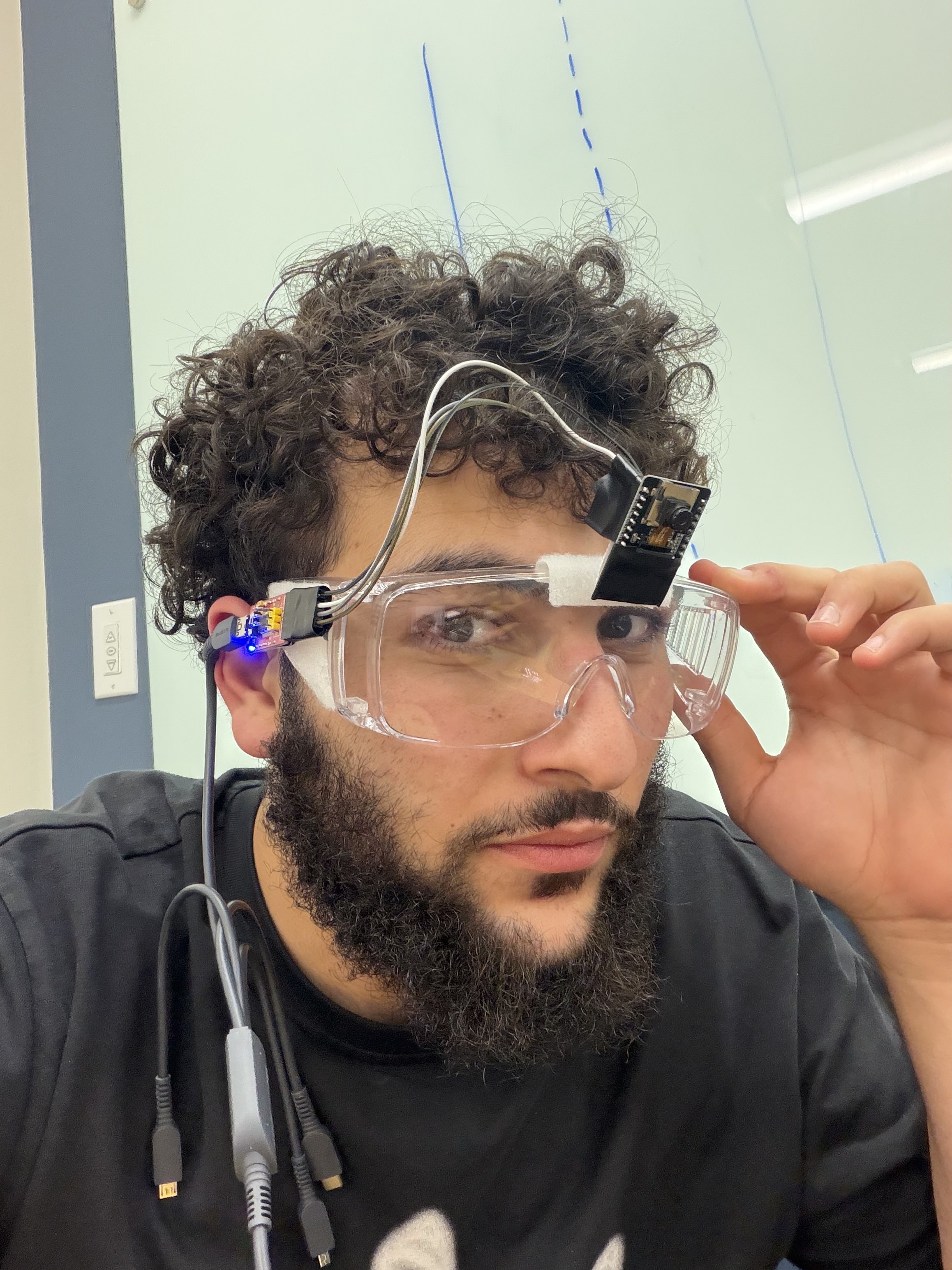
A forward-facing ESP32-CAM streams the driver's view to our software, where computer vision and AI process what is happening around the vehicle.
Drive Mode
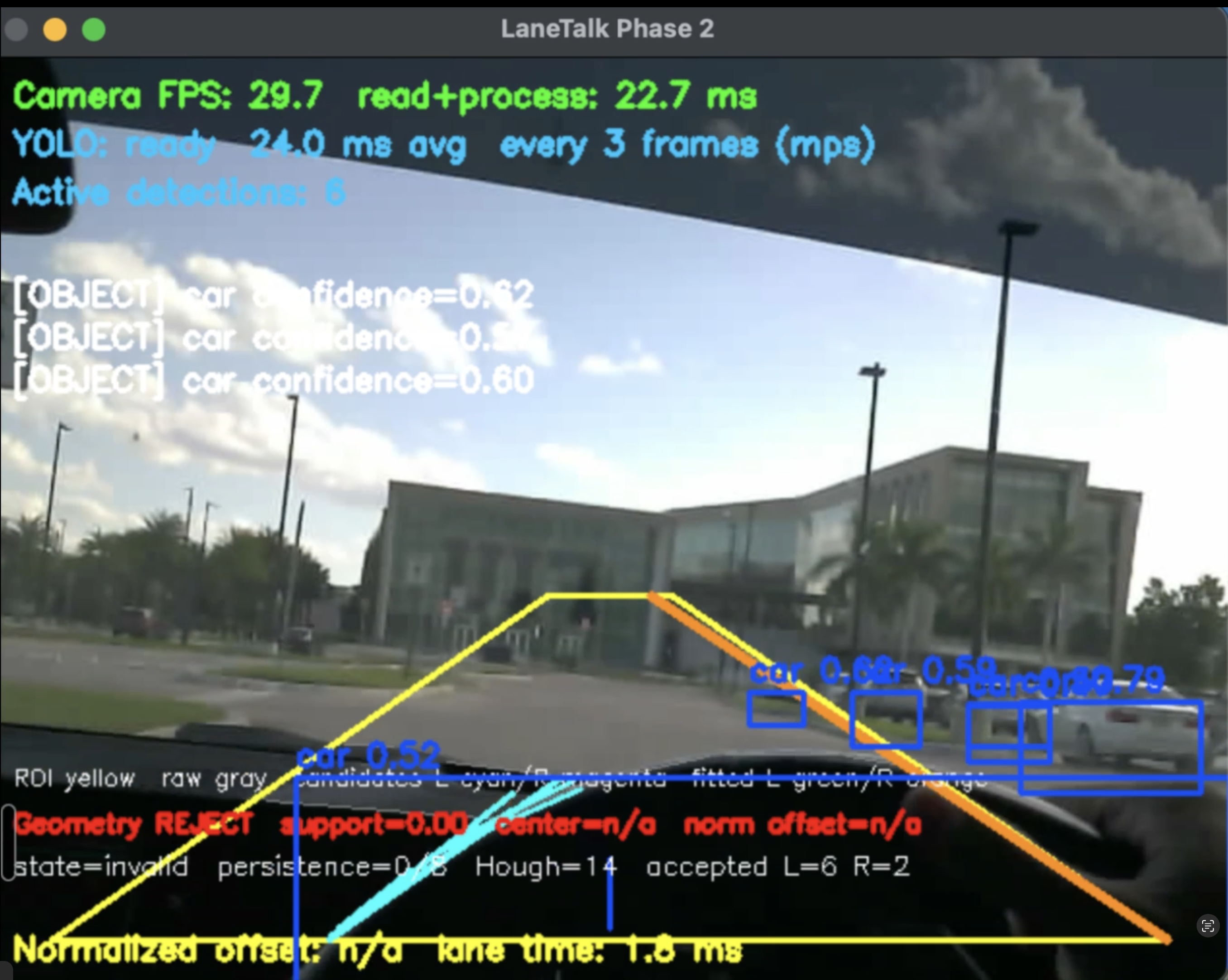
In Drive Mode, Clarity uses YOLO11n and OpenCV to process the live camera feed. The system can recognize objects such as vehicles and pedestrians and analyze lane geometry and positioning.
We intentionally keep real-time computer vision separate from the language model. Fast perception is handled locally, while higher-level AI is used for interaction and assistance.
This connects to the Waymo Mobility Challenge through our focus on improving the transportation experience with intelligent perception and driver awareness. Clarity is a co-pilot rather than an autonomous driving system.
Multimodal AI assistance
We use the Gemini API to give Clarity multimodal AI capabilities. Gemini can work with visual context from the camera and natural-language input so users can interact with the system through conversation rather than a traditional chat window.
This supports the Google Cloud – Best Use of Gemini API challenge by using Gemini as part of a physical, real-world wearable experience.
It also aligns with Microsoft's "What's Missing?" challenge. We identified something that is still unnecessarily difficult: accessing useful digital assistance while driving without looking down at another screen. The core Clarity experience is the wearable system itself—camera, computer vision, voice, and software—not a chatbot.
Accident assistance
Clarity is also designed to help students after a car accident.
In a stressful situation, the system can guide the user through important steps, help them document relevant details, capture notes hands-free, and organize that information into a clearer report for later use.
This directly connects to the State Farm Auto Insurance Challenge, which asks teams to make auto insurance and everyday risks simpler and more helpful for students.
Clarity does not determine fault, provide legal advice, or make insurance decisions. Its role is to help the user document and organize information.
Voice interaction
A wearable assistant should not require the driver to constantly look at a screen.
We integrate ElevenLabs to provide natural, human-sounding voice output. This allows Clarity to communicate information conversationally while keeping the experience hands-free.
That supports the MLH – Best Use of ElevenLabs challenge by making AI-generated voice a core part of the user experience.
Notes Mode
Clarity also includes a dedicated Notes Mode.
Users can quickly capture information through their voice instead of pulling out their phone. This is useful for saving reminders, observations, or information they want to return to later.
Together, the system works like this:
ESP32-CAM → live video → OpenCV + YOLO → driving context → Gemini → ElevenLabs voice → Notes
The goal is simple: help student drivers stay aware, access useful information, and respond to stressful situations while keeping their attention where it belongs.
How we built it
Clarity combines custom hardware, local computer vision, a web application, and cloud AI.
For the hardware, we use an AI-Thinker ESP32-CAM with an OV2640 camera. The ESP32 creates its own local Wi-Fi network and exposes a live MJPEG camera stream.
The laptop connects directly to that stream and performs the heavier computation.
Our computer-vision pipeline uses:
- OpenCV for frame processing and lane analysis
- YOLO11n for real-time object detection
- Background inference so YOLO does not block the camera display
- Structured events for objects and lane information
- Temporal filtering, confidence checks, and persistence logic to reduce false detections
During testing, our live camera pipeline reached roughly 30+ FPS, while YOLO inference remained fast enough to run alongside the camera feed.
For the application itself, we built a React-based dashboard that connects the physical camera to the rest of the Clarity experience.
We also integrated:
- Gemini API for multimodal AI interaction
- ElevenLabs for natural voice output
- Supabase for authentication and application data
- A local Python LaneTalk pipeline for real-time computer vision
One of our main architectural decisions was to avoid putting the language model directly inside the frame-by-frame safety loop. Computer vision handles immediate perception, while Gemini handles higher-level interaction.
Challenges we ran into
The biggest challenge was getting the hardware and software to behave like one system.
Before we could build any AI features, we had to learn how to flash and debug an ESP32-CAM using an FT232 adapter. We dealt with TX/RX wiring, boot modes, GPIO0, serial communication, unstable power assumptions, and repeated connection failures before finally getting reliable communication with the board.
Networking became another major challenge.
The ESP32-CAM creates its own Wi-Fi access point, which allows the laptop to receive the camera stream directly. However, services like Gemini and Supabase still require internet access. That meant we had to design around two network paths: one for the local camera and another for cloud services.
Lane detection was one of the hardest software problems.
Our first versions could sometimes mistake strong edges from the dashboard, hood, or car interior for actual lane markings. Rather than allowing uncertain detections to immediately become warnings, we added stricter geometry validation, confidence checks, temporal consistency, lane trust, and persistence requirements.
We learned that for a safety-related system, rejecting an uncertain detection is better than confidently reporting something incorrect.
We also attempted to integrate a physical button for changing modes. The button hardware was unreliable and did not consistently produce the GPIO transitions we needed. Instead of spending the rest of the hackathon forcing one component to work, we removed it from the critical path and moved mode control into software.
Finally, integrating a physical camera, local vision pipeline, React dashboard, Gemini, ElevenLabs, and Supabase meant debugging several systems at the same time. A problem that looked like an AI issue could actually be networking, camera streaming, browser permissions, or hardware.
Accomplishments that we're proud of
We are especially proud that Clarity became more than a mockup.
We successfully built a physical ESP32-CAM system that streams live video into our software and connected that stream to a real computer-vision pipeline.
Some of the accomplishments we are most proud of include:
- Building a working ESP32-CAM smart-glasses prototype
- Streaming the camera wirelessly over a local network
- Running the live camera feed through Python and OpenCV
- Reaching roughly 30+ FPS during live testing
- Running YOLO11n locally for real-time object detection
- Building and testing a lane-analysis pipeline
- Creating a React dashboard that connects the hardware with the user experience
- Integrating Gemini for multimodal AI interaction
- Integrating ElevenLabs for natural voice output
- Adding hands-free Notes functionality
- Designing Clarity so local perception can continue independently of cloud AI
We are also proud of the decisions we made when something did not work. Instead of hiding unreliable behavior, we added confidence gates, disabled features that were not ready, and simplified the design when necessary.
What we learned
The biggest lesson from Clarity was that building an AI product is very different from simply calling an AI model.
A useful wearable AI system requires hardware, networking, computer vision, cloud services, browser permissions, UI, and real-time performance to all work together.
We learned how to work directly with an ESP32-CAM, serial communication, Wi-Fi networking, MJPEG video streams, OpenCV, YOLO, React, Gemini, ElevenLabs, and Supabase.
We also learned the value of separating responsibilities.
YOLO and OpenCV are good at fast, deterministic perception. Gemini is much better suited for multimodal reasoning and natural interaction. ElevenLabs provides the voice layer. Keeping those responsibilities separate made Clarity easier to debug and more reliable.
Most importantly, we learned that uncertainty matters.
For something related to driving, the system should never pretend to know more than it does. Sometimes the correct output is not an alert—it is recognizing that the available visual information is not reliable enough.
What's next for Clarity - SmartGlasses
Our next step is to make Clarity smaller, more reliable, and more independent from the development laptop.
We want to improve the physical glasses design, remove cabling and go wireless, improve power management, and continue testing the camera from a stable forward-facing position.
We also want to improve lane understanding using more real-world road footage and strengthen how Clarity determines whether an object or lane condition is actually relevant to the driver.
For accident assistance, we want to make the documentation workflow more structured so students can more easily capture the information they may need after an incident.
Longer term, we see Clarity becoming a lightweight wearable co-pilot that combines local perception, multimodal AI, voice interaction, and useful driving tools without demanding another screen.
Our goal remains simple:
make everyday driving safer, calmer, and easier to manage—hands-free.
Github Link
Built With
- elevenlabs
- esp-32-cam
- ft232
- google-gemini
- google-genai
- google-live-api
- node.js
- opencv
- postgresql
- python
- react
- supabase
- typescript
- vite
- yolo11n


Log in or sign up for Devpost to join the conversation.