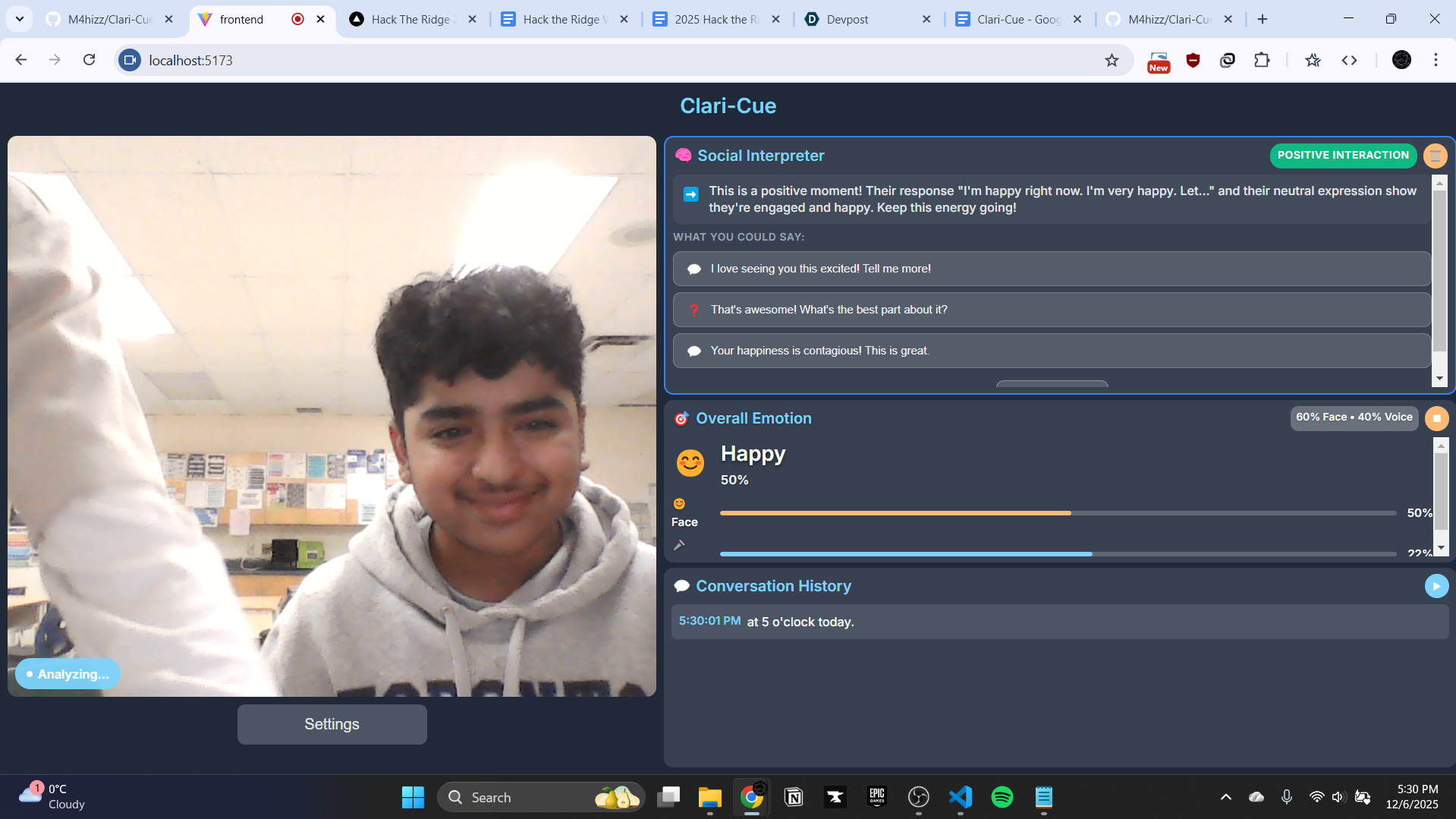
Project Description, What It Does Our app uses a camera and AI to interpret facial expressions, body language, and tone of voice to help neurodivergent users understand social cues in real time. It gives simple, visual feedback using colors, icons, or short emotion words so communication feels clearer and less stressful. We designed it for accessibility, especially for users who find non-verbal signals confusing or overwhelming. The app acts like a gentle “social helper,” showing cues such as: Whether someone looks happy, confused, frustrated, or neutral
If their body language seems open, interested, or closed-off
Whether their tone sounds calm, excited, or upset
Our goal is to make communication clearer, more inclusive, and less stressful, especially for neurodivergent students, youth, and individuals who struggle with decoding non-verbal signals. We built this so users can feel more comfortable in conversations, whether in school, workplaces, or daily life.
How We Built It (Technologies Used) Frontend: React.js Displays real-time video and audio results
Shows color-coded or icon-based emotion feedback
Uses WebRTC to send camera/mic input to the backend
Designed with accessibility in mind (clear layout, minimal text)
Backend: Python Built using FastAPI or Flask
OpenCV for processing webcam frames
Pretrained AI models for:
Facial expression recognition
Body posture and gesture detection (MediaPipe / OpenPose)
Tone-of-voice emotion recognition (Wav2Vec2-style models)
PyTorch/TensorFlow for model inference
Other Tools GitHub for version control
VS Code for development
Postman for API testing
Challenges We Ran Into The system took a long time to configure. Setting up all the libraries, models, and dependencies was harder than expected and slowed down development.
The AI models used a lot of VRAM. Running face, body, and voice models together was heavy, causing lag or performance drops on our machine.
Real-time processing was tricky. We had to optimize the code so the camera feed and AI outputs stayed smooth without long delays.
Connecting Python to React smoothly. Keeping the video stream and predictions in sync required debugging and testing.
Designing an interface that is simple and not overwhelming. We had to rethink colors, wording, and layouts to make the app friendly for neurodivergent users.
Accomplishments We’re Proud Of We built a working prototype that can understand face, body, and voice cues in real time.
We created an accessibility-focused UI designed specifically for neurodivergent users.
We learned how to combine multiple AI models into one system without major crashes.
We got Python and React communicating smoothly with live webcam input.
We turned a challenging idea into a functioning project within hackathon time.
What We Learned How to work with real-time webcam and microphone inputs
How different models detect emotions in different ways
How to optimize VRAM-heavy AI models
How to design accessible interfaces that support neurodivergent users
How to build a full-stack AI project connecting React and Python
How to troubleshoot quickly and work efficiently under time pressure


Log in or sign up for Devpost to join the conversation.