-
-
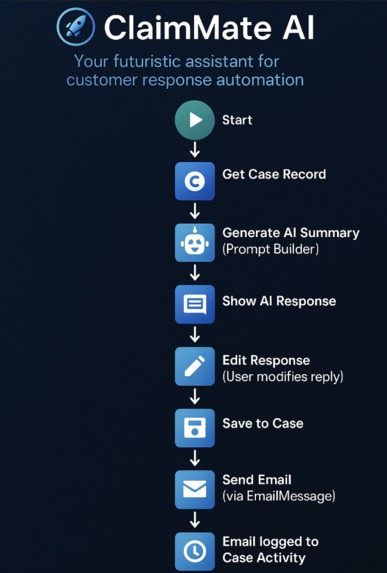
ClaimMate AI Flowchart
💡 Inspiration
As a Salesforce Flow builder and business automation enthusiast, I wanted to create something that reduces the time support agents spend on writing repetitive emails — but without sacrificing empathy.
I also wanted to explore how AI can assist people, not replace them, by allowing users to review and edit AI suggestions before sending.
🛠️ What it does
ClaimMate AI is a no-code Salesforce Flow that:
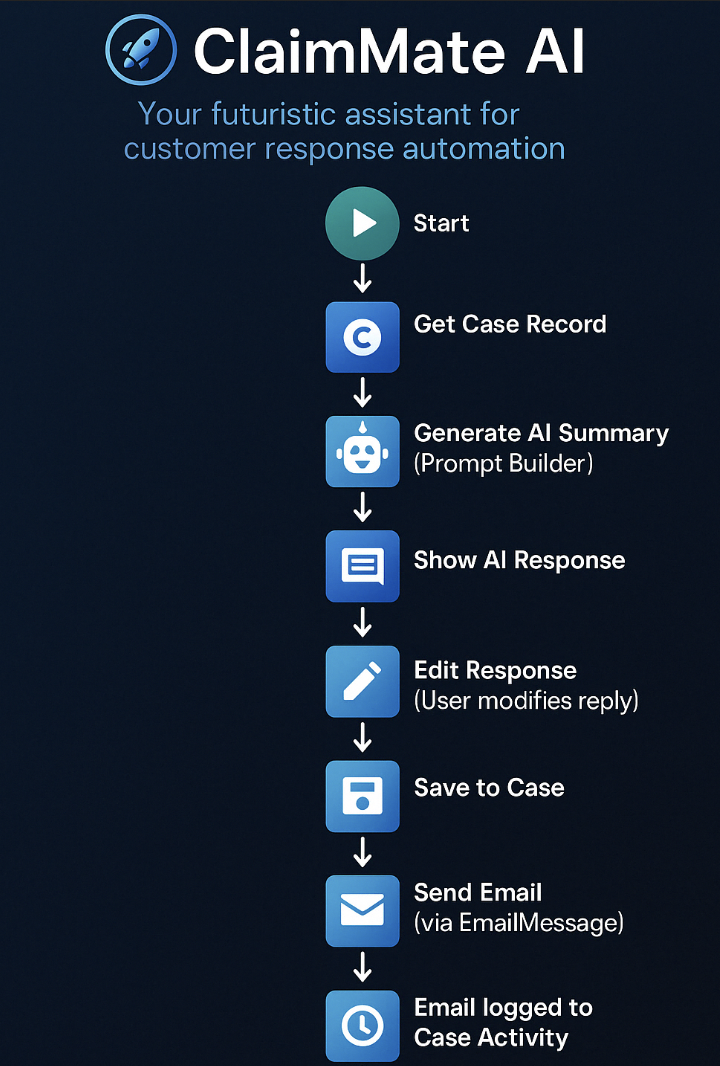
- Retrieves a Case record
- Uses Prompt Builder to summarize the issue and draft a response
- Lets the user edit the message
- Sends the reply via EmailMessage
- Logs the message in the Case Activity timeline
🔧 How I built it
I used Salesforce Flow Builder to design the step-by-step logic, integrating Prompt Builder to generate text based on Case Subject and Description.
Then I created an editable text area where the user can modify the AI-generated response.
Finally, I used EmailMessage to send the message and automatically link it to the Case activity history.
🚧 Challenges I ran into
- Getting the Prompt Builder to output useful, short, and polite responses
- Making sure the edited message is saved and also used in the final email
- Ensuring the email gets properly logged in the Case timeline
🎓 What I learned
- How to integrate Prompt Builder in Flow effectively
- How to balance AI automation with human input
- How to use EmailMessage for sending and logging emails in Salesforce
🚀 What's next
- Adding language support (multi-lingual replies)
- Making the prompt more context-aware (include Case Priority or Product info)
- Turning this into a managed package or AppExchange app## Inspiration
Built With
- flow
- lightningappbuilder
- promptbuilder
- salesforce


Log in or sign up for Devpost to join the conversation.