Try it: https://claimcheck.hanjunjung.workers.dev · Code: https://github.com/JeongHanJun/claimcheck · Video: https://youtu.be/OR-ZTnMi8F8
Inspiration
Skincare packs print exact numbers: "reduces the look of wrinkles by 31% in 8 weeks". The photo next to the number usually shows something far bigger. Shoppers decide at the shelf or on the product page, with no way to tell what 31% would look like on them. The question the challenge asks, what to do at the moment before a purchase, is exactly this one.
What it does
Pick a product claim, or paste one from any product page, and a photo. ClaimCheck:
- reads the claim: concern, percentage, time frame, study size, and how many people in the study saw any improvement;
- measures your skin today with YouCam Skin Analysis;
- renders the claimed change on your photo with YouCam Skin Simulation, changing only that concern;
- measures the render again, and corrects the strength once if the measured change misses the claim by more than 4 points;
- renders the same concern at full strength, the kind of retouch used in ads, and measures that too.
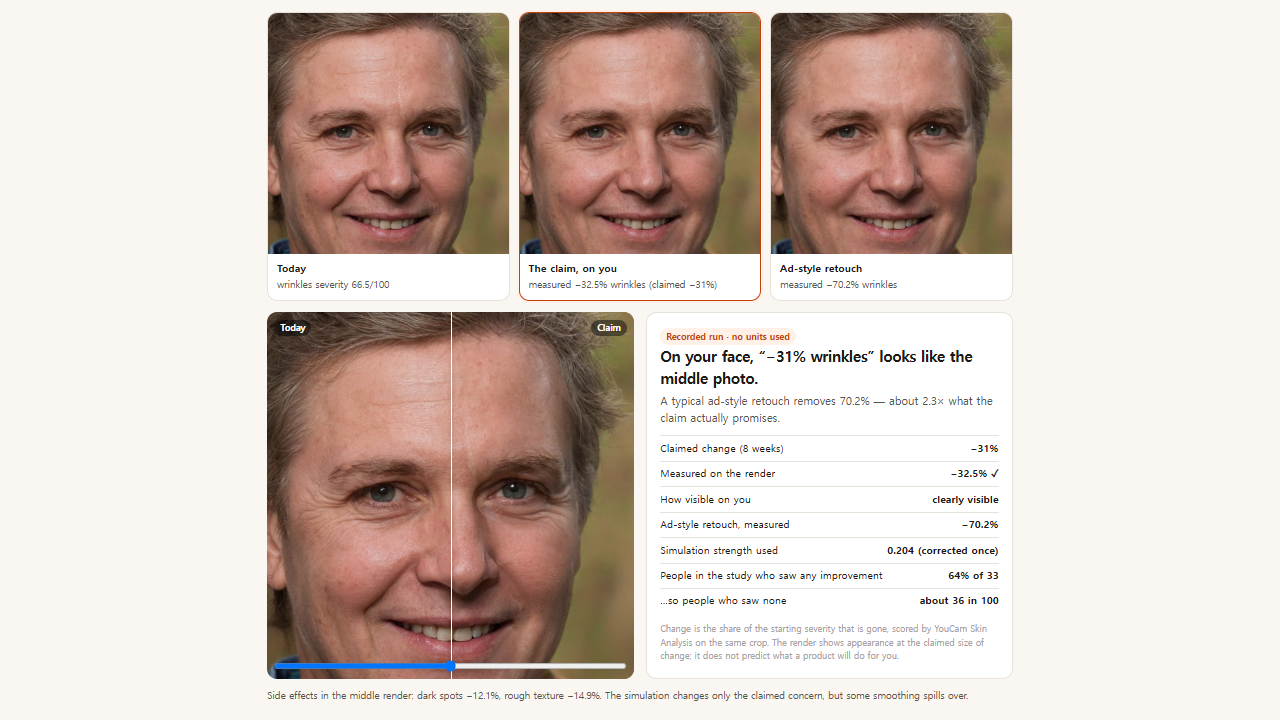
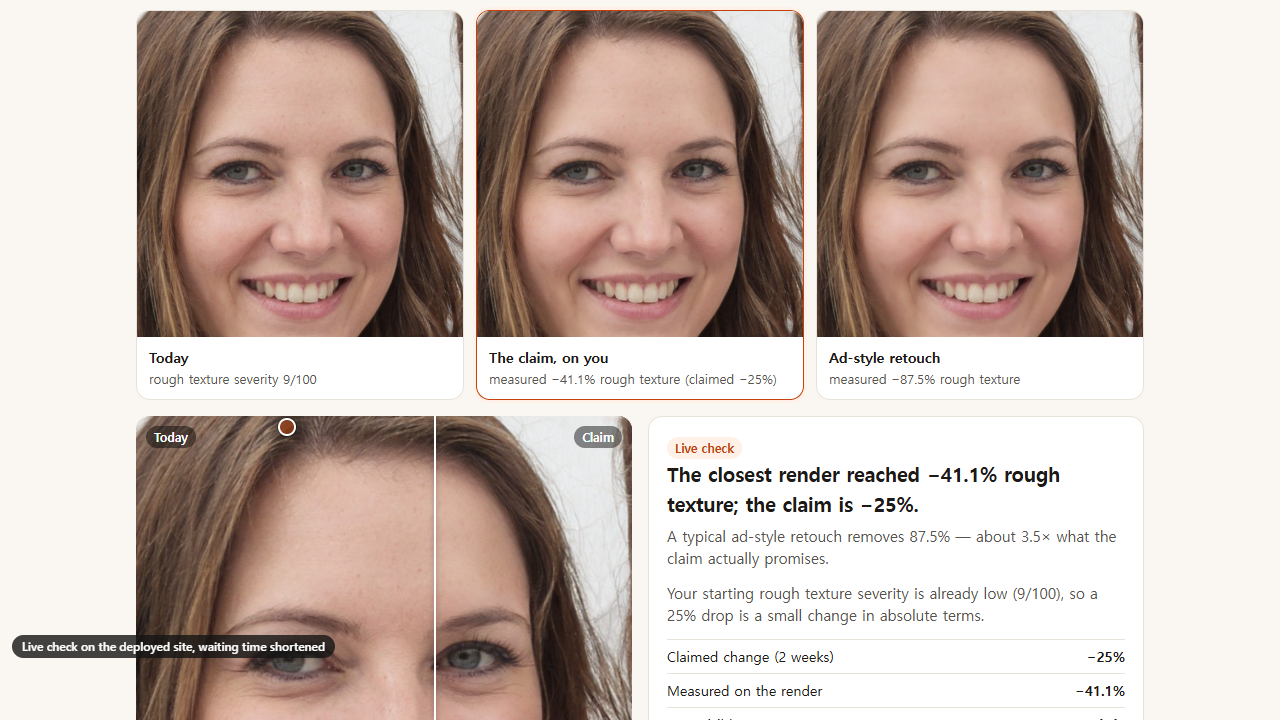
You get three photos side by side (today, the claim on you, the ad look), a slider between today and the claim, and a short verdict: claimed vs measured change, how visible it is on your face, the ad look as a multiple of the claim, the share of people in the study who saw nothing, and side effects on the other concerns.
On our sample face, "−31% wrinkles" measured −32.5% and looked clearly visible; the ad-style retouch measured −70%, 2.3 times the claim. On a face that starts with few wrinkles, the same claim is a subtle change, and the card says so.
How we used the YouCam API
- Skin Analysis (wrinkle, age_spot, texture, SD) is the measuring instrument. Every image, original and rendered, is scored on an identical crop, so before and after are comparable. We checked that the same image always returns the same scores.
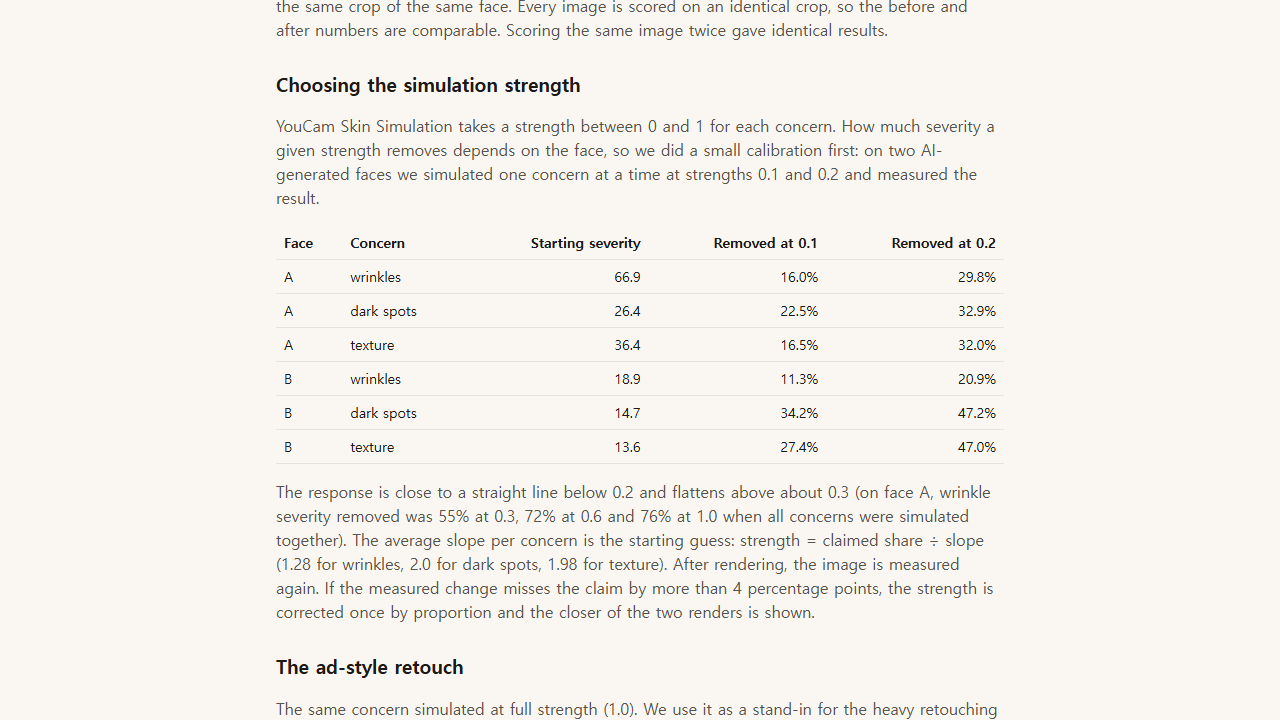
- Skin Simulation produces the render. We use one concern at a time so a wrinkle claim changes wrinkles, and we choose the strength from a calibration panel: on two faces, strengths 0.1 and 0.2 removed 11–47% of the starting severity depending on concern and face, and the effect saturates above about 0.3.
- The two APIs are chained in a closed loop: Analysis grades the Simulation output, and the strength is adjusted until the measured change matches the claim. That turns a marketing percentage into pixels on your own face, with a number under it.
- Files go up with
POST /fileand the presigned PUT; tasks are polled; the balance endpoint feeds a budget guard.
How it is built
Cloudflare Worker (TypeScript) holds the API key and exposes small endpoints: parse, upload, analyse, simulate, plan, verdict. The page (plain HTML/JS, no build step) frames the photo, crops each image the same way in a canvas, and walks the steps with a progress list. A Durable Object gives every live check a token with a fixed allowance (4 analyses, 3 simulations), limits visitors to 2 live checks a day, and switches the demo to recorded checks when the unit balance gets low. Recorded checks were produced by the same endpoints. The claim reader is rule-based on purpose, so the same text always gives the same numbers; 10 tests cover it and the math.
Challenges
- The two APIs want different framing: Skin Analysis rejects faces that are too small, Skin Simulation rejects faces that touch the edges. We simulate on the full photo and measure on a fixed crop of every image.
- The simulation response is steep and then flat. A linear guess overshoots on some faces, so the measured correction step matters more than a perfect prior.
- Pore scores did not move steadily with the simulation strength, so ClaimCheck recognises pore claims but refuses to render them instead of showing a number it cannot stand behind.
What we learned
Most of a "visible" change happens at low simulation strength. A typical 25–40% claim needs strength 0.1–0.3, while advertising-style smoothness sits near 1.0. That gap is the whole point of the product.
What's next
A browser extension that reads the claim from the product page you are on; photo-to-photo repeatability tests so the verdict can say when a difference is within measurement noise; more concerns once they calibrate cleanly.
Limits (also on the site)
The middle image shows appearance at the claimed size of change. It does not predict what a product will do for you and is not medical advice. Two-face calibration. Sample faces are AI-generated; product names are fictional.
Built With
- cloudflare-workers
- css3
- durable-objects
- html5
- javascript
- python
- typescript
- vitest
- youcam-api
- youcam-skin-analysis
- youcam-skin-simulation

Log in or sign up for Devpost to join the conversation.