Inspiration
CIVIC Hack 2026's challenge was chosen by municipal leaders at the Canadian Urban Institute's State of Canada's Cities Summit: How might we help residents understand a proposed municipal decision, how it could affect them, and when they can have a say?
As University of Waterloo Math students, we saw how much municipal decisions shape everyday life: bike lanes, parks, housing, budgets. Yet the information is spread across long PDFs, agendas and staff reports, and most residents only find out once a decision is made or construction has started. Renters, students, newcomers, seniors and people without a smartphone or home internet are the least likely to take part. We set out to make getting involved in decisions that affect daily life simple and accessible to everyone.
What it does
CivicSpeak – Your city. Your voice. Your future. It answers the three parts of the challenge:
1. Understand the decision
- Every proposal is explained in plain language, in four tabs:
- Breakdown: the summary with updates added as they happen, what's changing, the cost and what you can do.
- Pros & Cons: both sides, side by side. Once a proposal is completed, this becomes Impacts.
- Process: each step, labelled as a staff recommendation, a committee decision or a council decision.
- Sources: every claim links to the official document.
- Ongoing, Completed and Abandoned tabs, so residents also see what was decided and what fell through, and why.
2. See how it affects you
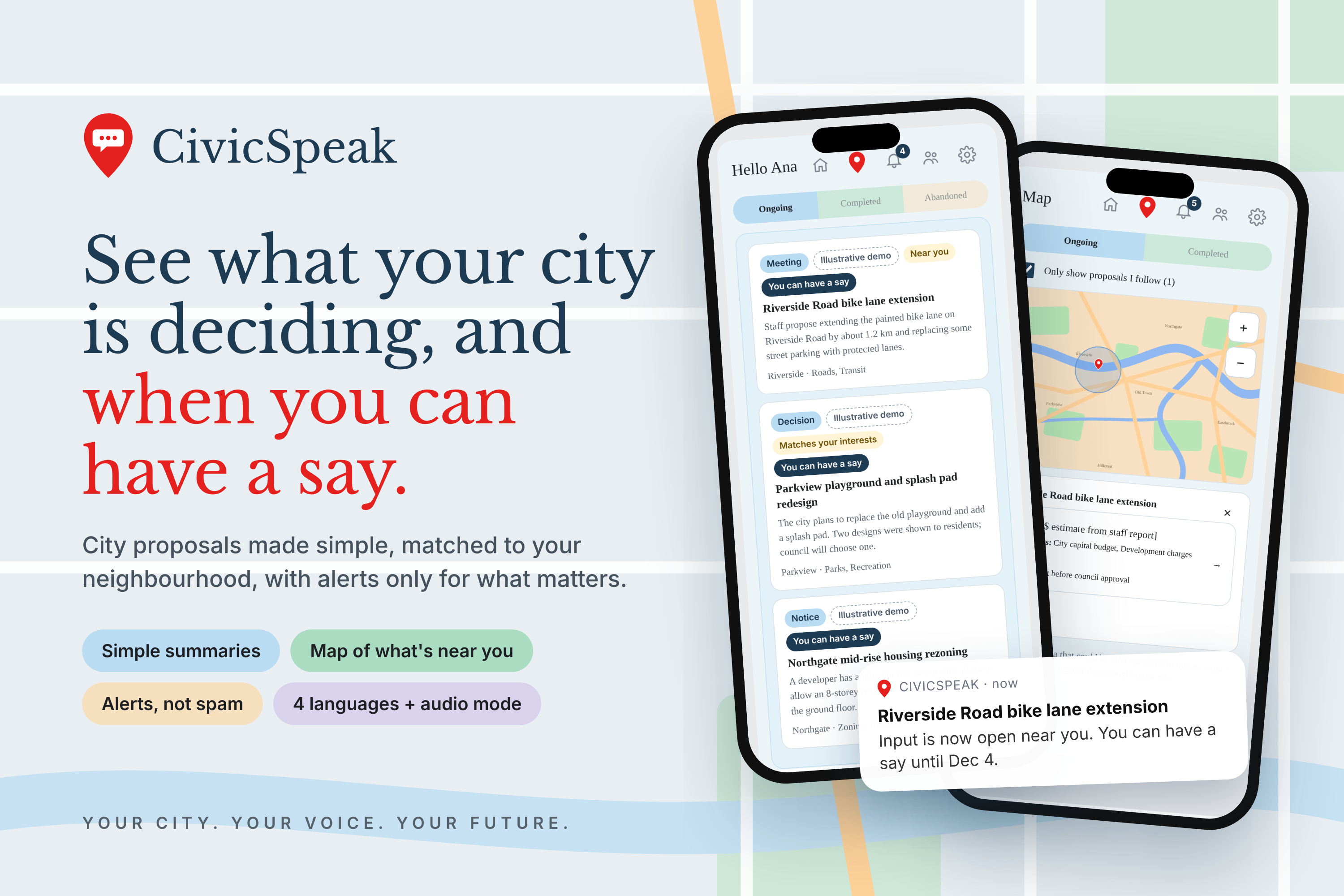
- Survey first, then the account. Five quick questions personalize the home screen and alerts, so they're useful, not spam.
- Map: follow a proposal (+) to pin it with the area it could affect. Tap a pin to see the cost, who pays and when, linked to the city's reserve fund statements.
3. Know when you can have a say
- Push notifications: when staff publish, change or update a proposal, residents get a push if it matches their topics, their location and their timing choice ("every update" or "only when I can have a say"), or if they follow it. Tapping the push opens the proposal.
- Text-message alerts, no app needed: anyone can text the CivicSpeak number with their address, choose their topics and area by replying with numbers, and get a text whenever a matching proposal is added or updated. They can text TOPICS, AREA or ADDRESS to change their choices, or STOP to unsubscribe.
- Proposals open for input are marked You can have a say, with a link to the official channel. When input is closed, it says N/A instead of giving false hope.
- A meeting date is never shown as a comment deadline.
- Your view: Support, Neutral or Oppose, each with its own prompt (for example "What would make this better?"). Vote totals are visible only to staff, so nobody just follows the crowd.
Closing the loop: no points or rewards. When a project is completed, staff post a Community story about what residents did and what changed because of it.
Who it's for
- Residents, especially those often left out:
- Language and accessibility: English, French, Spanish and Chinese, an audio mode with read-aloud for blind and low-vision users, and larger text.
- No smartphone or data plan: text-message alerts that work on any phone.
- No phone at all: kiosks in community centres and food banks, with no account needed.
- Municipal staff (clerks, communications and engagement teams) use the admin console to publish summaries, post updates, review feedback, mark ideas used in decisions and write community stories. Every publish or update automatically reaches the right residents by push and text.
- Councillors get quick summaries and resident feedback by neighbourhood.
How we built it
- Mobile app: a Flutter resident app for phones, connected through a JSON API, with push notifications through Firebase Cloud Messaging.
- Backend: Django with PostgreSQL/PostGIS for map locations, neighbourhood boundaries and impact areas, deployed with Coolify, including the staff admin console.
- Text messaging: the Twilio API. A webhook runs the sign-up conversation by text and checks Twilio's signature on every request, and alerts go out automatically from the admin console.
- Web demo: HTML, CSS and JavaScript, with resident, admin and kiosk modes and read-aloud through the Web Speech API.
- Security: all API keys (Twilio, Firebase) are read from environment variables, never stored in code.
Architecture and scalability
- One backend serves the phone app, text messages, the web app and the kiosks, so staff publish once and it reaches everyone.
- One alert module decides who hears about each change (by topic, location, timing and follows) and sends both push notifications and texts, so the rules are the same on every channel.
- Each municipality, its neighbourhoods (with postal areas and map boundaries) and its process stages are stored as data, not code, so another city or province's rules fit without rewriting the app.
- Staff roles (editor, moderator, viewer) keep publishing and moderation separate.
- Alerts are sent in the background with a cooldown, so staff aren't slowed down and residents aren't spammed.
- It runs on standard hosting with a small database, which keeps a pilot cheap.
Data (real vs illustrative)
- Real: City of Toronto reserve fund and development-charge statements power the funding view, and the City Council Voting Record open dataset informs how outcomes are shown. Every figure links to its source.
- Illustrative: the demo proposals are mock examples and are clearly labelled Illustrative in the app and in alerts.
Privacy
- Only the first three characters of a postal code are stored, never a full address. That includes people who sign up by text with their address.
- Kiosk feedback is anonymous.
- Email and phone are collected only if someone chooses those alerts, and anyone can unsubscribe from texts by replying STOP.
- A real pilot would need a privacy impact assessment.
AI disclosure
We used Claude (Anthropic) to help write code and drafts. All product, design and content decisions were ours. We checked the AI's work by testing every flow, including push notifications and the text-message sign-up, checking funding figures against the original City of Toronto reports, and labelling all mock content. No AI runs inside CivicSpeak itself.
Challenges we ran into
- Staying neutral: we hid vote totals from residents and put pros and cons side by side.
- Saying no to gamification: rewards like transit passes could attract people for the wrong reasons, so we built the Community tab instead.
- Alerting without spamming: matching each change to the right people by topic, location and timing, and limiting small edits to one alert per cooldown period.
- Reaching people without the app: designing a sign-up that works entirely by text.
- Representing city processes accurately: staff, committee and council play different roles, and a meeting date isn't a deadline.
- Setting up the stack: getting PostGIS, Django, Firebase, Twilio and the mobile app working together.
Accomplishments that we're proud of
In 36 hours we built a complete system: a working mobile app with push notifications, text-message alerts for people without the app, a backend with a staff admin console, and a kiosk mode, all built around accessibility, neutrality and what a municipality could realistically pilot.
What we learned
How decisions move from a staff report to committee to council, which laws shape public input (the Planning Act, the Development Charges Act, AODA), how much accessibility matters in civic tools, and how to reach people on whatever device they have.
What's next for CivicSpeak
- Connect to a city's agenda system and open data.
- Pilot with staff review of summaries on real agenda items.
- Usability testing with residents at a community centre.
- Text alerts in more languages, and phone-call alerts for people who prefer voice.
- Professional translation and a WCAG 2.1 AA accessibility audit.
- Flag decisions that may affect Indigenous rights and link to the official duty-to-consult process.


