-
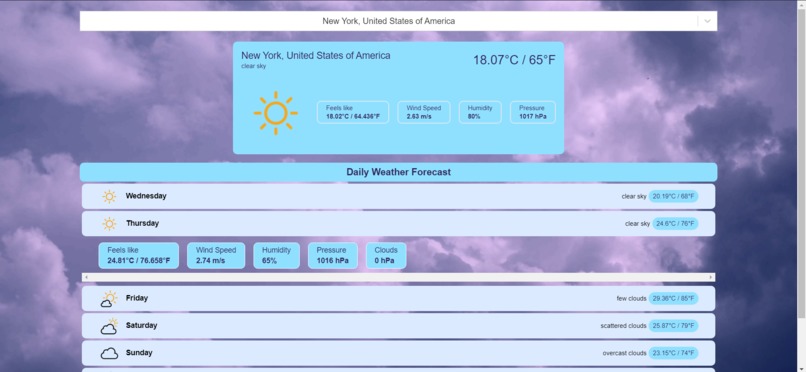
PC's version of City Weather
-
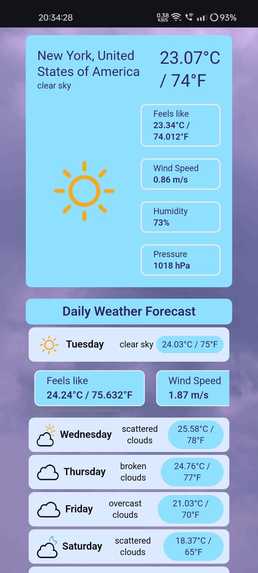
Phone's version of City Weather


Inspiration
The inspiration behind this weather app was to create a simple, user-friendly tool that provides accurate and real-time weather information. The goal was to improve my skills in web development and API integration while offering a useful service to users.
What it does
The city weather allows users to enter a city name and retrieve current weather conditions, including temperature and weather description, for that location. It fetches data from a weather API and displays it in a clean, responsive interface.
How I built it
I built the app using HTML, CSS, and JavaScript, with React as the front-end JavaScript library. The weather data is fetched from a weather API, and the app is deployed on Vercel for easy access and sharing. I am using 2 APIs that are GeoDB Cities and OpenWeather.
Challenges I ran into
Some challenges included handling API responses and errors, ensuring the app's responsiveness across different devices, and managing the asynchronous nature of API calls within the React library.
Accomplishments that I'm proud of
I am proud of successfully integrating the weather API, creating a responsive and user-friendly interface, and deploying the app on Vercel. The project has enhanced my skills in front-end development and API integration.
What I learned
I learned how to effectively use React for building dynamic web applications, handle API calls and responses, manage state in a React application, and deploy a web app using Vercel. Additionally, I gained experience in designing responsive user interfaces.
What's next for City Weather
I'm planning to add some advanced features such as weather forecasts with more details, geolocation-based weather data, customizable themes, and possibly integrating interactive maps and weather alerts to enhance the user experience.
Built With
- css3
- geodbcities
- github
- html5
- javascript
- openweather
- react.js
- tailwind
- vercel
- vscode
