-
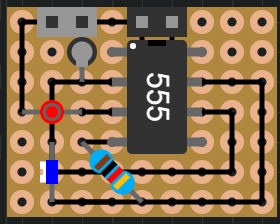
Square Wave Generator

Circuit Layout Creator
Circuit Layout Creator or CLC is an open source, circuit layout creation website. This project was inspired by DIYLC, with the main difference being that this project is compatable on all devices as long as they have a web broswer. As this project is currently being supported by a small group of people and developed by a single developer, lots of features are being worked on. As it stands a basic circuit can be created from start to finish.
Controls (It takes some time to learn these)
The main mode switching key is 'P' which switches between Component, Traces and None Selected. Component and Trace mode each highlight their respective type of element and change the way the other keys work. None mode highlight/selects nothing.
The keys - and = cycle through the elements in your selected mode (e.g. if the mode is Components, the = key will cycle from oldest to newest and the - key will do the opposite). The component selected will be shown with the green circle.
The keys [ and ] cycle through the pins of the element selected with the keys - and = as long as it is a trace or a component with 2 components. The pin selected will be shown with the red circle.
The key Backspace will delete the selected element wether that be a Component or a Trace.
Touch controls will be added in the near futureFuture Steps
As more feedback is given through the form on the help section of the app or through peers, the app will get more user friendly. Please feel free to discuss about this project or submit feedback!
Contributors
- Ethan Huber

Log in or sign up for Devpost to join the conversation.