From Classic Texts to Code: The Journey of Building the Literary Companion
They say the journey is the destination, and looking back at the development of the Literary Companion module for the Collaborative Insight Engine (CIE), I can't help but agree. What started as a vision to create a more immersive way to experience classic literature has culminated in a project that taught me as much about building robust software as it did about the timeless stories it presents. This project has been a testament to persistence and insight, and I'm excited to share the story behind it.
The Spark of Inspiration
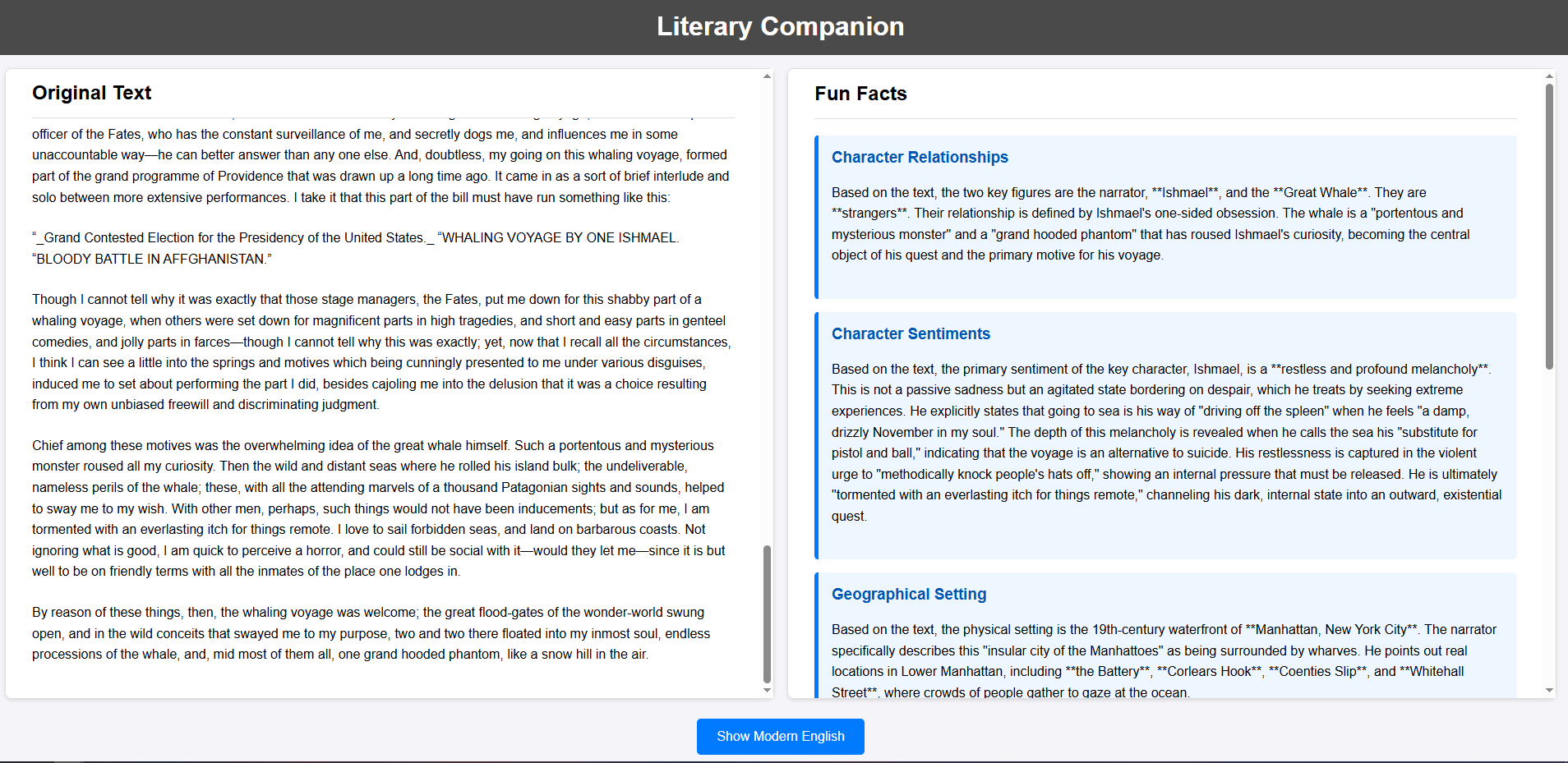
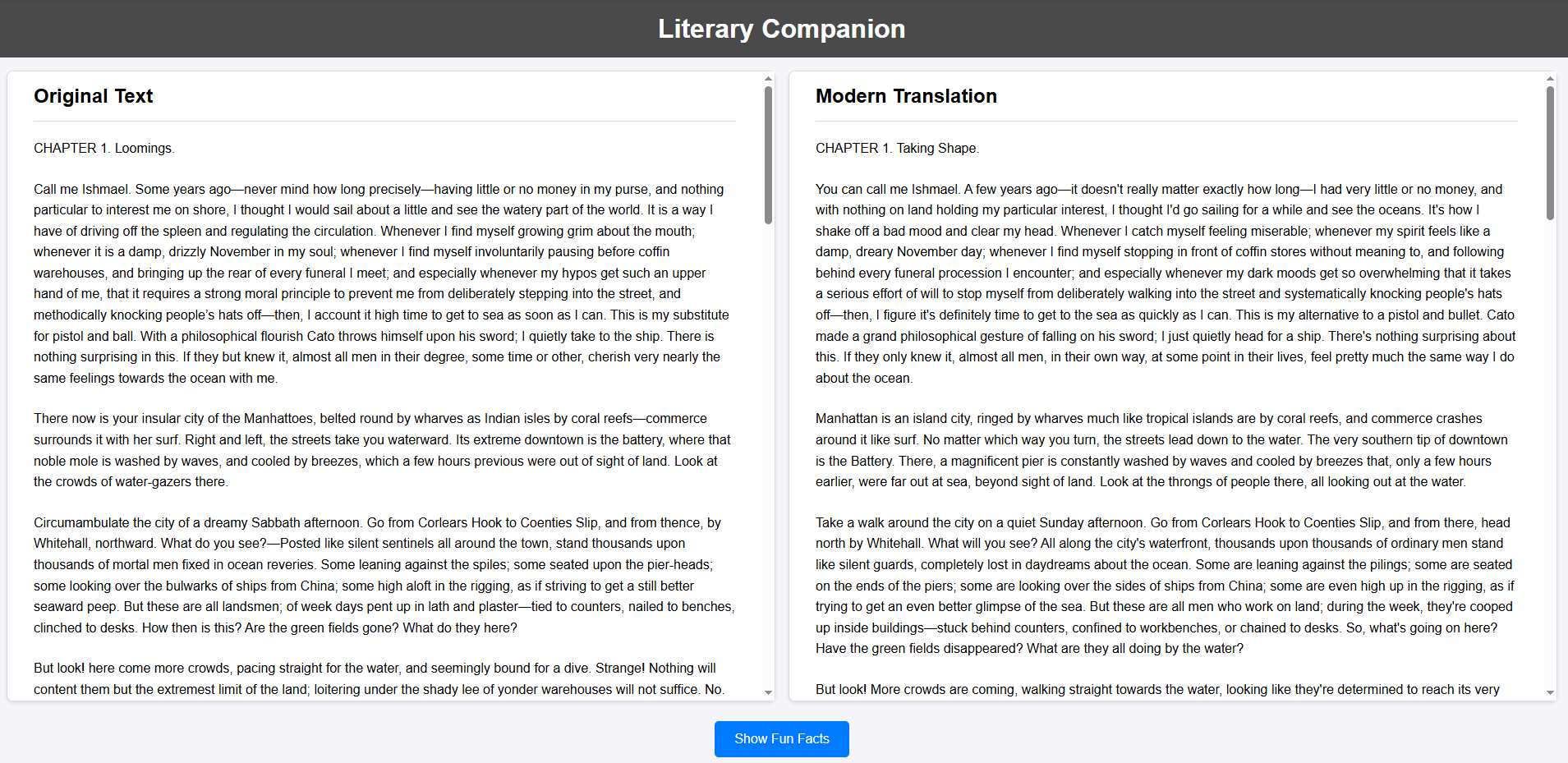
The idea for the Literary Companion was born from a desire to bridge the gap between the beautiful, yet sometimes dense, language of classic novels and the modern reader. I envisioned a tool that would present these timeless works in a fresh way, offering a synchronized, side-by-side view of the original text and a clear, modern English translation. But I wanted to go a step further. To truly enrich the reading experience, the companion needed to provide contextually relevant "fun facts" on demand, offering deeper insights into the world of the novel. This project was grounded in the architectural principles of modularity and agent specialization already established within the CIE platform.
Building the Companion: A Tale of Two Workflows
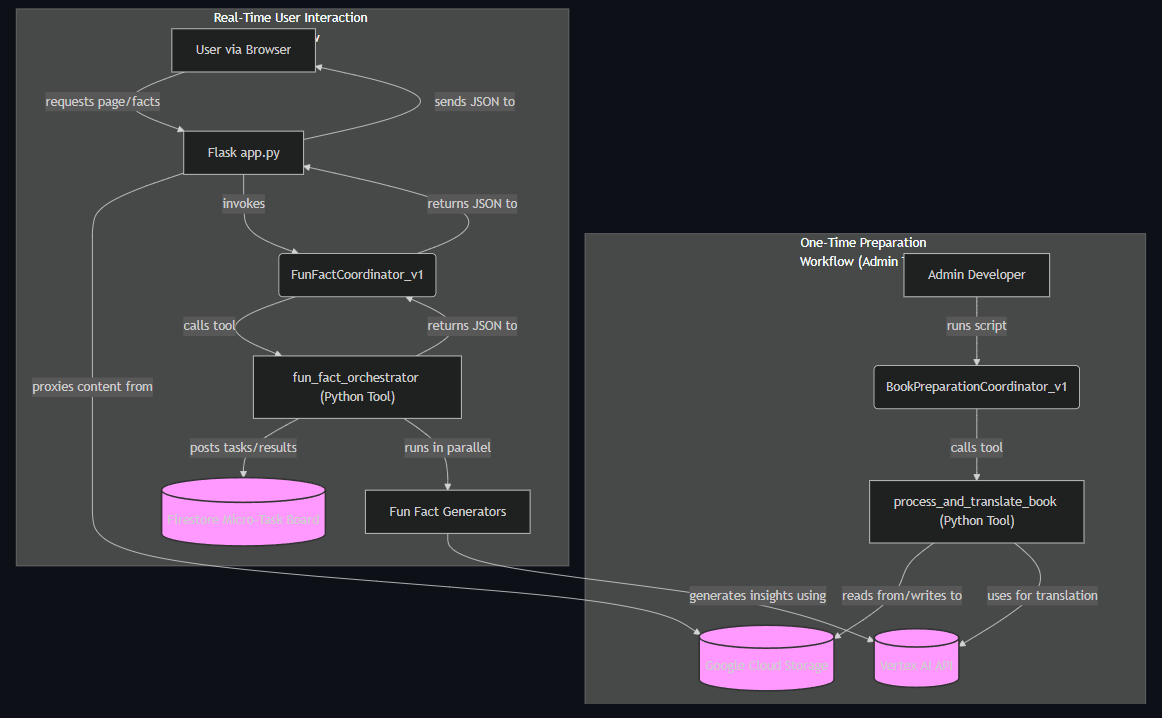
The construction of the Literary Companion was a methodical process, broken down into two main workflows: a one-time preparation process for the novels and a real-time workflow for generating user-facing fun facts.
Part 1: Preparing the Canvass
The first challenge was to prepare a classic novel for the companion. This involved creating the necessary tools for translation and cloud storage. A key decision was to use a generative AI model for translation instead of a standard API. This allowed for a more stylistic modernization of the text, preserving the original's meaning while updating its tone and vocabulary for contemporary readers.
A significant lesson in building reliable systems came from creating a master processing tool. Instead of having an agent juggle multiple tool calls, I built a single, powerful Python function to orchestrate the entire preparation workflow. This function reads a book from Google Cloud Storage (GCS), splits it into paragraphs, translates each one, and saves the structured result back to GCS as a JSON file. With this powerful tool in place, the preparation agent's role became wonderfully simple: to receive the file location and kick off the master tool.
Part 2: Bringing the Fun Facts to Life
For the real-time "fun facts" feature, I developed a backend capable of generating contextual information on demand. This system relies on a few key components:
- Specialized Fun Fact Generators: I created a library of Python functions, each designed to generate a specific category of fun fact using the Vertex AI SDK.
- Durable State Management: A micro-task board, using Firestore as its backend, was implemented to manage the state of asynchronous fun fact generation.
- Deterministic Orchestration: Similar to the preparation workflow, a Python orchestrator handles the entire fun fact generation process, from posting tasks to the board to calling the right generator and compiling the results.
- A Simple Agent: The Fun Fact Coordinator Agent acts as a clean entry point, taking the user's request and initiating the orchestrator tool.
Part 3: The User Interface
With the backend logic in place, the final step was to create an interactive frontend. I added several routes to the Flask API, including endpoints to serve the main HTML page, securely fetch the prepared novel content from GCS, and handle user requests for fun facts. The JavaScript on the frontend is responsible for rendering the original and translated texts in two panes, implementing synchronized scrolling using an Intersection Observer, and managing the "Show Fun Facts" button clicks.
Overcoming the Hurdles
No project of this complexity is without its challenges. One of the biggest lessons learned was the importance of deterministic orchestrators for reliability. Relying on a Python function for multi-step workflows proved far more efficient and dependable than prompting an LLM agent through a series of tool calls.
I also encountered 403 permission errors, which underscored the need for explicit credential and API configuration. Properly setting up the Vertex AI SDK and assigning the correct user roles resolved these issues. Furthermore, early on, I faced CORS errors when trying to fetch data directly from a private GCS bucket in the browser. The solution was to create a backend API endpoint to act as a secure proxy for this data. Finally, a client-side cache was implemented to store generated fun facts, dramatically improving the user experience by providing instantaneous results on subsequent requests.
The Journey Continues
Building the Literary Companion has been an incredible learning experience. It has reinforced the principles of robust, agent-based system design and has provided a solid foundation for future enhancements. I'm excited about the possibilities for what's next, including adding user annotations, AI-generated imagery for scenes, audio narration, and even scholarly commentary. On a platform level, there's potential to create a unified home page, generalize the micro-task board for other applications, and develop a core toolkit of common functions.
This project was a journey of persistence and discovery, and I'm grateful for the mentorship I received along the way. It's a prime example of how thoughtful architecture and a clear vision can transform a simple idea into a sophisticated and engaging tool.
Built With
- flask
- google-adk
- google-cloud
- google-cloud-run
- google-firestore
- python

Log in or sign up for Devpost to join the conversation.