-
-
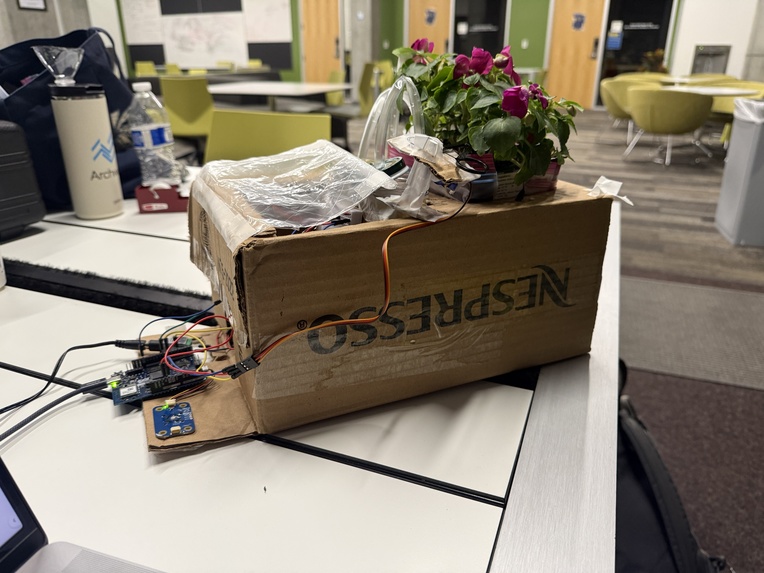
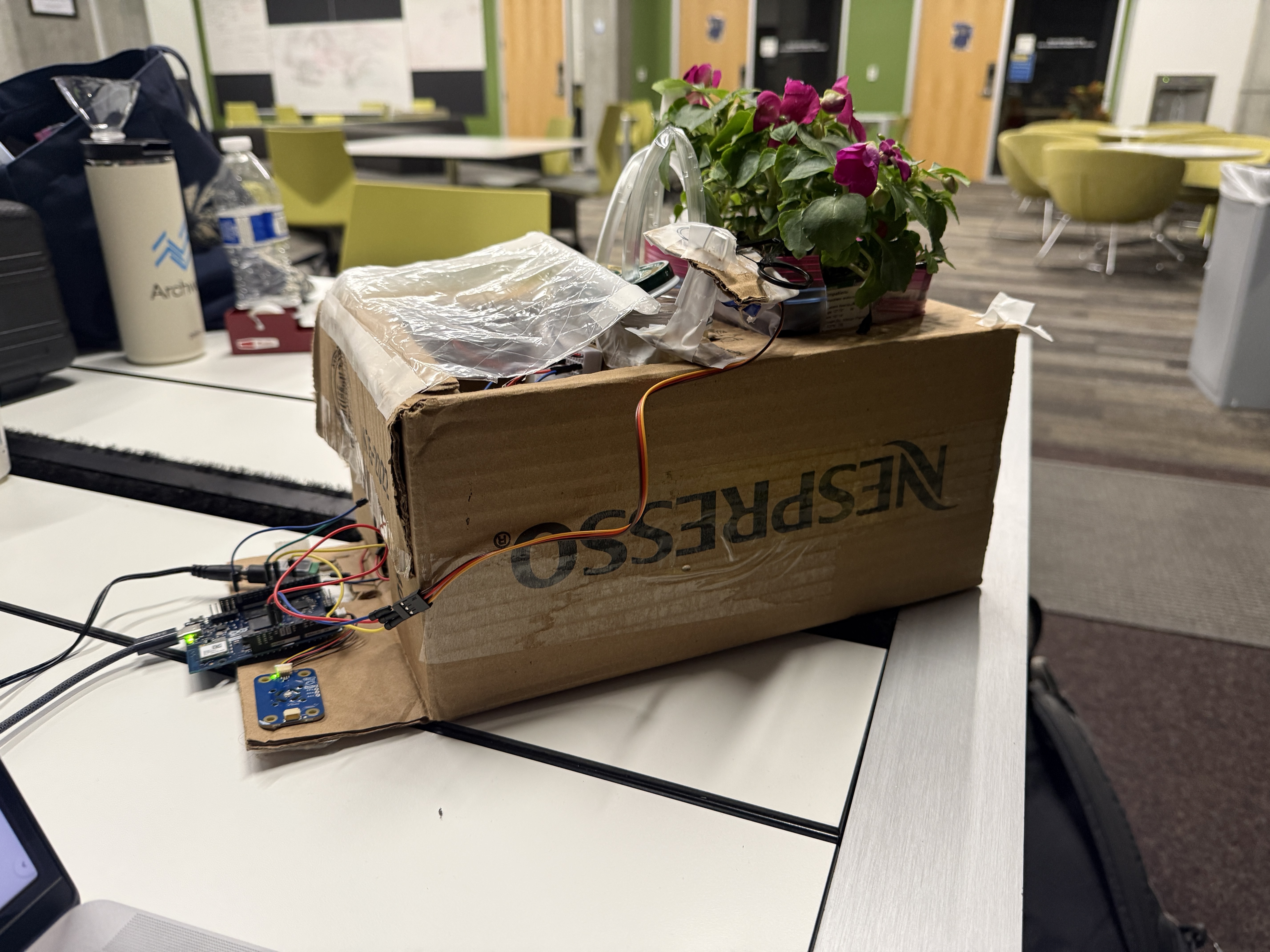
The hardware component of our project is a smart plant pot which takes care of your plant, if your screen time is good that is!
TL;DR
Your screen time is too high, but you’re not invested enough in lowering it. The Cibatus (nutrient in Latin) mobile app tracks your screen time, and your plant’s life depends on it. Log in, scan your pot to sync, name your plant, and set your screen time goals.
Bad screen time (based on your goals)? Your plant gets less nutrients in its water. REALLY bad screen time? No water! Bad screen time for the whole week? Your plant will get its stem chopped off!! Everything is automatic*, just download the app, sync your pot, and we do the rest!
The hardware runs two pumps for each water type, and a servo for the stem cutting scissors. It also senses temperature to automatically scale the amount of water dispensed to the environment.
We turn social media overuse into a moral dilemma; is your doom scrolling worth risking the life of a real, living plant?
*The Apple screen time API requires a developer subscription ($100). Our app is ready to integrate with this API, but we are using dummy data for demonstration to avoid paying this fee.
Inspiration
“Nearly 30% of American adults say they feel addicted to social media.” and Approximately 82% of Gen Z adults believe they are addicted to social media.” (source)
We all struggle with screen time, and digital pet apps rarely make people feel truly accountable. We started wondering: what if the plant was real?
Cibatus (nutrient in Latin) turns digital habits into real-world consequences. Instead of a virtual pet you can ignore, your screen time directly affects a living plant. By tying daily behavior to something tangible, we aim to motivate users to stay accountable, reduce doomscrolling, and build healthier habits while caring for something real, pretty, and sustainable.
What it does
The Cibatus mobile app tracks your screen time Every day at 11:59 PM, Cibatus evaluates your screen time from the past 24 hours and assigns a rating: Excellent: 50% or less of the screen-time goal = nutrient-rich water Good: 51-100% of the screen-time goal = regular water Bad: over 100% of the goal = no water The next day, your Cibatus smart pot automatically dispenses the correct water type, if applicable If you receive a Bad rating for four consecutive days, they receive a Kill Rating. This triggers the hardware system to cut one stem of the physical plant, creating real stakes while still giving users multiple chances to recover and improve.
To use Cibatus, users can create an account and log in, connect to a Cibatus smart pot using a unique QR code, set daily screen-time goals, customize their plant character and generate a cute digital plant character, and view plant health, screen-time history, and top app activity.
The hardware also uses a temperature sensor, scaling up the water distribution if the ambient temperature is high.
How we built it
We built the software component of Cibatus as a mobile application using React Native with Expo. The app uses Supabase for authentication, database management, and backend services. Within the app, we implemented a full onboarding experience where users can set screen-time goals, connect their plant, and personalize their experience, along with features for tracking screen-time activity and visualizing plant health over time. The UI/UX was designed in Figma and translated into a component architecture focused on maintainability and scalability. To keep development organized across mobile, backend, and hardware systems, we structured the project as a monorepo, which helped us iterate faster and maintain consistency across the different parts of the system.
The hardware uses the Arduino Uno Q provided by Qualcomm. The board fetches updates from the Supabase API and has two pumps and a pair of scissors actuated by a servo motor. The two pumps supply pure and nutrient enriched water to the plant (depending on user’s screen time) and the scissors are activated when the kill command is sent. Finally, a temperature sensor unit (Arduino Brick) is used to increase the amount of water provided (regardless of type) if it is warmer than 75*F (recommended maximum temp for our plant species).
We integrated the mobile application and the hardware plant pot through a server layer that acts as the bridge between user activity and physical outcomes. Screen-time data collected and processed by the app is sent to the backend, where it is evaluated against the user’s goals to determine the plant’s daily outcome. The backend then generates commands based on those results and communicates them to the hardware system, allowing the physical pot to respond accordingly.
Challenges we ran into
One of the biggest challenges we faced was navigating platform limitations, particularly with iOS. Our original plan was to pull real screen-time data directly from users’ devices, but restrictions within the Apple Developer Program prevented us from accessing the necessary APIs in the way we intended. We then attempted to pivot toward NFC-based pairing using prepared tags, but ran into similar certification and permission barriers that made it difficult to implement within our hackathon timeline. To keep the project moving and deliver a functional MVP, we adapted our approach by using simulated screen-time data and switching to a QR code scanning process to connect users to specific plant pots. Although these limitations prevented us from implementing some planned features fully, they pushed us to design a flexible system that can easily support real integrations in future iterations.
Accomplishments that we're proud of
This was our first time building a real hardware project! We’re proud of making something physical which syncs with a mobile app, and we’re happy that we were able to make the pot syncing dynamic, allowing this system to theoretically scale to more users!
What's next for Cibatus
The next steps for Cibatus focus on expanding both functionality and real-world integration. We plan to fully implement NFC-based pairing to make connecting a plant pot faster and more seamless, as well as integrate real screen-time activity data instead of relying on simulated data for our MVP. This will require a $100 Apple Developer license, which we could justify by selling physical pots alongside the free app! Beyond the technical improvements, we also want to introduce social features that allow users to share their plant progress and screen-time activity with friends, creating accountability through community and making the experience more engaging and motivating over time.
GitHub
Built With
- arduino
- edge
- expo-go
- figma
- flask
- mobile
- postgresql
- python
- react-native
- server


Log in or sign up for Devpost to join the conversation.