Inspiration
Doctors see wearable data in pieces: a glucose log here, a heart-rate export there, and almost always after the fact. With a full panel of patients, it's hard to tell who needs attention right now, and even harder to show a patient why their numbers move the way they do.
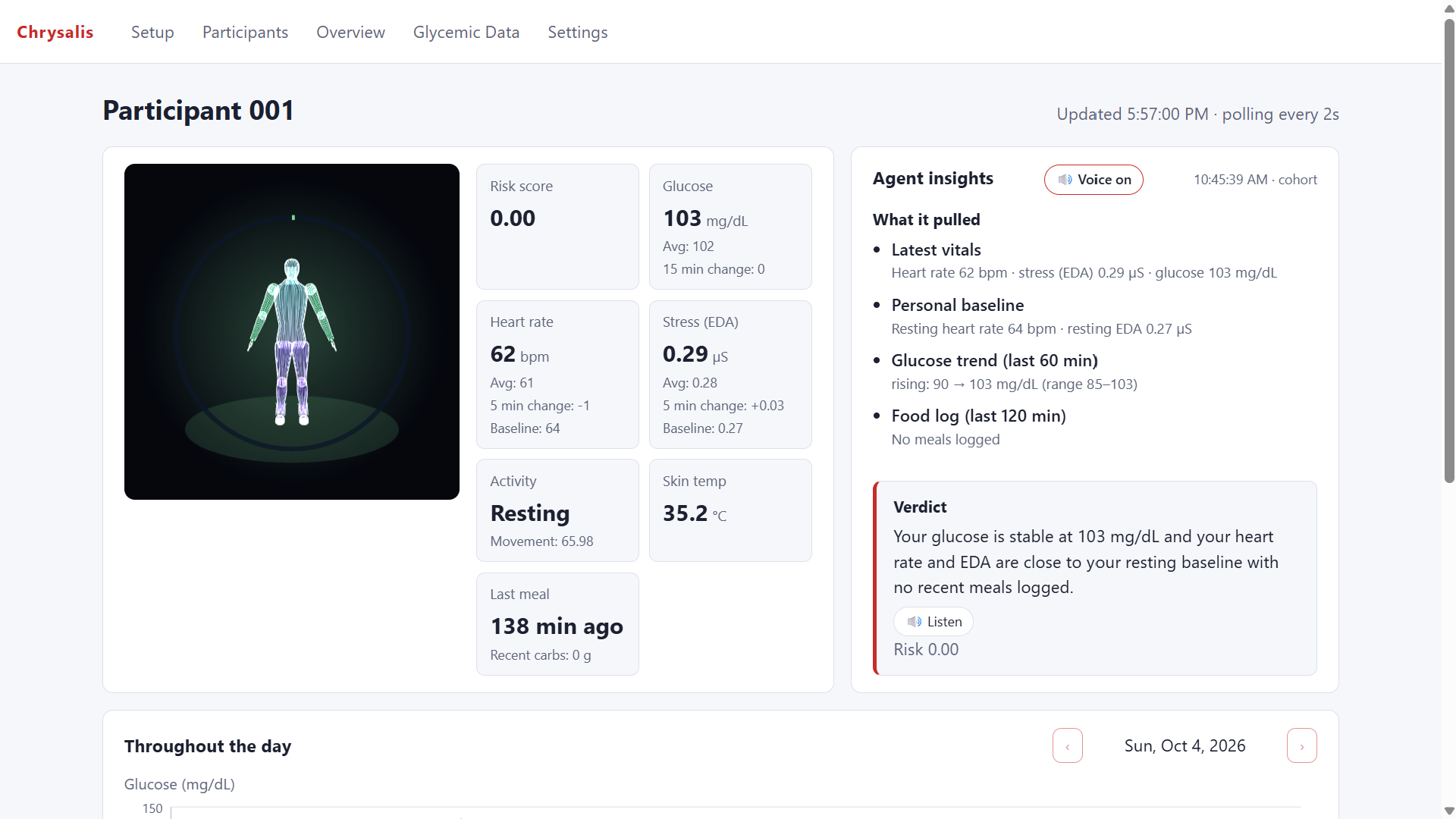
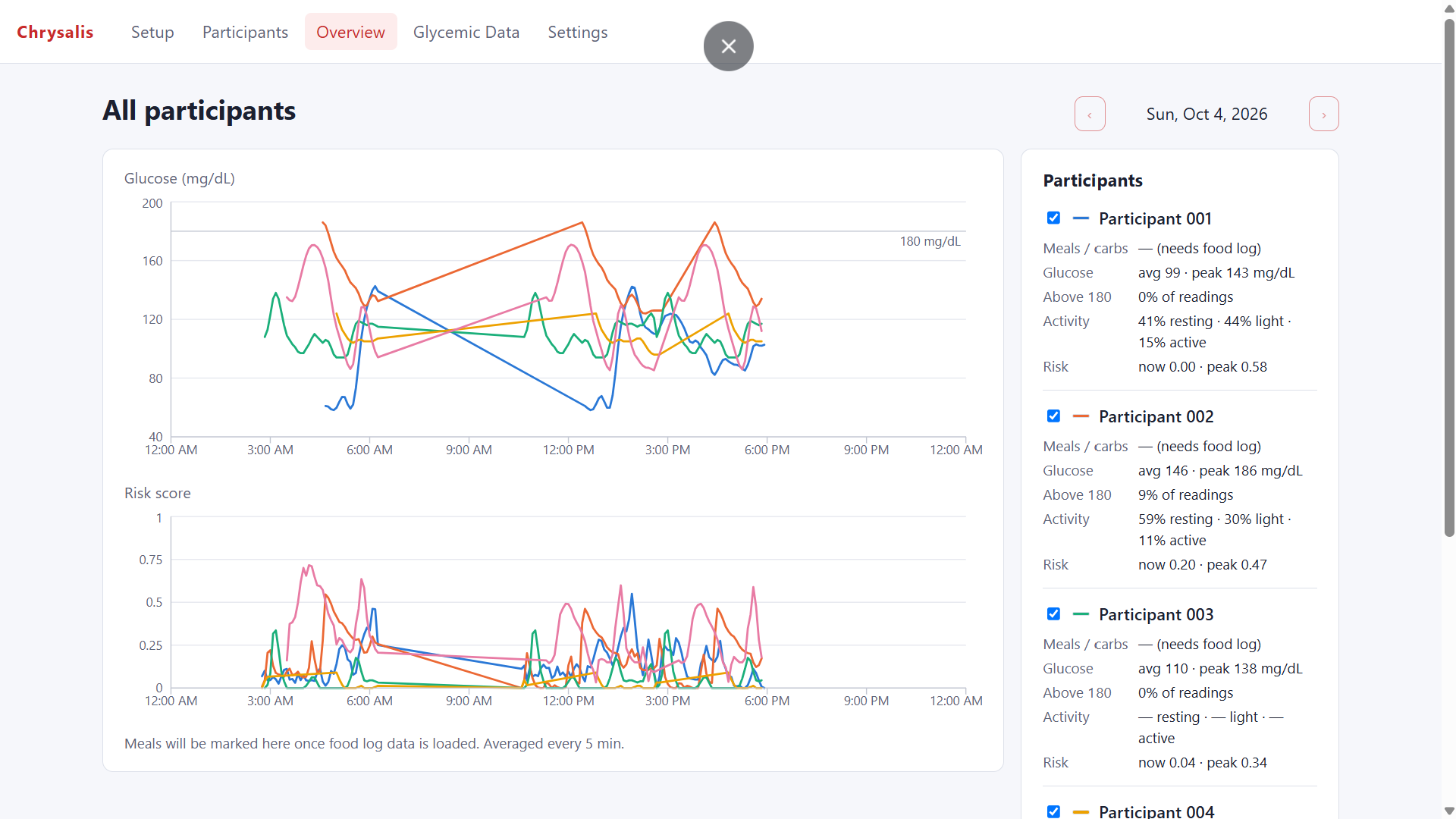
We wanted a tool that works in two directions. For the clinician, it shows every patient's live glucose, heart rate and stress in one view, with an AI agent flagging who's at risk. For the conversation with the patient, it opens a single patient's page with a 3D avatar of their own body's signals, and lets them explore together what happens if breakfast or the next 90 minutes go differently.
Glucose was a natural place to start. The same breakfast can affect two people very differently, and small choices afterward, like a walk or sitting still, change the curve. Chrysalis turns that from a lecture into something a patient can see for themselves, before it happens.
What it does
Chrysalis streams wearable data (glucose, heart rate, skin conductance/EDA, skin temperature and movement) in near real time and turns it into something you can see, compare and simulate.
- Holographic 3D avatar: Each participant appears as a live avatar. Its breathing follows heart rate, its glow shows stress, and rings and ripples show risk. It can also speak its summaries aloud.
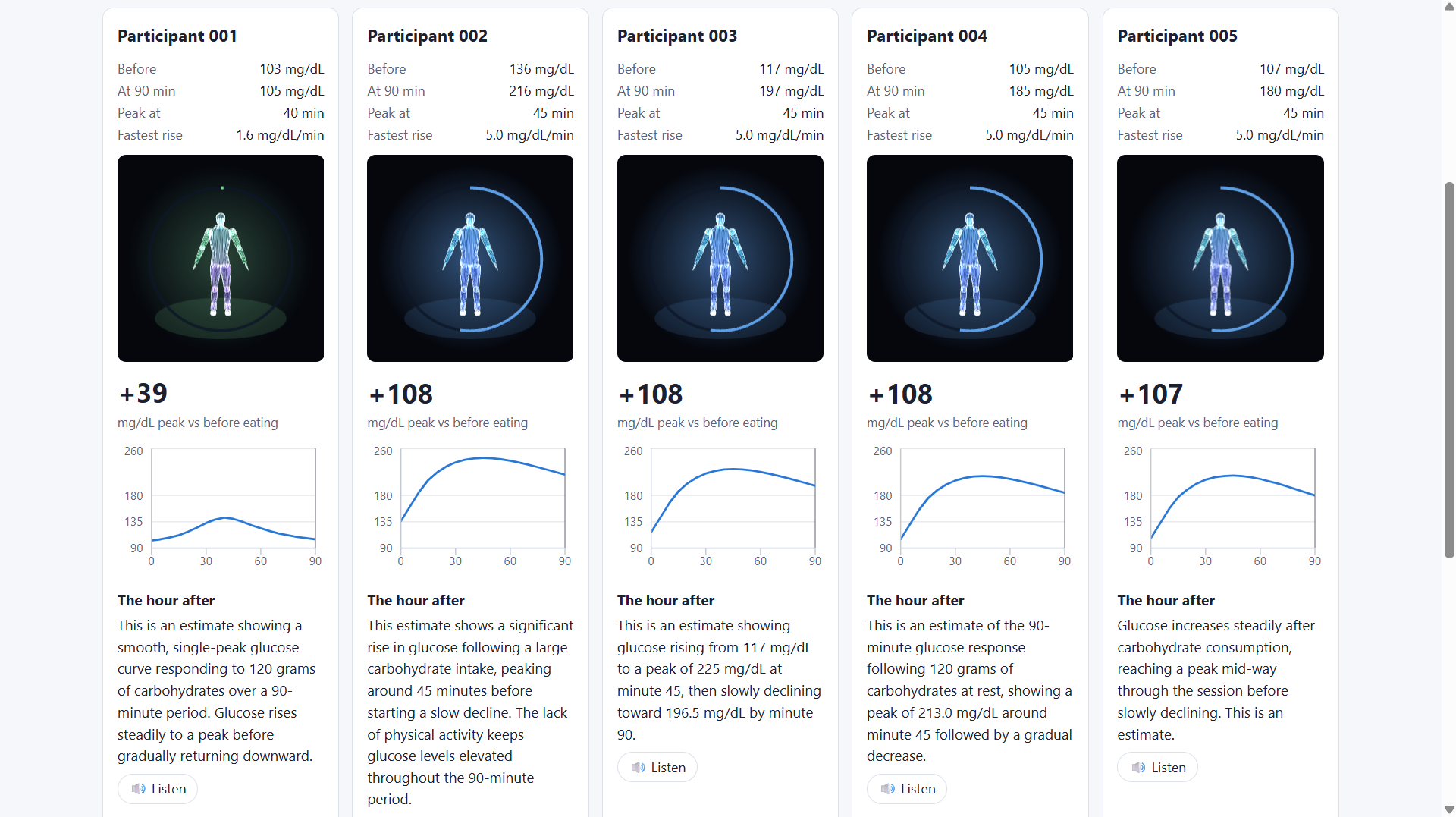
- Glycemic Forecast: Choose how many carbs you eat at breakfast and see your predicted glucose curve for the next 90 minutes, based on your own past meal responses.
- Lifestyle Simulator: Compare your normal morning with a simulated 90-minute morning. Pick an action for each 20-minute slot and watch your predicted curve change, with a short explanation and a suggested next step.
- Same breakfast, five people: One meal, five participants, five different curves.
- Overview and risk agent: All participants appear on one chart. A background AI agent checks the latest data every 2 minutes, flags risk, and writes plain-language summaries.
How we built it
We split the work four ways:
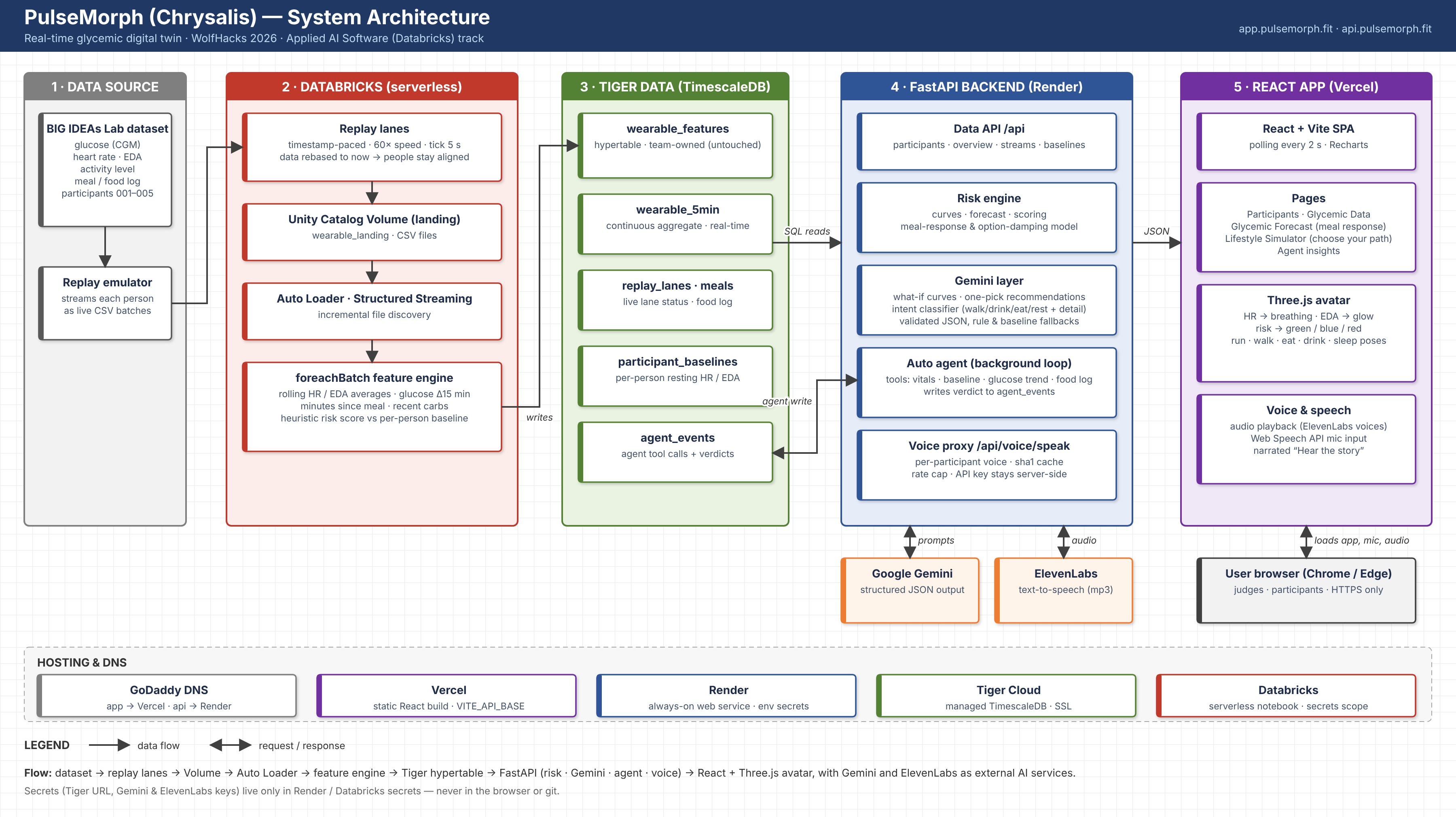
- Backend and frontend foundation: A FastAPI (Python) backend that reads from Tiger Data, and a React + Vite frontend with routing, charts and the API client.
- AI integration: Gemini for glucose predictions, what-if notes, suggestions and the risk agent, and ElevenLabs for the avatar's voice. Every Gemini call has a rule-based fallback.
- 3D avatar and design: A three.js avatar with a simple data contract, so it runs both inside the app and on its own with mock data.
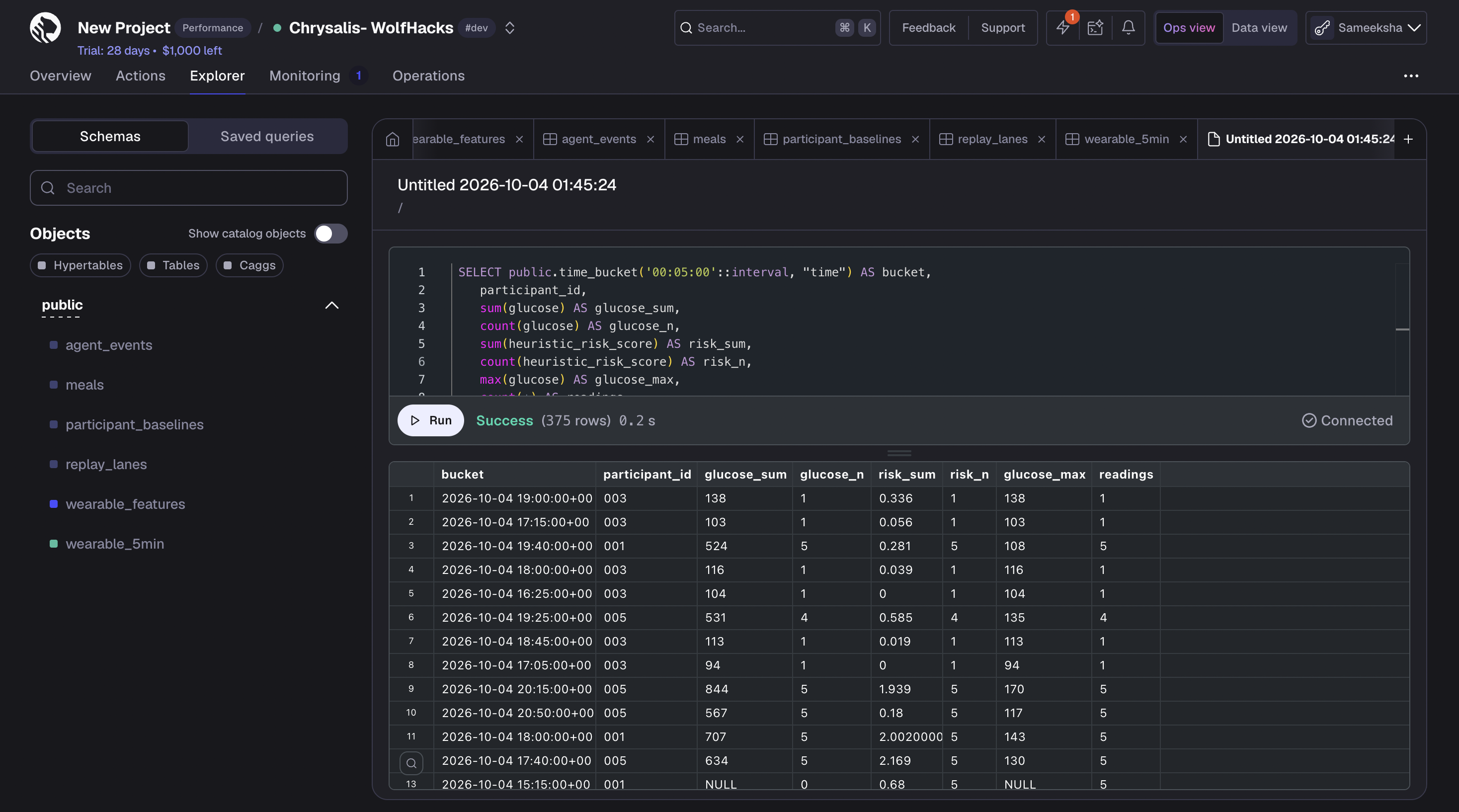
- Data pipeline: We used the BIG IDEAS Lab Glycemic Variability study from PhysioNet. A Python emulator replays it as a live feed into a Databricks Volume. A Databricks notebook then uses Auto Loader and Structured Streaming to clean the data, align it, compute risk scores, and write it to Tiger Data. There, hypertables and a 5-minute continuous aggregate serve the app.
We also built per-person meal-response profiles from each participant's Dexcom and food-log history, so forecasts are personal rather than generic.
The live app is deployed with the backend on Render, the frontend on Vercel, and the domain at app.pulsemorph.fit.
Challenges we ran into
- Finding the idea. At first we kept landing on "another health dashboard." We wanted something that could predict, not just display. The Glycemic Forecast is what made the project click.
- Data that wasn't aligned in time. Glucose, heart rate, EDA and accelerometer data all sample at different rates, so our early graphs were wrong. We fixed this in the Databricks pipeline by lining every stream up on a shared time grid before writing it to the database.
- The app that wouldn't update. After fixing synchronization, the app still showed the same values. We eventually found we were reading cached results instead of fresh data, so our fixes weren't showing up. Once we sorted out how the cached view refreshed, the data came through.
- Making a dataset feel live. The study data is historical, so we built an emulator and replay lanes to stream five participants at once. Adding accelerometer data after the batches were already uploaded required a separate merge script.
- Demo reliability. The free Render tier sleeps when idle, and the AI APIs have rate limits. We added Gemini fallbacks, an ElevenLabs rate limit, and a local-run backup plan.
Accomplishments that we're proud of
- We shipped a full, deployed web app in 24 hours, live at app.pulsemorph.fit.
- We built a pipeline that makes real study data behave like a live wearable feed: emulator to Databricks to Tiger Data.
- We built a Databricks streaming pipeline that cleans, aligns and scores data before writing it to Tiger Data.
- We made the 3D avatar a way to read the data at a glance, not just decoration.
- Predictions are personalized to each participant's own meal-response profile.
- The app degrades gracefully: it still works without the AI keys.
What we learned
- Time is the hardest part of time-series data. Aligning streams with different sample rates matters more than any model built on top of them.
- Know where your data is coming from. Continuous aggregates and caches make reads fast, but if you don't track how they refresh, you end up debugging the wrong layer.
- Streaming tools are worth it. Auto Loader and Structured Streaming let us simulate a real-time system without writing our own polling and checkpoint logic.
- Generative AI works best with real data underneath it. Gemini was most useful when grounded in each person's baseline curve, and the rule-based fallback kept the app working when the AI wasn't available.
- Agree on interfaces early. Defining the avatar's data contract and the API endpoints up front let four people build in parallel and connect everything at the end.
What's next for Chrysalis
- Real devices: Connect live wearables (Dexcom, Apple Health, Fitbit/Google Fit) in place of the study replay.
- Better models: Train on more participants and check accuracy against held-out meals, so forecasts come with confidence ranges.
- More inputs: Add sleep, protein, fat and fiber, not just carbs, to the simulator.
- Proactive nudges: Have the agent suggest a short walk or meal change before a predicted spike.
- Privacy and safety: Add user accounts, consent and data controls, and review AI-generated guidance with clinicians.
