-
-
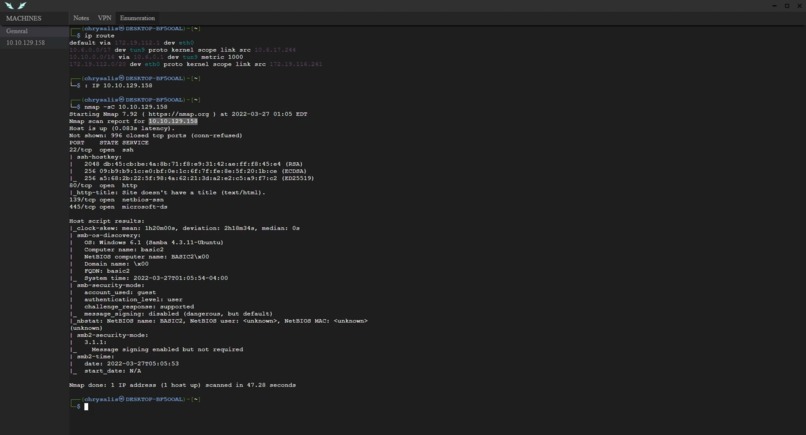
Using Chrysalis to scan a target machine
Inspiration
As I've been studying for pentesting certs, I have realized two things: that always having to work in VMs is annoying, and that the Windows development environment is incredibly awful. Chrysalis is my attempt to fix both problems: a Windows desktop app that ports tools from Kali Linux with minimal overhead and several added conveniences. It is designed to solve the frustrations I have when pentesting on bulky VMs, with no real organizations and boatloads of boilerplate. I designed Chrysalis around my ideal of the perfect pentesting process, and I hope to use it when I take my certification exams later this spring.
What it does
In short, a project in Chrysalis is a list of target machines, each of which has a notebook and its own set of Kali Linux terminals. New machines are automatically added as they are discovered, smoothing out the oft-messy art of pivoting between compromised machines. All the Kali Linux terminals run on the same WSL kernel, and are exposed through a thin Electron wrapper to Windows. This lightweight wrapper allows a pentester to use battle-tested Kali tools without having to wrangle with bulky VMs. As a mission, Chrysalis provides a structured, streamlined pentesting process on Windows using the established tools of Kali Linux.
Apart from enabling me to pentest from Windows, Chrysalis also aims to fix two issues I have while pentesting: difficulty in handling several compromised machines at once, and a rapid decay in organization. Chrysalis provides a rigid structure to pentests: initial discovery is done from the General tab, and every discovered machine gets its own semi-isolated tab. Inside every machine tab is a notepad and several terminals, each one intended for one part of the attacking process: recon, vulnerability analysis, exploitation, and so on. This rigid structure does wonders for organizing what is traditionally a messy, literally "hacky" process.
Finally, Chrysalis takes part in the ongoing automation of pentesting by allowing users to define custom scripts that execute complex commands. These scripts help to remove boilerplate associated with most pentests (for example, setting up a local webserver to host malware), further streamlining the path from enumeration to exploitation.
How we built it
Chrysalis consists of three asynchronous layers:
- The Windows Subsystem for Linux (WSL), running the Kali kernel and the plethora of terminals,
- An Electron frontend that wraps the terminal and provides pre- and post-processing of input, including custom functions and virtual environments, and
- A set of Flask microservices that act as a middleman between the two, and also allow for things like saving projects.
Having three asynchronous, semi-independent layers is crucial to making Chrysalis run smoothly despite the often-heavy workloads that exploitation entails. The Flask middleman in particular is very helpful in simplifying the frontend code and preventing the lag that comes with running PTYs in the rendering process.
Challenges we ran into
- The TryHackMe VPNs are not to be trusted.
- Implementing a wrapper around the Windows terminal that resembles Bash was incredibly difficult and took up almost half of my development time. Turns out Bash is really complicated.
- Ironically, Windows Defender massively slows down WSL processes and must be suspended for such processes for this sort of project to be viable.
Accomplishments that we're proud of
- Creating a half-decent Bash wrapper around cmd means I never have to work with that pile of junk ever again.
- The asynchronous chain that links the Kali terminals to the frontend keeps everything running smoothly even when intensive processes are running under the hood.
What we learned
- Don't start recording your demo at 11 PM.
- Seriously, don't.
- Terminals are incredibly complicated, and the set of metacharacters and protocols that control a PTY are best handled by existing software.
What's next for Chrysalis
- Finish polishing the terminal wrapper with more Bash conveniences (reverse i-search, multi-line inputs, etc.)
- Add a robust launcher that allows for saving of multiple projects.
- Untangle the desperate spiderweb of nonsense code and go open-source.

Log in or sign up for Devpost to join the conversation.