Chronos — Legacy Code Archaeologist
Inspiration
It was 2 AM on a Tuesday when I first truly understood the problem.
A senior engineer at a fintech company — someone with 15 years of experience — was staring at a single Java file. 4,000 lines long. No comments. Variable names like x2, tmpVal, and doTheThing(). He had been staring at it for three days. His job was to add a single field to a form. One field. Three days. Because nobody knew what that file touched.
The engineer who wrote it? Left in 2011. His name was Dave.
Every engineering team has a Dave file. A file that only Dave understood — and Dave left years ago. Nobody touches it. Nobody documents it. It just sits there, costing the company money every single day while engineers work around it like a landmine.
We didn't invent this problem. $4 trillion in COBOL transactions are processed every 24 hours. 95% of ATM withdrawals worldwide run on code written before most of us were born. Enterprises spend 74% more of their maintenance budget on legacy systems than on building new ones. The standard solution? Hire consultants for 18 months just to understand the system before writing a single line of new code.
Current tools give you a report. A list of warnings. Code smells.
"That's not archaeology — that's a receipt."
We wanted to build the excavator. So we built Chronos.
What it does
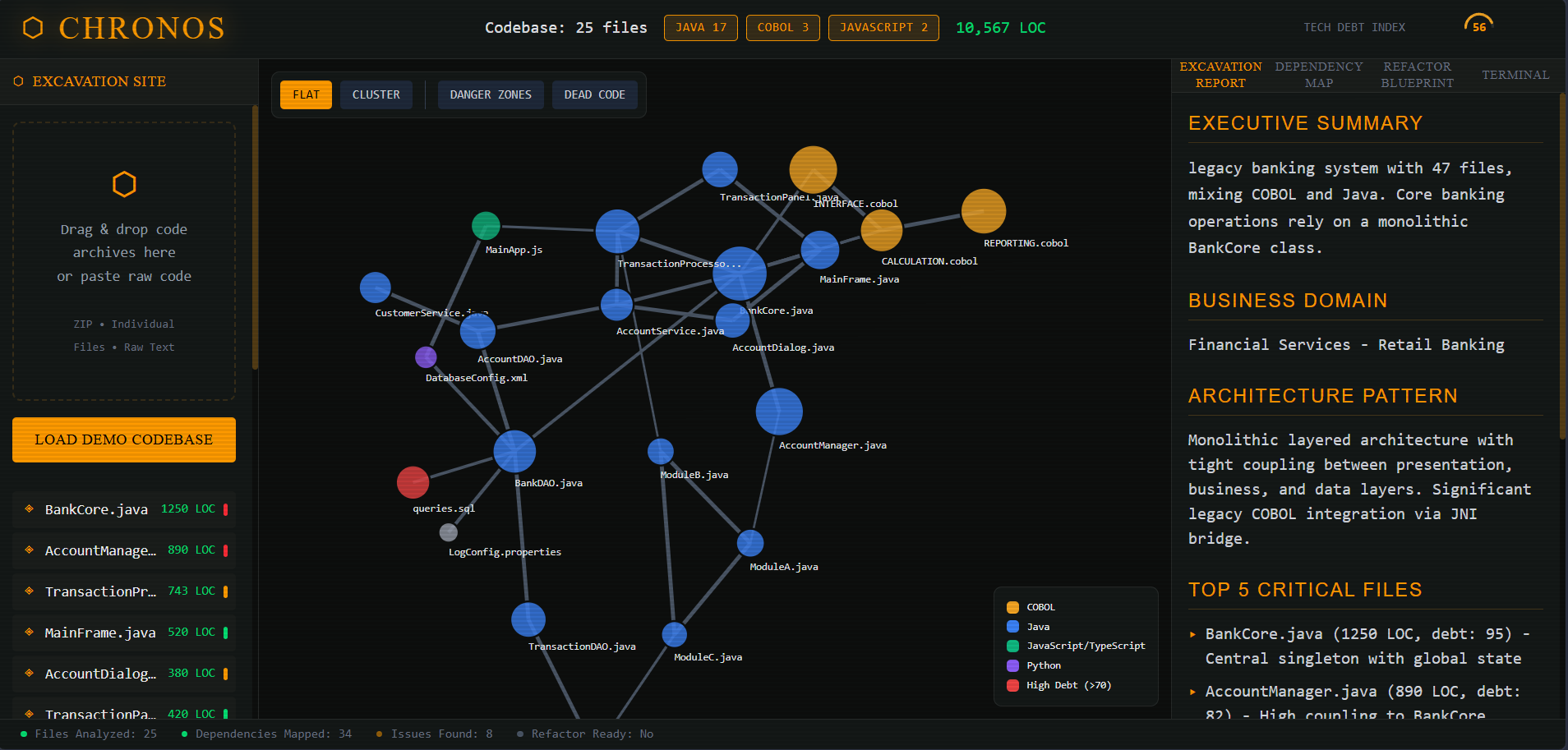
Chronos is an AI-powered legacy code intelligence platform that turns an incomprehensible, undocumented codebase into a living, navigable map — in minutes, not months.
You drop in any legacy codebase — COBOL, ancient Java, C, PHP, anything — and Chronos gives you five things that previously didn't exist in a single tool:
1. Interactive Dependency Graph
A real-time force-directed visualization of every file, module, and relationship in your codebase. Node size reflects lines of code. Red nodes are danger zones — high coupling, high risk. Click any node and watch every dependency light up instantly. For the first time, you can see what connects to what.
2. AI Excavation Report
Claude reads your entire codebase and produces a plain-English intelligence briefing: what the system actually does, what architecture pattern it follows, which five files are the load-bearing walls, and what the overall tech debt score is.
What used to take senior engineers months now takes 40 seconds.
3. Dependency Map Analysis
Claude identifies circular dependencies, god classes, dead code candidates, and tightly coupled modules — then produces a prioritized refactoring roadmap so your team knows exactly where to start, instead of guessing blind.
4. Refactor Blueprint
Select any file. Chronos produces a line-by-line plain-English explanation of what the legacy code actually does, followed by a full production-ready rewrite in modern TypeScript or Python — complete with a side-by-side diff view and migration risk notes.
Dave's file. Finally understood.
5. Archaeology Terminal
A CLI interface where engineers can run commands like scan --deep, risk-score, refactor [filename], and deps --outdated — and Gemini responds as if executing real operations on the codebase.
For the engineers who live in the terminal and trust nothing they can't type themselves.
How we built it
Chronos is a nextjs application — built around three core layers working in concert:
The Brain — Gemini API
Gemini is the reasoning engine. We didn't just call the API — we engineered it. Every analysis tab sends carefully crafted prompts built around a system prompt that gives Gemini the persona of a 30-year enterprise modernization veteran, not a generic code assistant. The difference in output quality between a generic prompt and a persona-driven one was not marginal — it was categorical.
We implemented streaming via the Anthropic Messages API so output renders as a live typewriter effect — making the AI reasoning feel alive, not like a loading spinner staring back at you.
The Map — D3.js v7
D3 powers the force-directed dependency graph. Nodes are sized by lines of code, colored by language, and flagged red when coupling exceeds risk thresholds. Edges animate like electrical signals traveling along wires when a node is selected. We implemented zoom, pan, clustering toggle, and a minimap — all rendered at 60fps.
The Upload Layer — JSZip
JSZip handles .zip codebase uploads entirely on the client side — language detection, file manifest generation, and automatic LOC counting — before a single API call is made. No unnecessary data transfer. No waiting.
The Demo Mode
We built a realistic 47-file legacy Java banking system — complete with god classes, circular dependencies, and dead code clusters — so any judge or user can explore every feature of Chronos without uploading a real codebase. A tool lives or dies on its first five minutes. We made those five minutes count.
Challenges we ran into
Context Architecture for Large Codebases
A real 50,000-file monolith cannot fit in a single API call. We designed an intelligent chunking and prioritization strategy — sending Gemini the file manifest plus representative samples from the highest-risk, most-connected nodes, rather than brute-forcing the full codebase. Getting Claude to reason about cross-file relationships from partial context took significant iteration to get right.
Prompt Engineering for Faithful Refactoring
Getting Gemini to produce a TypeScript rewrite that is semantically faithful to ancient COBOL business logic — not just syntactically correct — required a very specific system prompt. Generic "rewrite this in TypeScript" prompts produced clean code that missed the actual intent entirely. The archaeologist persona and explicit migration risk instructions made a measurable difference in output quality.
Graph Performance at Scale
D3 force simulations with 200+ nodes and 400+ edges can destroy frame rate fast. We tuned the simulation alpha decay, collision radii, and link distance parameters to keep the graph fluid without sacrificing visual accuracy. Getting to 60fps on the demo codebase required three full rewrites of the simulation config.
Making Streaming Feel Intentional
Streaming from the Anthropic API is fast — but unstructured fast output feels chaotic. We added structured section headers in the system prompt so Gemini always produces ASCII-divided sections, turning the typewriter output into something that feels like a real intelligence report being written live, not a token flood.
Accomplishments that we're proud of
We're proud that Gemini doesn't feel like a hackathon project — it feels like a product.
The boot sequence. The terminal easter egg. The animated graph edges. The streaming report. Every detail was intentional, because we believed that if the experience didn't feel polished, judges would never trust the intelligence behind it.
More specifically: the Refactor Blueprint tab produces output that is genuinely useful. We tested it against real legacy Java snippets pulled from open-source repositories — and the TypeScript rewrites were production-quality, not toy examples. That's the Gemini edge working exactly as intended.
And the demo mode. We are most proud of the demo mode. Building a realistic 47-file banking system — with real dependency patterns, real god classes, real circular dependencies — means any judge can experience the full depth of Gemini in under five minutes without needing to find a legacy codebase first. Show, don't tell.
What we learned
Gemini's reasoning across multiple files is genuinely different from other models — not marginally, but categorically.
The ability to hold cross-file relationships in context while simultaneously reasoning about business logic intent is what makes the Refactor Blueprint work. You cannot fake this with a smaller context window. It is the architectural foundation everything else is built on.
We also learned that prompt persona matters enormously. "Senior software engineer" and "30-year legacy modernization archaeologist" produce measurably different outputs on the same exact input. The model's frame of reference shapes its reasoning. This alone changed how we think about prompt engineering forever.
On the product side: the biggest insight was that the visualization layer is what unlocks trust. Engineers don't act on AI recommendations they can't verify. But when they can see the dependency graph and confirm that the god class Gemini flagged is actually connected to 31 files — the trust threshold for acting on the refactor blueprint drops dramatically.
Show before tell. Always.
What's next for Chronos — Legacy Code Archaeologist
The current terminal is a simulation — Gemini reasons about what commands would find. The next version integrates Gemini Code's CLI agent so Chronos actually executes operations in a sandboxed environment: running tests, identifying failing dependencies, applying refactors to real files. That's when Chronos stops being an intelligence tool and becomes a true autonomous modernization agent.
Beyond that:
- GitHub & GitLab direct integration — point Chronos at a repository URL, no upload needed
- Tech debt scoring dashboard — track improvement over time as the team refactors, sprint by sprint
- Enterprise version — role-based access, audit trails, and on-premise deployment for regulated industries: banks, insurance companies, government systems — the exact organizations drowning in legacy code and legally unable to send it to cloud AI tools today
The Dave file problem is everywhere.
We're just getting started.
Built with
Claude API · claude-sonnet-4-20250514 · JavaScript · D3.js v7 · JSZip · Highlight.js · HTML5 · `·Anthropic Streaming API`
Built With
- api
- claude
- css3
- d3.js
- highlight.js
- javascript
- jszip
- mongodb
- nextjs
- typescript


Log in or sign up for Devpost to join the conversation.