-
-
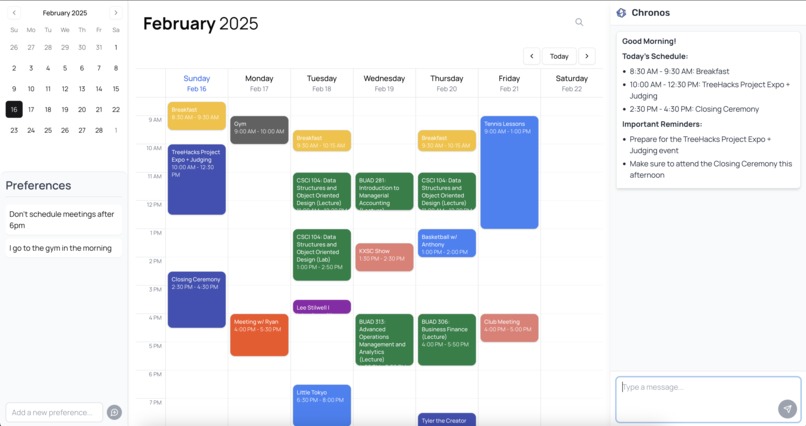
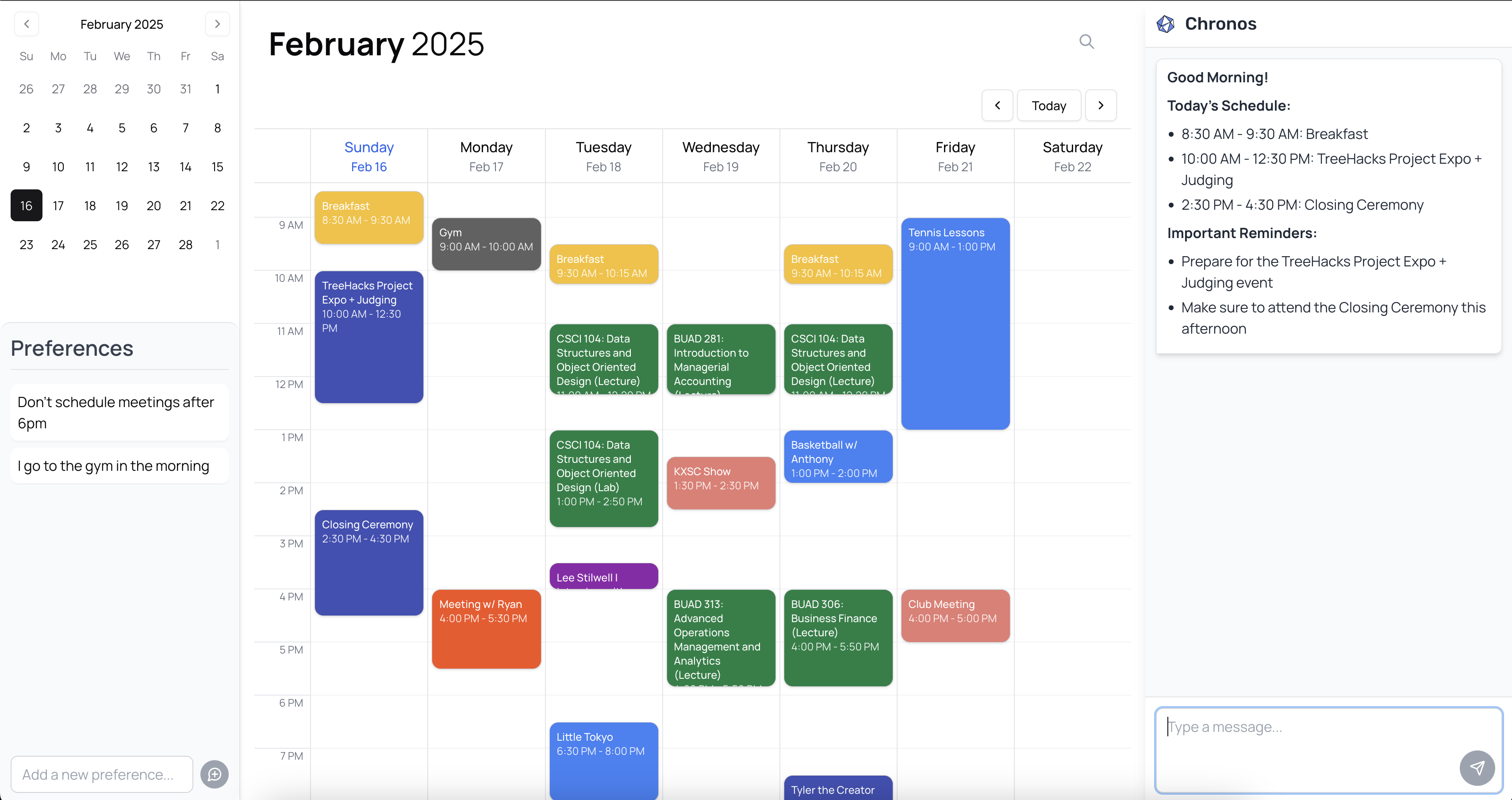
The main page of your Chronos Calendar.
-
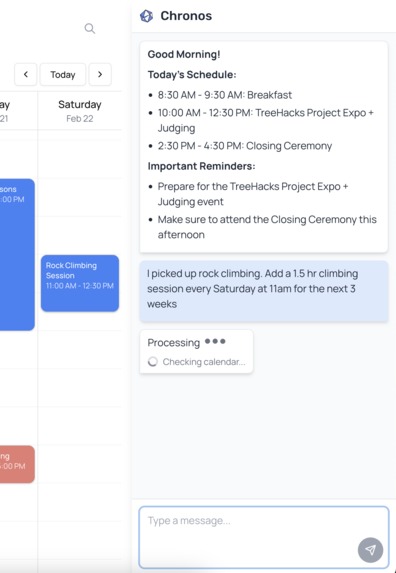
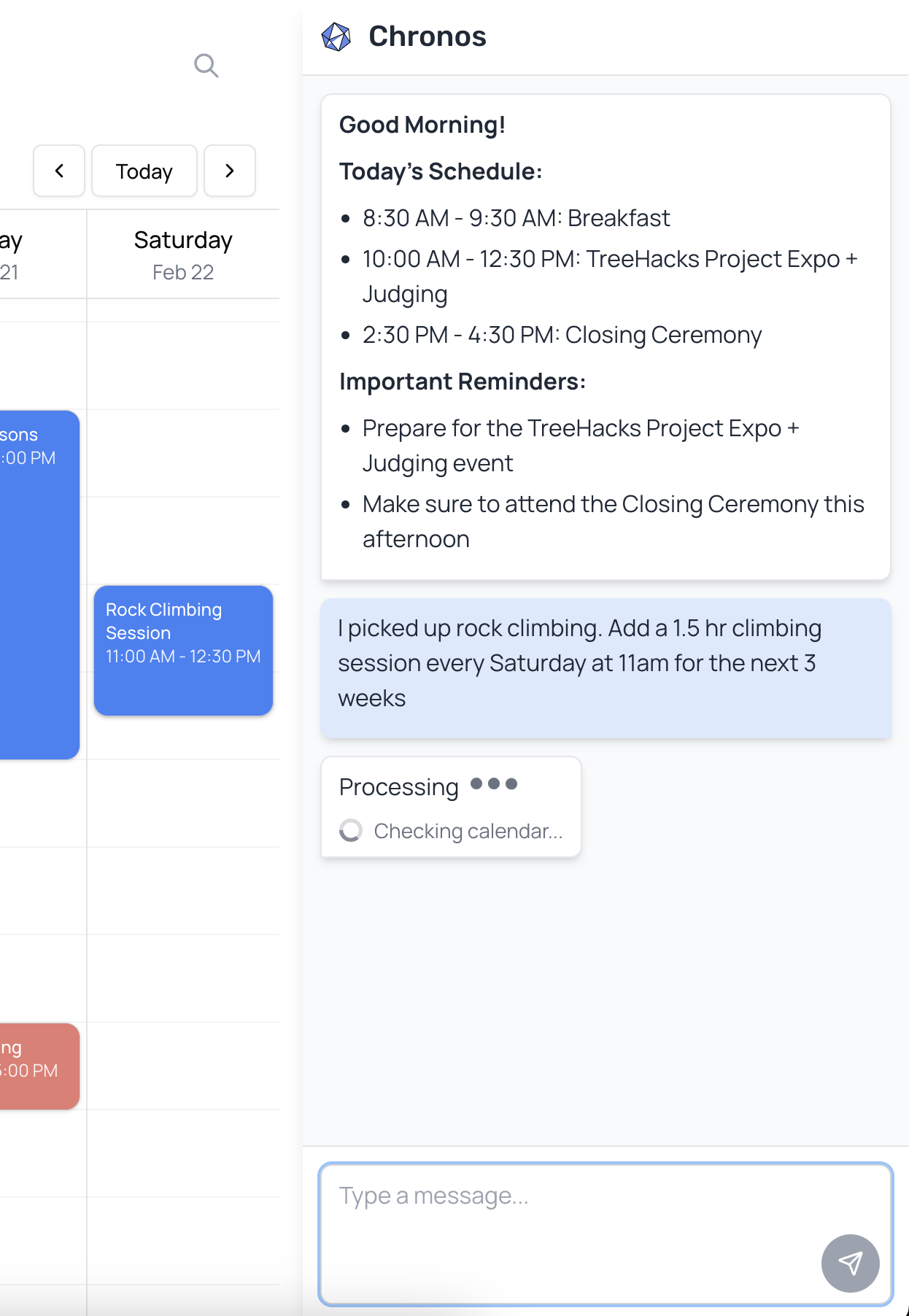
With Chronos, convert natural language into events scheduled directly onto your calendar.
-
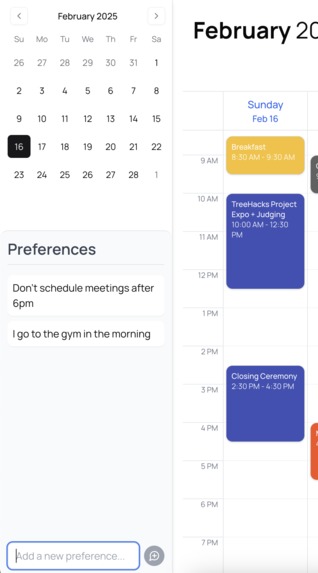
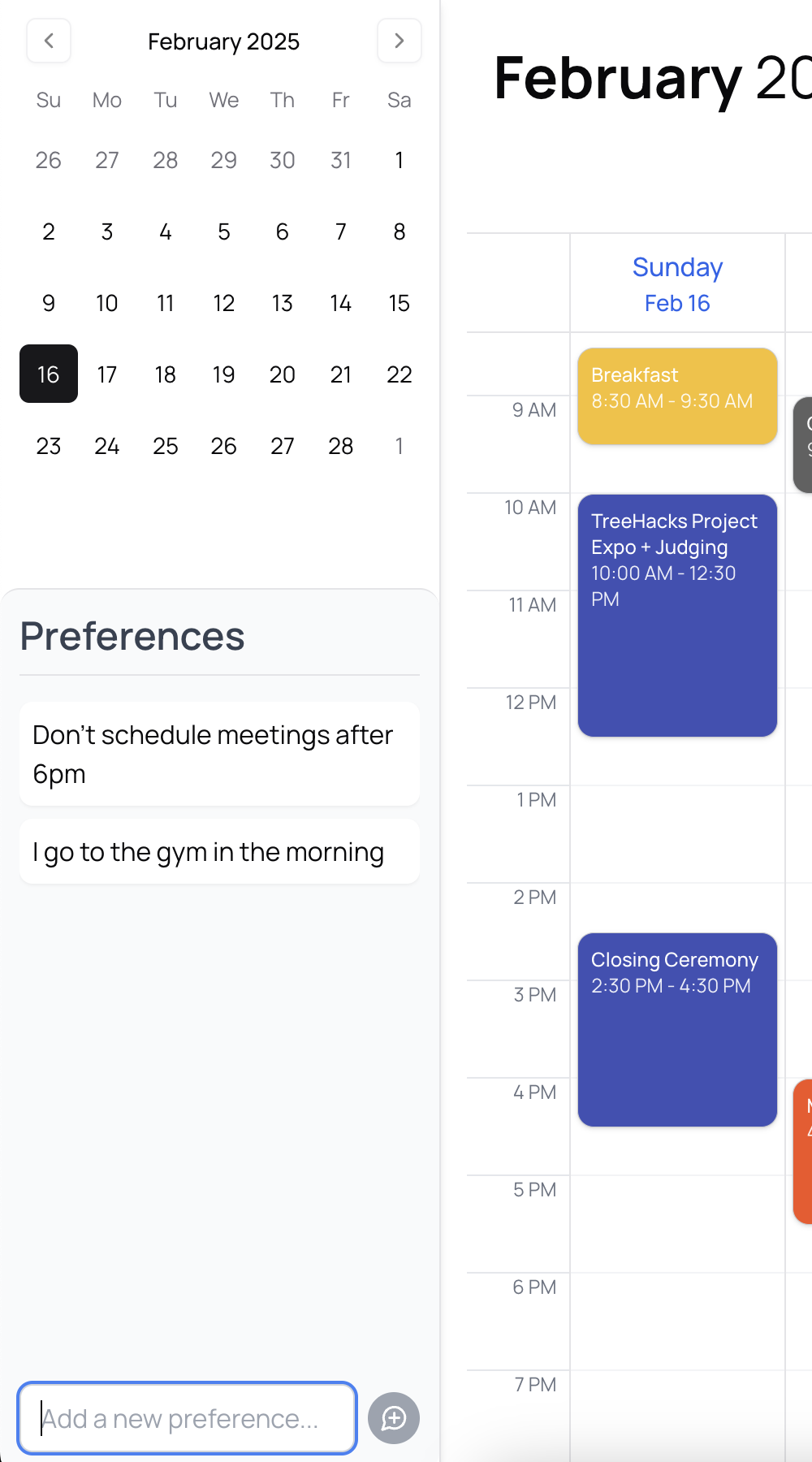
Configure your preferences for the scheduling agents to adhere to.
-
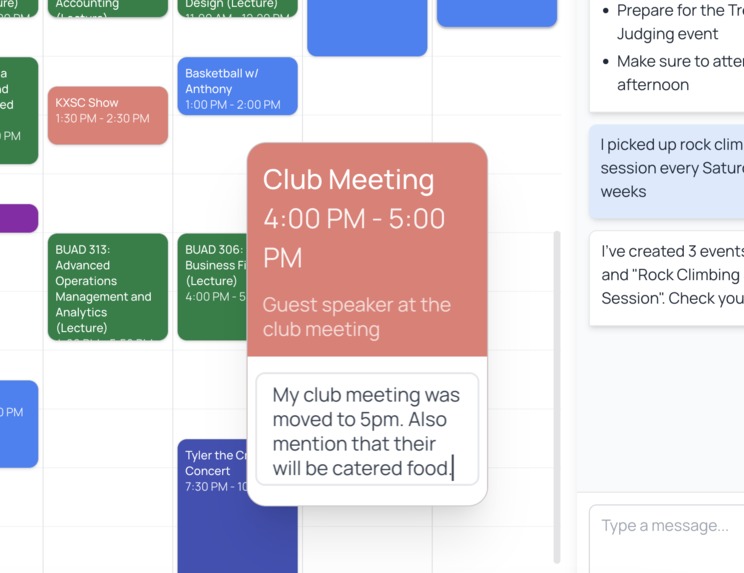
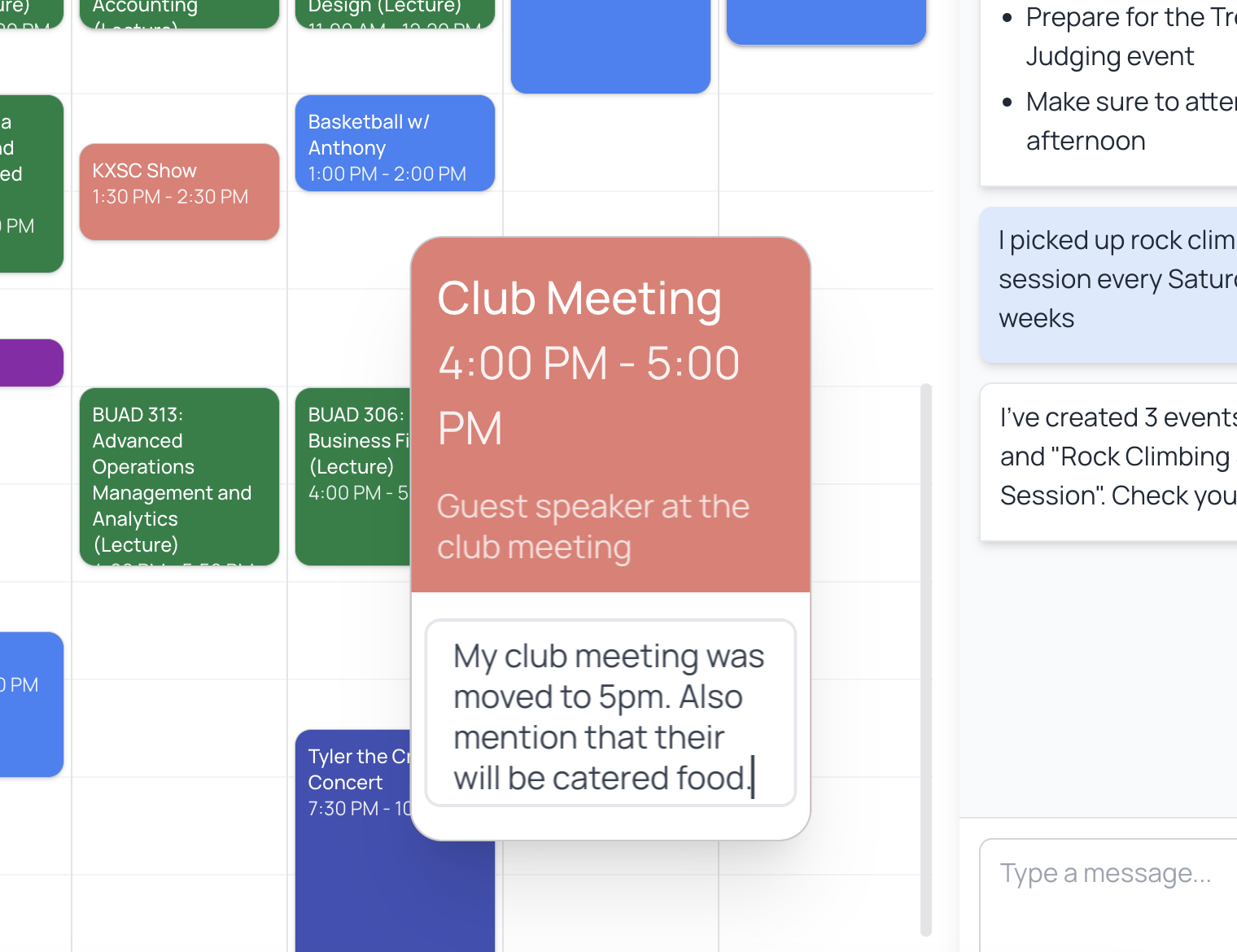
Directly modify events at a single-event level to invite people, modify time, descriptions, etc.
-
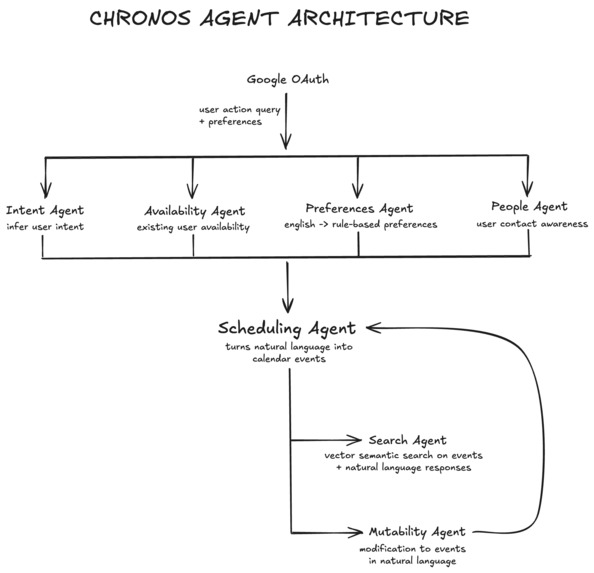
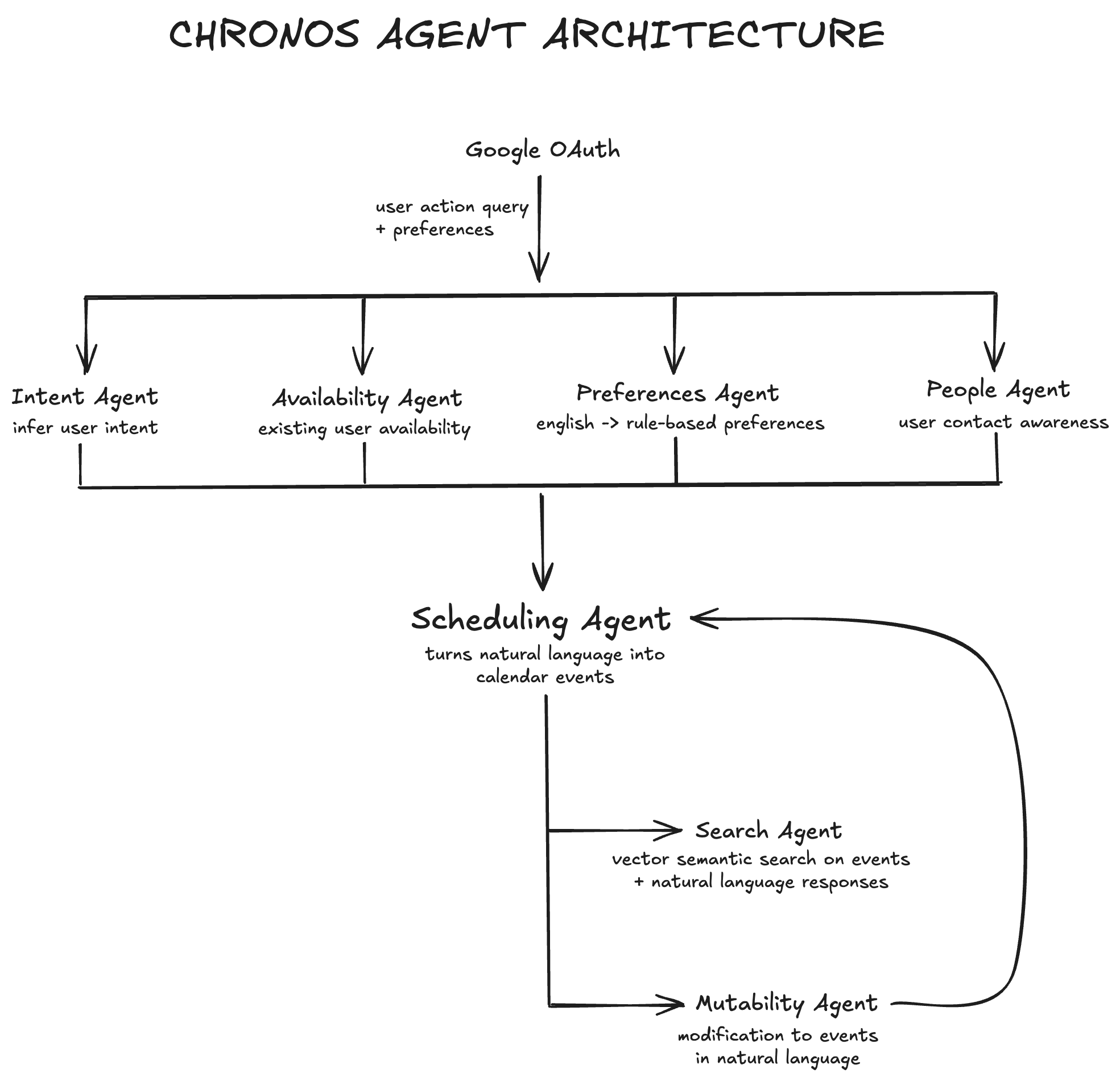
Our agent process-flow architecture.
Inspiration
Keeping track of a busy schedule is a frustrating, manual process. Adding, searching, and editing events takes a lot more effort than it should, with the average American spending anywhere between 45-50 minutes planning their day. Most calendar apps require a manual configuration of details (specific dates, times, and names) and don't adapt to how people plan their days.
What if your calendar could think the way you do? Instead of forms and dropdowns, imagine just typing what you need — "Block focus time in the mornings" or "Find time for dinner with Sarah next week" — with your schedule update instantly. We're making scheduling effortless with natural language processing and smart event handling.
What it does
At a high level, Chronos is a set of intelligent agents working together to find the intent behind your prompt and schedule your event for you in real-time. We have combined this agentic workflow with a beautiful UI/UX to create a truly comprehensive AI scheduling assistant.
Prompt Chronos to create, modify, or delete simple events like “Lunch with James at 12:45pm tomorrow”, or even complex queries like “I want to go to the gym with [email protected] at 8am every other day for the next 3 weeks.” P.S.--adding your university course schedule for the quarter/semester has never been easier!
Preferences act as your “user profile.” This is where you put conditions that don’t often change and that Chronos must always keep in mind, i.e. “I don’t want to have any meetings after 6pm.”
How We Built This
Agent Architecture
Our system is built on a sophisticated multi-agent architecture powered by Groq's LLaMA 3.3 70B model. Each agent is specialized for specific calendar operations and works in concert to provide intelligent scheduling:
Intent Agent
- Primary classifier for all user interactions
- Categorizes requests into CREATE, DELETE, EDIT, or UNKNOWN
- Uses sophisticated prompt engineering to understand context and implied actions
- Handles complex queries like "let's move tomorrow's lunch to Friday"
- Routes requests to appropriate specialized agents
Availability Agent
- Manages calendar availability analysis
- Processes two-week forward-looking time windows
- Generates human-readable availability summaries
- Considers timezone constraints (America/Los_Angeles)
- Formats events into digestible daily schedules
- Handles overlapping and adjacent event logic
Preferences Agent
- Converts natural language preferences into structured time-based rules
- Processes work hours, social time, and recurring patterns
- Extracts activity types, time constraints, and applicable days
- Determines if rules are blocking or preferential
- Maintains preference hierarchy and conflict resolution
- Integrates with scheduling decisions
Search Agent
- Implements vector-based calendar search using ChromaDB
- Creates and maintains sentence transformer embeddings
- Processes calendar events in optimized chunks
- Enables semantic understanding of event context
- Provides real-time event lookup and retrieval
- Handles fuzzy matching and contextual search
Mutability Agent
- Specializes in event modifications and deletions
- Preserves event integrity during changes
- Handles recurring event patterns
- Manages attendee updates and notifications
- Ensures calendar consistency during modifications
- Validates changes against user preferences
Scheduling Agent
- Orchestrates all other agents' operations
- Implements the core scheduling logic
- Manages Google Calendar API integration
- Handles contact lookup and attendee validation
- Processes complex scheduling constraints
- Provides real-time feedback and confirmation
People Agent
- Grabs relevant contacts over the Google People API
- Allows users to mention contacts in natural language
- Events are created with attendee emails by default, without extra effort from the user
Backend Pipeline
Request Processing
Natural Language Input → Intent Classification → Agent Selection →
Preference Validation → Calendar Operation → Real-time Response
Data Flow
User Input → Flask Server → Groq LLM →
Google Calendar API → ChromaDB → UI Update
Performance Optimizations
Chunked Processing
- Calendar events are processed in chunks of 10
- Reduces memory usage and improves response time
Embedding Caching
- Vector embeddings are cached in ChromaDB
- Enables fast semantic search without recomputing
Background Processing
- Long-running tasks are handled asynchronously
- Provides immediate user feedback while processing
Response Streaming
- Implemented server-sent events for real-time updates
- Reduces perceived latency for users
Preference Optimization
- Caches processed preference rules
- Maintains preference hierarchy for quick access
- Optimizes rule matching during scheduling
Challenges we ran into
Building Agent Architecture Challenge: Ensuring seven AI agents work seamlessly, especially in coordinating Availability, Preferences, and Scheduling Agents. Solution: Developed a cascading agent system, where the Intent Agent first classifies the request, then routes tasks to specialized agents.
Natural Language Understanding Challenge: Users phrase scheduling requests ambiguously ("Call in the evening with James"), requiring accurate intent recognition. Solution: Fine-tuned LLM-powered parsing to handle multi-step requests and ensure structured inputs for downstream agents.
Multi-Event Scheduling Logic Challenge: Handling recurring commands like "Go to the gym every night" required resolving conflicts, durations, and smart defaults. Solution: Used prompt engineering to generate structured event outputs, enabling the Scheduling Agent to process multiple events accurately.
Real-time Calendar Updates Challenge: Keeping the UI and Google Calendar synchronized in real-time. Solution: Built a streaming response system using Flask and React's state management to reflect changes instantly.
Preference Management Challenge: Converting natural language preferences into actionable scheduling rules. Solution: Designed a structured JSON schema for preferences and used LLM-powered conversion for consistency.
Vector Search Optimization Challenge: Running efficient semantic search across thousands of calendar events. Solution: Implemented chunked processing and optimized embeddings to speed up retrieval.
Speech-to-Text Challenges Challenge: Adding voice commands required transferring audio from frontend to backend, but encoding and permission issues caused failures. Solution: Pivoted to prioritize text-based interaction, ensuring reliability before revisiting accessibility features.
Accomplishments that we're proud of
✅ User-Friendly Interface – Our intuitive design makes it effortless to manage schedules, with 35 people already on the waitlist for our Beta launch.
✅ Smart Multi-Event Scheduling – Users can create recurring or multi-event commands in plain English, like: "Start going to the gym every night." Chronos understands and schedules it seamlessly.
✅ Agent Transparency – Users can see how our seven specialized AI agents collaborate in real-time to process and optimize scheduling requests.
What we learned
Agentic Workflows need to be Robust … User Research is Crucial
- Speaking with 40+ users helped us uncover real pain points and focus on solving actual problems, not just assumptions.
Organization is Key for Success
- Defining roles and workflows made collaboration across teams smooth and efficient.
Structured Workflows Keep Teams Aligned
- A clear process + ongoing to-do list ensured everyone stayed on the same page and could adapt during hectic moments.
Moving Quick
- Moving quickly while staying focused on goals helped our team deliver results under tight deadlines
What's next for Chronos Calendar
This weekend, we spoke to fellow hackers to learn from their experiences and better understand their pain points. We now have a growing waitlist of 35 students. In the coming weeks, we want to keep iterating. Here’s what’s next: Speech-to-Text Integration (Groq):
- Enable users to add, search, and modify events, plus log preferences using voice input.
Interactive Chat Functionality:
- Introduce a conversational interface where users can ask about their schedule, reschedule events, and receive smart recommendations.
Keyboard Shortcuts for Efficiency:
- Implement quick actions for scheduling, searching, and editing events – making navigation even quicker.
Understanding Preference-Backed Goals:
- Offer scheduling suggestions based on user habits. We want Chronos to learn and adapt from previous calendar events.


Log in or sign up for Devpost to join the conversation.