ChronoGrid is a deterministic calendar computation and multi-surface rendering engine designed around a simple principle: a civil date is data, not a timestamp.
Most calendar interfaces look trivial.
Seven columns.
Four to six rows.
A month name.
A collection of numbers.
But beneath that grid is a surprisingly deep systems problem involving leap-year arithmetic, weekday derivation, locale conventions, week boundaries, date-only semantics, responsive layouts, physical print dimensions, serialization, and validation.
ChronoGrid explores what happens when those concerns are separated into a small, deterministic calendar architecture instead of being mixed directly into UI components.
The project grew out of work around JW Calendar, where the same calendar information may eventually need to remain structurally consistent across browser interfaces, printable layouts, yearly views, monthly views, and machine-readable representations.
The central question became:
Can a calendar be computed once, verified once, and rendered correctly everywhere?
ChronoGrid is my attempt to answer that question.
The problem
A common calendar implementation begins with something similar to:
new Date(year, month, day)
and immediately couples calendar arithmetic to timestamps, local timezone behavior, browser APIs, and presentation logic.
That works surprisingly well — until it does not.
A value such as:
2027-03-14
represents a civil date.
A value such as:
2027-03-14T00:00:00-05:00
represents an instant interpreted through a timezone offset.
Those concepts are related, but they are not equivalent.
ChronoGrid therefore begins with an intentionally small domain object:
type CalendarDate = {
  year: number
  month: number
  day: number
}
No timezone.
No clock.
No accidental midnight conversion.
The temporal layer decides what a date means before any renderer decides what it should look like.
Architecture
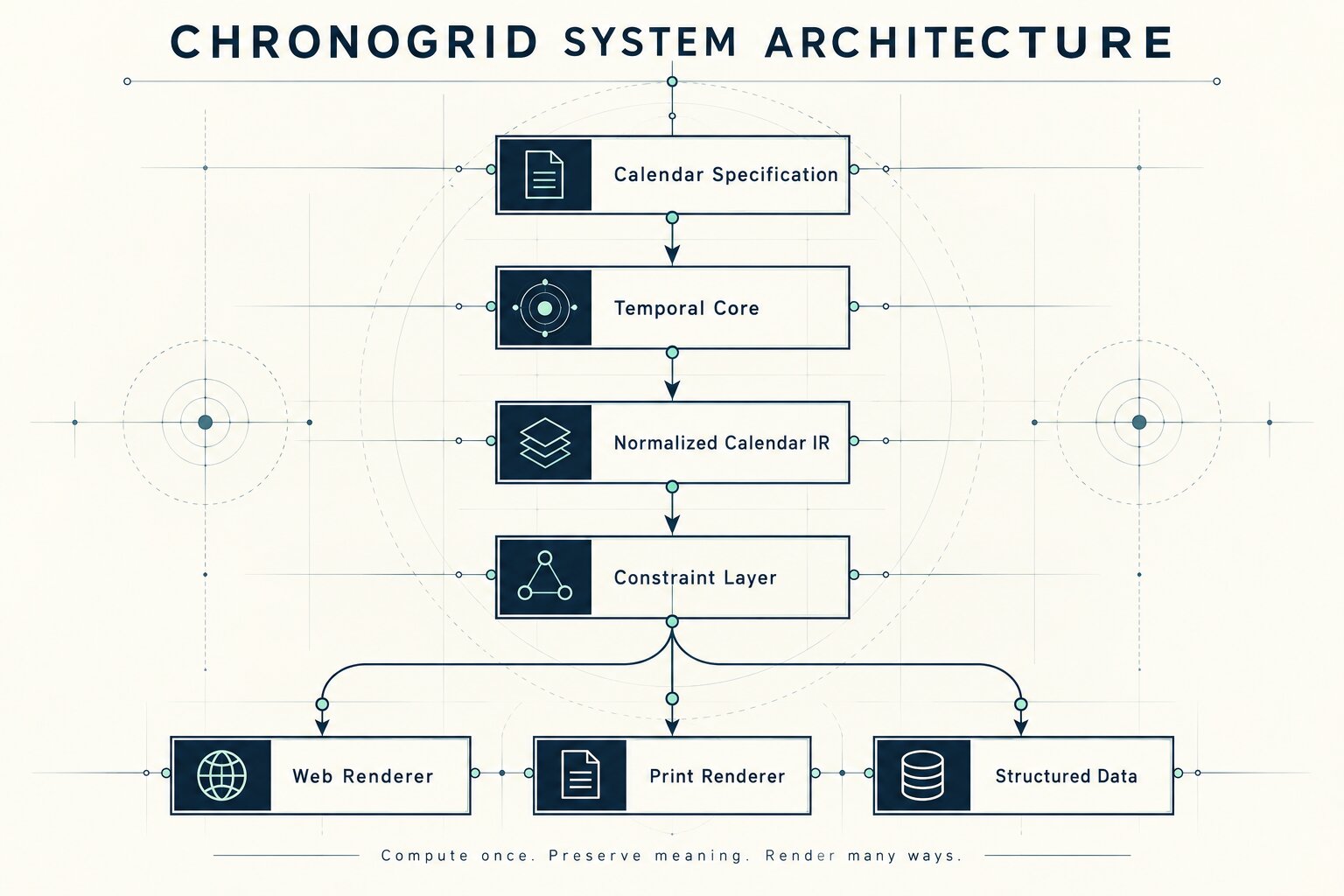
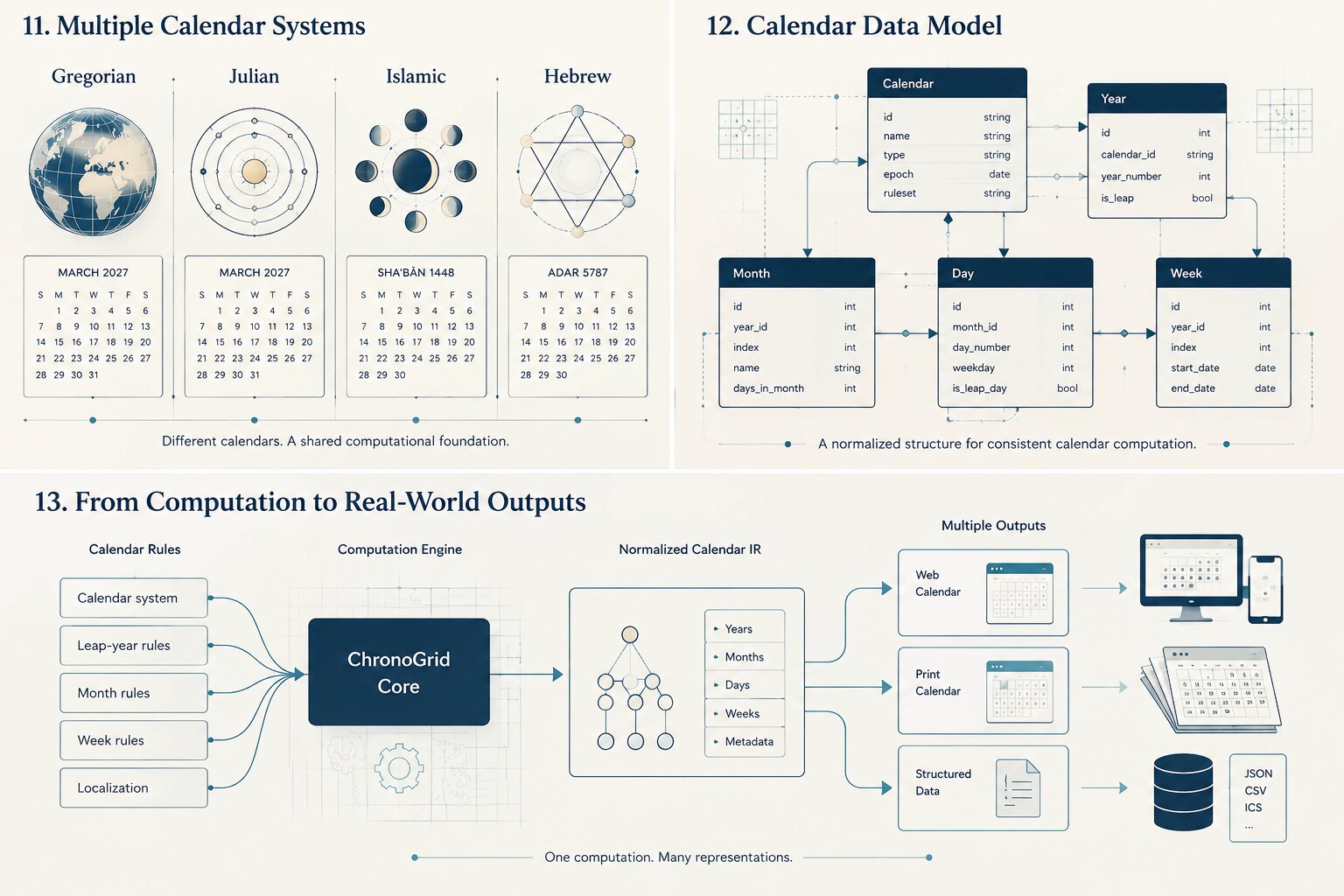
ChronoGrid is organized as a pipeline:
┌─────────────────────────────┐
│     Calendar Specification  │
│                             │
│ year • locale • week start  │
│ rendering constraints       │
└──────────────┬──────────────┘
               │
               ▼
┌─────────────────────────────┐
│       Temporal Core         │
│                             │
│ leap years                  │
│ month lengths               │
│ weekday arithmetic          │
│ boundaries                  │
└──────────────┬──────────────┘
               │
               ▼
┌─────────────────────────────┐
│    Normalized Calendar IR   │
│                             │
│ year → month → week → day   │
└──────────────┬──────────────┘
               │
               ▼
┌─────────────────────────────┐
│      Constraint Layer       │
│                             │
│ screen • print • data       │
└───────┬──────────┬──────────┘
        │          │
   ┌────▼────┐ ┌───▼─────┐ ┌──────────▼───────┐
   │   Web   │ │  Print  │ │ Structured Data  │
   │ HTML/CSS│ │ SVG/PDF │ │ JSON / future ICS│
   └─────────┘ └─────────┘ └──────────────────┘
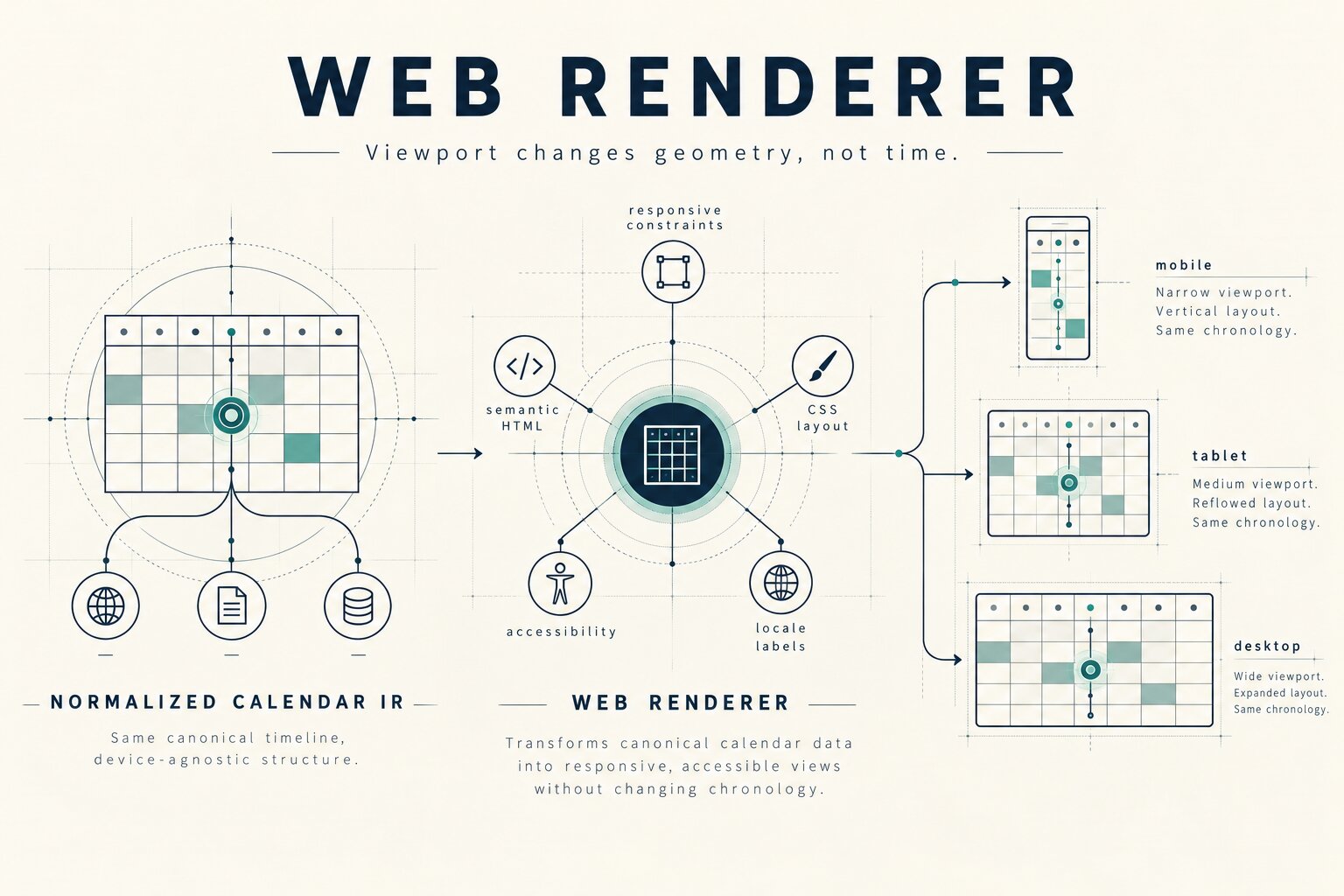
The important architectural decision is that renderers do not perform calendar arithmetic.
They receive an already-normalized representation.
That separation makes the temporal layer testable without a browser and makes new renderers possible without duplicating date logic.
The mathematical core
Calendars are deterministic systems, so ChronoGrid treats the underlying rules explicitly.
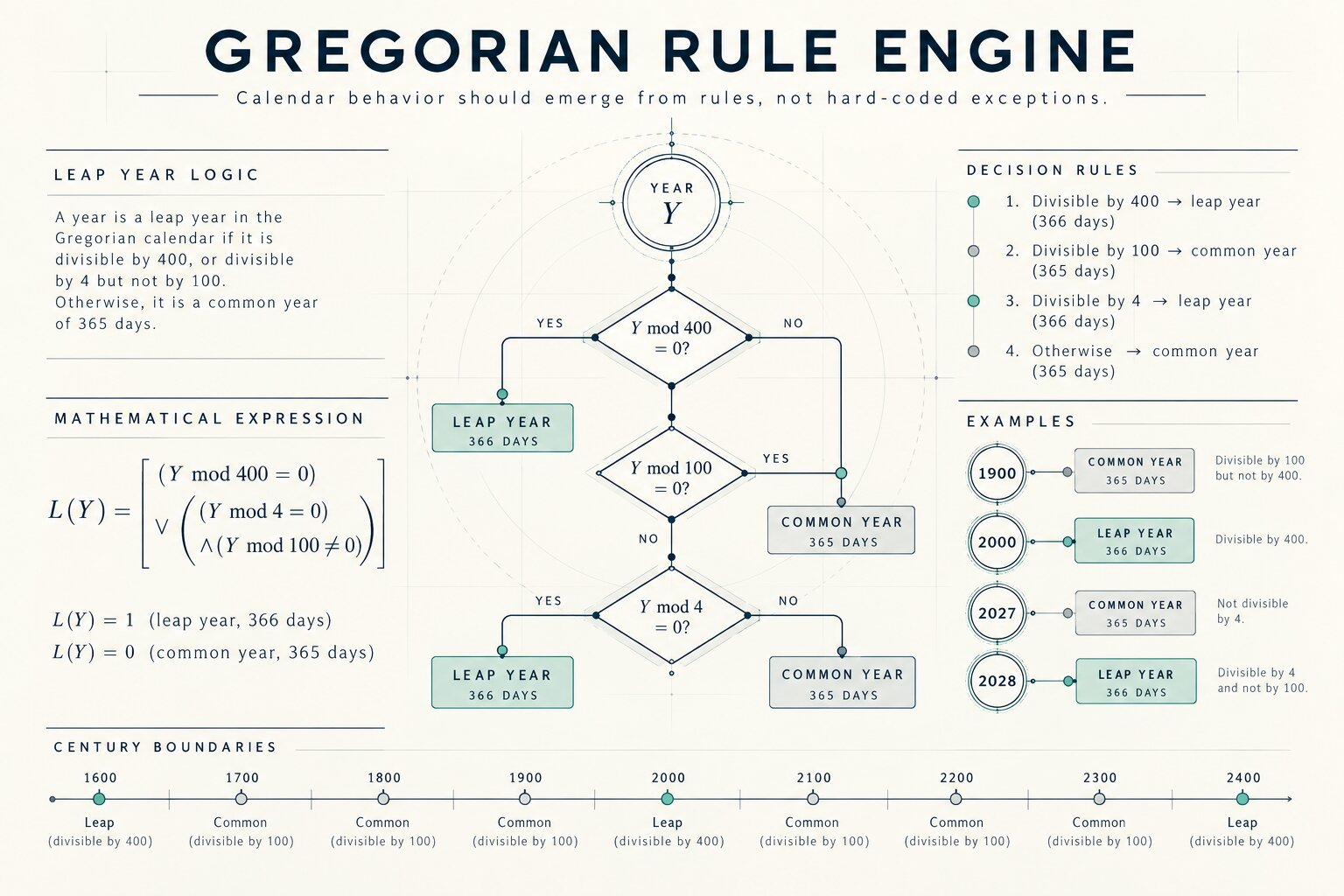
Gregorian leap-year rule
For year (y), define the leap-year indicator:
[ L(y)= \begin{cases} 1 & \text{if } 400 \mid y \ 1 & \text{if } 4 \mid y \text{ and } 100 \nmid y \ 0 & \text{otherwise} \end{cases} ]
Equivalent implementation:
const isLeapYear = (year: number): boolean =>
  year % 400 === 0 ||
  (year % 4 === 0 && year % 100 !== 0)
This means:
1900 → common year
2000 → leap year
2027 → common year
2028 → leap year
2100 → common year
That distinction matters because a calendar engine must survive century boundaries, not just the current decade.
Month-length function
For month (m) and year (y):
[ D(y,m)= \begin{cases} 31 & m \in {1,3,5,7,8,10,12}\ 30 & m \in {4,6,9,11}\ 28 + L(y) & m=2 \end{cases} ]
The renderer never guesses the number of days.
The temporal core supplies it.
Absolute-day representation
Internally, dates can also be reasoned about relative to an absolute ordinal.
The number of leap days before year (y) is:
[ B(y)=
\left\lfloor\frac{y-1}{4}\right\rfloor
\left\lfloor\frac{y-1}{100}\right\rfloor + \left\lfloor\frac{y-1}{400}\right\rfloor ]
The number of days before year (y) is therefore:
[ Y(y)=365(y-1)+B(y) ]
For date ((y,m,d)), an ordinal representation can be expressed as:
[ N(y,m,d)= Y(y) + \sum_{i=1}^{m-1}D(y,i) + (d-1) ]
This turns several apparently different calendar operations into integer arithmetic.
For example, given a known reference date (D_0):
[ weekday(D)= \left( weekday(D_0)+N(D)-N(D_0) \right)\bmod 7 ]
ChronoGrid can therefore reason about weekdays without requiring calendar rendering code to manipulate timestamps.
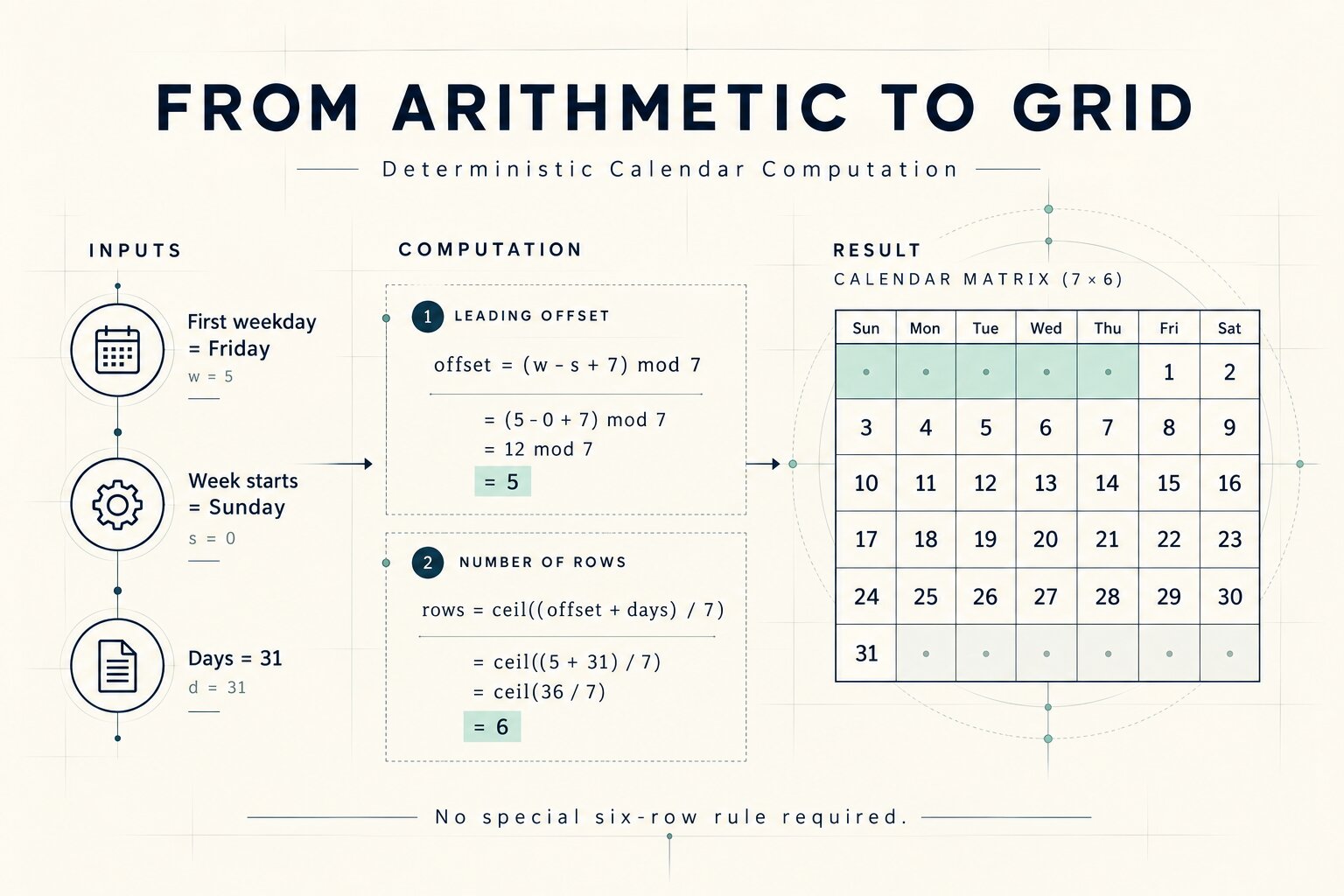
Building a month grid
Suppose:
- (w) = weekday of the first day of the month
- (s) = configured first weekday of the week
- (n) = number of days in the month
The leading offset is:
[ o=(w-s+7)\bmod 7 ]
The required number of calendar rows is:
[ r= \left\lceil \frac{o+n}{7} \right\rceil ]
This naturally produces months containing four, five, or six visible week rows.
For example:
first weekday      = Friday
week starts        = Sunday
days in month      = 31

offset             = 5
occupied positions = 5 + 31 = 36
rows               = ceil(36 / 7)
                   = 6
No special six-row-calendar rule is necessary.
It falls out of the arithmetic.
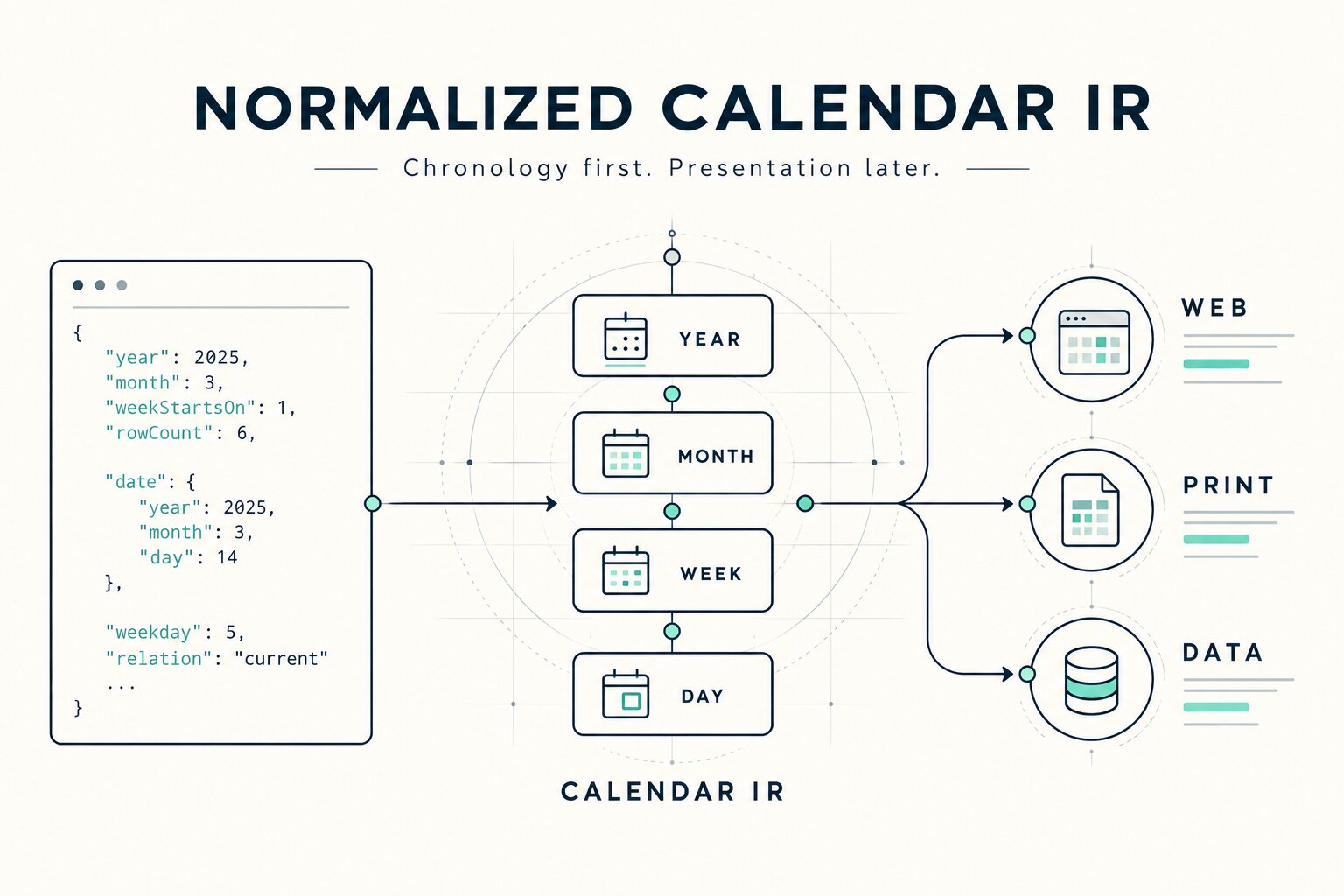
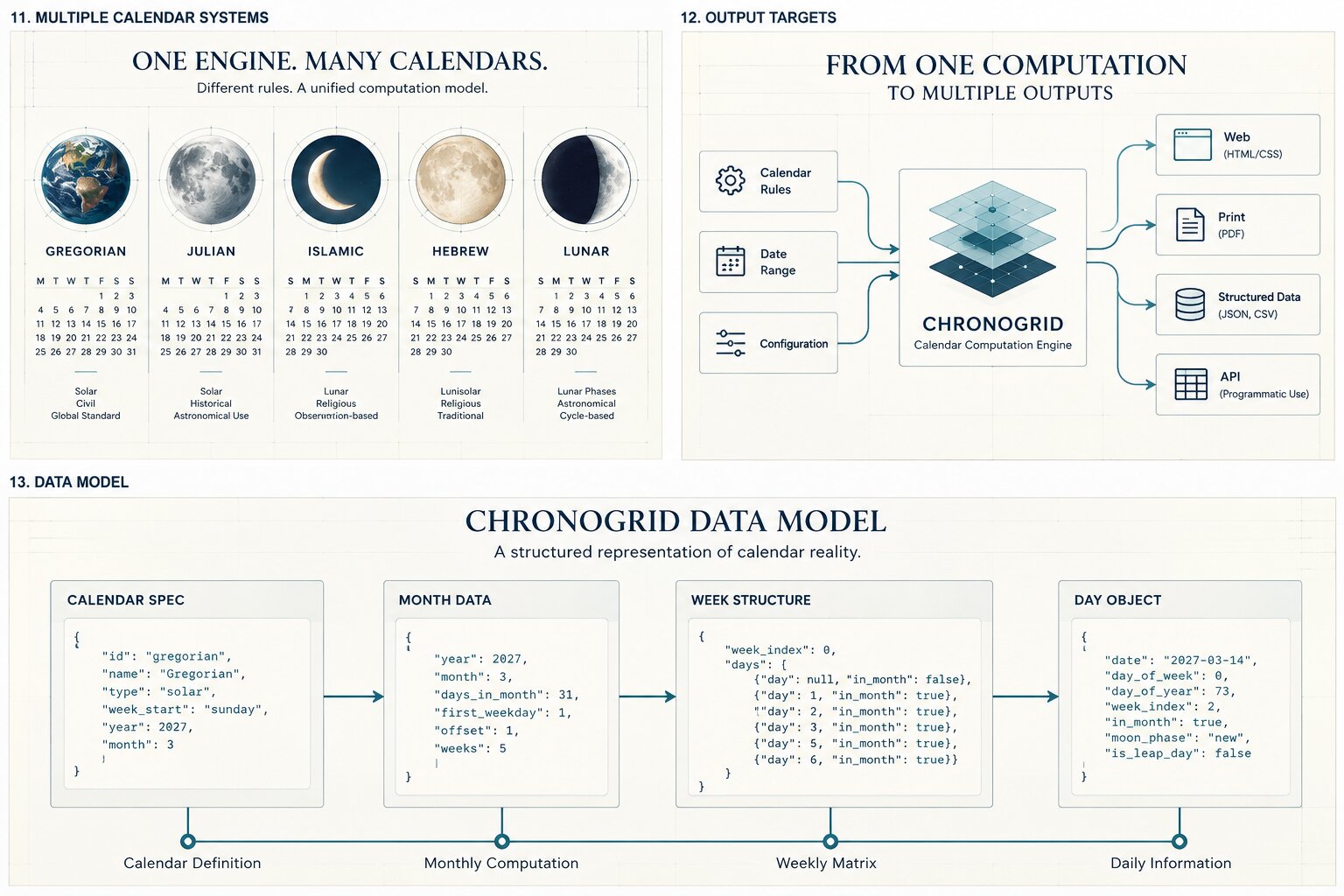
Normalized Calendar IR
ChronoGrid does not generate HTML immediately.
The core produces an intermediate representation — a renderer-neutral calendar graph.
A simplified month might look like this:
{
  "year": 2027,
  "month": 1,
  "weekStartsOn": 0,
  "dayCount": 31,
  "rowCount": 6,
  "weeks": [
    {
      "index": 0,
      "days": [
        {
          "date": "2026-12-27",
          "day": 27,
          "weekday": 0,
          "relation": "previous"
        },
        {
          "date": "2027-01-01",
          "day": 1,
          "weekday": 5,
          "relation": "current"
        }
      ]
    }
  ]
}
The complete representation contains enough semantic information for a renderer to answer questions such as:
Is this date inside the active month?
Which weekday does it belong to?
Does the grid need six rows?
Is this an overflow cell?
What is the canonical civil-date identifier?
Presentation is deliberately absent.
That comes later.
Calendar invariants
A deterministic engine becomes much more useful when its output can be checked against properties that must always hold.
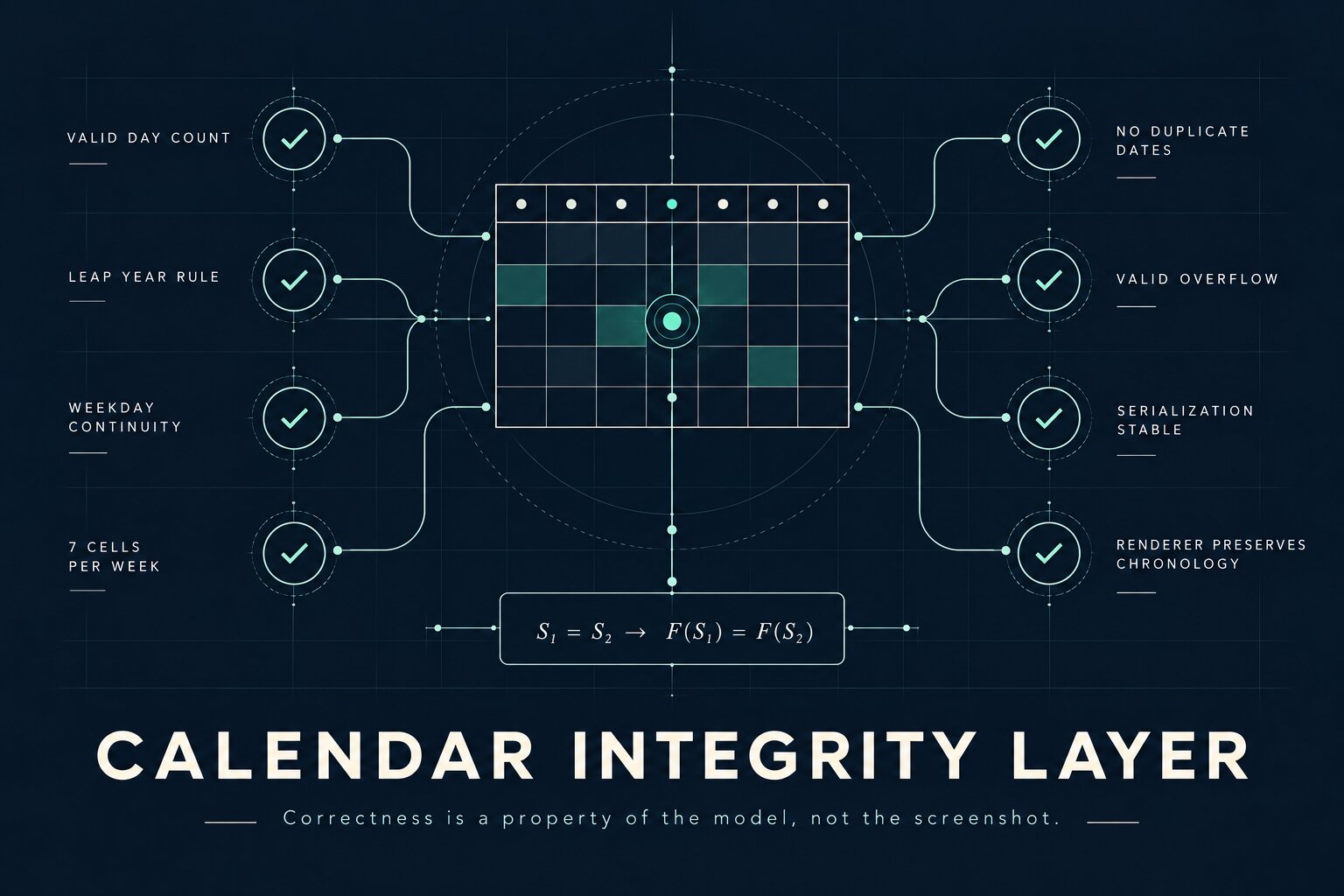
ChronoGrid is designed around structural invariants including:
I1  Every valid civil date appears exactly once in its month.

I2  A month contains exactly D(y,m) active dates.

I3  February contains 29 active dates iff L(y) = 1.

I4  Consecutive civil dates advance the weekday by one modulo seven.

I5  Each generated week contains exactly seven positions.

I6  A month grid contains enough cells to contain offset + dayCount.

I7  No renderer is permitted to alter temporal meaning.

I8  Serializing and deserializing the calendar model preserves identity.

I9  Adjacent-month overflow cells map to valid neighboring civil dates.

I10 Rendering constraints may change geometry, never chronology.
These invariants are more valuable than testing a handful of manually selected screenshots.
They describe what must remain true for every calendar.
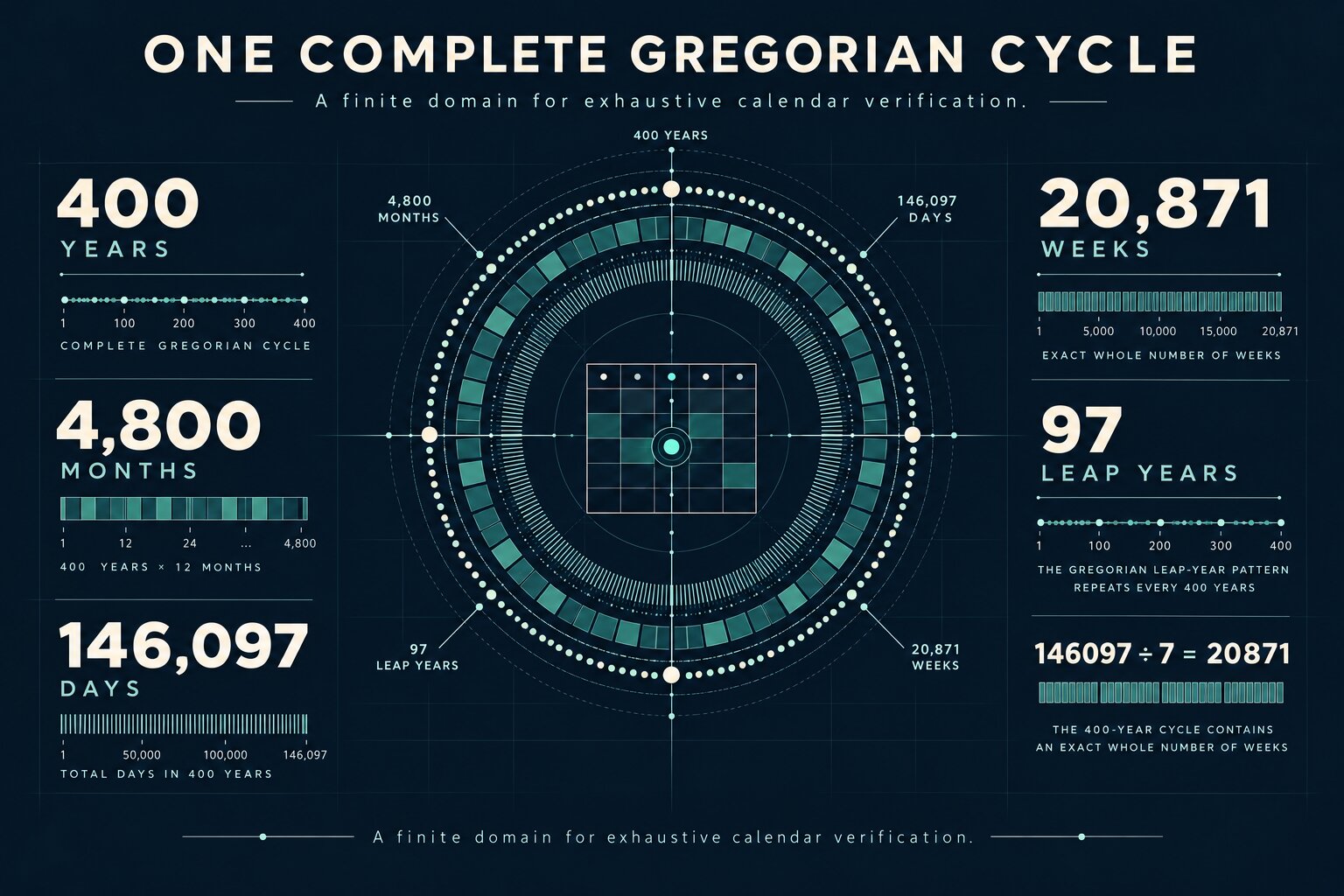
Why the 400-year cycle matters
The Gregorian leap-year pattern repeats every 400 years.
Within one complete cycle:
[ 400 \times 365 + 97 = 146097 ]
days occur.
And:
[ 146097 \div 7 = 20871 ]
exactly.
So the Gregorian 400-year cycle contains an integer number of weeks.
That makes a complete 400-year traversal an unusually powerful validation domain.
Instead of testing only familiar years such as 2026 or 2027, the verification strategy can exercise:
400 years
4,800 months
146,097 civil dates
century boundaries
97 leap years
all weekday/month alignments
A deterministic calendar engine is small enough that exhaustive structural validation over an entire Gregorian cycle is practical.
This is one of my favorite properties of the project.
Verification strategy
ChronoGrid's verification model combines example tests with property-oriented checks.
Representative examples catch understandable cases:
expect(isLeapYear(2000)).toBe(true)
expect(isLeapYear(1900)).toBe(false)
expect(daysInMonth(2028, 2)).toBe(29)
expect(daysInMonth(2100, 2)).toBe(28)
Structural checks go further.
Pseudo-code:
for (const year of gregorianCycle()) {
  for (const month of months(year)) {
    const grid = generateMonth(year, month)

    assert(grid.activeDays.length === daysInMonth(year, month))
    assert(grid.weeks.every(week => week.days.length === 7))
    assert(noDuplicateCivilDates(grid))
    assert(weekdayContinuity(grid))
    assert(validOverflowDates(grid))
  }
}
The goal is not merely:
"January 2027 looks correct."
The stronger question is:
"What property would make an incorrect January impossible?"
That shift from screenshot correctness to invariant correctness shaped the architecture.
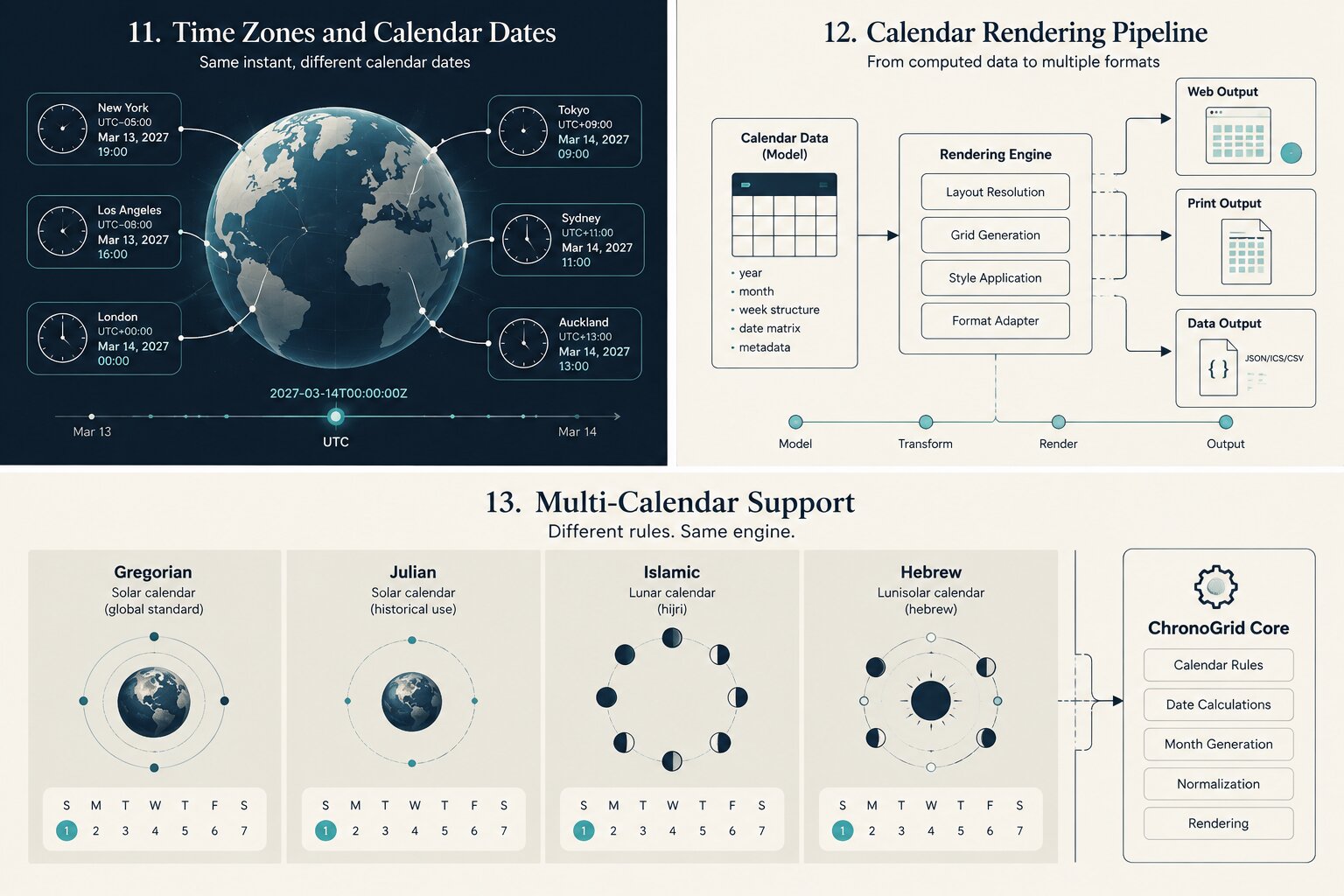
Date ≠ timestamp
One of the most important lessons from the project is that calendar software becomes easier to reason about when three concepts remain separate:
Civil Date
    │
    │ optional interpretation
    ▼
Local Date + Time
    │
    │ timezone resolution
    ▼
Instant / Timestamp
A printable calendar often needs only the first.
A meeting scheduler frequently needs all three.
Conflating them too early creates bugs around midnight, daylight-saving transitions, serialization, and timezone conversion.
ChronoGrid therefore keeps the calendar layer date-first.
Locale is configuration, not chronology
Different users may expect different week conventions.
For example:
Sunday-first layout
Monday-first layout
localized weekday labels
localized month labels
ISO-oriented week behavior
ChronoGrid treats these as configuration around a canonical temporal model.
Conceptually:
type CalendarSpec = {
  year: number
  locale: string
  weekStartsOn: 0 | 1 | 2 | 3 | 4 | 5 | 6
}
The underlying civil date does not change because its label or column position changes.
This separation is essential for predictable localization.
Screen rendering and print rendering are different problems
One of the most interesting parts of ChronoGrid is treating print as a first-class rendering target rather than an afterthought.
A browser layout works with a variable viewport:
width  = unknown
height = dynamic
zoom   = variable
input  = mouse / touch / keyboard
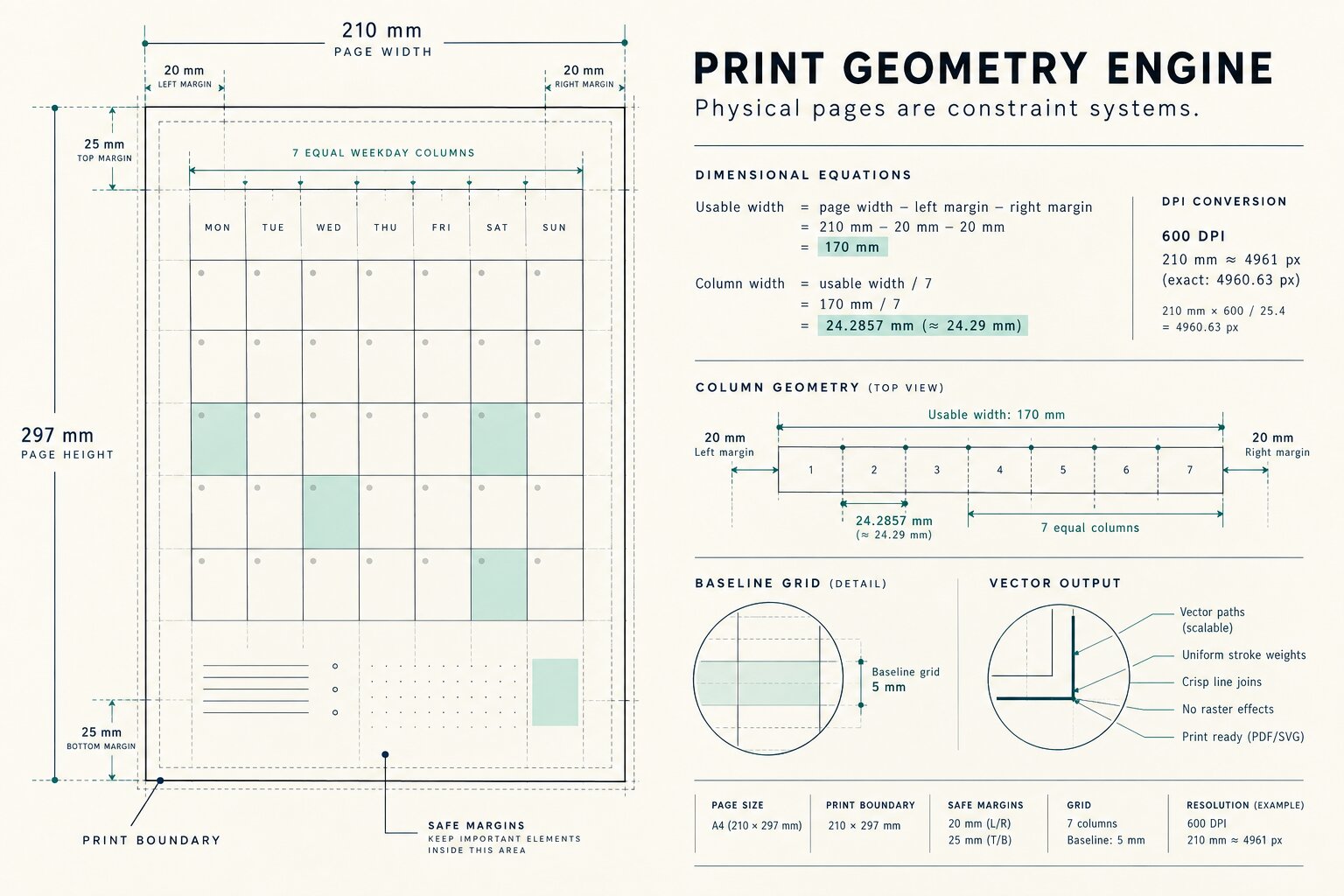
A printed page has very different constraints:
width  = physical
height = physical
margins = explicit
page breaks = destructive if wrong
output geometry = fixed
For a physical page with width (W), left margin (m_l), and right margin (m_r):
[ W_u = W-(m_l+m_r) ]
where (W_u) is usable width.
For a seven-column month layout:
[ W_c = \frac{W_u}{7} ]
where (W_c) is the nominal width available to each weekday column.
For raster preflight at (P) DPI, millimeters convert approximately to pixels through:
[ px = mm \times \frac{P}{25.4} ]
At 600 DPI, for example, a 210 mm A4 page width corresponds to roughly:
[ 210 \times \frac{600}{25.4} \approx 4961 \text{ px} ]
This distinction matters when designing assets that should remain sharp both on screen and in high-resolution printable output.
One model, multiple surfaces
The long-term architecture is designed around a single calendar model feeding specialized renderers.
                    Calendar IR
                        │
         ┌──────────────┼──────────────┐
         │              │              │
         ▼              ▼              ▼
      Browser         Print          Data
         │              │              │
      HTML/CSS       SVG/PDF         JSON
         │              │              │
 responsive rules   page geometry   integrations
This avoids having separate date logic for:
- a responsive monthly calendar,
- a yearly overview,
- printable pages,
- SVG exports,
- structured calendar data.
The renderer changes.
The calendar does not.
Complexity
Calendar generation has a naturally bounded output size.
A month normally contains between 28 and 42 visible grid positions depending on rendering policy.
If (c) represents the number of emitted cells:
[ T(c)=O(c) ]
and:
[ M(c)=O(c) ]
for time and output-model memory respectively.
Because (c) is tightly bounded for a single month, practical generation cost is effectively constant from a user's perspective.
More importantly, ChronoGrid does not need to scan previous years to generate an arbitrary month.
Ordinal arithmetic allows direct computation.
That makes random access to distant years straightforward.
Renderer contract
A renderer receives chronology.
It does not own chronology.
Conceptually:
interface CalendarRenderer<TOutput> {
  render(
    calendar: CalendarModel,
    constraints: RenderConstraints
  ): TOutput
}
Possible implementations include:
WebRenderer
SvgRenderer
PrintRenderer
JsonRenderer
A renderer may decide:
font size
line thickness
page margins
responsive breakpoint
cell padding
visual hierarchy
It may not decide:
whether 2028 is a leap year
how many days February contains
what weekday a civil date represents
That boundary is intentionally strict.
Determinism
For the same calendar specification (S):
[ F(S)=C ]
where (C) is the normalized calendar model.
A fundamental project goal is:
[ S_1=S_2 \Rightarrow F(S_1)=F(S_2) ]
The temporal core should not depend on:
current system time
browser timezone
network state
randomness
UI state
screen dimensions
That makes generated calendars cacheable, reproducible, testable, and easier to compare across environments.
What was challenging
1. Separating civil dates from instants
JavaScript's traditional date APIs encourage timestamp-oriented thinking even when the domain problem is purely calendrical.
Designing the model around civil dates required being explicit about where timezone semantics begin.
2. Keeping rendering out of computation
It is tempting to solve a visual problem by inserting special cases into date generation.
That quickly makes the model dependent on one layout.
ChronoGrid instead keeps layout metadata and temporal truth separate.
3. Handling boundary conditions
Most calendar code works during ordinary months.
The interesting failures appear around:
February 29
December → January
century years
six-row months
week-start changes
ISO-oriented boundaries
adjacent-month overflow
Those cases influenced the design far more than the easy ones.
4. Designing for print and web simultaneously
The same information can serve both media, but the layout engines should not be identical.
ChronoGrid shares semantic data while allowing different geometric constraints.
What I learned
The project changed how I think about calendars.
A calendar is not primarily a grid.
The grid is only one projection of a temporal model.
Once that distinction is made, the system becomes easier to decompose:
chronology
    ↓
semantic model
    ↓
constraints
    ↓
projection
It is the same idea used in compilers, rendering pipelines, and document systems:
normalize first, render later.
That architectural pattern turned out to fit calendar software remarkably well.
Relationship with JW Calendar
ChronoGrid is being developed alongside JW Calendar, which provides a practical environment for exploring calendar layouts and long-term calendar presentation.
The relationship is intentionally one-directional:
ChronoGrid
    │
    │ temporal + structural model
    ▼
JW Calendar
    │
    ├── yearly experiences
    ├── monthly experiences
    ├── responsive layouts
    └── print-oriented outputs
ChronoGrid is the engineering experiment.
JW Calendar is where those ideas can meet real calendar use cases.
What's next
The next phase of ChronoGrid is focused on turning the architecture into a more complete reusable engine.
Planned areas include:
Temporal API compatibility
Investigating interoperability with modern date/time primitives while preserving strict date-only semantics where appropriate.
Property-based verification
Generating large numbers of valid calendar specifications and checking invariants automatically.
Full 400-year regression traversal
Using the complete Gregorian cycle as a deterministic validation corpus.
ISO week support
Representing week-numbering years without contaminating the base Gregorian month model.
Structured exports
Adding canonical JSON and exploring iCalendar-compatible output where events are involved.
Print preflight
Validating page dimensions, safe margins, minimum typography sizes, overflow, and vector/raster asset quality before export.
Localization profiles
Separating language, labels, week starts, and regional display conventions into explicit configuration.
Renderer snapshots
Comparing deterministic SVG output to detect unexpected visual regressions.
Long-term idea
The long-term vision is not to build another date-picker library.
It is to explore a small calendar compiler.
Calendar Specification
        ↓
Temporal Analysis
        ↓
Normalized Calendar IR
        ↓
Constraint Resolution
        ↓
Target Renderer
        ↓
Web / Print / SVG / Data
In that sense, ChronoGrid treats a calendar much like a compiler treats a program:
- input has semantics,
- semantics are normalized,
- invariants are checked,
- target-specific output is generated afterward.
The visible calendar is simply the final projection.
Final principle
The entire project can be summarized by one rule:
Compute time once. Preserve its meaning. Render it many ways.
Built With
- api
- css3
- html5
- intl
- javascript
- json
- node.js
- svg
- typescript
- vitest


Log in or sign up for Devpost to join the conversation.