Inspiration
All of us grew up watching family members live with conditions like diabetes and high blood pressure. We saw parents and grandparents get a diagnosis, leave the doctor's office with a pamphlet, and then be left on their own: no easy way to track their numbers, no idea whether a reading was something to worry about, and no plan for what to eat or how to exercise safely.
When we looked for apps to help them, we kept hitting the same wall. Most fitness and nutrition apps are built for people who are already healthy, and their meal plans assume one kind of kitchen. Advice like "have a salad and grilled chicken" doesn't help someone whose everyday food is roti, dal and rice, or who eats halal, or who needs to watch their blood sugar with every meal. Our families weren't the people these apps were designed for.
What it does
ChronoCare is a personal health companion that turns your health information into one simple daily plan.
- Personalized AI plans: a 7-day meal plan, workout plan and bedtime routine, built from your age, height, weight, cultural background, dietary restrictions, health conditions and goals. A halal South Asian user with high blood pressure gets very different meals from a vegetarian marathon runner.
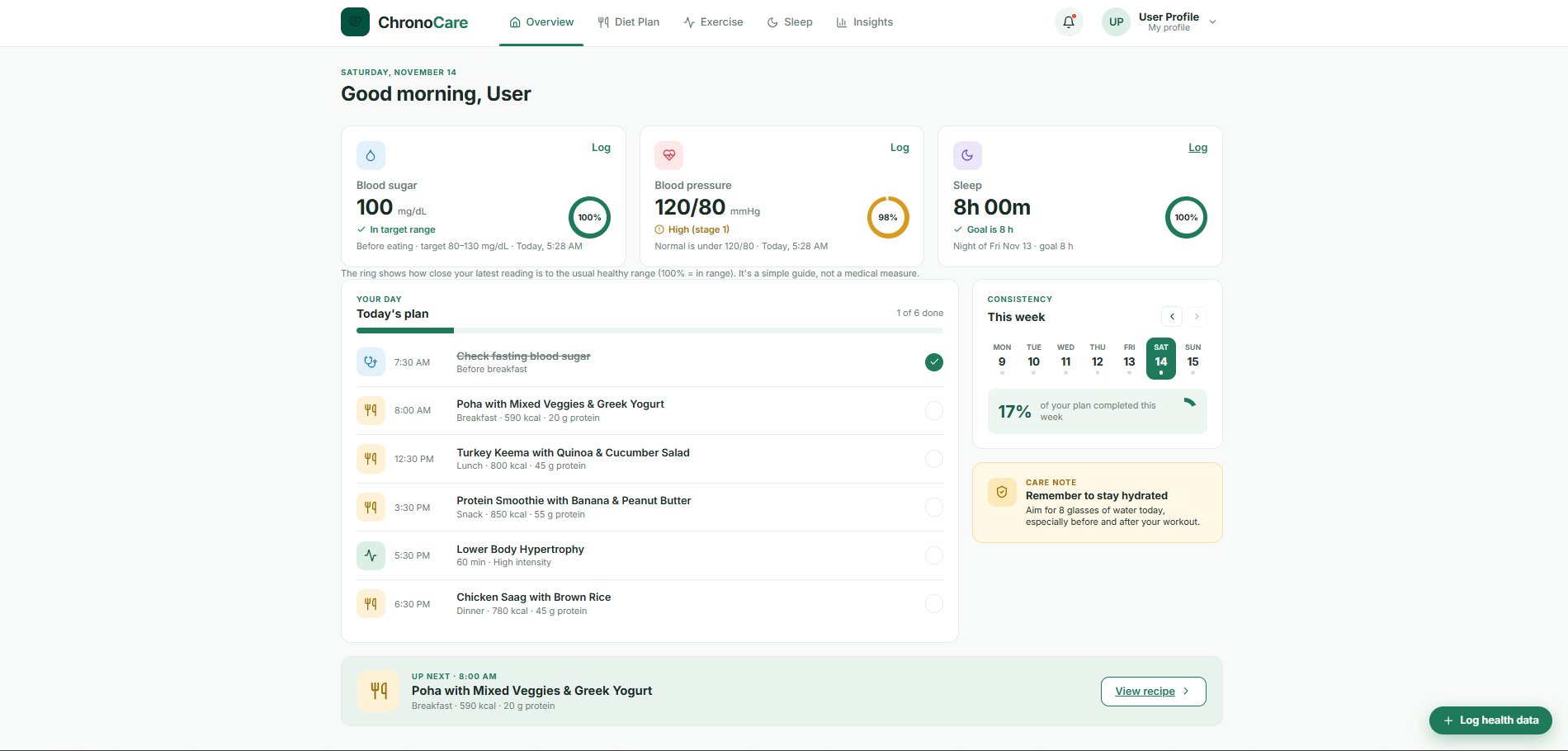
- One daily plan: the Overview merges meals, workouts, health checks and your wind-down routine into a single timeline, shows what's up next, and tracks your consistency across the week.
- Health tracking: log blood pressure, blood sugar and sleep. Each reading gets a status like "In target range" or "High (stage 1)" and a score for how close it is to the healthy range.
- Swap anything: don't feel like HIIT today? Swap it for a walk. Every meal, workout and bedtime step has alternatives, plus recipe and how-to links.
- Log a symptom: describe how you feel and get practical, personalized self-care advice, including when to see a doctor.
- Safety first: dangerous readings, like blood pressure of 180/120 or higher or severely low blood sugar, skip the AI entirely and show clear "get help now" guidance.
How we built it
The stack
- Backend: Python and Flask, with SQLAlchemy for the database, Flask-Login for accounts and Flask-WTF for forms and CSRF protection
- Frontend: Jinja templates, HTML, CSS and vanilla JavaScript, with Chart.js for charts and Lucide for icons
- AI: the Groq API running an open-weight large language model
- Database: SQLite while developing, PostgreSQL in production
- Deployment: Gunicorn on Render
Architecture
We split the app into Flask blueprints, one per feature, so each teammate could own a page without stepping on each other's code:
auth        → sign up, log in, onboarding ("About you")
diet        → meal plans, goals, shared checklist & symptom APIs
exercise    → workout plans
sleep       → sleep logging, sleep goals, bedtime routines
overview    → the home dashboard that pulls everything together
insights    → snapshot + full history
ai_service  → the only file that talks to the AI
The pages share helpers instead of copying them. For example, the exercise and sleep pages reuse the diet page's profile and validation helpers, and the symptom popup is one shared template and script that drops into any page.
Onboarding drives everything
When someone signs up, they fill in an "About you" form: age, height, weight, sex, ethnicity, dietary restrictions, diagnosed conditions and conditions they're worried about. Those answers are stored as codes (halal, type2, hypertension) and turned into plain language before going to the AI, so every plan starts from the same picture of the person.
One AI layer, built not to break
Every AI request goes through a single module, ai_service.py. That gave us a few big wins:
- Structured prompts. Each feature (meals, workouts, sleep routines, symptom advice) has its own system prompt with clear rules: respect allergies and dietary restrictions, adapt for diabetes and high blood pressure, include rest days, never suggest medication. Each prompt also requires a strict JSON format.
- JSON mode + validation. We request JSON output, then clean every response before saving it: we fill in missing fields, pull numbers out of text like
"450 kcal", match categories to a fixed list and drop broken entries. A bad AI answer shows a friendly "please try again" instead of a broken page. - Links that always work. AI models often invent recipe and video URLs that lead nowhere, so we generate search links from the meal or exercise name instead.
- Demo mode. With no API key set, the same functions return realistic sample data. Anyone can try the full app for free, and we could build the interface without spending API credits.
- Swappable model. The model name lives in an environment variable. When our provider retired the model we started with, we switched with a one-line config change.
Safety rules that come before the AI
For a health app, some answers can't be left to a language model. Before any symptom or reading reaches the AI, fixed rules check for emergencies:
- Blood pressure of 180/120 or higher
- Blood sugar that's severely low or very high
- Words like "chest pain", "fainted" or "can't breathe"
If any match, the AI is skipped and the user sees clear "get help now" guidance, including when to call 911.
Making readings meaningful
Blood pressure readings are sorted into the American Heart Association categories (Normal, Elevated, Stage 1, Stage 2, Crisis). Blood sugar is judged against American Diabetes Association-style targets, which change depending on whether the person has diabetes and whether they've just eaten. Each reading also gets a simple score for how close it is to the healthy range. For a value $v$ above the target range $[\ell, h]$, falling to zero at a limit $z$:
$$\text{score} = \max\left(0,\; 100\left(1 - \frac{v - h}{z - h}\right)\right)$$
Readings below the range are scored the same way, and anything inside the range scores 100%. We also handle both blood sugar units (mmol/L and mg/dL). Values are always stored in mg/dL and shown in whichever unit the user typed.
Keeping every page in sync
The hardest design problem was making separate pages feel like one app:
- One checklist table stores every ticked item, labelled consistently across pages. Ticking a meal on the Overview ticks it on the Diet page too.
- One readings table collects blood pressure and blood sugar from every popup. Logging "150/92" as a symptom on the exercise page updates the Overview and Insights automatically, and the newest reading always wins.
- The Overview merges today's meals, workouts, bedtime routine and health checks into a single timeline. It works out what's up next using the user's own clock, and scores weekly consistency, counting each plan only from the day it was created so earlier days don't look like misses.
The frontend
Each page loads its data as JSON inside the template, then renders and updates itself with vanilla JavaScript: no page reloads to tick a box, swap a meal or log a reading. Charts use Chart.js (stacked bar charts for the week, doughnuts for the day), while the small progress rings are pure CSS (conic-gradient). Popups use the native HTML <dialog> element, and all AI-generated text is escaped before it's shown.
Security
- CSRF protection on every form and JavaScript request
- Hashed passwords and POST-only logout
- Login required on every page, with each user only able to see their own data
- No-cache headers so the Back button can't show private pages after logging out
- API keys and secrets kept in environment variables, never in Git
How we worked
We built each feature on its own Git branch and merged through pull requests. Before merging, we tested features end to end with Flask's test client: signing up, onboarding, generating plans, logging readings, checking safety thresholds and making sure every other page still worked.
Challenges we ran into
- Making AI output reliable. Models sometimes return missing fields, numbers as text (
"450 kcal") or invented recipe links that don't exist. We built a cleaning layer for every response and replaced AI-generated URLs with search links that always work. - Keeping health advice safe. We couldn't let an AI improvise during a medical emergency, so fixed safety rules run before the AI for dangerous readings and emergency words like "chest pain".
- Keeping every page in sync. A reading logged from a symptom popup has to show up on the Overview and Insights, and ticking a meal on the Overview has to tick it on the diet page. We had to consolidate everything into shared tables.
- Time is surprisingly hard. Sleep crosses midnight, so averaging a 12:40 am and an 11:30 pm bedtime naively gives nonsense. Servers also run on UTC, which shifts "today" by several hours.
- Units and formats. Blood sugar comes in both mmol/L and mg/dL, and blood pressure needs both numbers. We added parsing and validation so
120alone isn't treated as a valid reading. - Working in parallel. With teammates building login, onboarding and pages at the same time, we hit merge conflicts, duplicated code and features that didn't know about each other, and learned to coordinate around shared models.
- A model retired mid-build. Our AI model was retired by the provider partway through, so we made the model name configurable and switched without changing any code.
Accomplishments that we're proud of
- ** A Finished Product, ** not just ready for deployment but also for launch and coming updates
- Plans that respect culture and conditions, not just calories: halal, vegetarian, allergies, diabetes-friendly and low-sodium options are built into the plan from day one.
- A safety layer that doesn't depend on the AI for emergencies.
- Everything connects: one checklist, one set of readings and one goal flow through the Overview, Diet, Exercise, Sleep and Insights pages.
- Free to try: demo mode works with no API key or setup beyond installing the app.
What we learned
- How to structure a growing Flask app with blueprints, shared helpers and a clean data model.
- How to prompt an AI for structured, dependable output, and why you should never trust it without validation.
- Real clinical guidelines for blood pressure, blood sugar and sleep, and how to present them responsibly without pretending to be a doctor.
- Web security basics like CSRF protection, POST-only logout and escaping AI-generated text before displaying it.
- Team workflow with Git branches and pull requests, and why agreeing on shared tables early saves a lot of rework.
- How to work effectively with AI coding assistants: they speed up building, but every change still needs testing and review.
What's next for ChronoCare
- Real insights: trend charts for blood pressure, blood sugar and sleep over time, plus patterns like "your blood pressure is higher after short nights."
- Weekly AI check-ins that summarise progress and adjust next week's plan.
- Wearable and glucose monitor sync, so readings and sleep are logged automatically.
- Sharing with a care team, so doctors and dietitians can review readings between appointments.
- Reminders and a mobile-friendly app, plus more languages to reach the communities that need it most.
