-
-
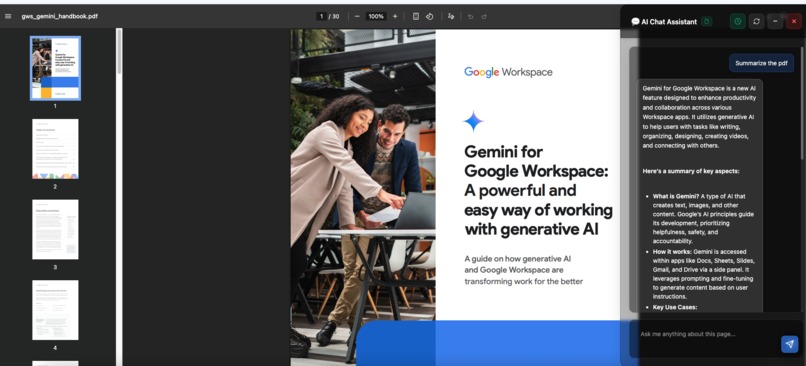
Window Screenshot
-
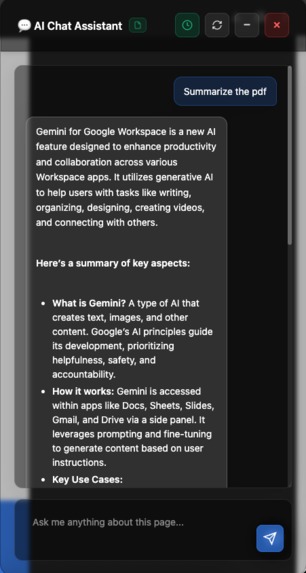
Chat interface
-
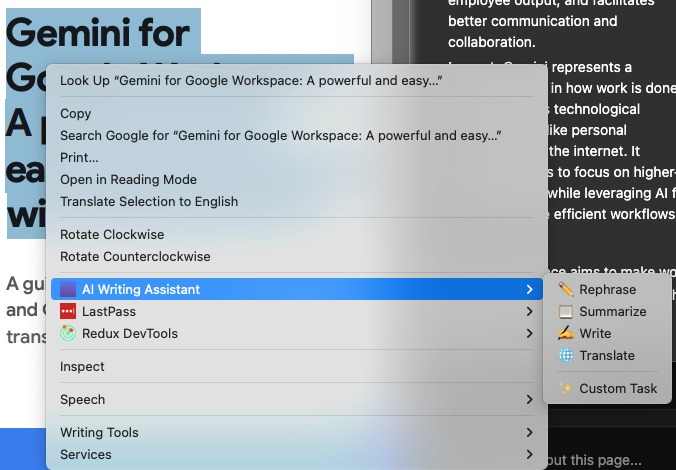
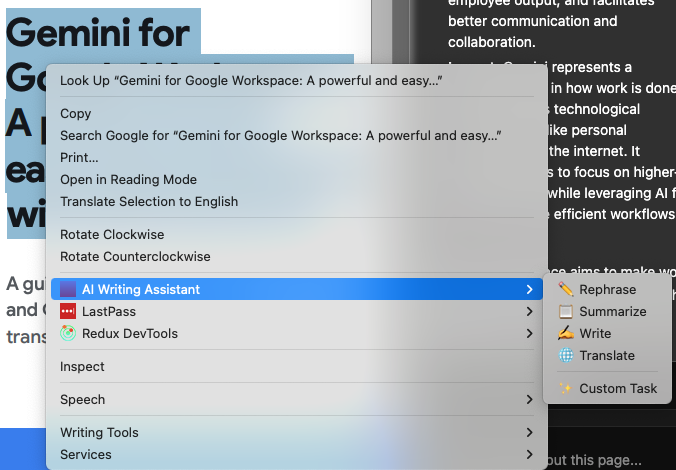
Extension functionality

Chromini - Chrome Built-in AI Writing Assistant
Inspiration
Chrome's announcement of Built-in AI APIs (Gemini Nano running directly in the browser) opened up exciting possibilities for privacy-focused, on-device AI applications. The inspiration came from seeing how powerful AI could be without compromising user privacy or requiring constant internet connectivity. We wanted to create a writing assistant that felt native to the browsing experience something that could understand context, work with PDFs, and help users across any website without sending their data to external servers.
What it does
Chromini is a Chrome extension that brings AI-powered writing assistance directly to your browser using Chrome's Built-in AI APIs. It features:
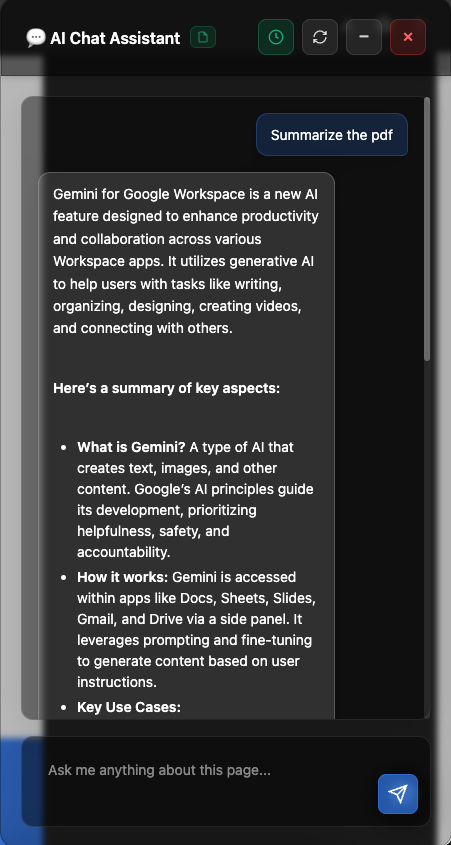
- Context-aware chat interface that can analyze and answer questions about any webpage or PDF document with a glassmorphic look to ensure workflow is not disrupted.
- AI writing tools accessible via right-click context menu: rephrase, summarize, write, and translate selected text
- Automatic language detection for seamless translation between 12+ languages
- Real-time streaming responses that display AI-generated content word-by-word
- PDF text extraction allowing users to query and analyze PDF documents naturally
- Page context awareness where the AI understands what you're reading and can answer questions about it
- Copy/Insert functionality to easily transfer AI-generated content into text fields
- Complete privacy - All processing happens entirely on-device with no data sent to external servers
How we built it
We built Chromini as a Manifest V3 Chrome extension leveraging five different Chrome Built-in AI APIs:
- Writer API - For general content generation and conversational AI
- Rewriter API - For rephrasing text while maintaining meaning
- Summarizer API - For creating key-point summaries in markdown format
- Translator API - For multi-language translation
- Language Detector API - For automatic source language detection
Architecture
The architecture consists of:
- Background service worker (
background.js) managing context menus and PDF fetching - Content script (
content.js) handling all AI integrations, chat UI, and page context extraction - PDF.js integration (
pdf-extractor.js) for extracting text from PDF documents - Custom markdown renderer (
markdown.js) for rich text display and keyboard shortcuts
We implemented streaming responses to provide real-time feedback, page context extraction (limited to 3000 words for performance), and a floating chat button that's accessible from anywhere. The UI features a gradient header, minimizable windows, and action buttons for copying or inserting AI responses.
Challenges we ran into
API Availability & Detection: Chrome's Built-in AI APIs are experimental and have varying availability across devices. We had to implement comprehensive availability checks for each API and gracefully handle cases where APIs weren't available or required model downloads.
PDF Text Extraction: Extracting text from PDFs proved complex. We had to integrate PDF.js, handle CORS restrictions through the background script proxy, and manage the asynchronous nature of PDF parsing while keeping the UI responsive.
Context Management: Balancing context size with performance was tricky. Too much context overwhelmed the model; too little made responses less useful. We settled on 3000 words with smart truncation and implemented a toggle to disable context when not needed.
Cursor Position Tracking: Making the "Insert" button work reliably across different input types (textarea, contenteditable, regular inputs) required tracking the last active element and cursor position across all user interactions.
Model Download UX: The AI models require significant downloads (up to 22GB). We implemented download progress monitoring with real-time percentage displays to keep users informed during the initialization process.
Streaming Implementation: Properly handling async iterators for streaming responses while updating the UI smoothly and maintaining markdown formatting required careful state management.
Accomplishments that we're proud of
- Five AI APIs working together: Successfully integrated Writer, Rewriter, Summarizer, Translator, and Language Detector APIs in a cohesive experience
- PDF support: Built seamless PDF text extraction and context-aware Q&A for PDF documents
- Zero external servers: Everything runs on-device, ensuring complete user privacy
- Polished UX: Created a draggable, resizable, minimizable chat interface with keyboard shortcuts (Ctrl+Shift+Space)
- Real-time streaming: Implemented smooth word-by-word text generation that feels responsive
- Smart context awareness: The AI can "see" what's on the page and answer questions about it
- Language auto-detection: Automatic source language detection makes translation effortless
- Comprehensive documentation: Created detailed guides including installation checklists, testing guides, and API documentation
What we learned
- Chrome Built-in AI APIs are powerful but experimental: Device requirements are high (22GB storage, 4GB+ VRAM, 16GB RAM), and API availability varies significantly
- On-device AI is the future: Privacy-focused, offline-capable AI opens new possibilities for browser extensions
- Progressive enhancement is key: We had to design for scenarios where some APIs are available and others aren't
- Context window limitations matter: Understanding how much context to provide and when to truncate was crucial for good performance
- Streaming improves perceived performance: Real-time responses feel much faster than waiting for complete generation
- PDF.js is incredibly powerful: Mozilla's PDF.js library enabled rich PDF interactions we didn't think possible in a browser extension
What's next for Chromini
- Settings panel: Allow users to customize tone, length, and other API parameters
- Conversation history: Save and restore chat sessions across browsing sessions
- Export functionality: Save conversations as markdown or text files
- Custom prompts library: Let users save and reuse frequently used prompts
- Voice input: Add speech-to-text for hands-free interaction
- Theme customization: Implement light/dark modes and custom color themes
- More keyboard shortcuts: Add customizable hotkeys for common actions
- Chrome Web Store publication: Package and publish for wider distribution
- Integration with other Chrome AI APIs: Explore Prompt API extensions as they become available
- Multi-language UI: Translate the extension interface itself to support global users


Log in or sign up for Devpost to join the conversation.