Inspiration
The inspiration came from what to build with those apis inital and when the openai announsece the agent flow, I got the trust to continue doing this prjoect so it could be configured inside the browser and make the shortcuts for everyone much easier like imagine copying the emails in the contact section and writing email and send it it's multistep task but with ai could write what you want to say and enter the email it would send it throught workflow configuration that you build.
What it does
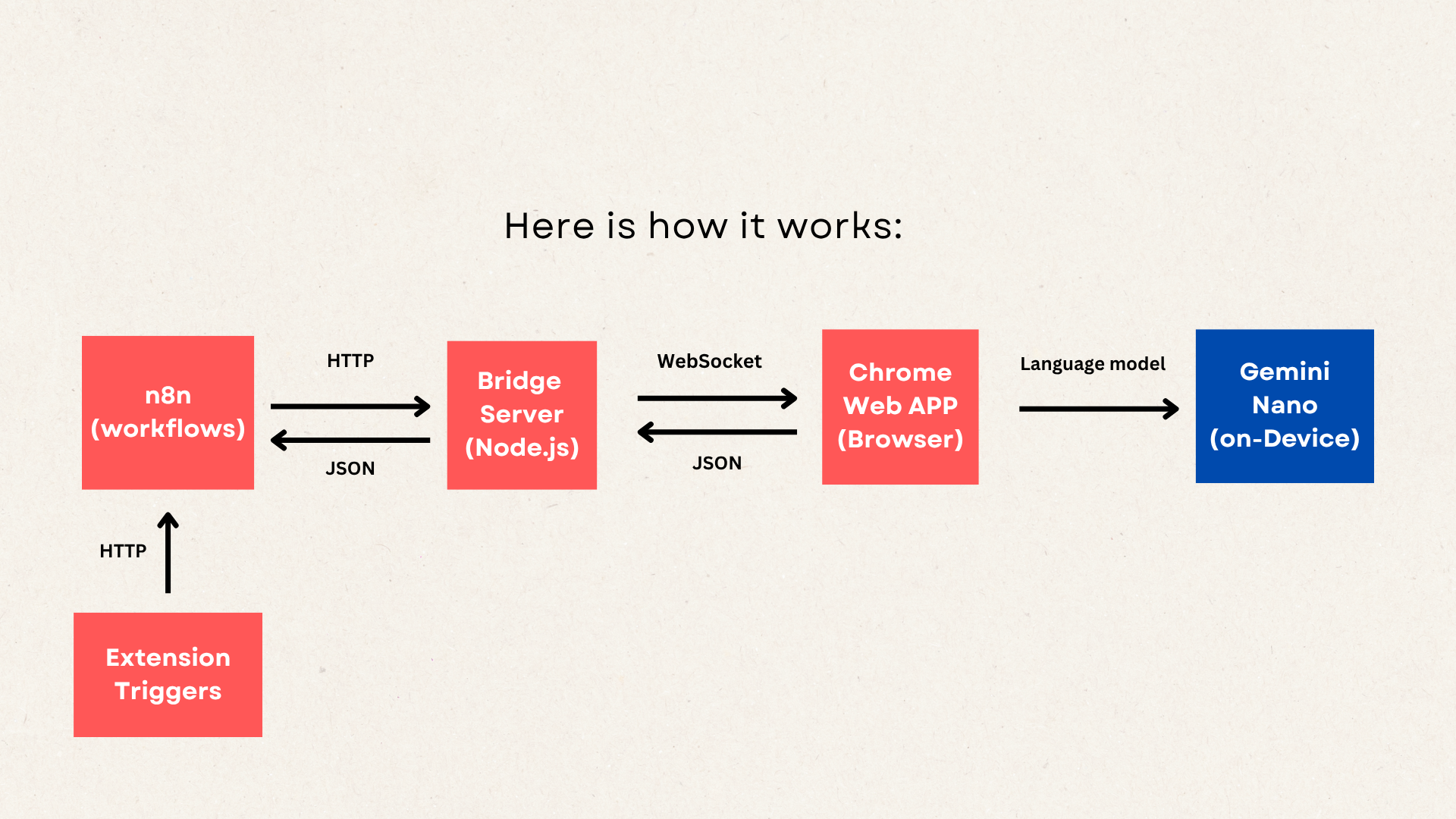
The project connects the Chrome built-in model api with n8n and runs them locally, basically replacing the agent nodes with Chrome built-in nodes to use them with all the workflows and respond with the results.
How we built it
- Build a workflow with one of the Chrome built-in nodes that you would find after searching inside the n8n and activating them after building.
- Configure the workflows inside the extension settings and then run the workflows as you need.
Challenges we ran into
Routing the connections between Chrome built-in APIs, the n8n, and the extension was challenging to configure as a first-time build workflow with n8n.
What we learned
JSON, for the most part, is how to send and receive data between those routing points.
What's next for Chrome Workflows
-better ux -more workflows -better system prompts, it does make a difference.


Log in or sign up for Devpost to join the conversation.