Inspiration
The idea for Chrome Tab Copilot came from a simple frustration — having too many tabs open and losing track of what’s where. We realized that tab overload isn’t just a clutter problem, it’s a context and cognition problem. We wanted a way to think with our browser, not just through it — a tool that could recall, summarize, and organize information like a personal assistant, while keeping everything fast, private, and offline. When we discovered Chrome’s Built-in AI (Gemini Nano) APIs, the opportunity was clear: build a truly local AI Copilot that runs natively inside Chrome itself.
What it does
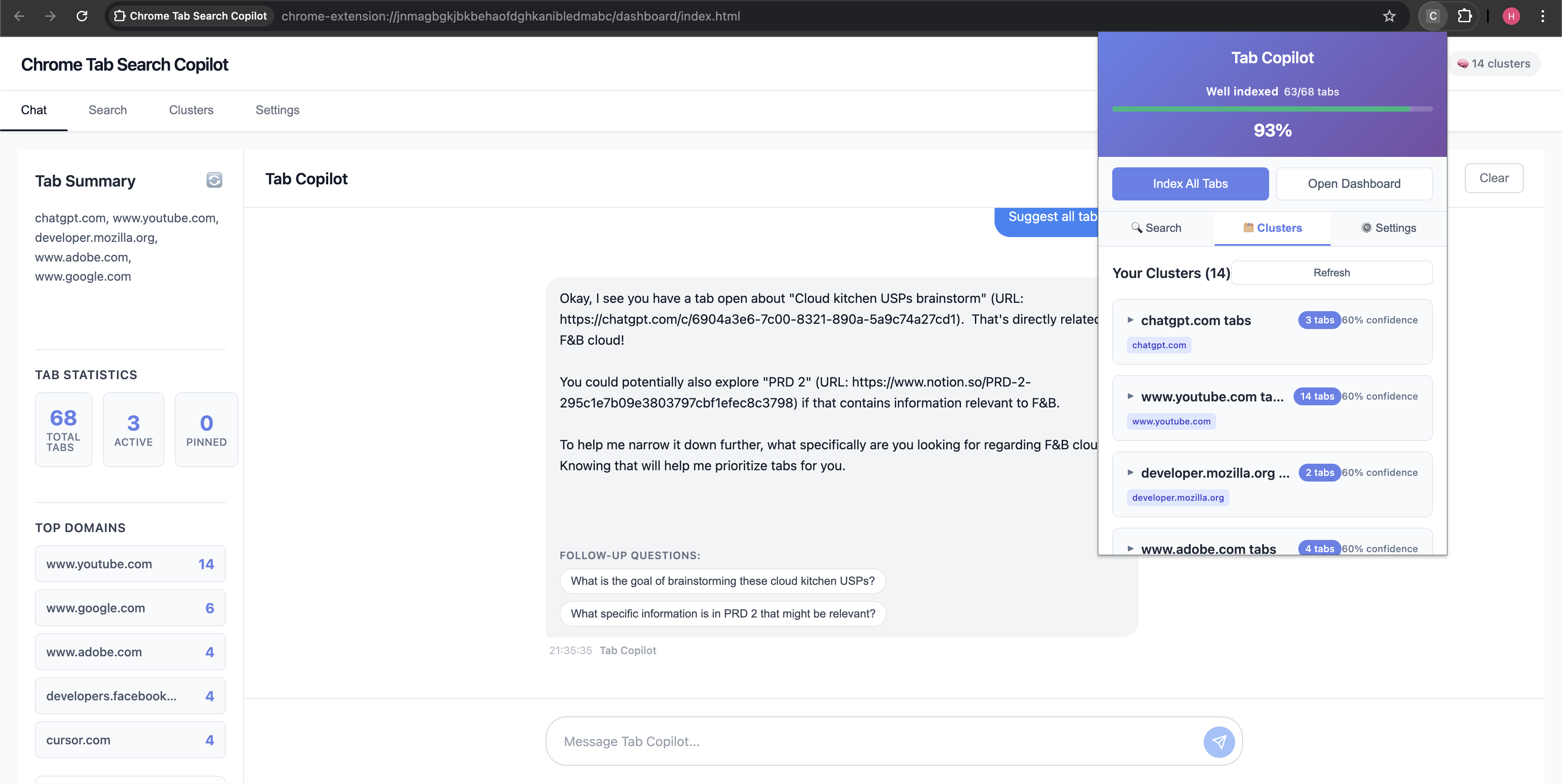
Chrome Tab Copilot is an AI-powered Chrome extension that:
- Understands your open tabs through semantic indexing
- Searches them instantly
- Summarizes pages and even multiple tabs together
- Clusters related tabs automatically by topic
- Chats with you about your open tabs for effortless recall
- All of this happens entirely on-device, powered by Chrome’s native AI — ensuring privacy, speed, and zero reliance on cloud servers.
How we built it
We built Chrome Tabs Copilot as a 100% local-first Chrome extension—everything runs in your browser, no backend needed. Using React and TypeScript, we leverage Chrome's built-in AI for semantic understanding and IndexedDB for local storage. When you open tabs, content scripts extract page text and store it locally. Then Chrome AI powers search, clustering, summaries, and chat—all on-device. We created a popup for quick access and a dashboard for deeper interactions, with a background service worker managing everything behind the scenes.
Challenges we ran into
- Service workers have limited Chrome AI access—we restructured to use AI primarily in UI contexts and pass messages between components.
- Building intelligent fallbacks was essential—not everyone has Chrome AI enabled. We created keyword search, text extraction, and domain-based clustering that keep the extension working even without AI.
- Tab content extraction also had edge cases with shadow DOM and lazy-loaded content.
Accomplishments that we're proud of
- 100% local-first architecture—your data never leaves your browser.
- The custom clustering feature lets users create named clusters and get AI-powered tab suggestions.
- Graceful degradation works whether Chrome AI is available or not—we use AI when possible and fall back seamlessly. - The conversational interface feels natural with context-aware responses.
- Throughout, we focused on robust error handling so users never hit dead ends.
What we learned
Chrome AI is powerful but experimental—APIs vary by namespace, timing matters, and capabilities checks are crucial. Local-first simplified deployment and eliminated privacy/latency concerns. Fallbacks are features—good keyword search is fast and accurate, so users often can't tell the difference. Extension development has unique constraints—message passing, storage quotas, and permission models shaped our architecture.
What's next for Chrome Tabs Copilot
- Improved Custom Clustering Recommendations: We're making AI tab suggestions smarter by incorporating usage patterns, temporal signals, and better context understanding.
- Project Mode: The big vision—let users create research projects where Chrome AI analyzes tabs, identifies knowledge gaps, suggests optimal reading sequences, and tracks learning progress. Turns random tab browsing into a guided research experience.
- Multi-device sync: Exploring encrypted sync options that keep local-first principles while enabling cross-device access.
- Enhanced visualizations: Better cluster graphs and timeline views of browsing patterns.
Built With
- chromeai
- chromeextensionapi
- indexeddb
- react
- typescript
- vite


Log in or sign up for Devpost to join the conversation.