Inspiration
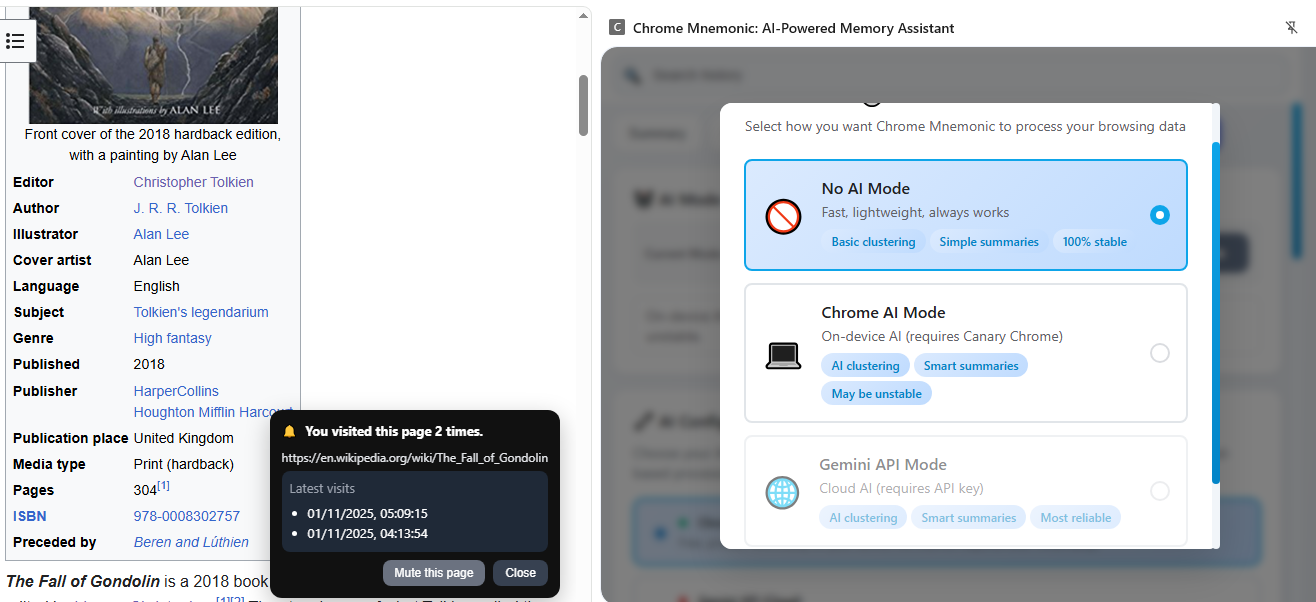
I built Chrome Mnemonic because browser history today is a passive, brittle list of titles and URLs — but people remember ideas, not links. I wanted a lightweight, privacy-first way to turn that raw log into a usable memory: automatically cluster related visits into sessions, summarize what you learned, and let you ask natural-language questions about your past browsing. The project was inspired by the friction of rediscovering useful pages, the power of on-device AI, and the desire to keep personal browsing data local unless a user explicitly opts into cloud processing.
What it does
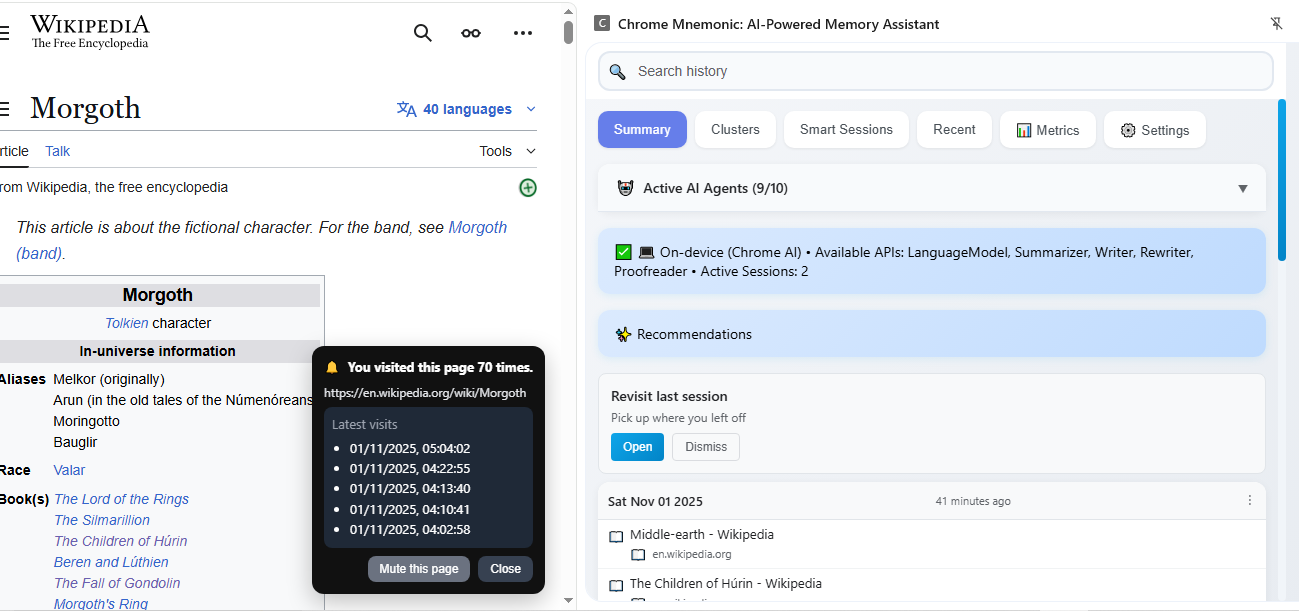
Clusters related pages into “Research Sessions” and exposes those clusters in an easy UI (popup.html / popup-new.js / popup-old.js). Produces short AI-generated summaries for sessions and pages when Chrome’s built-in AI is available; otherwise uses local heuristics. Provides a conversational chat UI (conversation.js) that accepts text and screenshots and can query your history semantically. Offers a hybrid mode via hybrid-ai-service.js so users can opt into the Gemini cloud API (requires an API key) when they want extra capability. Runs heavy computation off the UI thread in history-worker.js (grouping, session building, stats) with local synchronous fallbacks in history-service.js. Privacy-first by default: processing is on-device; cloud (Gemini) is opt-in and stored locally.
The building process
Plain JavaScript + HTML + CSS (Manifest V3 Chrome extension). No npm build required to run the extension in Chrome. Core files and responsibilities: UI: popup.html, popup.js, popup-new.js, popup-old.js, history-page.html History + indexing: history-service.js with a web worker fallback in history-worker.js AI orchestration: ai-service.js and hybrid-ai-service.js (hybrid routing between Chrome on-device AI and Gemini) Features: features folder (clustering, conversation, multimodal analysis) Background: background.js for revisit notifications Worker offload: expensive grouping/clustering work runs in history-worker.js and communicates back via messages. The UI calls these via Promise-returning methods on HistoryService. Availability checks & fallbacks: every AI call checks API availability (AIService.checkAIAvailability()); when builtin APIs don't exist the code uses local heuristics implemented in BasicAIService. Tests: Jest-based tests live in tests and mock Chrome APIs and AI responses (setup.js) so features can be verified without live AI calls. A couple of short technical notes: Session grouping uses a time-gap heuristic (e.g., group entries separated by less than a threshold τ). If we express that threshold as math: τ=30 minutes (example) Clustering / summary complexity is designed to be efficient; typical indexing/clustering work is approximately: T cluster =O(n log n) where n is the number of recent items being processed.
The Main Challenges
To make things worse, my system was a complete disaster. The model kept crashing on me, and most of the time I couldn't even use or test the APIs properly. So I was basically developing half-blind, trying to build features I couldn't reliably run. Most of the history-processing APIs run in web workers and return Promises, but a lot of the UI code was written assuming they'd return values immediately. That's why we kept seeing "undefined" show up in the interface—the code wasn't awaiting those Promises. I fixed the main conversation fallback by making sure to await historyService.getHistoryStats() and converting the fallback functions to async. Chrome's built-in AI features were another headache. They're not available everywhere—it depends on whether you're on stable, beta, or canary builds. So I had to build pretty thorough feature detection and make sure there were solid fallbacks when those APIs weren't available. The Gemini API integration brought up some interesting UX and security questions. Since it's cloud-based and optional, I needed to figure out how users could safely add their API keys, test them to make sure they work, and remove them if needed. Plus, the app had to check at startup which modes were available based on whether keys were stored. Being a Manifest V3 extension added another layer of complexity. Service workers have their own lifecycle quirks, and you have to be really careful about permission boundaries. Finally, testing became more involved. The unit tests needed reliable mocks for both the AI APIs and Chrome's APIs. And since I was adding all this async handling, I had to update tests that were previously expecting synchronous results—they now needed to handle Promise resolutions properly.
Accomplishments
Implemented a fully working popup/side-panel UI with conversational and session-based views (popup.html, popup-new.js, conversation.js). Built a hybrid AI architecture (hybrid-ai-service.js) that cleanly routes between on-device Chrome AI and Gemini cloud when enabled. Privacy-first default: everything runs locally by default; cloud is opt-in and stored only in chrome.storage.local with explicit user action. Web Worker offload for heavy computations (history-worker.js) so the UI stays responsive. Completed a targeted bugfix that removed the "undefined pages visited..." fallback in the conversation UI by ensuring the UI awaits worker-returned stats. Created a clear todo/audit list to finish remaining defensive awaits, settings UX for keys, and tests updates.
Adding Notification Feature
The extension includes a smart revisit notification system that enhances user awareness of their browsing patterns: Revisit Notifications (Chrome Canary + Chrome ) Background Detection: Automatically detects when users revisit pages they've visited before Visit Tracking: Shows visit count and displays a list of the latest 5 visit timestamps Non-Intrusive Toast: Displays an elegant toast notification in the bottom-right corner without opening the extension Persistent Display: Toast remains visible until explicitly closed or muted by the user Page-Level Muting: Users can mute notifications for specific pages while keeping notifications active for other sites Detailed Visit History: Displays formatted timestamps (date and time) for each visit in an easy-to-read list format URL Context: Shows the exact page URL being revisited for context
What I Learned
The biggest mistake I kept making was forgetting to await worker-backed APIs in the UI code. When you don't await these Promise-returning calls, you end up with placeholder text and weird race condition bugs everywhere. I also learned that feature detection and fallbacks are critical when you're working with platform-specific APIs like Chrome's on-device AI. Not everyone has access to these features, so your app needs to handle that gracefully. For privacy-sensitive features like Gemini cloud processing, I found it's much better to make users explicitly opt in. It's clearer for users and reduces privacy concerns. Web Workers are incredibly useful, but they require careful error handling and solid fallback strategies to work reliably. And here's something that tripped me up: when you refactor synchronous code to be asynchronous, you need to update your tests too. Tests that expected immediate returns now need to mock Promise resolutions with things like mockResolvedValue. Finally, small UI touches make a huge difference. Things like showing disabled mode cards, adding an "Open Settings" button, or including a "Test Connection" feature really help users understand why certain features aren't available without the right API keys.
What's next for Chrome Mnemonic
Short term (high priority) Finish defensive await fixes across all UI controllers (patch popup-old.js, remaining popup.js spots) to eliminate remaining "undefined" situations. Implement Settings UX improvements: Add Gemini API key textbox, "Test Connection" button, "Save Settings", and "Clear API Key" button. On startup, read chrome.storage.local (e.g., geminiApiKey, useGemini) and enable/disable the three mode cards (No AI / Chrome AI / Gemini) accordingly. If no keys are present, show only No AI with a prominent message linking to Settings. Expose helper methods like isGeminiConfigured() and isChromeAIAvailable() in HybridAIService for consistent UI logic.


Log in or sign up for Devpost to join the conversation.