Inspiration
Like most Chrome users, I live in a state of "tab chaos." When I'm researching a new idea, shopping, or working on a project, I quickly end up with 30-40 tabs. This isn't just clutter; it's a barrier to productivity. The browser becomes a fragmented list of data, making it impossible to see connections or synthesize information.
I was inspired to build a tool that didn't just clean this chaos, but actively understood it. I wanted an assistant that could look at my tabs and say, "I see you're trying to build a new PC. Here are all your component tabs," and then go one step further and synthesize those findings for me, all using Chrome's new on-device AI for speed and privacy.
What it does
AI Tab Companion automatically scans all open tabs and uses on-device AI to understand their content and purpose. It then:
Intelligently Groups Tabs: It clusters tabs based on their semantic content (not just their domain).
Generates AI Labels: It uses the ai.languageModel (Gemini Nano) to generate a short, clear, human-readable name for each group (e.g., "AI News" or "Medical Journal Research").
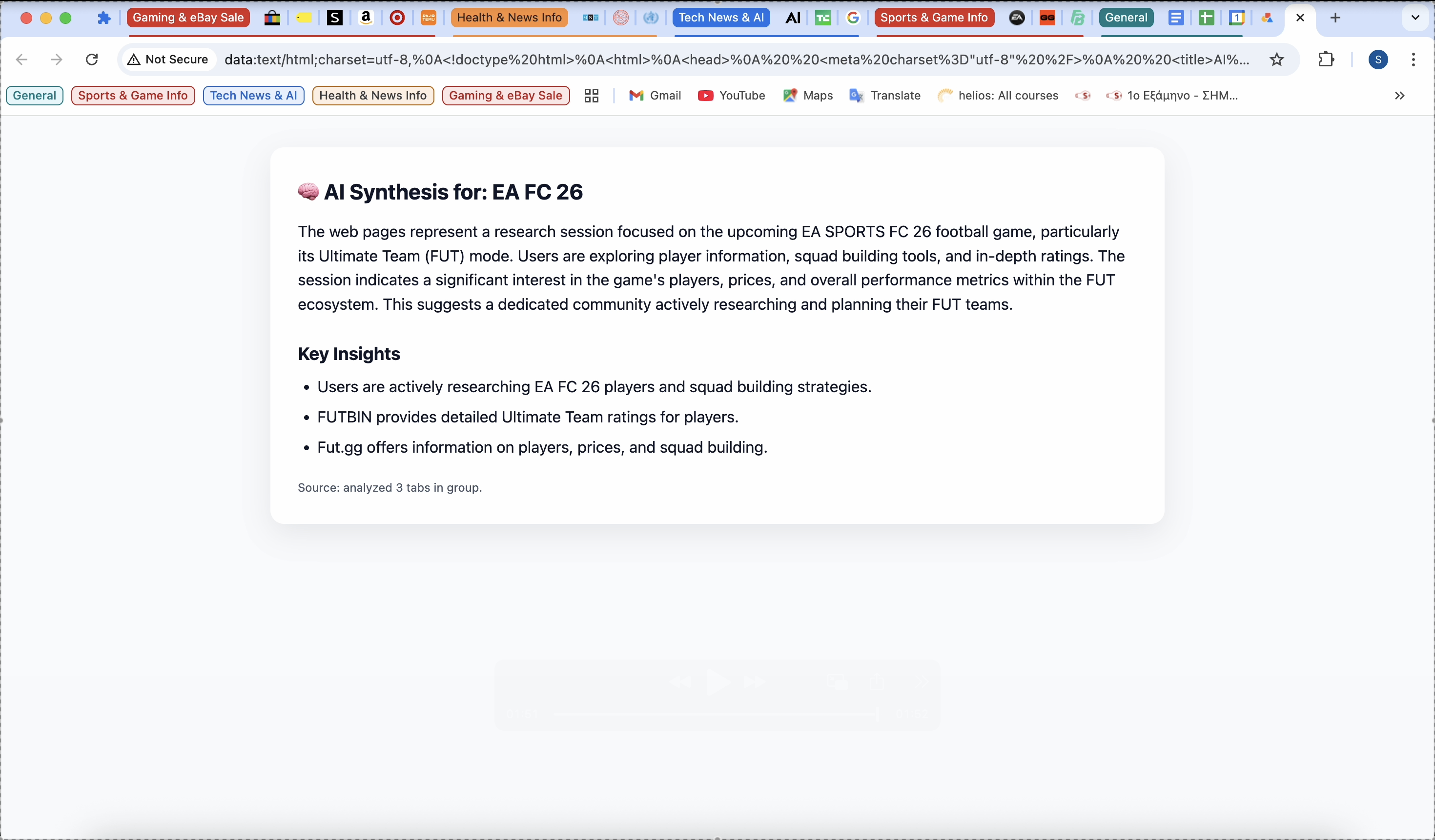
Synthesizes Groups into Reports: This is the core feature. A user can click "View Full Analysis" on any group, and the extension uses the Prompt API to read all tabs in that group, compare them, and generate a full AI Synthesis Report with a summary and key insights. This turns a dozen fragmented tabs into a single, scannable piece of knowledge.
How I built it
I built this on a robust, multi-stage hybrid AI pipeline that runs 100% on-device. The main challenge was balancing the speed of traditional methods with the intelligence of an LLM.
Fast Grouping (TF-IDF): The pipeline first uses a language-agnostic TF-IDF model to create initial "draft" groups. This is fast and works for any language.
AI-First Architecture: I originally architected the system to be Embedding-first. My code is built to use the EmbeddingModel API for similarity, but as it's not yet available, the system gracefully falls back to TF-IDF.
AI Merge Pass (ai.languageModel): The TF-IDF model often over-splits groups (e.g., "PC Gaming" and "NVIDIA GPUs"). To fix this, I added an "AI Merge Pass" that uses Gemini Nano in an efficient batch process to ask, "Are these two groups the same user task?" and intelligently merge them.
AI Labeling & Synthesis (ai.languageModel): The same Prompt API is used to generate all group names and the final "Full Analysis" reports.
Data Enrichment (ai.summarizer): I use the Summarizer API selectively only on tabs with weak text content to ensure the grouping engine always has quality data to analyze.
Challenges I ran into
The Missing Embedding API: My biggest challenge was discovering the on-device EmbeddingModel API (which my code was built to use) isn't available in the current Canary preview. This forced a major pivot. Instead of giving up, I re-architected the system to gracefully fall back to TF-IDF, making the extension resilient and functional today.
AI Performance: The "AI Merge Pass" was taking nearly a minute to run (making 10+ separate AI calls). I solved this by implementing batch processing—running all 10 prompts inside a single AI session, which cut the processing time by over 90% (from ~55s to ~5s).
"Dumb" Heuristics: My own initial hardcoded rules (like splitShoppingCategories) were fighting the AI/TF-IDF pipeline and creating bad, fragmented groups. I had to trust the AI pipeline and disable my old rules.
Accomplishments that I'm proud of
I'm proud of building a resilient and truly hybrid AI system. The pipeline (TF-IDF + LLM correction) works remarkably well, proving you can build a powerful, general-purpose AI tool even with today's performance constraints. The "AI Merge Pass" batching logic is a technical solution I'm particularly proud of, as it makes advanced AI analysis fast enough for a real-world extension.
What I learned
The true power of on-device AI is in a hybrid approach. I learned that using fast, classic algorithms (like TF-IDF) for 90% of the "heavy lifting" and then using the "smart" LLM (Gemini Nano) selectively to correct mistakes and add the final layer of understanding is the most effective and performant strategy.
What's next for AI Tab Companion
The architecture is ready for the future. The number one next step is to integrate the EmbeddingModel API as soon as it becomes available. Since the system is already built to be "Embedding-first" (with TF-IDF as a fallback), this will be an easy upgrade that will make the semantic grouping even more accurate. I also plan to explore using the AI to identify and suggest "actionable next steps" based on a group's content (e.g., "Ready to buy?" for a shopping group).
Built With
- a
- ai.summarizer)
- and
- built-with:-javascript-(manifest-v3)
- chrome's-on-device-ai-(ai.languagemodel
- hybrid
- tf-idf

Log in or sign up for Devpost to join the conversation.